PROJECT ON SIMULATION OF FORWARD KINEMATICS OF A 2R ROBOTIC ARM
AIM
Write a program in Matlab to simulate the forward kinematics of a 2R Robotic Arm
OBJECTIVES
- Write Matlab program for forward kinematics of a 2R Robotic arm
- Simulation of 2R robotic arm USING FOR LOOP
- Create an Animation video of the 2R robotic arm.
WORKFLOW
STEP1: Write a code for forward kinematics, where the length of two arms considered as l1 and l2 and theta of both arms considered as theta1 and theta2
Example
Length of link1(l1) = 2;
Length of link2(l2) = 0.75
Theta1 = from 0 to 90
Theta2=from 0 to 90
STEP2: Using of for loop for repeating the actions for a given number of times.
STEP3: Write a code for animation video and store it in a folder.
CONTENT
STEP1: Start with clear all, close all and clc, after that define inputs like the length of links,angle made by link. Code wrote in Matlab
% INPUTS
L1 = 2; % LENGTH OF THE LINK 1
L2 = 0.75; % LENGTH O THE LINK 2
theta1= linspace(0,90,10); % theta is in degree
theta2= linspace(0,90,10); % theta is in degree
*LINSPACE COMMAND USE FOR THETA INDICATES THAT FROM 0 TO 90 THERE WILL TEN VALUES OF THETA. LINSPACE COMMAND USE FOR GENERATE GIVEN NUMBER OF VALUES FOR A RANGE DEFINED
STEP2: Start with for loop command, repeatedly execute a block of code use loop systems, and For loop used to repeat a specified number of times. In this program for forward kinematics of 2R robotic arm simulator for every theta1 value or every co-ordinate of link1 simultaneously theta2 or co-ordinate of link 2 changes to repeat every time for loop was used.
Code used in MATLAB,example
Ct =1;% counter
for i= 1:length(theta1)
THETA1= theta1(i);
for j= 1:length(theta2)
THETA2= theta2(j);
x0=0;
y0=0;
x1=l1*cosd(THETA1);
y1=l1*sind(THETA1);
x2=x1+l2*cosd(THETA2);
y2=y1+l2*sind(THETA2);
*Formula written in above used for find out the co-ordinates of links in forward kinematics
%plotting
plot([x0 x1],[y0 y1],[x1 x2],[y1 y2],'linewidth',2)
axis([-0.1 1.5 0 1.5]),Fixed the axis
pause(0.03)
M(ct)=getframe(gcf); This line of code used for get each every frame
ct =ct+1;
end
end
STEP3: Write a program for animation video and store a video which is clearly shown below
Movie(M)
videofile=VideoWriter(Forward kinematics of 2R robotic arm.,'Uncompressed AVI')
open(videofile)
writeVideo(videofile,M)
close(videofile)
% Two arm robotic arm simulator

%Inputs
l1 = 2; % length of link 1 (cm)
l2 = 0.75 ; % length of link 2 (cm)

theta1 = linspace(0,90,10);
theta2 = linspace(0,90,10);
ct = 1;
for i=1:length(theta1)
    THETA1 = theta1(i);
    for j=1:length(theta2)
        THETA2=theta2(j);
        %Co-ordinates
        x0=0;
        y0=0;

        x1=l1*cosd(THETA1);
        y1=l1*sind(THETA1);

        x2=x1+l2*cosd(THETA2);
        y2=y1+l2*sind(THETA2);

          %plotting
plot([x0 x1],[y0 y1],[x1 x2],[y1 y2],'linewidth',2)
axis([-0.1 6 -0.1 6])
pause(0.5)
m(ct)=getframe(gcf);
ct=ct+1;
    end
end
movie(m)
videofile=VideoWriter('forward_kinematics of 2R robotic arm','uncompressed AVI');
open(videofile)
writeVideo(videofile,m)
close(videofile)
SIMPLE EXAMPLE AND OUTPUT WHERE THETA 1 AND THETA2 WAS FIXED
% Forward kinematis of 2R robotic arm manipulator
% Inputs
l1 =10; % length of link 1(cm)
l2 = 5; % length of link 2 (cm)

theta1=60;% angle made by link 1 with x-axis
theta2=45;% angle made by link 2 with x-axis

% Co-ordinates

x0=0;
y0=0;

x1=l1*cosd(theta1);
y1=l1*sind(theta1);

x2=x1+l2*cosd(theta2);
y2=y1+l2*sind(theta2);

%plotting
line([x0 x1],[y0 y1],'linewidth',2,'color','r')
line([x1 x2],[y1 y2],'linewidth',2,'color','b')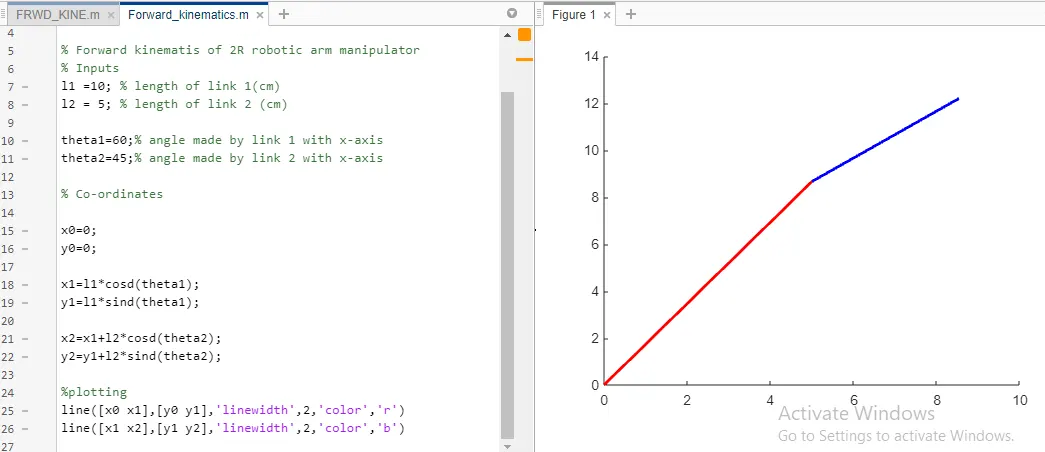
CONCLUSION
- Obtained A Simulation Of 2R Robotic Arm By Using Of Foor Loop And Animation Video For The Robotic Arm.
Google Drive link: https://drive.google.com/file/d/1UW_I55wtfxJopTOHzsk4OOQKeDqiK-pi/view?usp=sharing
YOUTUBE LINK: https://youtu.be/o5mKnjk5LkU