Project 6 Mini Project
Mini Project: Image Classifiaction using MobileNet architecture
Learning Objectives : understand and implement an image classification model using MobileNet architecture.
1.MobileNets Architecture:
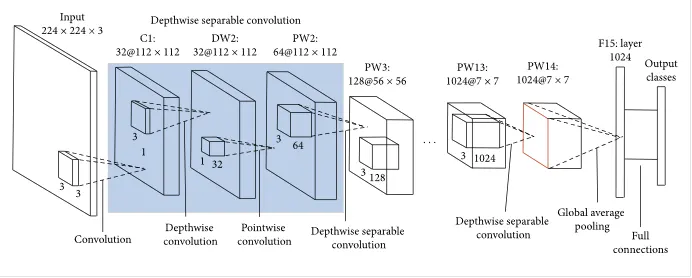
- MobileNets: Efficient Convolutional Neural Networks for Mobile Vision Applications, Howard et al, 2017.
- MobileNets are a class of small, low-latency, low-power models that can be used for classification, detection, and other common tasks convolutional neural networks are good for. Because of their small size, these are considered great deep learning models to be used on mobile devices.
- The size of one of the currently largest MobileNets is about 17 MB,as compare to size VGG16 about 553 MB.
- One more difference is number of parameters VGG16 has 138 million parameters and MobileNet has just 4.2 million parameters.
- The MobileNet model is designed to be used in mobile applications, and it is TensorFlow’s first mobile computer vision model.
- MobileNet uses depthwise separable convolutions. It significantly reduces the number of parameters when compared to the network with regular convolutions with the same depth in the nets. This results in lightweight deep neural networks.
- For MobileNets the depthwise convolution applies a single filter to each input channel. The pointwise convolution then applies a 1×1 convolution to combine the outputs the depthwise convolution.
- 1.Depthwise convolution.
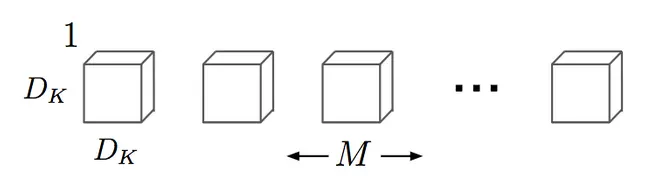
- It is a map of a single convolution on each input channel separately. Therefore its number of output channels is the same as the number of the input channels.
- 2.Pointwise convolution.
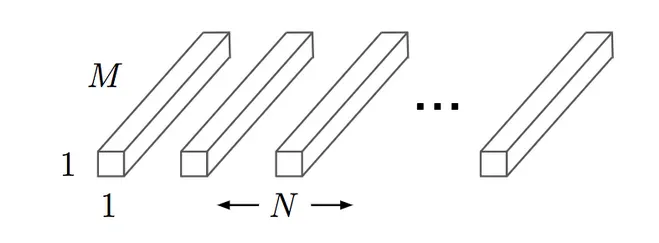
- Convolution with a kernel size of 1x1 that simply combines the features created by the depthwise convolution.
MobileNet with Keras:
Importing all neccessary libraries
import numpy as np
import tensorflow as tf
from tensorflow import keras
from tensorflow.keras.layers import Dense, Activation
from tensorflow.keras.optimizers import Adam
from tensorflow.keras.metrics import categorical_crossentropy
from tensorflow.keras.preprocessing.image import ImageDataGenerator
from tensorflow.keras.preprocessing import image
from tensorflow.keras.models import Model
from tensorflow.keras.applications import imagenet_utils
from sklearn.metrics import confusion_matrix
import seaborn as sns
import itertools
import os
import shutil
import random
from PIL import Image
import matplotlib.pyplot as plt
%matplotlib inline- For image classification task I am using Sign Language dataset for numbers ,which is downloaded from kaggles.
- This dataset contains 10 classes, from 0 to 9. And each class shows image of sign languages for numbers(digits) from 0 to 9.
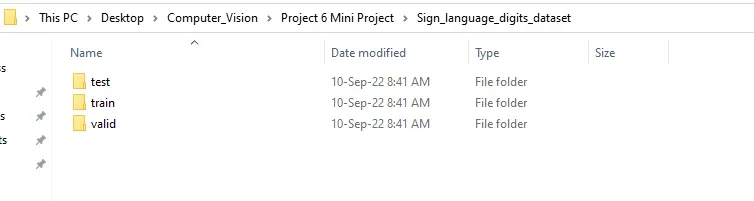
- Organizing downloaded dataset into train, valid, test dirs
- Before we can begin building the model, we first need to organize our images on disk.
- First, we create train, valid, and test directories.
- We then move all class directories (0 - 9) with their respective images from Sign_language-digits_dataset
into the train directory. - We then make class directories (0 - 9) for the valid and test data sets as well.
- We then loop through each class directory in the train directory and randomly move 30 images from each class into the corresponding class directory in valid and 5 images from each class into the corresponding class directory in test.
#Organize data into train, valid, test dirs

os.chdir('Sign_language_digits_dataset')
if os.path.isdir('train/0/') is False:
    #First, we create train, valid, and test directories.
    os.mkdir('train')
    os.mkdir('valid')
    os.mkdir('test')

    for i in range(0, 10):
        shutil.move(f'{i}','train') # moving all classes from (0-9) with their respective images
        os.mkdir(f'valid/{i}')       # Making directories for each class from (0-9) within the valid folder
        os.mkdir(f'test/{i}')        # Making directories for each class from (0-9) within the test folder

        #Setecting random 30 images from i class and storing in varible valid sample
        valid_samples = random.sample(os.listdir(f'train/{i}'), 30)
        for j in valid_samples:
            shutil.move(f'train/{i}/{j}', f'valid/{i}') # moving valid samples into the valid/class directory

        #selecting random 5 images from train folder for each classes
        test_samples = random.sample(os.listdir(f'train/{i}'), 5)
        for k in test_samples:
            shutil.move(f'train/{i}/{k}', f'test/{i}') #moving test samples into test/class directory
os.chdir('../..')
We can see folder structure as folllows
Set path to the train, valid & test data
After orgnizing the data on disk, we need to create the directory iterators for the train,validation, and test sets.
train_path = r'C:UsersabcdDesktopComputer_VisionProject 6 Mini ProjectSign_language_digits_datasettrain'
valid_path = r'C:UsersabcdDesktopComputer_VisionProject 6 Mini ProjectSign_language_digits_datasetvalid'
test_path = r'C:UsersabcdDesktopComputer_VisionProject 6 Mini ProjectSign_language_digits_datasettest'
2.Preprocessing The Data
- We are using ImageDataGenerator(parameter).
- We are passing preprocessing_finction as parameter to the ImageDataGenerator.
- We're setting preprocessing_function equal to tf.keras.applications.mobilenet.preprocess_input.
- This is going to do the necessary MobileNet preprocessing on the images obtained from flow_from_directory().
- To flow_from directory(), we're passing in the path to the data set, the target_size to resize the images to,and the batch_size we're choosing to use for training.
- We do this exact same thing for all three data sets: train, validation, and test.
- For test_batches, we're also supplying one additional parameter, shuffle=False, which causes the test datasetto not be shuffled, so that we can access the corresponding non-shuffled test labels to plot to a confusion matrix later.
train_batches = ImageDataGenerator(preprocessing_function=tf.keras.applications.mobilenet.preprocess_input).flow_from_directory(directory=train_path, target_size=(224,224), batch_size=10)

valid_batches = ImageDataGenerator(preprocessing_function=tf.keras.applications.mobilenet.preprocess_input).flow_from_directory(directory=valid_path, target_size=(224,224), batch_size=10)

test_batches = ImageDataGenerator(preprocessing_function=tf.keras.applications.mobilenet.preprocess_input).flow_from_directory(directory=test_path, target_size=(224,224), batch_size=10, shuffle=False)
Found 1712 images belonging to 10 classes. Found 300 images belonging to 10 classes. Found 50 images belonging to 10 classes.
Building new model on top of base model
Now,we'll download the original MobileNet model,and print a summary of it.
Model: "mobilenet_1.00_224"
_________________________________________________________________
Layer (type)                 Output Shape              Param #
=================================================================
input_1 (InputLayer)         [(None, 224, 224, 3)]     0
_________________________________________________________________
conv1_pad (ZeroPadding2D)    (None, 225, 225, 3)       0
_________________________________________________________________
conv1 (Conv2D)               (None, 112, 112, 32)      864
_________________________________________________________________
conv1_bn (BatchNormalization (None, 112, 112, 32)      128
_________________________________________________________________
conv1_relu (ReLU)            (None, 112, 112, 32)      0
_________________________________________________________________
conv_dw_1 (DepthwiseConv2D)  (None, 112, 112, 32)      288
_________________________________________________________________
conv_dw_1_bn (BatchNormaliza (None, 112, 112, 32)      128
_________________________________________________________________
conv_dw_1_relu (ReLU)        (None, 112, 112, 32)      0
_________________________________________________________________
conv_pw_1 (Conv2D)           (None, 112, 112, 64)      2048
_________________________________________________________________
conv_pw_1_bn (BatchNormaliza (None, 112, 112, 64)      256
_________________________________________________________________
conv_pw_1_relu (ReLU)        (None, 112, 112, 64)      0
_________________________________________________________________
conv_pad_2 (ZeroPadding2D)   (None, 113, 113, 64)      0
_________________________________________________________________
conv_dw_2 (DepthwiseConv2D)  (None, 56, 56, 64)        576
_________________________________________________________________
conv_dw_2_bn (BatchNormaliza (None, 56, 56, 64)        256
_________________________________________________________________
conv_dw_2_relu (ReLU)        (None, 56, 56, 64)        0
_________________________________________________________________
conv_pw_2 (Conv2D)           (None, 56, 56, 128)       8192
_________________________________________________________________
conv_pw_2_bn (BatchNormaliza (None, 56, 56, 128)       512
_________________________________________________________________
conv_pw_2_relu (ReLU)        (None, 56, 56, 128)       0
_________________________________________________________________
conv_dw_3 (DepthwiseConv2D)  (None, 56, 56, 128)       1152
_________________________________________________________________
conv_dw_3_bn (BatchNormaliza (None, 56, 56, 128)       512
_________________________________________________________________
conv_dw_3_relu (ReLU)        (None, 56, 56, 128)       0
_________________________________________________________________
conv_pw_3 (Conv2D)           (None, 56, 56, 128)       16384
_________________________________________________________________
conv_pw_3_bn (BatchNormaliza (None, 56, 56, 128)       512
_________________________________________________________________
conv_pw_3_relu (ReLU)        (None, 56, 56, 128)       0
_________________________________________________________________
conv_pad_4 (ZeroPadding2D)   (None, 57, 57, 128)       0
_________________________________________________________________
conv_dw_4 (DepthwiseConv2D)  (None, 28, 28, 128)       1152
_________________________________________________________________
conv_dw_4_bn (BatchNormaliza (None, 28, 28, 128)       512
_________________________________________________________________
conv_dw_4_relu (ReLU)        (None, 28, 28, 128)       0
_________________________________________________________________
conv_pw_4 (Conv2D)           (None, 28, 28, 256)       32768
_________________________________________________________________
conv_pw_4_bn (BatchNormaliza (None, 28, 28, 256)       1024
_________________________________________________________________
conv_pw_4_relu (ReLU)        (None, 28, 28, 256)       0
_________________________________________________________________
conv_dw_5 (DepthwiseConv2D)  (None, 28, 28, 256)       2304
_________________________________________________________________
conv_dw_5_bn (BatchNormaliza (None, 28, 28, 256)       1024
_________________________________________________________________
conv_dw_5_relu (ReLU)        (None, 28, 28, 256)       0
_________________________________________________________________
conv_pw_5 (Conv2D)           (None, 28, 28, 256)       65536
_________________________________________________________________
conv_pw_5_bn (BatchNormaliza (None, 28, 28, 256)       1024
_________________________________________________________________
conv_pw_5_relu (ReLU)        (None, 28, 28, 256)       0
_________________________________________________________________
conv_pad_6 (ZeroPadding2D)   (None, 29, 29, 256)       0
_________________________________________________________________
conv_dw_6 (DepthwiseConv2D)  (None, 14, 14, 256)       2304
_________________________________________________________________
conv_dw_6_bn (BatchNormaliza (None, 14, 14, 256)       1024
_________________________________________________________________
conv_dw_6_relu (ReLU)        (None, 14, 14, 256)       0
_________________________________________________________________
conv_pw_6 (Conv2D)           (None, 14, 14, 512)       131072
_________________________________________________________________
conv_pw_6_bn (BatchNormaliza (None, 14, 14, 512)       2048
_________________________________________________________________
conv_pw_6_relu (ReLU)        (None, 14, 14, 512)       0
_________________________________________________________________
conv_dw_7 (DepthwiseConv2D)  (None, 14, 14, 512)       4608
_________________________________________________________________
conv_dw_7_bn (BatchNormaliza (None, 14, 14, 512)       2048
_________________________________________________________________
conv_dw_7_relu (ReLU)        (None, 14, 14, 512)       0
_________________________________________________________________
conv_pw_7 (Conv2D)           (None, 14, 14, 512)       262144
_________________________________________________________________
conv_pw_7_bn (BatchNormaliza (None, 14, 14, 512)       2048
_________________________________________________________________
conv_pw_7_relu (ReLU)        (None, 14, 14, 512)       0
_________________________________________________________________
conv_dw_8 (DepthwiseConv2D)  (None, 14, 14, 512)       4608
_________________________________________________________________
conv_dw_8_bn (BatchNormaliza (None, 14, 14, 512)       2048
_________________________________________________________________
conv_dw_8_relu (ReLU)        (None, 14, 14, 512)       0
_________________________________________________________________
conv_pw_8 (Conv2D)           (None, 14, 14, 512)       262144
_________________________________________________________________
conv_pw_8_bn (BatchNormaliza (None, 14, 14, 512)       2048
_________________________________________________________________
conv_pw_8_relu (ReLU)        (None, 14, 14, 512)       0
_________________________________________________________________
conv_dw_9 (DepthwiseConv2D)  (None, 14, 14, 512)       4608
_________________________________________________________________
conv_dw_9_bn (BatchNormaliza (None, 14, 14, 512)       2048
_________________________________________________________________
conv_dw_9_relu (ReLU)        (None, 14, 14, 512)       0
_________________________________________________________________
conv_pw_9 (Conv2D)           (None, 14, 14, 512)       262144
_________________________________________________________________
conv_pw_9_bn (BatchNormaliza (None, 14, 14, 512)       2048
_________________________________________________________________
conv_pw_9_relu (ReLU)        (None, 14, 14, 512)       0
_________________________________________________________________
conv_dw_10 (DepthwiseConv2D) (None, 14, 14, 512)       4608
_________________________________________________________________
conv_dw_10_bn (BatchNormaliz (None, 14, 14, 512)       2048
_________________________________________________________________
conv_dw_10_relu (ReLU)       (None, 14, 14, 512)       0
_________________________________________________________________
conv_pw_10 (Conv2D)          (None, 14, 14, 512)       262144
_________________________________________________________________
conv_pw_10_bn (BatchNormaliz (None, 14, 14, 512)       2048
_________________________________________________________________
conv_pw_10_relu (ReLU)       (None, 14, 14, 512)       0
_________________________________________________________________
conv_dw_11 (DepthwiseConv2D) (None, 14, 14, 512)       4608
_________________________________________________________________
conv_dw_11_bn (BatchNormaliz (None, 14, 14, 512)       2048
_________________________________________________________________
conv_dw_11_relu (ReLU)       (None, 14, 14, 512)       0
_________________________________________________________________
conv_pw_11 (Conv2D)          (None, 14, 14, 512)       262144
_________________________________________________________________
conv_pw_11_bn (BatchNormaliz (None, 14, 14, 512)       2048
_________________________________________________________________
conv_pw_11_relu (ReLU)       (None, 14, 14, 512)       0
_________________________________________________________________
conv_pad_12 (ZeroPadding2D)  (None, 15, 15, 512)       0
_________________________________________________________________
conv_dw_12 (DepthwiseConv2D) (None, 7, 7, 512)         4608
_________________________________________________________________
conv_dw_12_bn (BatchNormaliz (None, 7, 7, 512)         2048
_________________________________________________________________
conv_dw_12_relu (ReLU)       (None, 7, 7, 512)         0
_________________________________________________________________
conv_pw_12 (Conv2D)          (None, 7, 7, 1024)        524288
_________________________________________________________________
conv_pw_12_bn (BatchNormaliz (None, 7, 7, 1024)        4096
_________________________________________________________________
conv_pw_12_relu (ReLU)       (None, 7, 7, 1024)        0
_________________________________________________________________
conv_dw_13 (DepthwiseConv2D) (None, 7, 7, 1024)        9216
_________________________________________________________________
conv_dw_13_bn (BatchNormaliz (None, 7, 7, 1024)        4096
_________________________________________________________________
conv_dw_13_relu (ReLU)       (None, 7, 7, 1024)        0
_________________________________________________________________
conv_pw_13 (Conv2D)          (None, 7, 7, 1024)        1048576
_________________________________________________________________
conv_pw_13_bn (BatchNormaliz (None, 7, 7, 1024)        4096
_________________________________________________________________
conv_pw_13_relu (ReLU)       (None, 7, 7, 1024)        0
_________________________________________________________________
global_average_pooling2d (Gl (None, 1024)              0
_________________________________________________________________
reshape_1 (Reshape)          (None, 1, 1, 1024)        0
_________________________________________________________________
dropout (Dropout)            (None, 1, 1, 1024)        0
_________________________________________________________________
conv_preds (Conv2D)          (None, 1, 1, 1000)        1025000
_________________________________________________________________
reshape_2 (Reshape)          (None, 1000)              0
_________________________________________________________________
predictions (Activation)     (None, 1000)              0
=================================================================
Total params: 4,253,864
Trainable params: 4,231,976
Non-trainable params: 21,888
- In original mobileNet first layer is Input layer,it has nothing to learn,so learnable parameters are zero,this layers just privides input image's shape.
- last layer is output layer with 1000 output neurons.
- Next, we're going to grab the output from the sixth to last layer of the model and store it in this variable x.
- We'll be using this to build a new model.
- This new model will consist of the original MobileNet up to the sixth to last layer.
- We're not including the last five layers of the original MobileNet.
- By looking at the summary of the original model, we can see that by not including the last five layers, we'll be including everything up to and including the last global_average_pooling layer.
- Now, output from the global_average_pooling layer that we will pass to our output layer, which we're calling output. The output layer will just be a Dense layer with 10 output nodes for the ten corresponding classes, and we'll use the softmax activation function.
x = mobile.layers[-6].output #Storing global_average_pooling2d output in x variableoutput = Dense(units=10, activation='softmax')(x) #passing original mobileNet outputi.e(x) from global_pooling_layer to the our new output layer.- Now, we construct the new fine-tuned model, which we're calling model.
- To build the new model, we create an instance of the Model class and specify the inputs to the model to be equal to the input of the original MobileNet, and then we define the outputs of the model to be equal to the output variable we created directly above.
model = Model(inputs=mobile.input, outputs=output) #created new model- This creates a new model, which is identical to the original MobileNet up to the original model's sixth to last layer.
- We don't have the last five original MobileNet layers included, but instead we have a new layer, the output layer we created with ten output nodes.
-
Now, we need to choose how many layers we actually want to be trained when we train on our new data set.
-
We still want to keep a lot of what the original MobileNet has already learned from ImageNet by freezing the weights in many of layers, especially earlier ones, but we do indeed need to train some layers since the model still needs to learn features about this new data set.
for layer in model.layers[:-30]:
layer.trainable = False- So the thirty-to-last layer and all layers after it will be trained when we fit the model on the new data set. All layers above will not be trained, so their original ImageNet weights will stay in place.
- Training the last 30 layers will give us a pretty decently performing model.
#Printing summary of new model
- Looking at the model summary now, we can see the new model architecture, along with how the number of trainable parameters has changed from the original model.
model.summary() # printing new model summary Model: "functional_1" _________________________________________________________________ Layer (type) Output Shape Param # ================================================================= input_1 (InputLayer) [(None, 224, 224, 3)] 0 _________________________________________________________________ conv1_pad (ZeroPadding2D) (None, 225, 225, 3) 0 _________________________________________________________________ conv1 (Conv2D) (None, 112, 112, 32) 864 _________________________________________________________________ conv1_bn (BatchNormalization (None, 112, 112, 32) 128 _________________________________________________________________ conv1_relu (ReLU) (None, 112, 112, 32) 0 _________________________________________________________________ conv_dw_1 (DepthwiseConv2D) (None, 112, 112, 32) 288 _________________________________________________________________ conv_dw_1_bn (BatchNormaliza (None, 112, 112, 32) 128 _________________________________________________________________ conv_dw_1_relu (ReLU) (None, 112, 112, 32) 0 _________________________________________________________________ conv_pw_1 (Conv2D) (None, 112, 112, 64) 2048 _________________________________________________________________ conv_pw_1_bn (BatchNormaliza (None, 112, 112, 64) 256 _________________________________________________________________ conv_pw_1_relu (ReLU) (None, 112, 112, 64) 0 _________________________________________________________________ conv_pad_2 (ZeroPadding2D) (None, 113, 113, 64) 0 _________________________________________________________________ conv_dw_2 (DepthwiseConv2D) (None, 56, 56, 64) 576 _________________________________________________________________ conv_dw_2_bn (BatchNormaliza (None, 56, 56, 64) 256 _________________________________________________________________ conv_dw_2_relu (ReLU) (None, 56, 56, 64) 0 _________________________________________________________________ conv_pw_2 (Conv2D) (None, 56, 56, 128) 8192 _________________________________________________________________ conv_pw_2_bn (BatchNormaliza (None, 56, 56, 128) 512 _________________________________________________________________ conv_pw_2_relu (ReLU) (None, 56, 56, 128) 0 _________________________________________________________________ conv_dw_3 (DepthwiseConv2D) (None, 56, 56, 128) 1152 _________________________________________________________________ conv_dw_3_bn (BatchNormaliza (None, 56, 56, 128) 512 _________________________________________________________________ conv_dw_3_relu (ReLU) (None, 56, 56, 128) 0 _________________________________________________________________ conv_pw_3 (Conv2D) (None, 56, 56, 128) 16384 _________________________________________________________________ conv_pw_3_bn (BatchNormaliza (None, 56, 56, 128) 512 _________________________________________________________________ conv_pw_3_relu (ReLU) (None, 56, 56, 128) 0 _________________________________________________________________ conv_pad_4 (ZeroPadding2D) (None, 57, 57, 128) 0 _________________________________________________________________ conv_dw_4 (DepthwiseConv2D) (None, 28, 28, 128) 1152 _________________________________________________________________ conv_dw_4_bn (BatchNormaliza (None, 28, 28, 128) 512 _________________________________________________________________ conv_dw_4_relu (ReLU) (None, 28, 28, 128) 0 _________________________________________________________________ conv_pw_4 (Conv2D) (None, 28, 28, 256) 32768 _________________________________________________________________ conv_pw_4_bn (BatchNormaliza (None, 28, 28, 256) 1024 _________________________________________________________________ conv_pw_4_relu (ReLU) (None, 28, 28, 256) 0 _________________________________________________________________ conv_dw_5 (DepthwiseConv2D) (None, 28, 28, 256) 2304 _________________________________________________________________ conv_dw_5_bn (BatchNormaliza (None, 28, 28, 256) 1024 _________________________________________________________________ conv_dw_5_relu (ReLU) (None, 28, 28, 256) 0 _________________________________________________________________ conv_pw_5 (Conv2D) (None, 28, 28, 256) 65536 _________________________________________________________________ conv_pw_5_bn (BatchNormaliza (None, 28, 28, 256) 1024 _________________________________________________________________ conv_pw_5_relu (ReLU) (None, 28, 28, 256) 0 _________________________________________________________________ conv_pad_6 (ZeroPadding2D) (None, 29, 29, 256) 0 _________________________________________________________________ conv_dw_6 (DepthwiseConv2D) (None, 14, 14, 256) 2304 _________________________________________________________________ conv_dw_6_bn (BatchNormaliza (None, 14, 14, 256) 1024 _________________________________________________________________ conv_dw_6_relu (ReLU) (None, 14, 14, 256) 0 _________________________________________________________________ conv_pw_6 (Conv2D) (None, 14, 14, 512) 131072 _________________________________________________________________ conv_pw_6_bn (BatchNormaliza (None, 14, 14, 512) 2048 _________________________________________________________________ conv_pw_6_relu (ReLU) (None, 14, 14, 512) 0 _________________________________________________________________ conv_dw_7 (DepthwiseConv2D) (None, 14, 14, 512) 4608 _________________________________________________________________ conv_dw_7_bn (BatchNormaliza (None, 14, 14, 512) 2048 _________________________________________________________________ conv_dw_7_relu (ReLU) (None, 14, 14, 512) 0 _________________________________________________________________ conv_pw_7 (Conv2D) (None, 14, 14, 512) 262144 _________________________________________________________________ conv_pw_7_bn (BatchNormaliza (None, 14, 14, 512) 2048 _________________________________________________________________ conv_pw_7_relu (ReLU) (None, 14, 14, 512) 0 _________________________________________________________________ conv_dw_8 (DepthwiseConv2D) (None, 14, 14, 512) 4608 _________________________________________________________________ conv_dw_8_bn (BatchNormaliza (None, 14, 14, 512) 2048 _________________________________________________________________ conv_dw_8_relu (ReLU) (None, 14, 14, 512) 0 _________________________________________________________________ conv_pw_8 (Conv2D) (None, 14, 14, 512) 262144 _________________________________________________________________ conv_pw_8_bn (BatchNormaliza (None, 14, 14, 512) 2048 _________________________________________________________________ conv_pw_8_relu (ReLU) (None, 14, 14, 512) 0 _________________________________________________________________ conv_dw_9 (DepthwiseConv2D) (None, 14, 14, 512) 4608 _________________________________________________________________ conv_dw_9_bn (BatchNormaliza (None, 14, 14, 512) 2048 _________________________________________________________________ conv_dw_9_relu (ReLU) (None, 14, 14, 512) 0 _________________________________________________________________ conv_pw_9 (Conv2D) (None, 14, 14, 512) 262144 _________________________________________________________________ conv_pw_9_bn (BatchNormaliza (None, 14, 14, 512) 2048 _________________________________________________________________ conv_pw_9_relu (ReLU) (None, 14, 14, 512) 0 _________________________________________________________________ conv_dw_10 (DepthwiseConv2D) (None, 14, 14, 512) 4608 _________________________________________________________________ conv_dw_10_bn (BatchNormaliz (None, 14, 14, 512) 2048 _________________________________________________________________ conv_dw_10_relu (ReLU) (None, 14, 14, 512) 0 _________________________________________________________________ conv_pw_10 (Conv2D) (None, 14, 14, 512) 262144 _________________________________________________________________ conv_pw_10_bn (BatchNormaliz (None, 14, 14, 512) 2048 _________________________________________________________________ conv_pw_10_relu (ReLU) (None, 14, 14, 512) 0 _________________________________________________________________ conv_dw_11 (DepthwiseConv2D) (None, 14, 14, 512) 4608 _________________________________________________________________ conv_dw_11_bn (BatchNormaliz (None, 14, 14, 512) 2048 _________________________________________________________________ conv_dw_11_relu (ReLU) (None, 14, 14, 512) 0 _________________________________________________________________ conv_pw_11 (Conv2D) (None, 14, 14, 512) 262144 _________________________________________________________________ conv_pw_11_bn (BatchNormaliz (None, 14, 14, 512) 2048 _________________________________________________________________ conv_pw_11_relu (ReLU) (None, 14, 14, 512) 0 _________________________________________________________________ conv_pad_12 (ZeroPadding2D) (None, 15, 15, 512) 0 _________________________________________________________________ conv_dw_12 (DepthwiseConv2D) (None, 7, 7, 512) 4608 _________________________________________________________________ conv_dw_12_bn (BatchNormaliz (None, 7, 7, 512) 2048 _________________________________________________________________ conv_dw_12_relu (ReLU) (None, 7, 7, 512) 0 _________________________________________________________________ conv_pw_12 (Conv2D) (None, 7, 7, 1024) 524288 _________________________________________________________________ conv_pw_12_bn (BatchNormaliz (None, 7, 7, 1024) 4096 _________________________________________________________________ conv_pw_12_relu (ReLU) (None, 7, 7, 1024) 0 _________________________________________________________________ conv_dw_13 (DepthwiseConv2D) (None, 7, 7, 1024) 9216 _________________________________________________________________ conv_dw_13_bn (BatchNormaliz (None, 7, 7, 1024) 4096 _________________________________________________________________ conv_dw_13_relu (ReLU) (None, 7, 7, 1024) 0 _________________________________________________________________ conv_pw_13 (Conv2D) (None, 7, 7, 1024) 1048576 _________________________________________________________________ conv_pw_13_bn (BatchNormaliz (None, 7, 7, 1024) 4096 _________________________________________________________________ conv_pw_13_relu (ReLU) (None, 7, 7, 1024) 0 _________________________________________________________________ global_average_pooling2d (Gl (None, 1024) 0 _________________________________________________________________ dense (Dense) (None, 10) 10250 ================================================================= Total params: 3,239,114 Trainable params: 2,404,874 Non-trainable params: 834,240
#we can compare the trainable parameters of both new model as well as original MobileNet model.
#Trainable parameters in new model are less than the original model.
3.Training new model
Compiling the model
#Compiling the model
#Adam optimizer
#loss function will be categorical cross entropy
#evaluation metric will be accuracy

model.compile(optimizer=Adam(learning_rate=0.0001), loss='categorical_crossentropy', metrics=['accuracy'])
Fit the model
#we use fit() method to train the model

history = model.fit(x=train_batches,
            steps_per_epoch=len(train_batches),
            validation_data=valid_batches,
            validation_steps=len(valid_batches),
            epochs=10,
            verbose=2)
Epoch 1/10 172/172 - 188s - loss: 0.5861 - accuracy: 0.8312 - val_loss: 0.2420 - val_accuracy: 0.9167 Epoch 2/10 172/172 - 176s - loss: 0.0661 - accuracy: 0.9907 - val_loss: 0.1196 - val_accuracy: 0.9800 Epoch 3/10 172/172 - 176s - loss: 0.0351 - accuracy: 0.9947 - val_loss: 0.0907 - val_accuracy: 0.9867 Epoch 4/10 172/172 - 184s - loss: 0.0158 - accuracy: 0.9982 - val_loss: 0.0820 - val_accuracy: 0.9900 Epoch 5/10 172/172 - 184s - loss: 0.0125 - accuracy: 0.9994 - val_loss: 0.0776 - val_accuracy: 0.9967 Epoch 6/10 172/172 - 181s - loss: 0.0147 - accuracy: 0.9982 - val_loss: 0.0766 - val_accuracy: 0.9967 Epoch 7/10 172/172 - 183s - loss: 0.0070 - accuracy: 1.0000 - val_loss: 0.0757 - val_accuracy: 0.9967 Epoch 8/10 172/172 - 184s - loss: 0.0059 - accuracy: 0.9994 - val_loss: 0.0728 - val_accuracy: 0.9967 Epoch 9/10 172/172 - 212s - loss: 0.0046 - accuracy: 1.0000 - val_loss: 0.0698 - val_accuracy: 0.9967 Epoch 10/10 172/172 - 197s - loss: 0.0044 - accuracy: 0.9994 - val_loss: 0.0740 - val_accuracy: 0.9967
#1.Results are very good.
#2.Training set accuracy is reached to 100 % pretty early in the training.
#3.Validation set accuracy also reached to 99 %.
#list all data in history
print(history.history.keys())
dict_keys(['loss', 'accuracy', 'val_loss', 'val_accuracy'])
Model accuracy plot during training
#Summarize history for accuracy

plt.plot(history.history['accuracy'])
plt.plot(history.history['val_accuracy'])
plt.title('model accuracy')
plt.ylabel('accuracy')
plt.xlabel('epoch')
plt.legend(['train','validation'],loc='upper left')
plt.show()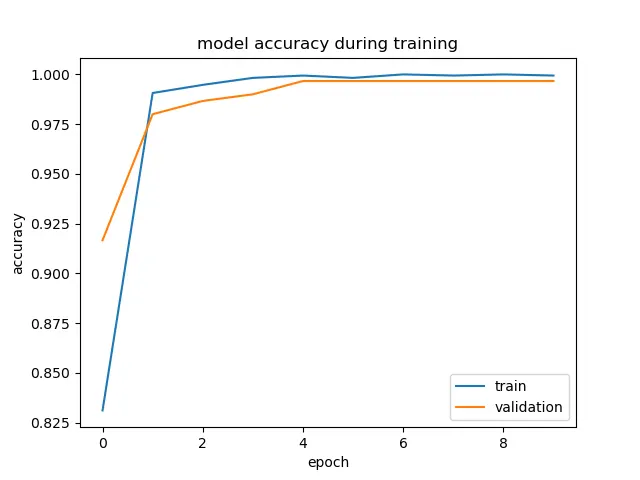
Model loss plot during training
#summarize history for loss

plt.plot(history.history['loss'])
plt.plot(history.history['val_loss'])
plt.title('model loss')
plt.ylabel('loss')
plt.xlabel('epoch')
plt.legend(['train','validation'],loc='upper left')
plt.show()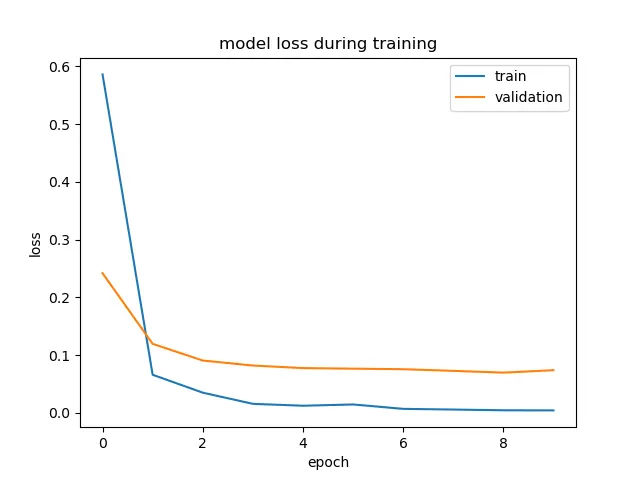
4.Using The Model For Inferences
#Setting test labels
test_labels = test_batches.classes
Now we're just printing the class_indices from our test_batches so that we can see the order of the classes and specify them in that same order when we create the labels for our confusion matrix.
test_batches.class_indices{'0': 0,
'1': 1,
'2': 2,
'3': 3,
'4': 4,
'5': 5,
'6': 6,
'7': 7,
'8': 8,
'9': 9}
#Predictions
#We use model.predict() to run the predictions

predictions = model.predict(x=test_batches, steps=len(test_batches), verbose=0)
#Confusion matrix
#After creating the labels, we then plot our confusion matrix.

cm = confusion_matrix(y_true=test_labels, y_pred=predictions.argmax(axis=1))

print('Comfusion matrix:n',cm)
Comfusion matrix: [[5 0 0 0 0 0 0 0 0 0] [0 5 0 0 0 0 0 0 0 0] [0 0 5 0 0 0 0 0 0 0] [0 0 0 5 0 0 0 0 0 0] [0 0 0 0 5 0 0 0 0 0] [0 0 0 0 0 5 0 0 0 0] [0 0 0 0 0 0 5 0 0 0] [0 0 0 0 0 0 0 5 0 0] [0 0 0 0 0 0 0 0 5 0] [0 0 0 0 0 0 0 0 0 5]]
#Heatmap
plt.figure(figsize=(10,7))
sns.heatmap(cm,annot = True,fmt = 'd',)
plt.savefig("Heatmap")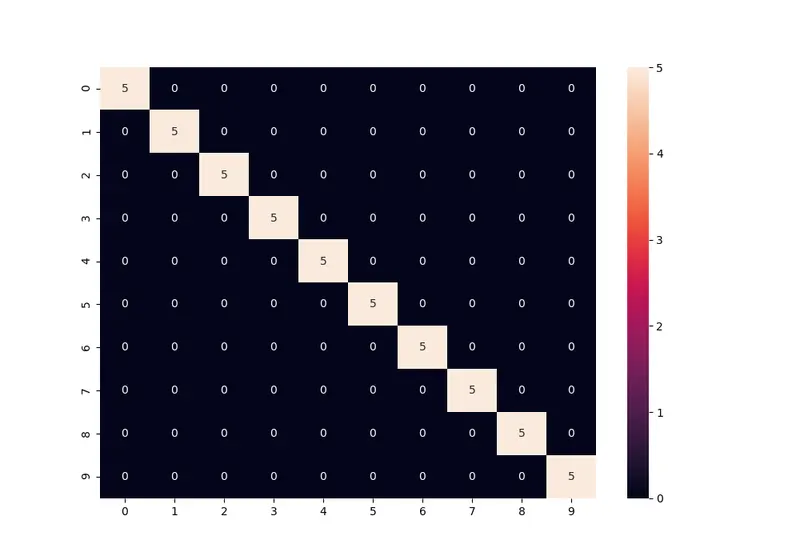
- Just checking out the diagonal in white that contains all the correctly predicted samples,we can get an idea that the model did pretty well. Each class had 5 samples, and we see a decent amount of 5s here.
Classification_report
from sklearn.metrics import classification_report

print(classification_report(y_true=test_labels, y_pred=predictions.argmax(axis=1)))
precision recall f1-score support
0 1.00 1.00 1.00 5
1 1.00 1.00 1.00 5
2 1.00 1.00 1.00 5
3 1.00 1.00 1.00 5
4 1.00 1.00 1.00 5
5 1.00 1.00 1.00 5
6 1.00 1.00 1.00 5
7 1.00 1.00 1.00 5
8 1.00 1.00 1.00 5
9 1.00 1.00 1.00 5
accuracy 1.00 50
macro avg 1.00 1.00 1.00 50
weighted avg 1.00 1.00 1.00 50
#Results
1.Test Accuarcy is 100 %.
2.Our model is performing very well on test data.
3.Values of precision and recall is 100% for every class.
#Save model
model.save('MobileNet_model.h5') # Save model Let's Check the performance of model on Unseen data
#displaying unseen image file which is going to be tested on "MobileNet_model.h5"
filename=r'C:UsersabcdDesktopComputer_VisionProject 6 Mini ProjectSmple images1.JPG'
Image(filename, width=254,height=256)
Let's see whether the our "MobileNet_model.h5" classify above image correctly or not

#defining load fun which load the image from disk and preprocess

def load_image(img_path):
    img = image.load_img(img_path ,target_size=(224, 224))  # Accepts the image file and target_size for image
    img_array = image.img_to_array(img)                            # Convert images into array
    img_array_expanded_dims = np.expand_dims(img_array, axis=0)    # expands the dimensions (4D)
return tf.keras.applications.mobilenet.preprocess_input(img_array_expanded_dims) #preprocesses the given image data to be in the same format as the images that MobileNet was originally trained on.- load_image() that accepts an image path, and processes the image to get it in a format that the model expects.
- preprocess_input() from tf.keras.applications.mobilenet, which preprocesses the given image data to be in the same format as the images that MobileNet was originally trained on. Specifically, it's scaling the pixel values in the image between -1 and 1, and this function will return the preprocessed image data as a numpy array.
Predicting with "MobileNet_model.h5"
#Loading "MobileNet_model.h5"
MobileNet_model = keras.models.load_model('MobileNet_model.h5')
#Image path
img_path = r'C://Users//abcd//Desktop//Computer_Vision//Project 6 Mini Project//Smple images//1.JPG'
preprocessed_image = load_image(img_path) #preprocessing
Sign language digit image belongs to class: 1

Our trained MobileNet_model on custom dataset is performing well on test data as well as on unseen data

#Note:I have uploaded same project file in.ipynb format as well dataset in zip file which is used in this project.