Project 6 Mini Project
Aim: To understand and implement an image classification model using MobileNet Architecture (MNA).
Procedure:
MobileNet Architecture (MNA):
The MobileNet model is designed to be used in mobile applications, and it is TensorFlow’s first mobile computer vision model.
MobileNet uses depthwise separable convolutions. It significantly reduces the number of parameters when compared to the network with regular convolutions with the same depth in the nets. This results in lightweight deep neural networks.
A depthwise separable convolution is made from two operations.
- Depthwise convolution.
- Pointwise convolution.
MobileNet is a class of CNN that was open-sourced by Google, and therefore, this gives us an excellent starting point for training our classifiers that are insanely small and insanely fast.
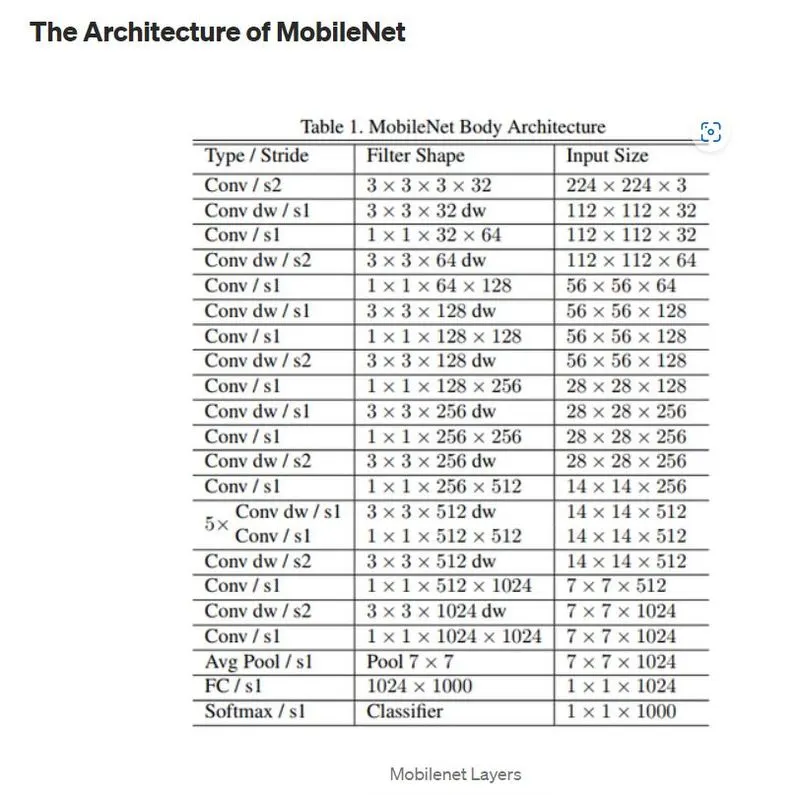
Depthwise separable convolution is a depthwise convolution followed by a pointwise convolution
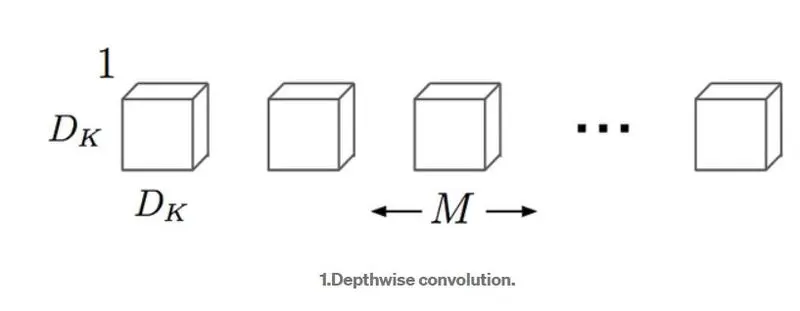
1. Depthwise convolution:
It is a map of a single convolution on each input channel separately. Therefore its number of output channels is the same as the number of the input channels. Its computational cost is
Df² * M * Dk².
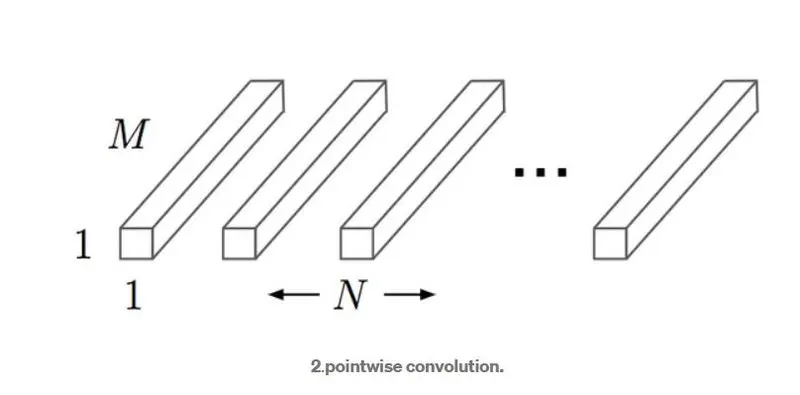
2. pointwise convolution:
Convolution with a kernel size of 1x1 that simply combines the features created by the depthwise convolution. Its computational cost is
M * N * Df².
Code:
1. Import all the necessary modules like TensorFlow and its layers, optimizers and preprocessor. Also import NumPy and cv2
import numpy as np
import cv2
import tensorflow as tf
from tensorflow import keras
from tensorflow.keras.layers import Dense, Activation
from tensorflow.keras.optimizers import Adam
from tensorflow.keras.metrics import categorical_crossentropy
from tensorflow.keras.preprocessing import image
from tensorflow.keras.preprocessing.image import ImageDataGenerator
from tensorflow.keras.applications import imagenet_utils
from sklearn.metrics import confusion_matrix
from tensorflow.keras.models import Model
import itertools
import shutil
import random
import matplotlib.pyplot as plt
2. Download a MobileNet model, and then use it for inference just on a few random images to see how well it classifies these images according to ImageNet classes.
mobile = tf.keras.applications.mobilenet.MobileNet(  input_shape=(224, 224, 3),
    alpha=1.0,
    include_top=True,
    weights="imagenet",
    input_tensor=None,
    classes=1000,
    pooling=None,
    classifier_activation="softmax",
    )
Arguments
- input_shape: Optional shape tuple, to be specified if to use a model with an input image resolution that is not (224, 224, 3). It should have exactly 3 input channels (224, 224, 3). Can also omit this option if to infer input_shape from an input_tensor. If choose to include both input_tensor and input_shape then input_shape will be used if they match, if the shapes do not match then it will throw an error. E.g.
(160, 160, 3)would be one valid value. - alpha: controls the width of the network. This is known as the depth multiplier in the MobileNetV3 paper, but the name is kept for consistency with MobileNetV1 in Keras.
- If
alpha< 1.0, proportionally decreases the number of filters in each layer. - If
alpha> 1.0, proportionally increasing the number of filters in each layer. - If
alpha= 1, the default number of filters from the paper are used at each layer.
- If
- include_top: Boolean, whether to include the fully-connected layer at the top of the network. Defaults to
True. - weights: String, one of
None(random initialization), 'imagenet' (pre-training on ImageNet), or the path to the weights file to be loaded. - input_tensor: Optional Keras tensor (i.e. output of
layers.Input()) to use as image input for the model. - pooling: String, optional pooling mode for feature extraction when
include_topisFalse.Nonemeans that the output of the model will be the 4D tensor output of the last convolutional block.avgmeans that global average pooling will be applied to the output of the last convolutional block, and thus the output of the model will be a 2D tensor.maxmeans that global max pooling will be applied.
- classes: Integer, optional number of classes to classify images into, only to be specified if
include_topis True, and if noweightsargument is specified. - dropout_rate: fraction of the input units to drop on the last layer.
- classifier_activation: A
stror callable. The activation function is to use on the "top" layer. Ignored unlessinclude_top=True. Setclassifier_activation=Noneto return the logits of the "top" layer. When loading pre-trained weights,classifier_activationcan only beNoneor"softmax". - include_preprocessing: Boolean, whether to include the preprocessing layer (
Rescaling) at the bottom of the network. Defaults toTrue.
3. Define a function to read the image and processes the image to get it in a format that the model expects.
def prepare_image(file):
    img = image.load_img(file, target_size=(224, 224))
    img_array = image.img_to_array(img)
    img_array_expanded_dims = np.expand_dims(img_array, axis=0)
    return tf.keras.applications.mobilenet.preprocess_input(img_array_expanded_dims)
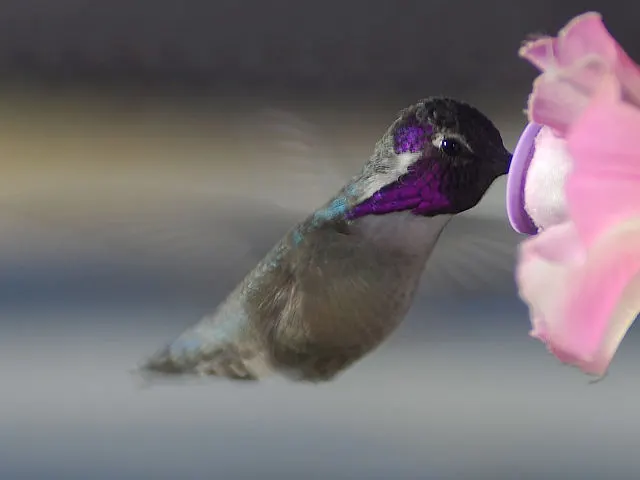
4. Read and display the image before passing it on to the prepare_image function
img_read = cv2.imread('hb.jpg')
cv2.imshow('img', img_read)
cv2.waitKey(0)
Input Image
5. Now call the prepare_image function with the argument file, 'hb.jpg' to generate the pre-processed image to predict. and the pass that processed_image to predictions
preprocessed_image = prepare_image('hb.jpg')
predictions = mobile.predict(preprocessed_image)
6. Pass the predictions to the result to generate result and print results
results = imagenet_utils.decode_predictions(predictions)
print(results)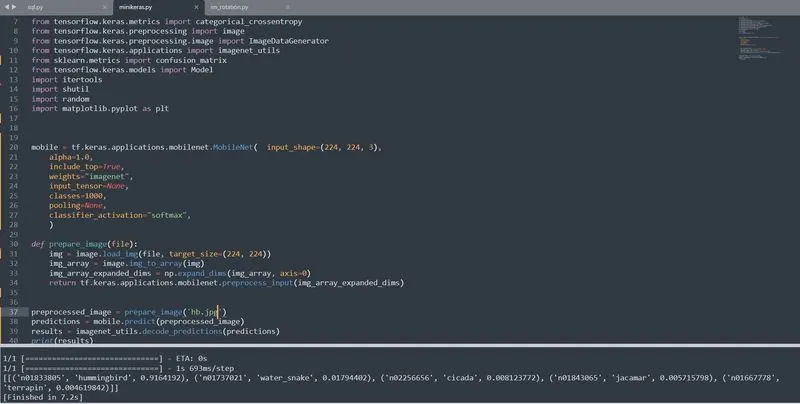
Output
Results:
Passed on image contains a hummingbird flying in the air feeding on a flower. The above architecture with ImageNet dataset pretrials predicts the image has a hummingbird with 91.6% probability and other four predictions with a lot less probability in just 7.7 seconds. So overall I'd say the model did a good job at classifying this one.