Project 3
DOS is an attack used to deny legitimate users access to a resource such as accessing a website, network, emails, etc. or making it extremely slow. DoS is the acronym for Denial of Service. This type of attack is usually implemented by hitting the target resource such as a web server with too many requests at the same time. This results in the server failing to respond to all the requests. The effect of this can either be crashing the servers or slowing them down.
Cutting off some business from the internet can lead to significant loss of business or money. The internet and computer networkspower a lot of businesses. Some organizations such as payment gateways, e-commerce sites entirely depend on the internet to do business.
In this tutorial, we will introduce you to what denial of service attack is, how it is performed and how you can protect against such attacks.
Topics covered in this tutorial
- Types of Dos Attacks
- How DoS attacks work
- DoS attack tools
- DoS Protection: Prevent an attack
- Hacking Activity: Ping of Death
- Hacking Activity: Launch a DOS attack
Types of Dos Attacks
There are two types of Dos attacks namely;
- DoS– this type of attack is performed by a single host
- Distributed DoS– this type of attack is performed by a number of compromised machines that all target the same victim. It floods the network with data packets.
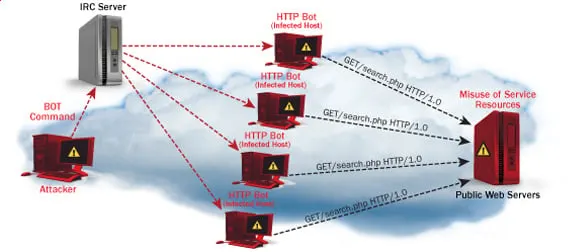
How DoS attacks work
Let’s look at how DoS attacks are performed and the techniques used. We will look at five common types of attacks.
Ping of Death
The ping command is usually used to test the availability of a network resource. It works by sending small data packets to the network resource. The ping of death takes advantage of this and sends data packets above the maximum limit (65,536 bytes) that TCP/IP allows. TCP/IP fragmentation breaks the packets into small chunks that are sent to the server. Since the sent data packages are larger than what the server can handle, the server can freeze, reboot, or crash.
Smurf
This type of attack uses large amounts of Internet Control Message Protocol (ICMP) ping traffic target at an Internet Broadcast Address. The reply IP address is spoofed to that of the intended victim. All the replies are sent to the victim instead of the IP used for the pings. Since a single Internet Broadcast Address can support a maximum of 255 hosts, a smurf attack amplifies a single ping 255 times. The effect of this is slowing down the network to a point where it is impossible to use it.
Buffer overflow
A buffer is a temporal storage location in RAM that is used to hold data so that the CPU can manipulate it before writing it back to the disc. Buffers have a size limit. This type of attack loads the buffer with more data that it can hold. This causes the buffer to overflow and corrupt the data it holds. An example of a buffer overflow is sending emails with file names that have 256 characters.
Teardrop
This type of attack uses larger data packets. TCP/IP breaks them into fragments that are assembled on the receiving host. The attacker manipulates the packets as they are sent so that they overlap each other. This can cause the intended victim to crash as it tries to re-assemble the packets.
SYN attack
SYN is a short form for Synchronize. This type of attack takes advantage of the three-way handshake to establish communication using TCP. SYN attack works by flooding the victim with incomplete SYN messages. This causes the victim machine to allocate memory resources that are never used and deny access to legitimate users.
DoS attack tools
The following are some of the tools that can be used to perform DoS attacks.
- Nemesy– this tool can be used to generate random packets. It works on windows. This tool can be downloaded from http://packetstormsecurity.com/files/25599/nemesy13.zip.html . Due to the nature of the program, if you have an antivirus, it will most likely be detected as a virus.
- Land and LaTierra– this tool can be used for IP spoofing and opening TCP connections
- Blast– this tool can be downloaded from http://www.opencomm.co.uk/products/blast/features.php
- Panther– this tool can be used to flood a victim’s network with UDP packets.
- Botnets– these are multitudes of compromised computers on the Internet that can be used to perform a distributed denial of service attack.
Also Check:- Best FREE DDoS Attack Online Tool | Software | Websites
DoS Protection: Prevent an attack
An organization can adopt the following policy to protect itself against Denial of Service attacks.
- Attacks such as SYN flooding take advantage of bugs in the operating system. Installing security patches can help reduce the chances of such attacks.
- Intrusion detection systems can also be used to identify and even stop illegal activities
- Firewalls can be used to stop simple DoS attacks by blocking all traffic coming from an attacker by identifying his IP.
- Routers can be configured via the Access Control List to limit access to the network and drop suspected illegal traffic.
Hacking Activity: Ping of Death
We will assume you are using Windows for this exercise. We will also assume that you have at least two computers that are on the same network. DOS attacks are illegal on networks that you are not authorized to do so. This is why you will need to setup your own network for this exercise.
Open the command prompt on the target computer
Enter the command ipconfig. You will get results similar to the ones shown below
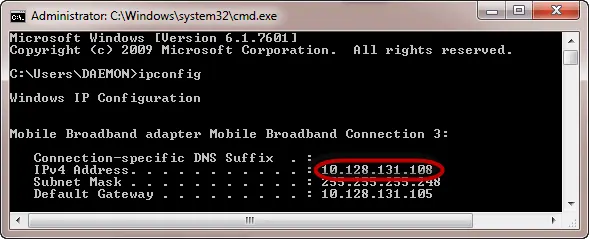
For this example, we are using Mobile Broadband connection details. Take note of the IP address. Note: for this example to be more effective, and you must use a LAN network.
Switch to the computer that you want to use for the attack and open the command prompt
We will ping our victim computer with infinite data packets of 65500
Enter the following command
ping 10.128.131.108 –t |65500
HERE,
- “ping” sends the data packets to the victim
- “10.128.131.108” is the IP address of the victim
- “-t” means the data packets should be sent until the program is stopped
- “-l” specifies the data load to be sent to the victim
You will get results similar to the ones shown below
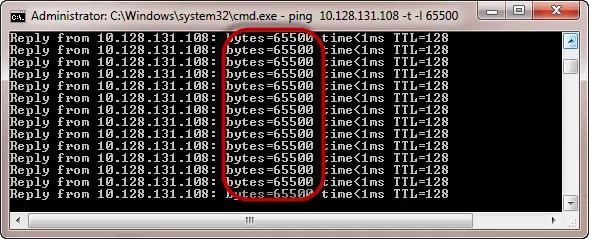
Flooding the target computer with data packets doesn’t have much effect on the victim. In order for the attack to be more effective, you should attack the target computer with pings from more than one computer.
The above attack can be used to attacker routers, web servers etc.
If you want to see the effects of the attack on the target computer, you can open the task manager and view the network activities.
- Right click on the taskbar
- Select start task manager
- Click on the network tab
- You will get results similar to the following
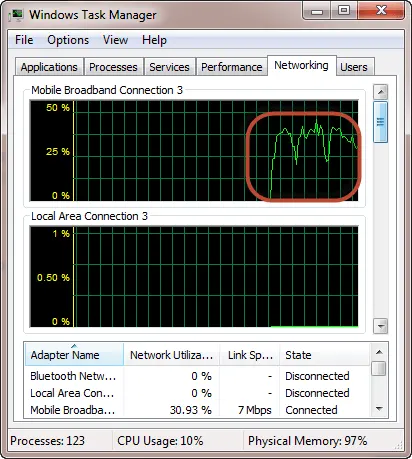
If the attack is successful, you should be able to see increased network activities.
Hacking Activity: Launch a DOS attack
In this practical scenario, we are going to use Nemesy to generate data packets and flood the target computer, router or server.
As stated above, Nemesy will be detected as an illegal program by your anti-virus. You will have to disable the anti-virus for this exercise.
- Download Nemesy from http://packetstormsecurity.com/files/25599/nemesy13.zip.html
- Unzip it and run the program Nemesy.exe
- You will get the following interface
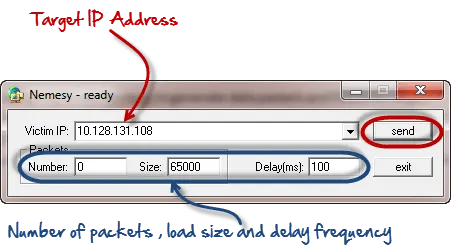
Enter the target IP address, in this example; we have used the target IP we used in the above example.
HERE,
- 0 as the number of packets means infinity. You can set it to the desired number if you do not want to send, infinity data packets
- The size field specifies the data bytes to be sent and the delay specifies the time interval in milliseconds.
Click on send button
You should be able to see the following results
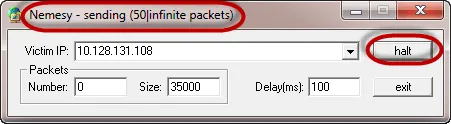
The title bar will show you the number of packets sent
Click on halt button to stop the program from sending data packets.
You can monitor the task manager of the target computer to see the network activities.
Summary
- A denial of service attack’s intent is to deny legitimate users access to a resource such as a network, server etc.
- There are two types of attacks, denial of service and distributed denial of service.
- A denial of service attack can be carried out using SYN Flooding, Ping of Death, Teardrop, Smurf or buffer overflow
- Security patches for operating systems, router configuration, firewalls and intrusion detection systems can be used to protect against denial of service attacks.
A replay attack is a type of man-in-the-middle attack in which a hacker or user sniffs info being sent on a channel to interrupt them & resend them under the cloak of genuine messages.
What makes the replay attack mainly damaging is that the attacker does not even need to decrypt the note they resend but can still fool the person who receives it into thinking that the message is genuine.
In other words, think of this illegal party as having the capability to snoop on all your conversations, communication, & digital activity taking place through that specific channel. A Wi-Fi network for instance.
There are many implications of such an attack since it can render closely all your communications online susceptible.
More extremely, it will carry on to linger as a constant phantom within your prospect security protocols as there is no way to recognize for how long your communications have cooperated.
How Does a Replay Attack Work?
Take a look at this real-life attack situation. By sending encrypted info to the firm’s financial administrator, a corporate worker requests a fund transfer.
This communication is interrupted by an attacker, who captures it and might now resend it.
The communication is already properly encrypted & seems valid to the financial administrator since it is a reliable message that has simply been resending.
In this circumstance, unless the fiscal administrator has cause to be suspicious, he or she is possibly to react to the new request. A vast quantity of money might be sent to the attacker’s bank account as a reprisal.
Replay attack vs. man-in-the-middle
There are various types of security threats that attackers can use to exploit uncertain applications. Threat actors can run several of these attacks using automatic software, while others need a more active role from attackers.
In this segment, we will clarify the basic knowledge behind a man-in-the-middle (MITM) attack, offering examples and mitigation methods.
What Is a Man-in-the-Middle Attack?
A man-in-the-middle attack is a kind of eavesdropping attack, where attackers disturb an existing conversation or data transfer. After injecting themselves in the “mid” of the transfer, the attackers made-up to be both genuine participants.
This allows an attacker to interrupt information & data from either party while also sending harmful links or other information to both genuine participants in a method that might not be sensed till it is too late.
You can think of this kind of attack as similar to the game of telephone where one person’s words are carried along from member to member until it has changed by the time it reaches the last person.
In a man-in-the-middle attack, the middle contributor manipulates the conversation unidentified to either of the two genuine participants, acting to save confidential information & otherwise cause damage. Now we are going to tell you more about replay attacks.
Replay Attacks In Detail
Let us know replay attacks in detail with the benefit of a real-life example. Consider a business staff member asking for a monetary transaction from the company’s financial manager. He does so by sending an encoded message.
An attacker seeking a loophole to launch a replay attack might snoop on this message to satisfy his intention. His following step would be capturing the message so that he can resend it.
Now the message will look completely authentic because it has already been sent once. The financial administrator, who gets the message, will find it authentic as it has already been encoded.
What will occur now? In this case, the chances are that the fiscal administrator will reply to this new message unless there is a strong reason to get distrustful.
He will not distinguish between the two statements— the one he gets from the company’s staff fellow & the other he received from the hacker.
The receiver, in this circumstance, the fiscal administrator, has received a similar message. It could lead to the fiscal administrator sending a heavy amount to the bank account of the attacker.
So, what the hacker did was crack the message from the network & decrypt it. He doesn’t even need to read or decipher the message. He just resends the update as it is.
The attacker used a humble technique or hack to break into the system & replay it simply by resending a message. It is how a replay attack in network safety works.
Examples of Replay Attacks
Suppose in the statement of two parties tom & bob; tom is sending his key to bob to verify his identity but in the meantime Attacker Jake overhears the conversation between them & keeps the data which are required to verify his identity to Bob. Later Jake contacts Bob and verifies its authenticity.
Except mitigated, networks and computers subject to replay attack would see the attack procedure as genuine messages.
One instance of a replay attack is to replay the note sent to a network by an attacker, which was formerly sent by a certified user.
Though the messages might be encrypted & the attacker might not get the real keys, retransmission of valid data or logon posts could help them gain adequate access to the network.
A replay attack can get access to the assets by replaying a verification message and can complicate the destination host.
One of the finest techniques to prevent replay attacks is by using strong digital signatures with timestamps.
An additional technique that could be used to evade a replay attack is by making random session keys that are time-bound and procedure bound.
A one-time password for every request also helps in preventing replay attacks and is often used in banking operations.
Other methods used against replay attacks comprise sequencing of messages & non-acceptance of repeated messages.
How To Prevent Replay Attacks
We recognize that replay attacks can lead to dire penalties. So, the real query is, how can we protect ourselves from replay attacks?
The main way to stop replay attacks is to attach timestamps or order numbers to every sent message. This will let the receiver discard some messages with a repeated timestamp or order number.
An additional prevention technique is to utilize digital signatures to make it simpler for the receiver to validate if the sender is really the individual they think they are.
Replay attacks can also be minimalized with the help of random-session session keys, which are time-specific & will change with time making it hard for an attacker to fool the receiver with an earlier message.
As replay attacks are contingent on reusing the session authorizations that an attacker has intercepted, stopping replay attacks frequently means generating a single-use encryption key or ID for an Internet session.
Several network transmissions between two users now use a particular, single-use encryption key, which is simply valid for one session and will not let an attacker replay the session.
Users might even log into an account with a single-use passcode, which will have to be reset for every successive login. This stops a replay attacker from submitting one more request with the intercepted password; it will no longer be functional.
A virtual private network can protect users from man-in-the-middle attacks: they set up a computer network distinct from the normal network, which normally prevents attackers from stealing on the Internet connection.
But, VPNs are not flawless, and they’ve sometimes allowed attackers to gain the user’s network through endpoint insecurities.
Certain VPNs really have flaws that let attackers replay Internet sessions, having gained access to their network link using cookies that weren’t dealt with correctly.
If you are using a VPN to evade replay attacks, research different options cautiously & watch for security bugs that have come to light in specific VPN products.
Standard Techniques in Replay Attacks
The predictable techniques in replay attacks are listed below.
Kerberos prevention technique: Throughout protocol exchanges between the user & the server, Kerberos implements a time authenticator. It also drafts the ticket’s lifetime and, most significantly, the user’s timestamp.
The message will be excluded if the authenticator’s timestamp isn’t within 5 minutes of the server’s time. This is because the extreme duration that might be accepted between users & servers is five minutes. But, the timing can be different.
One-time passwords (OTP): A password or secret code that can simply be used once for a transaction. With the user’s OTP program, the verification server operates on similar authorizations in OTP-based safety features.
The use of OTP is based on the indication that every OTP is valid for 10 minutes or one effective activation, depending on which comes first.
Sequencing: Authentic messages are numbered, & the receiver will reject accept packages, not in the right order. As a result, inner delay or duplication attacks are stopped.
Random session key: The session key allows both parties to have protected & closed-end transactions using time-bound & process-bound code.
The IT industry has recently seen a steady increase of distributed denial of service (DDoS) attacks. Years ago, DDoS attacks were perceived as minor nuisances perpetrated by novice attackers who did it for fun and it was relatively easy to mitigate them. Unfortunately, that situation is no more. DDoS attacks are now a sophisticated activity, and in many cases, big business.
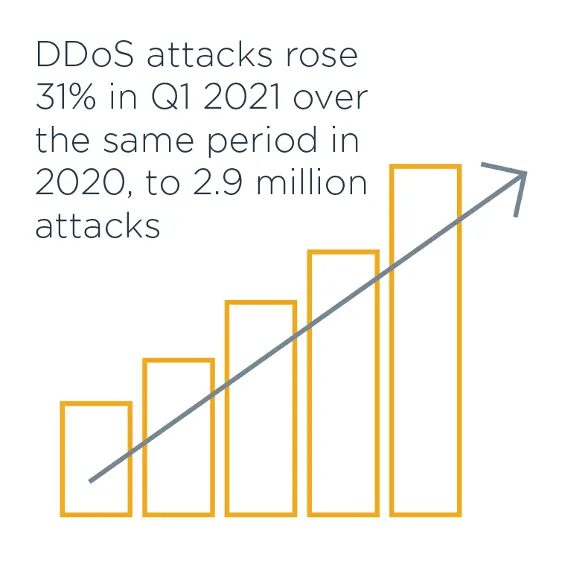
InfoSecurity Magazine reported 2.9 million DDoS attacks in Q1 of 2021, an increase of 31% over the same period in 2020.
DDoS attacks rose 31% in Q1 2021 over the same period in 2020, to 2.9 million attacks
In recent years, we have seen an exponential increase in DDoS attacks that have incapacitated businesses for significant amounts of time.
- In February of 2020, Amazon Web Services (AWS) suffered a DDoS attack sophisticated enough to keep its incident response teams occupied for several days also affecting customers worldwide.
- In February of 2021, the EXMO Cryptocurrency exchange fell victim to a DDoS attack that rendered the organization inoperable for almost five hours.
- Recently, Australia experienced a significant, sustained, state-sponsored DDoS attack.
- Belgium also became a victim of a DDoS attack that targeted the country’s parliament, police services and universities.
Hundreds of thousands of unnamed, undocumented, yet successful DDoS attacks continue daily. In fact, it is these attacks that are the most effective and costly. The DDoS upward trend promises to continue, putting IT pros with mitigation skills in high demand.
Raging IT Warfare: What Is a DDoS Attack?
Despite becoming more common, DDoS attacks can be quite advanced and difficult to combat. But what exactly is a DDoS attack and what does DDoS stand for?
DDoS is short for distributed denial of service. A DDoS attack occurs when a threat actor uses resources from multiple, remote locations to attack an organization’s online operations. Usually, DDoS attacks focus on generating attacks that manipulate the default, or even proper workings, of network equipment and services (e.g., routers, naming services or caching services). In fact, that’s the main problem.
Sophisticated DDoS attacks don’t necessarily have to take advantage of default settings or open relays. They exploit normal behavior and take advantage of how the protocols that run on today’s devices were designed to run in the first place. In the same way that a social engineer manipulates the default workings of human communication, a DDoS attacker manipulates the normal workings of the network services we all rely upon and trust.
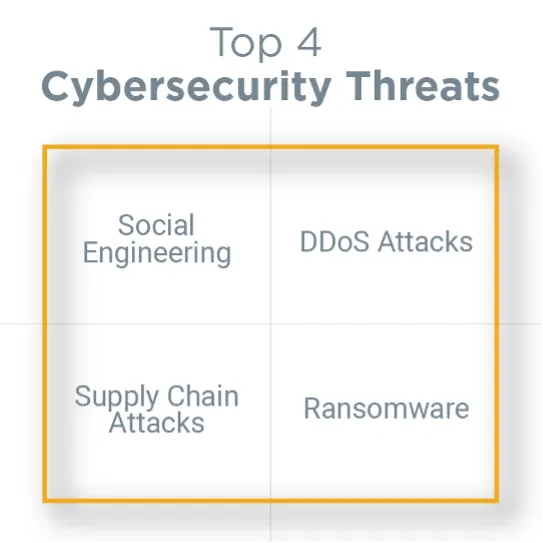
When a DDoS attack takes place, the targeted organization experiences a crippling interruption in one or more of its services because the attack has flooded their resources with HTTP requests and traffic, denying access to legitimate users. DDoS attacks are ranked as one of the top four cybersecurity threats of our time, amongst social engineering, ransomware and supply chain attacks.
Modern Warfare: Avoiding Confusion About DDoS Attacks
It’s relatively easy to confuse DDoS attacks with other cyberthreats. In fact, there is a significant lack of knowledge among IT pros and even cybersecurity professionals concerning exactly how DDoS attacks work.
In a DDoS attack, cybercriminals take advantage of normal behavior that occurs between network devices and servers, often targeting the networking devices that establish a connection to the internet. Therefore, attackers focus on the edge network devices (e.g., routers, switches), rather than individual servers. A DDoS attack overwhelms the network’s pipe, (the bandwidth) or the devices that provide that bandwidth.
Here’s a useful analogy: Imagine that several people call you simultaneously so that you can’t make or receive phone calls or use your phone for any other purpose. This problem persists until you block those calls through your provider.
Notice that you don’t fix, upgrade or otherwise make adjustments to your actual mobile device. Instead, you fix the connection between the attackers and your phone by using your mobile phone provider’s blocking service.
A similar thing happens during a DDoS attack. Instead of modifying the resource that is being attacked, you apply fixes (otherwise known as mitigations) between your network and the threat actor.
DDoS vs. DoS Attacks: What’s the Difference?
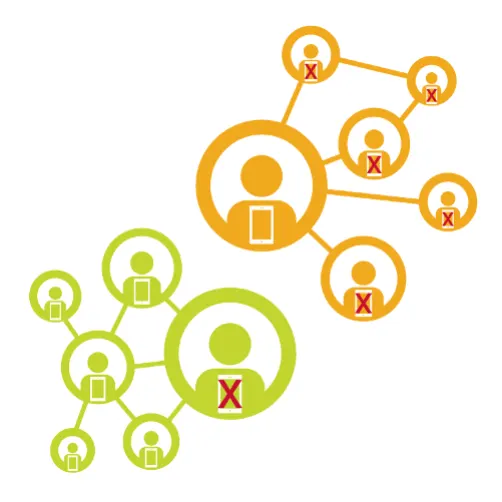
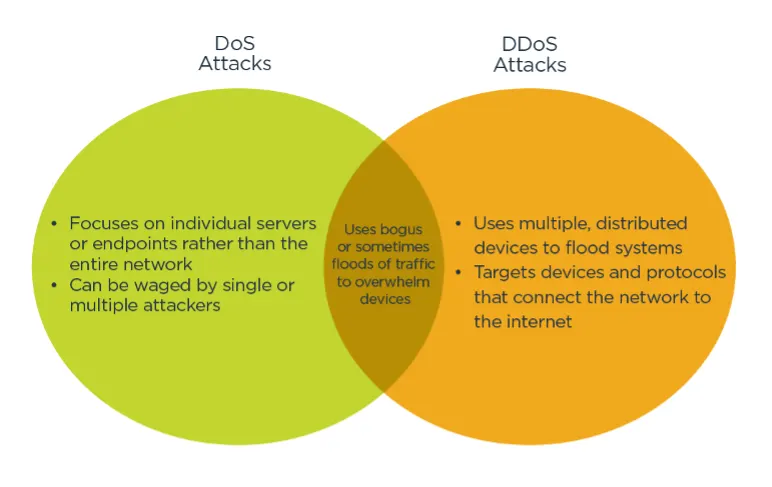
It’s important to avoid confusing a DDoS (distributed denial of service) attack with a DoS (denial of service) attack. Although only one word separates the two, these attacks vary significantly in nature.
- Strictly defined, a typical DDoS attack manipulates many distributed network devices in between the attacker and the victim into waging an unwitting attack, exploiting legitimate behavior.
- A traditional DoS attack doesn’t use multiple, distributed devices, nor does it focus on devices between the attacker and the organization. These attacks also tend not to use multiple internet devices.
Typical DoS attacks can include the following:
- Single-source SYN floods: This occurs when an attacker uses a single system to issue a flood attack of SYN packets, manipulating the typical TCP three-way handshake. For example, a SYN flood someone might generate using a Kali Linux computer is not a true DDoS attack because the attack being made is only coming from one device. This is the case even if the attacker uses IP address spoofing. A true DDoS attack is generated by network-level devices, for network-level devices. In other words, you use multiple routers or Memcached servers to attack a network.
- The “ping of death”: Years ago, some network drivers contained flawed code that would crash a system if it received an ICMP packet that contained certain parameters.
- The slow loris attack: The slow loris attack is often called a DDoS attack, but because the attack targets a specific server (in this case, a web server) and usually does not use intermediate networking devices, it is typically a traditional DoS attack.
Each of the above DoS attacks take advantage of software or kernel weaknesses in a particular host. To resolve the issue, you fix the host, and/or filter out the traffic. If you can upgrade a server to mitigate an attack, then it doesn’t qualify as a traditional DDoS attack.
Remember, in a DDoS attack, the threat actor adopts a resource consumption strategy. This strategy involves using what appears to be legitimate requests to overwhelm systems which are, in fact, not legitimate, resulting in system issues.
Attack Strategy: Types of DDoS Attacks
There are three general types of DDoS attacks.
1. Application Layer
2. Protocol
3. Volumetric
In some cases, IT and cybersecurity professionals consider protocol and application-based DDoS attacks to be one category.
Gathering Intel: Why You Need to Know About DDoS Attacks
DDoS attacks have become increasingly problematic, and IT pros need to be ready.
- Layer 7 attacks have increased through 2020, going into 2021, according to CloudFlare.
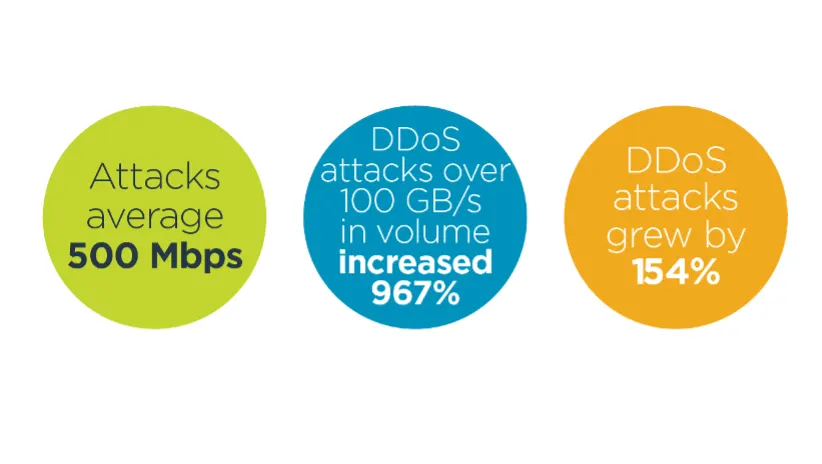
- The number of DDoS attacks over 100 GB/s in volume increased nearly tenfold (967%) in Q1 2020, according to Comparitech.
- The sheer size of volumetric attacks has increased to overwhelming proportions. CloudFlare also reports that 500 Mbps DDoS attacks have become the norm for volumetric attacks.
- DDoS attacks are becoming more common. In 2021, ZDNet has reportedthat DDoS attacks grew by at least 154% in the previous two years.
- Attacks have become more sophisticated. Attackers have combined DDoS with other types of attacks, including ransomware.
- DDoS attackers have adopted sophisticated artificial intelligence (AI) and machine learning methods to help conduct their attacks. For example, DDoS botnets apply machine learning methods to conduct sophisticated network reconnaissance to find the most vulnerable systems. They also use AI to reconfigure themselves to thwart detection and change attack strategies. Modern attacks will likely manifest as both defenders and attackers pit AI-enabled systems against each other.
- DDoS attackers have adopted a blended attack strategy. They combine various attack methods with social engineering, credential stealing and physical attacks, making the actual DDoS attack only a single factor in a multifaceted approach.
Tactical Warfare: How DDoS Attackers Avoid Detection
DDoS attacks are known to be cunning and therefore tricky to nail down. One of the reasons they are so slippery involves the difficulty in identifying the origin. Threat actors generally engage in three major tactics to pull off a DDoS attack:
1. Spoofing
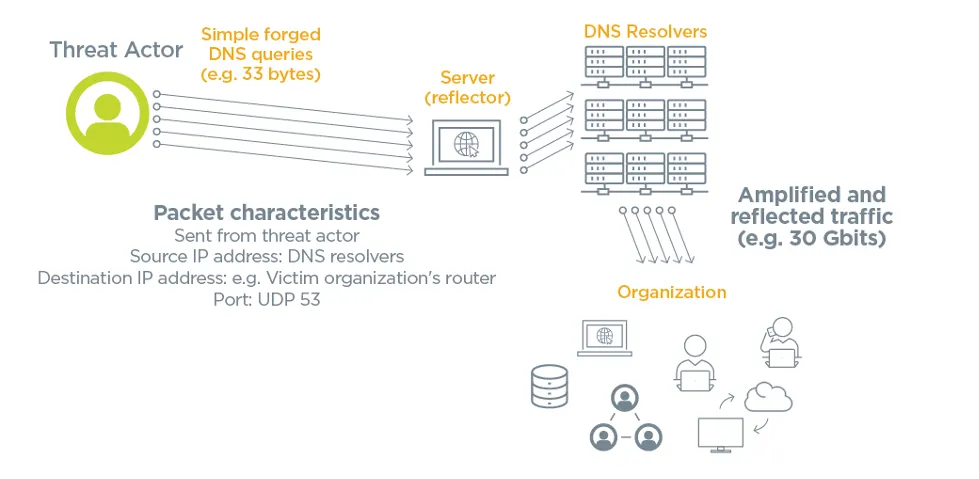
By default, IPv4 and IPv6 do not have the ability to authenticate and trace traffic. With IPv4 networks especially, it is quite simple to spoof source and destination addresses. DDoS attackers take advantage of this issue by forging packets that have bogus source addresses. As a result, it is possible for an attacker to trick legitimate devices into responding to these packets by sending millions of replies to a victim host that never actually made a request in the first place.
2. Reflection
Attackers usually want to hide any trace of their involvement in a DDoS attack. To do this, they manipulate the default behavior of internet services so that the services effectively hide the actual attacker. Services often used in these types of attacks include the thousands of Domain Name System (DNS), Network Time Protocol (NTP) and Simple Network Management (SNMP) servers. This is one of the primary reasons that attackers are attracted to a DDoS strategy. Internet services not only provide the traffic, but they also tend to make it more difficult for defenders to trace the origin of the attack because most servers don’t keep detailed logs of the services that have used them.
3. Amplification
Amplification is a tactic that lets a DDoS attacker generate a large amount of traffic using a source multiplier which can then be aimed at a victim host. Amplification attacks don’t use a botnet, it is simply a tactic that allows an attacker to send a single forged packet which then tricks a legitimate service into sending hundreds, if not thousands, of replies to a victim network or server.
It’s very important to understand that DDoS attacks use normal internet operations to conduct their mischief. These devices aren’t necessarily misconfigured, they are actually behaving as they are supposed to behave. Attackers have simply found a way to exploit this behavior and manipulate it to conduct their DDoS attack.
Additionally, network devices and services often become unwitting participants in a DDoS attack. These three tactics take advantage of the default behavior of network resources worldwide. These resources include:
- Routers
- Switches
- Firewalls
- Load balancers
- Caching servers
- Edge network devices
- Mobile towers (including 4G and 5G)
Battle Duration: How Long Do DDoS Attacks Last?
DDoS attacks vary greatly in length and sophistication. A DDoS attack can take place over a long period of time or be quite brief:
- Long-Term Attack: An attack waged over a period of hours or days is considered a long-term attack. For example, the DDoS attack on AWS caused disruption for three days before finally being mitigated.
- Burst Attack: Waged over a very short period of time, these DDoS attacks only last a minute or even a few seconds.
Don’t be deceived. Despite being very quick, burst attacks can actually be extremely damaging. With the advent of internet of things (IoT) devices and increasingly powerful computing devices, it is possible to generate more volumetric traffic than ever before. As a result, attackers can create higher volumes of traffic in a very short period of time. A burst DDoS attack is often advantageous for the attacker because it is more difficult to trace.
Technological Warfare: Botnets and DDoS Attacks
Botnets, which are vast networks of computers, can be used to wage DDoS attacks. They are usually composed of compromised computers (e.g., IoT devices, servers, workstations, routers, etc.), or zombies, that are controlled by a central server.
Attackers don’t necessarily need a botnet to conduct a DDoS attack. Threat actors can simply manipulate the tens of thousands of network devices on the internet that are either misconfigured or are behaving as designed.
Nevertheless, it is important to understand how a botnet-based DDoS attack can occur.A More Sophisticated Digital Enemy: The Evolution of the DDoS Attack
One of the realities of cybersecurity is that most attackers are moderately talented individuals who have somehow figured out how to manipulate a certain network condition or situation. Even though there is often discussion about advanced persistent threats (APT) and increasingly sophisticated hackers, the reality is often far more mundane.
For example, most DDoS attackers simply find a particular protocol. They’ll discover that they can manipulate the transmission control protocol (TCP) handshake to create a flood attack of SYN packets or a particular type of server, such as the memory cache daemon (it is often called “Memcached,” for memory cache daemon). The Memcached service is a legitimate service frequently used to help speed up web applications. Attackers have often exploited Memcached implementations that are not properly secured, and even those that are operating properly.
Attackers have also discovered that they can compromise IoT devices, such as webcams or baby monitors. But today, attackers have more help. Recent advancements have given rise to AI and connective capabilities that have unprecedented potential. Like legitimate systems administrators, attackers now have voice recognition, machine learning and a digital roadmap that can allow them to manipulate integrated devices in your home or office, such as smart thermostats, appliances and home security systems.
Plan of Attack: The Anatomy of a Botnet-Based DDoS Attack
DDoS traffic comes in quite a few different varieties. In the case of a botnet-based attack, the DDoS threat actor is using a botnet to help coordinate the attack. Understanding the types of traffic will help to select proactive measures for identification and mitigation. Click on the red plus signs to learn more about each type of DDoS traffic.
1. Command and Control (C&C)
2. Coordination
3. Beaconing/Heartbeat Traffic
4. Attack Traffic
5. Operational Technology (OT)/IoT
6. Unusual Traffic
7. Multivector
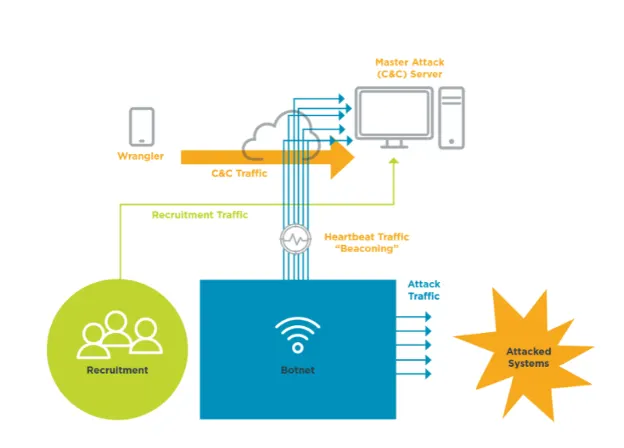
Assembling Weaponry: Tools for Understanding How DDoS Attacks Work
DDoS attacks take on many forms and are always evolving to include various attack strategies. It’s essential that IT pros equip themselves with the knowledge of how attacks work.
There are three models that can help provide insight into the inner workings of DDoS attacks:
- Lockheed Martin Cyber Kill Chain:Used to help provide a framework for attack strategies, this model outlines seven steps a hacker might take to conduct a long-term persistent DDoS attack. This model does not account for the use of botnets to compromise systems.
- Mitre ATT&CK Model: This model profiles real-world attacks and provides a knowledge base of known adversarial tactics and techniques to help IT pros analyze and prevent future incidents. This model is particularly useful to individuals who wish to defend themselves against DDoS attacks because it allows you to profile attackers and identify their strategies.
- Diamond Model of Intrusion Analysis:The Diamond model helps organizations weigh the capabilities of an adversary and the capabilities of the victim, as discussed in a CompTIA blog about the three major cybersecurity models. Even though the Diamond model was created to model actual intrusions, it is also useful for identifying DDoS attacks.
As an IT pro, knowing how to approach a DDoS attack is of vital importance as most organizations have to manage an attack of one variety or another over time. Security analysts and threat hunters often use the ATT&CK model and the Mitre ATT&CK Navigator to help identify conditions that allow for DDoS attacks to be particularly successful.
A Brief History of Major Attacks: DDoS Examples
There have been an exceedingly large number of distributed denial of service attacks over the years. Let’s begin with a short list of major DDoS attacks, the motivations behind them and the lasting impact they have on our digital world. Click on the red plus signs to learn more about each of these major DDoS attacks.
1. Estonia: April 27, 2007
2. Republic of Georgia: July 20, 2008
3. Spamhaus: March 18, 2013
4. Occupy Central: June 2014
5. Dyn: October 21, 2016
6. GitHub: February 28, 2018
7. Amazon Web Services (AWS): February 2020
8. Google: September 2017 (Reported October 2020)
9. Sector-Specific Attacks: 2019-2021

The Attacker Profile: Who Performs DDoS Attacks?
You often see images of nefarious, dark-hooded individuals to symbolize the malicious threat actor. In reality, these groups of attackers are often well known to authorities and use DDoS tactics to gain influence, disrupt government and military operations or cause people to lose confidence in a market sector, company brand or long-established institution.
Regardless of the motivations that power these attacks, hackers can easily be hired to help launch a DDoS attack—available simply as guns for hire. Individuals or entire commercial groups are available for hire on the dark web, often under a service model, similar to that of infrastructure as a service (IaaS) or software as a service (SaaS). In fact, Radware issued a global security alert in August of 2020 in response to the expanding prevalence of DDoS-for-hire attacks.
What Motivates an Attack: The Reasons Behind a DDoS Attack
In order to thwart DDoS attacks, it’s important to understand what drives the incident. While DDoS attacks vary greatly in nature when it comes to tactics and methods, DDoS attackers also may have a multitude of motives, including the following.
- Financial Motives: DDoS attacks are often combined with ransomware attacks. The attacker sends a message informing the victim that the attack will stop if the victim pays a fee. These attackers are most often part of an organized crime syndicate. Today, though, these syndicates can be as small as a dozen individuals with networking knowledge and extra time on their hands. Sometimes, rival businesses will even conduct DDoS attacks on each other to gain a competitive edge.
- Ideological Motives: Attacks are often launched to target oppressive governing bodies or protestors in political situations. A DDoS attack of this kind is often conducted to support a particular political interest or belief system, such as a religion.
- State-sponsored Motives: DDoS attacks are often waged to cause confusion for military troops or civilian populations when political unrest or dissension becomes apparent.
- Tactical Motives: In this case, the DDoS attack is waged as part of a larger campaign. In some cases, the campaign includes a physical attack or another series of software-based attacks. For example, militaries have been known to combine DDoS attacks with physical ones. Tactical attacks are used to divert attention away from normal IT tasks to take advantage of a different target – the old bait-and-switch cyberattack.
- Business/Economical Motives: DDoS attacks of this variety help to gather information or cause damage to particular industry sectors. For example, attacks on companies such as Sony, British Airways and Equifax caused consumers to lose faith in entire industries.
- Extortion Motives: Other attacks are used to attain some personal or monetary gain through extorted means.
Missile Launched: Tools That Perform DDoS Attacks
Attackers use several devices to target organizations. These are some common tools used in DDoS attacks:
- Services: These include Memcached (used to speed up database and web-based transactions), the DNS server, the NTP and the SNMP.
- Network Devices: Network devices include items such as routers and switches.
- Botnets: Collections of compromised systems commonly used in DDoS attacks.
- IoT Devices: Weaknesses in connected devices can be exploited by cybercriminals, turning them into zombies. The infamous Mirai botnet was utilized to launch a series of attacks using unsecured baby monitors.
- AI: Artificial intelligence is being used by hackers to modify code during a DDoS attack automatically so the attack remains effective despite safeguards.
- Exploitation of Legacy Equipment:Older hardware is often exposed to more vulnerabilities and is routinely targeted and exploited.
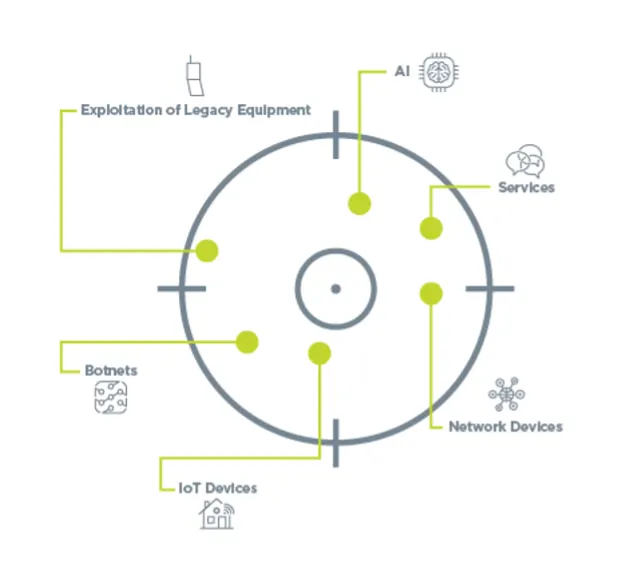
The Role of Recon: Keeping Track of DDoS Attacks
DDoS attackers get more and more savvy every day. Attacks are expanding in size and duration, with no signs of slowing. Organizations need to keep a finger on the pulse of incidents to understand how susceptible they may be to a DDoS attack.
Here are some resources that can help you keep track of the latest DDoS attacks:
- Mazebolt Worldwide List of DDoS Attacks: This resource provides a running list of attacks with information such as date, country of origin, downtime, attack details and even links to press information about the incident.
- Cybersecurity Threat Intelligence (CTI) Sharing Resources:
- CompTIA ISAO: CompTIA maintains an organization dedicated to sharing intelligence related to threats and providing actionable insight for mitigating and solving cybersecurity challenges.
- U.S. CISA Automated Indicator Sharing: The tool provided by CISA enables real-time sharing of cyberthreat information to help limit the prevalence of attacks.
- FBI Infragard: A partnership between the FBI and private sectors, InfraGard supports the sharing of information about attacks and mitigation techniques.
- Digital Attack Map: This map shows a live feed of DDoS attacks across the world and allows you to filter by type, source port, duration and destination port.
- AlienVault Open Threat Exchange: This threat intelligence community provides free access to threat indicators and allows for sharing of threat research with others.
- Threatbutt Internet Hacking Attack Attribution Map: This map provides real-time tracking of DDoS attacks around the globe.
- Is It Down Right Now?: This resource is a good place to start when you suspect an attack. Check to see whether a website is down by entering the domain and this tool will return immediate results.
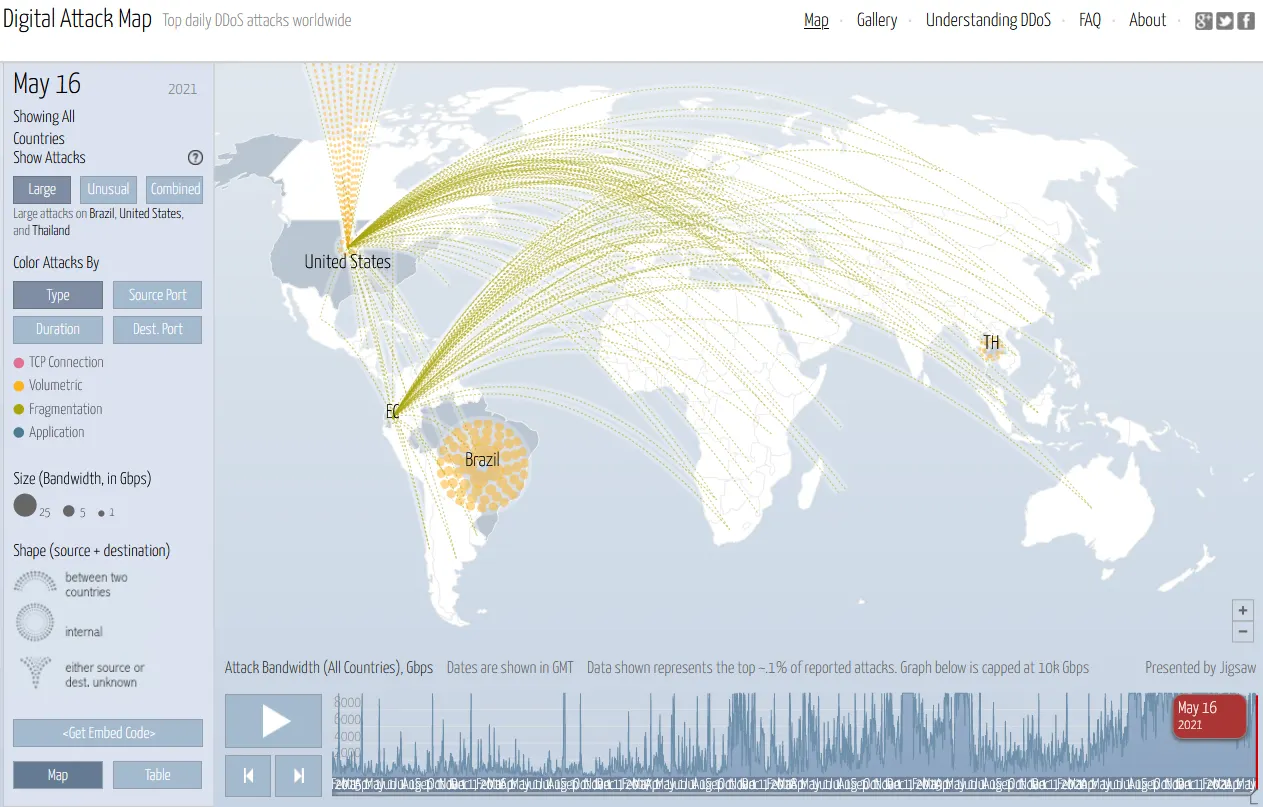
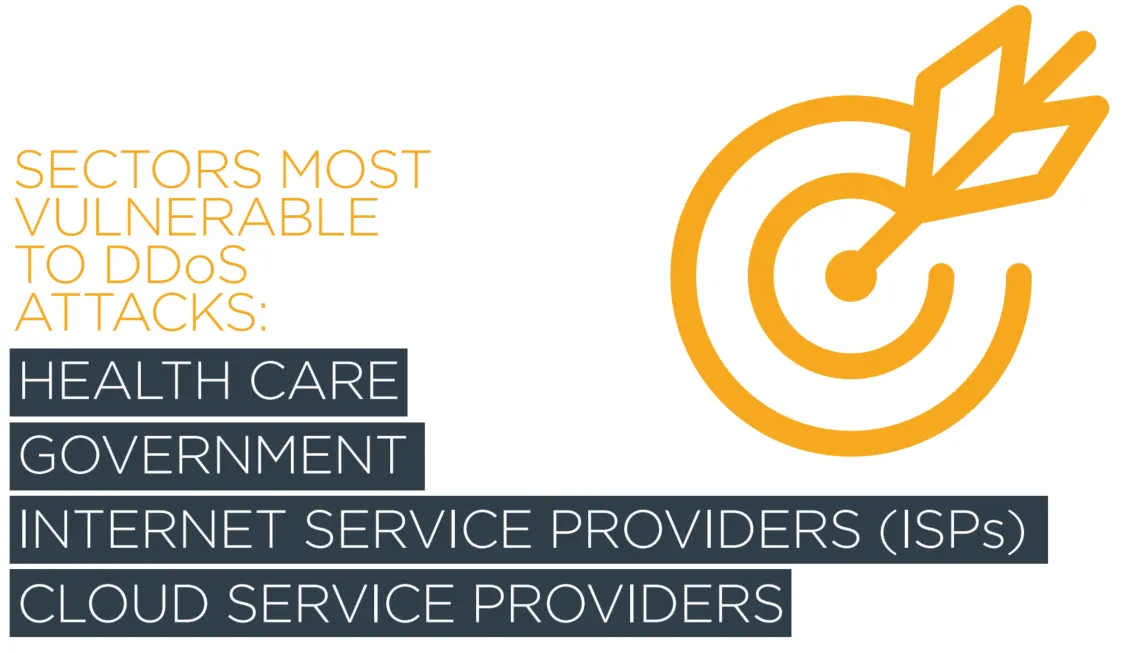
Target Identified: What Do DDoS Attackers Target the Most?
While organizations in any industry are vulnerable, these sectors are subject to DDoS attacks most often:
- Health care
- Government
- Internet service providers (ISPs)
- Cloud service providers
Eyes on the Enemy: Identifying DDoS Attacks
From a tactical DDoS mitigation standpoint, one of the primary skills you need to have is pattern recognition. Being able to spot repetitions that signify a DDoS attack is taking place is key, especially in the initial stages. Automated applications and AI are often used as helpers, but generally companies need a skilled IT professional to differentiate between legitimate traffic and a DDoS attack.
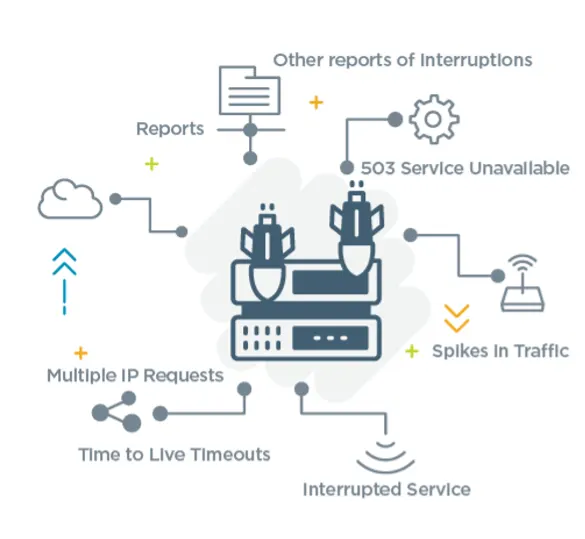
Workers often look for the following warning signs that a DDoS attack is taking place:
- Reports from existing mitigation devices (e.g., load balancers, cloud-based services)
- Customers report slow or unavailable service
- Employees utilizing the same connection also experience issues with speed
- Multiple connection requests come in from a specific IP address over a short amount of time
- You receive a 503 service unavailable error when no maintenance is being performed
- Ping requests to technology resources time out due to Time to Live (TTL) timeouts
- Logs show an abnormally huge spike in traffic
Responding to a Threat: Response Techniques, Services and Strategies Used to Mitigate a DDoS Attack
DDoS mitigation is quite different than mitigating other cyberattacks, such as those originating from ransomware. DDoS attacks are generally mitigated by devices and services that have been enabled to handle these types of attacks. For example, today’s load balancers are sometimes able to handle DDoS attacks by identifying DDoS patterns and then taking action. Other devices can be used as intermediaries, including firewalls and dedicated scrubber appliances.
When trying to mitigate a DDoS attack, you want to focus on placing services and devices between your network and the systems being used to attack you. Because attackers generate DDoS traffic by exploiting legitimate network and internet behavior, any connected device or server is vulnerable to an attack because it isn’t recognized as malicious in nature. You must create an intermediate mitigation solution to respond to that attack instead. In a ransomware or malware attack, security professionals generally solve the problem by upgrading the software on end points or restoring from backup.
Acting on a Threat: 5 Steps for DDoS Attack Response
Typical steps for responding to a DDoS attack include:
1. Detection
Early detection is critical for defending against a DDoS attack. Look for warning signs, provided above, that you may be a target. DDoS detection may involve investigating the content of packets to detect Layer 7 and protocol-based attacks or utilizing rate-based measures to detect volumetric attacks. Rate-based detection is usually discussed first when it comes to DDoS attacks, but most effective DDoS attacks are not blocked using rate-based detection.
2. Filtering
A transparent filtering process helps to drop the unwanted traffic. This is done by installing effective rules on network devices to eliminate the DDoS traffic.
3. Diversion and redirection:
This step involves diverting traffic so that it doesn’t affect your critical resources. You can redirect DDoS traffic by sending it into a scrubbing center or other resource that acts as a sinkhole. It is typically recommended that you transparently communicate what is taking place so that employees and customers don’t need to change their behavior to accommodate slowness.
4. Forwarding and analysis:
Understanding where the DDoS attack originated is important. This knowledge can help you develop protocols to proactively protect against future attacks. While it may be tempting to try and kill off the botnet, it can create logistical problems and may result in legal ramifications. Generally, it is not recommended.
5. Alternate delivery
It is possible to use alternate resources that can almost instantaneously offer new content or open up new networking connections in the event of an attack.

One of the best ways to mitigate a DDoS attack is to respond as a team and collaborate during the incident response process. The steps outlined above can only be achieved through a combination of services, devices and individuals working together. For example, to mitigate Layer 7 DDoS attacks it is often necessary to do the following:
- Detection: Organizations will use a combination of security analyst and penetration activities to identify Layer 7 attack patterns. A penetration tester generally simulates the DDoS attack, and the security analyst will listen carefully to identify unique characteristics.
- Traffic filtering: Use scrubbing centers and services to help redirect and contain harmful traffic.
- Layer 7 control: CAPTCHAs and cookie challenges are often used to determine if a network connection request is originating from a bot or legitimate user.
- Forwarding of packets to a security professional for further analysis: A security analyst will engage in pattern recognition activities and then recommend mitigation steps according to their findings.
- Alternate delivery during a Layer 7 attack: Using a CDN (content delivery network) could help support additional uptime when your resources are combatting the attack. It is important to note that mitigation devices can experience problems. It may not be properly updated or configured, and can actually become part of the problem during a DDoS attack.
Limiting the Damage: DDoS Mitigation Techniques
Once you know you are facing a DDoS attack, it’s time for mitigation. Prepare for the fight!
| Cloud scrubbing devices | Often called scrubbing centers, these services are inserted between the DDoS traffic and the victim network. They take traffic meant for a specific network and route it to a different location to isolate the damage away from its intended source. The scrubbing center cleans the data, only allowing legitimate business traffic to pass on to the destination. Examples of scrubbing services include those provided by Akamai, Radware and Cloudflare. |
| Multiple internet service connections | Because DDoS attacks often seek to overwhelm resources with traffic, businesses sometimes use multiple ISP connections. This makes it possible to switch from one to another if a single ISP becomes overwhelmed. |
| Black hole | This DDoS mitigation technique involves using a cloud service to implement a strategy known as a data sink. The service channels bogus packets and floods of traffic to the data sink, where they can do no harm. |
| Content delivery network (CDN) | This is a group of geographically distributed proxy servers and networks often used for DDoS mitigation. A CDN works as a single unit to provide content quickly via multiple backbone and WAN connections, thus distributing network load. If one network becomes flooded with DDoS traffic, the CDN can deliver content from another unaffected group of networks. |
| Load balancing servers | Generally deployed to manage legitimate traffic, load balancing servers can also be used to thwart DDoS attacks. IT pros can utilize these devices to deflect traffic away from certain resources when a DDoS attack is under way. |
| Web application firewall (WAF) | Used to filter and monitor HTTP traffic, WAFs are often used to help mitigate DDoS attacks and are commonly part of cloud-based services such as AWS, Azure or CloudFlare. While sometimes effective, a dedicated device or cloud-based scrubber is often recommended instead. A WAF focuses on filtering traffic to a specific web server or application. But a true DDoS attack focuses on network devices, thus denying services eventually meant for the web server, for example. Still, there are times when a WAF can be used in conjunction with additional services and devices to respond to a DDoS attack. |
Almost all DDoS mitigation devices on the market use the same five mechanisms:
- Signature
- Behavioral or SYN flood
- Rate-based and geolocation: As mentioned above, this is not usually reliable.
- Botnet detection/IP reputation lists: The success of using lists will vary depending on the quality of your lists.
- Challenge and response
Weapons at the Ready: DDoS Mitigation Services
Hundreds of organizations provide devices and services intended to help you prevent or combat a DDoS attack. A small sample of these services and devices is shown below.
|
Offers protection against Layer 3 and Layer 4 attacks. Available to all customers at no extra charge. Additional protection for Layer 7 attacks is available for a fee. |
|
|
Solutions include cloud-based, on-premise and hybrid protection completely focused on thwarting DDoS attacks. |
|
|
Layer 3, 4 and 7 services for free, as well as more sophisticated DDoS protection services for a fee. |
|
| Akamai | A highly respected service for help against volumetric DDoS attacks. Akamai owns many sites around the world to help identify and filter traffic. |
| AppTrana | Focuses on Layer 7 as well as volumetric (Layer 3 and 4) DDoS traffic. |
| Alibaba DDoS | Specializes in mitigating volumetric attacks. |
A Coordinated Defense: Best Practices for DDoS Response
Click the red plus signs for more details on the eight ways you can prepare for a DDoS attack.
1. Policy creation or alteration
2. Identify critical services
3. CDN information backup
4. Multiple ISP connections
5. Server and endpoint backup
6. Risk analysis
7. Identify and assign responsibility
8. Practice
Training at the Ready: The Do’s and Don’ts of Responding to a DDoS Attack
When dealing with a DDoS attack, there are certain best practices that can help keep a situation under control. Observe these DDoS attack do’s and don’ts.
| Overcommunicate with management and other workers. Leadership needs to be informed and involved so that the necessary steps are taken to limit damage. | Overcommunicate with the public. To limit damage to your brand’s reputation and ensure you have the attack contained, only provide necessary information to the public. |
| Delegate tasks. A DDoS attack means all hands on deck. Enlist other IT pros to report back and follow up with quick updates. | Assume that it is someone else’s responsibility to handle the attack. These attacks must be dealt with quickly, and waiting to hand off responsibility can cost valuable time. |
| Focus on root-cause analysis. Uncovering the cause of the attack can be vital when attempting to slow the progression. | Try to solve the problem alone. DDoS attacks can escalate very quickly. Enlisting others in your mitigation efforts will help curb the attack more quickly. |
| Conduct mock exercises for DDoS attacks. This may involve planned or surprise exercises to properly educate IT pros, staff and management on response activities. | Make the assumption that IT pros, staff or management know what to do during a DDoS attack. Without proper training, these attacks can be damaging, and many employees lack the practical skills to counteract the hack. |
| Work with ISPs, cloud providers and other service providers to determine the costs related to the DDoS attack. Get a report from all providers. To move past the attack, you need to know exactly what you are dealing with and have documentation to illustrate it. | Presume old reports are still valid. Any reports older than six months or that involve data from before a company merger or major business change should not be considered sound data. |
A Formidable Strategy: DDoS Mitigation Matrix
With so many as-a-service options, it can be difficult to know which services to engage as part of an effective DDoS prevention strategy. This DDoS mitigation matrix should help you understand how to place your services appropriately.
| Web server | Company server room | Installed on the on-premise Web Application Firewall (WAF) |
| Database server | Public cloud | Load balancer, cloud-based DDoS mitigation server |
| Credit card-accepting commerce server | Private cloud | Load balancer, cloud-based DDoS mitigation server, alternate ISP |
| Virtual Desktop Infrastructure (VDI) hosts for end users | Public cloud | Cloud-based DDoS protection service, alternate ISP, |
| Network infrastructure | On-premise | Multiple alternate ISPs, cloud scrubbing service |
Your matrix would, of course, vary according to your business-critical resources. It’s also important to remember that outsourcing still requires internal support. If you purchase a costly mitigation device or service, you need someone in your organization with enough knowledge to configure and manage it.
There are times when it is useful to simply outsource for a skillset. But, with DDoS attacks and others, it is always best to have internal expertise. Otherwise, you may end up with a situation where an outsourced expert has made changes to your DDoS protection suite, but then moves on to another organization.
IT Pro Skills and Tools for DDoS Management
As an IT pro, you can take steps to help ready yourself for a DDoS attack. Check out the following skills and tools that can help you successfully manage an incident.
Attack Basics: The Skills You Need to Manage DDoS Attacks
Employers will want to know that you are armed with the skills necessary for combatting a DDoS attack. Adding these skills to your toolset will help illustrate your ability to thwart attacks.
- Develop effective planning and management of products and applications.
- Communicate clearly during a response.
- Demonstrate ability to work with cloud and ISP providers to tackle difficult situations and troubleshoot problems.
- Illustrate effectiveness in red teaming and blue teaming drills.
- Proactively act as a threat hunter to identify potential threats and understand which systems are critical to business operations.

Standards such as the U.S. National Institute of Standards and Technology (NIST) Special Publication (SP) 800-61 provide a helpful foundation for knowing how to respond to attacks of various types. The IT industry also uses the ISO/IEC 27035-1:2016 standard as a guideline for incident response procedures. As a general rule, organizations with a reputation for responding well to incidents tend to use such standards as helpful guidelines, rather than absolute rules to follow.
IT pros can also benefit from seeing demonstrations of attacks to learn how data behaves in particular situations. Take the time to view demonstrations of the following attacks:
- Ransomware
- DDoS
- Browser-based threats

DDoS Boot Camp: DDoS Education Options for IT Pros
Ongoing education is essential for any IT pro. Technology advances every day, and IT pros that stagnate will eventually be deemed unnecessary as legacy systems die off and new platforms take their place. To remain relevant, it’s important to continue educating yourself.
The standards and practices taught in the industry will also help you and your organization respond to DDoS attacks. One way to obtain the appropriate level of knowledge is to learn the standards and best practices covered by the IT certifications found in the CompTIA Cybersecurity Pathway.