Project 2 - Measuring the distance of an object using ultrasonic sensor and also smoothen the sensor data using moving average filter
Overview of the Project:
In this project the implementation of code for “Measuring distance of an object using ultrasonic distance sensor (28015 Ping) and also smoothen the sensor data using moving average filter”.
Goals:
- Measuring the distance in terms of inches of an object using Ultrasonic Distance Sensor (28015 Ping).
- The sensor data is smoothened by using Moving average filter technique to eliminate the high frequency variations from the sensor data.
Key Highlights of the Project:
- Measuring the distance travelled by the wave to the object and gets bounced back from the object to sensor.
- Smoothening the sensor data by moving average filter technique, the filter has a window of certain size. That window determines that how many data the filter can take.
Deliverables of this project:
- The distance travelled by a wave to the object for which we want to measure the distance using Ultrasonic Distance Sensor (28015 Ping).
- Eliminate the high frequency jitters from the sensor data by Moving Average filter to smoothen the sensor data.
Expected Outcomes:
The students will get the Knowledge on Ultrasonic sensor (28015 Ping) to measure the distance travelled by wave to the object, the hardware connection of 2 Arduino’s connected to the sensor and smoothening the sensor data by removing high frequency variations using Moving Average Filter Technique.
Measuring the distance of an object using ultrasonic sensor
Objective: To measure the distance of an object using ultrasonic distance sensor (28015 Ping) and to implement I2C communication protocol.
Circuit:
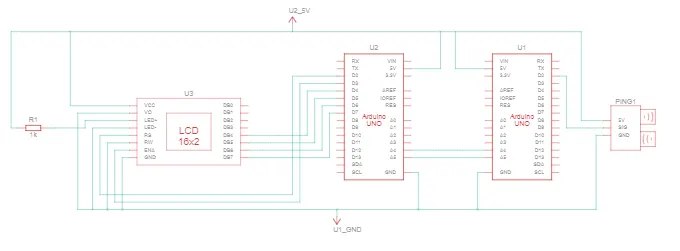
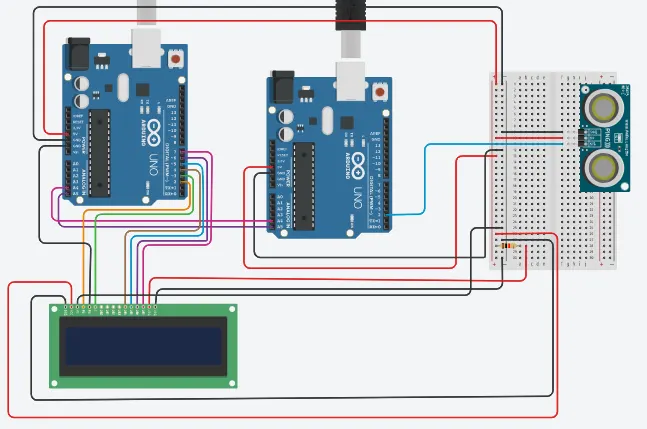
The analog pins A4 and A5 in master arduino and slave arduino are used for I2C communication.
In master arduino, the digital pin 2 is connected to RS of LCD. Digital pin 3 connected to E of LCD. The Digital pins 4, 5, 6, 7 are connected to DB1, DB2, DB3, DB4 of LCD. Input supply 5v and Gnd are connected to the LCD from arduino. In LCD, the anode is connected through an 1k ohm resistor and the cathode is connected to the Gnd.
In slave arduino, the 5v, Gnd are connected to the master arduino in bread board. The digital pin 2 is used to send and receive data from the sig pin from ultrasonic distance sensor (28015 Ping).
Code:
//MASTER
#include<LiquidCrystal.h> // Header to use LCD functions
#include<Wire.h> // Header to use I2C communication
LiquidCrystal lcd(2,3,4,5,6,7); //pins connected to LCD
int distance; //variable to print the data from slave
void setup()
{
Serial.begin(9600);
Wire.begin(); //To begin I2C communication
lcd.begin(16,2); //To begin LCD display
lcd.clear();
}
void loop()
{
Wire.requestFrom(8,4); // 8 is address 4 byte
distance=Wire.read(); //To print character by character
lcd.setCursor(0,0); //To move the cursor to the first line
lcd.print(distance); //To print the received message from slave 1
lcd.print(" inches"); //To display in LCD
delay(50); //delay
Wire.end(); //To end the I2C transmission
}
//Slave
#include<Wire.h> // Header to use I2C communication
int sig = 2; //Assigning pin2 as sig for readabilty
int duration, inches, cm; //Declaring as integer type
static int avg; //Declaring avg as static int type
void setup()
{
Serial.begin(9600);
Wire.begin(8); //To begin I2C communication with address 8
Wire.onRequest(distance); //Calling function from master
}
void loop()
{
delay(100);
}
void distance() //Called function
{
pinMode(sig, OUTPUT); //Declaring pin2 as output
digitalWrite(sig, LOW); //Sensor is triggered by pin2 with delay
delay(5);
digitalWrite(sig, HIGH);
delay(10);
digitalWrite(sig, LOW);
pinMode(sig, INPUT); //Declaring pin2 as input
duration = pulseIn(sig, HIGH); //To read the pulse
inches = (duration/74)/2; //converting time into a distance
Wire.write(inches); //Return value to master
delay(10);
}
Output:
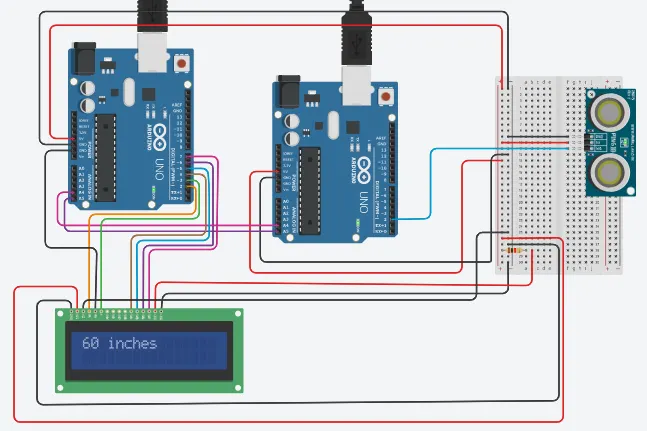
The distance in ultrasonic distance sensor is adjusted to around 60 inches and the value is displayed in the LCD connected to master