Project 2 - Measuring the distance of an object using ultrasonic sensor and also smoothen the sensor data using moving average filter
PROGRAM:
#include
#define trigger 18
#define echo 19
LiquidCrystal lcd(2,3,4,5,6,7);
float time=0,distance=0;
void setup()
{
lcd.begin(16,2);
pinMode(trigger,OUTPUT);
pinMode(echo,INPUT);
program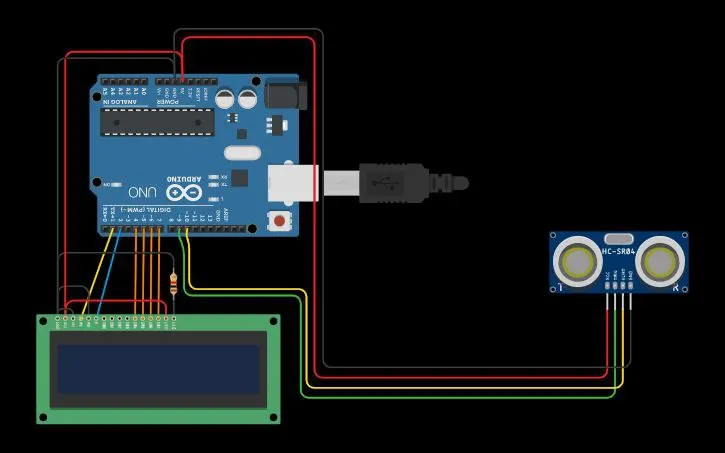
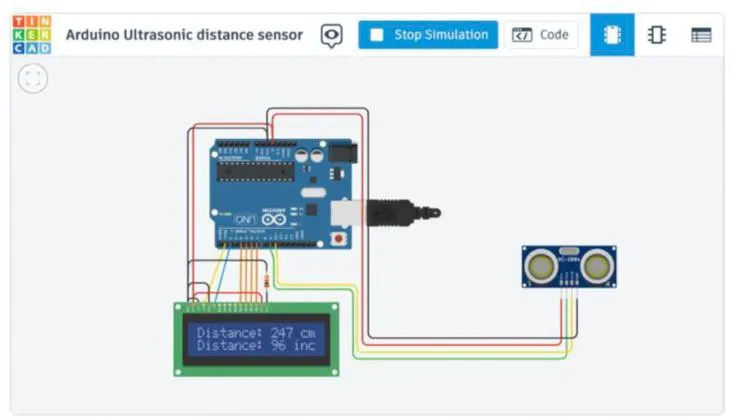 #include <LiquidCrystal.h> // includes the LiquidCrystal Library
LiquidCrystal lcd(1, 2, 4, 5, 6, 7); // Creates an LCD object. Parameters: (rs, enable, d4, d5, d6, d7)
const int trigPin = 9;
const int echoPin = 10;
long duration;
int distanceCm, distanceInch;
void setup() {
lcd.begin(16,2); // Initializes the interface to the LCD screen, and specifies the dimensions (width and height) of the display
pinMode(trigPin, OUTPUT);
pinMode(echoPin, INPUT);
}
void loop() {
digitalWrite(trigPin, LOW);
delayMicroseconds(2);
digitalWrite(trigPin, HIGH);
delayMicroseconds(10);
digitalWrite(trigPin, LOW);
duration = pulseIn(echoPin, HIGH);
distanceCm= duration*0.034/2;
distanceInch = duration*0.0133/2;
lcd.setCursor(0,0); // Sets the location at which subsequent text written to the LCD will be displayed
lcd.print("Distance: "); // Prints string "Distance" on the LCD
lcd.print(distanceCm); // Prints the distance value from the sensor
lcd.print(" cm");
delay(10);
lcd.setCursor(0,1);
lcd.print("Distance: ");
lcd.print(distanceInch);
lcd.print(" inch");
delay(10);
}
lcd.print(" Ultra sonic");
lcd.setCursor(0,1);
lcd.print("Distance Meter");
delay(2000);
lcd.clear();
lcd.print(" Circuit Digest");
delay(2000);
}
void loop()
{
lcd.clear();