Project 2 - Measuring the distance of an object using ultrasonic sensor and also smoothen the sensor data using moving average filter
Aim
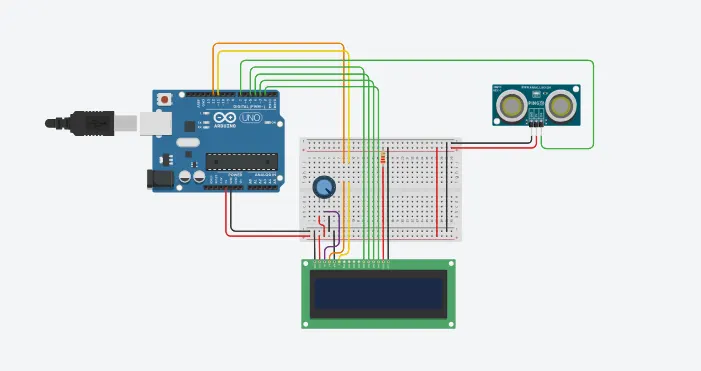
The aim of this project is to measure the distance of an object using an ultrasonic distance sensor (28015 Ping) and apply a moving average filter to smoothen the sensor data. The project utilizes an Arduino board to process the sensor readings and display the distance on an LCD screen.
Components Required
- Arduino Uno R3
- 250 kΩ Potentiometer
- Ultrasonic Distance Sensor
- 220 Ω Resistor
- LCD 16 x 2
Circuit Diagram
Code
#include
const int numReadings=10; //no. of readings to avg
int readings[numReadings]; //array to store sensor readings
int index=0; //index for current reading
int total=0; //total sum of readings
int inches=0; //distance in inches
int cm=0; //distance in centimeters
LiquidCrystal lcd(12,11,5,4,3,2); //initialize lcd display
void setup()
{
lcd.begin(16,2); //initialize lcd display with 16 columns and 2 rows
lcd.print("New String!!"); //display string on LCD
Serial.begin(9600); //initialize serial communication
pinMode(7, INPUT); //set pin 7 asa input
}
void loop()
{
lcd.clear(); //clear screen
cm=0.01723*readUltrasonicDistance(7); //read distance from sensor
//update the array with latest reading
total=total-readings[index]; //subtract old reading from total
readings[index]=cm; //store new reading
total=total+readings[index]; //add new reading to total
index=(index+1)%numReadings; //move to next index
//calculate avg distance
cm=total/numReadings; //calculate avg (in cm)
inches=cm/2.54; //convert cm to inches
Serial.print("cm:");
Serial.print(cm); //print distance in cm
lcd.setCursor(0,0); //set cursor to 1st column of 1st row
lcd.print("cm:");
lcd.setCursor(4,0); //set cursor to 5th column of 1st row
lcd.print(cm);
Serial.print("inch:");
Serial.println(inches); //print distance in inches
lcd.setCursor(0,1); //set cursor to 1st column of 2nd row
lcd.print("inch:");
lcd.setCursor(6,1); //set cursor to 7th column of 2nd row
lcd.print(inches);
delay(250); //wait
}
long readUltrasonicDistance(int pin)
{
pinMode(pin,OUTPUT); //set pin as output
digitalWrite(pin,LOW); //set pin to low
delayMicroseconds(2); //delay 2 microsec
digitalWrite(pin,HIGH); //set pin to HIGH
delayMicroseconds(10); //delay 10 microsec
digitalWrite(pin,LOW); //set pin to LOW
pinMode(pin,INPUT); //set pin as input
return pulseIn(pin,HIGH); //measure pulse duration and return result
}
Execution
- The code begins by including the `LiquidCrystal` library, which allows communication with the LCD display.
- Constants and variables are declared:
- 'numReadings' is the number of readings to average.
- 'readings' is an array used to store the sensor readings.
- 'index' keeps track of the current reading in the 'readings' array.
- 'total' stores the sum of all readings.
- 'inches' and 'cm' store the distance in inches and centimeters, respectively.
- An instance of the `LiquidCrystal` class is created, defining the pins used to connect the LCD display.
- In the 'setup()' function:
- The LCD display is initialized with the specified number of columns and rows.
- "New String !!!" is printed on the LCD display.
- Serial communication is initialized at a baud rate of 9600.
- Pin 7 is set as an input pin.
- The 'loop()' function is where the main code execution takes place in an infinite loop.
- The LCD display is cleared at the beginning of each iteration.
- The 'cm' variable is assigned the distance measured by the ultrasonic sensor, which is obtained from the 'readUltrasonicDistance()' function. The distance is calculated in centimeters.
- The array 'readings' is updated with the latest reading:
- The oldest reading is subtracted from the 'total' sum.
- The new reading is stored in the 'readings' array.
- The new reading is added to the 'total' sum.
- The 'index' is updated to move to the next reading in the array, or wrap around to 0 if the end is reached.
- The average distance is calculated:
- The 'total' sum is divided by the 'numReadings'.
- The distance in centimeters is printed to the serial monitor.
- The distance in centimeters is displayed on the LCD screen:
- The LCD cursor is positioned at the first column of the first row.
- "cm: " is displayed.
- The LCD cursor is positioned at the fifth column of the first row.
- The distance in centimeters is displayed.
- The distance in inches is printed to the serial monitor.
- The distance in inches is displayed on the LCD screen:
- The LCD cursor is positioned at the first column of the second row.
- "inch: " is displayed.
- The LCD cursor is positioned at the seventh column of the second row.
- The distance in inches is displayed.
- The program delays for 1 second before the next iteration of the loop.
- The 'readUltrasonicDistance()' function is defined:
- The 'pinMode()' function sets the specified pin as an output.
- The pin is set to low to ensure a clean pulse.
- A 2-microsecond delay is added.
- The pin is set to high to trigger the ultrasonic sensor.
- A 10-microsecond delay is added.
- The pin is set to low again.
- The pin mode is changed to input to receive the echo signal.
- The 'pulseIn()' function measures the pulse duration and returns the result.
Output
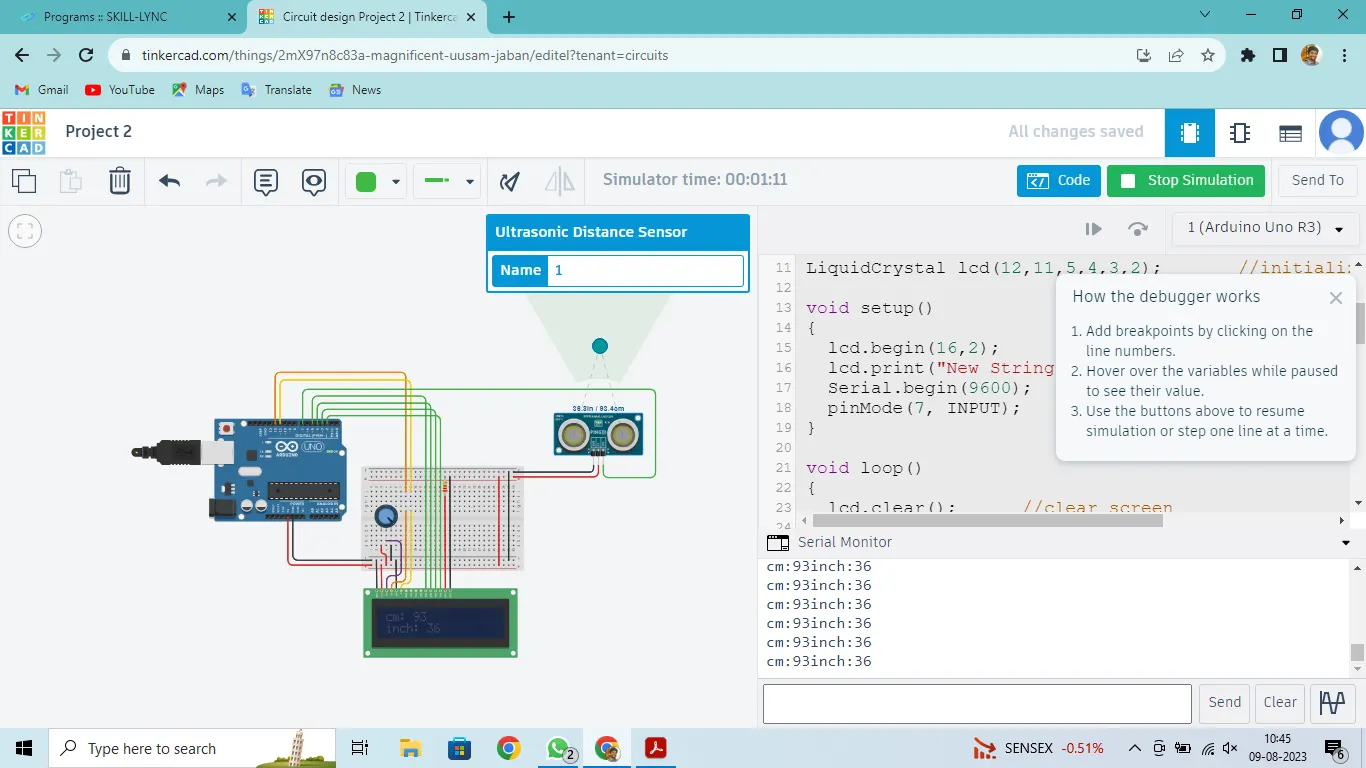
The project successfully measures the distance of an object using the ultrasonic distance sensor. The moving average filter is applied to smoothen the sensor data, resulting in more stable distance readings. The distances in centimeters and inches are displayed on the LCD screen and printed to the serial monitor.
Conclusion
In conclusion, the project demonstrates the implementation of an ultrasonic distance sensor with a moving average filter to accurately measure the distance of an object. The moving average filter helps to minimize sensor noise and provides more reliable distance readings. The use of an Arduino board and LCD display enhances the user interface and allows for convenient distance monitoring. The project can be further expanded and improved for various applications such as robotics, home automation, and security systems.