Project 2 - Create a report using PowerQuery, Macro VBA, List Functions and Data Validation functions for Data Reporting of Supply Chain Management companies
https://drive.google.com/file/d/1h_G-pabDfF1lz0l-kQiv9Qyyob9XAk9q/view
Features of Dashboard
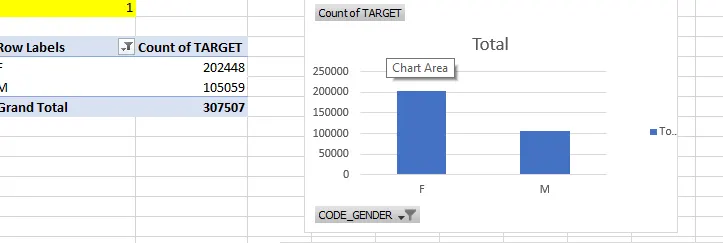
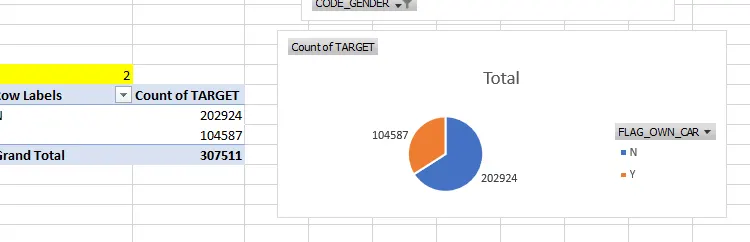
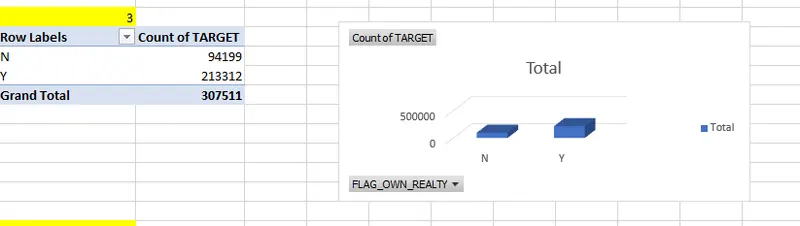
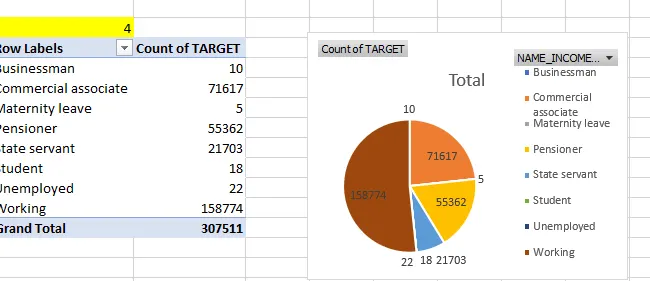
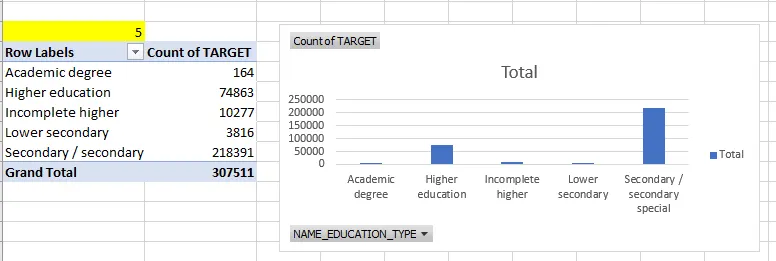
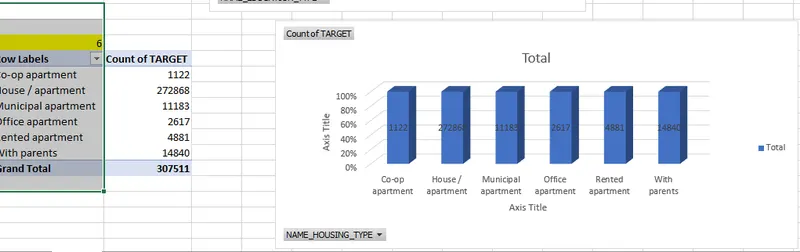
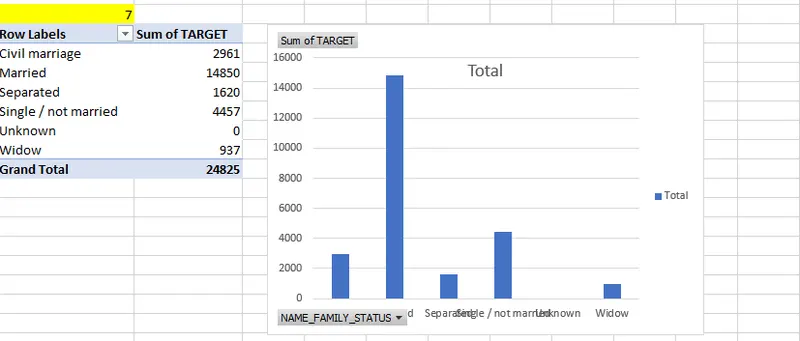
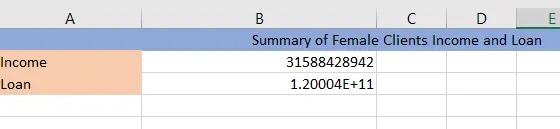
- Data Summary of All Female Client’s for Income and Loan Amount using New Functions
- Data Summary of All Male Client’s for Income and Loan Amount using List Functions

-
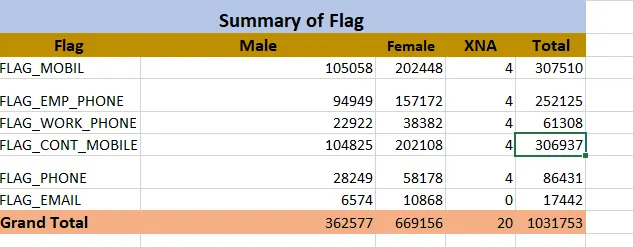
- Data Summary for all Flag Columns like (FLAG_DOCUMENT_2, FLAG_DOCUMENT_3 etc.) using all variants of DCOUNT function.
- Create a Macro for Data Formatting
-
Sub CondFormatDocumenter()
Dim sCF(0 To 2) As Variant
Dim rCF As Range
Dim rCell As Range
Dim iCF As Integer
Dim nFile As Long
Dim sC As String
Dim strCF As String
Dim strInteriorColor As String
Dim strFontColor As String
sC = vbTab
On Error Resume Next
Set rCF = Cells.SpecialCells(xlCellTypeAllFormatConditions)
On Error GoTo 0
If Not rCF Is Nothing Then
nFile = FreeFile
Open "test.txt" For Output As #nFile
For Each rCell In rCF
iCF = rCell.FormatConditions.Count
For iCF = 1 To iCF
With rCell.FormatConditions(iCF)
sCF(0) = Choose(.Type, "Cell Value Is", "Formula Is")
sCF(1) = .Formula1
On Error Resume Next
sCF(2) = .Formula2
On Error GoTo 0
Select Case .Type
Case xlCellValue
Select Case .Operator
Case xlAnd
strCF = "Between" & sC & sCF(1) _
& sC & "And" & sC & sCF(2)
Case xlNotBetween
strCF = "Not Between" & sC & sCF(1) _
& sC & "And" & sC & sCF(2)
Case xlEqual
strCF = "Equal to" & sC & sCF(1)
Case xlNotEqual
strCF = "Not Equal to" & sC & sCF(1)
Case xlGreater
strCF = "Greater Than" & sC & sCF(1)
Case xlLess
strCF = "Less Than" & sC & sCF(1)
Case xlGreaterEqual
strCF = "Greater Than or Equal to" _
& sC & sCF(1)
Case xlLessEqual
strCF = "Less Than or Equal to" _
& sC & sCF(1)
Case Else
'do nothing
End Select
Case xlExpression
strCF = sCF(1)
Case Else
strCF = sCF(1)
End Select
If .Interior.ColorIndex > 0 Then
strInteriorColor = sC & "Interior: " _
& .Interior.ColorIndex
Else
strInteriorColor = ""
End If
If .Font.ColorIndex > 0 Then
strFontColor = sC & "Font: " _
& .Font.ColorIndex
Else
strFontColor = ""
End If
strCF = sC & "Cond " & iCF & ": " _
& sCF(0) & sC & strCF _
& strInteriorColor & strFontColor
End With
Print #nFile, rCell.Address(False, False) _
& strCF
Erase sCF
Next iCF
Next rCell
Close #nFile
End IfEnd Sub
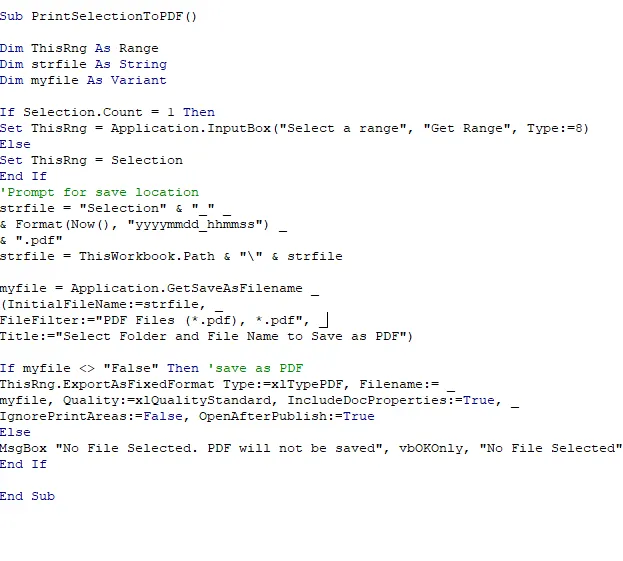
* VBA code to copnvert selected data into pdf format
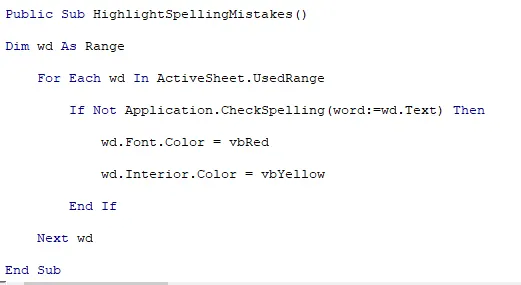
- VBA Code for checking spelling Mistakes