Project 2 - Create a report using PowerQuery, Macro VBA, List Functions and Data Validation functions for Data Reporting of Supply Chain Management companies
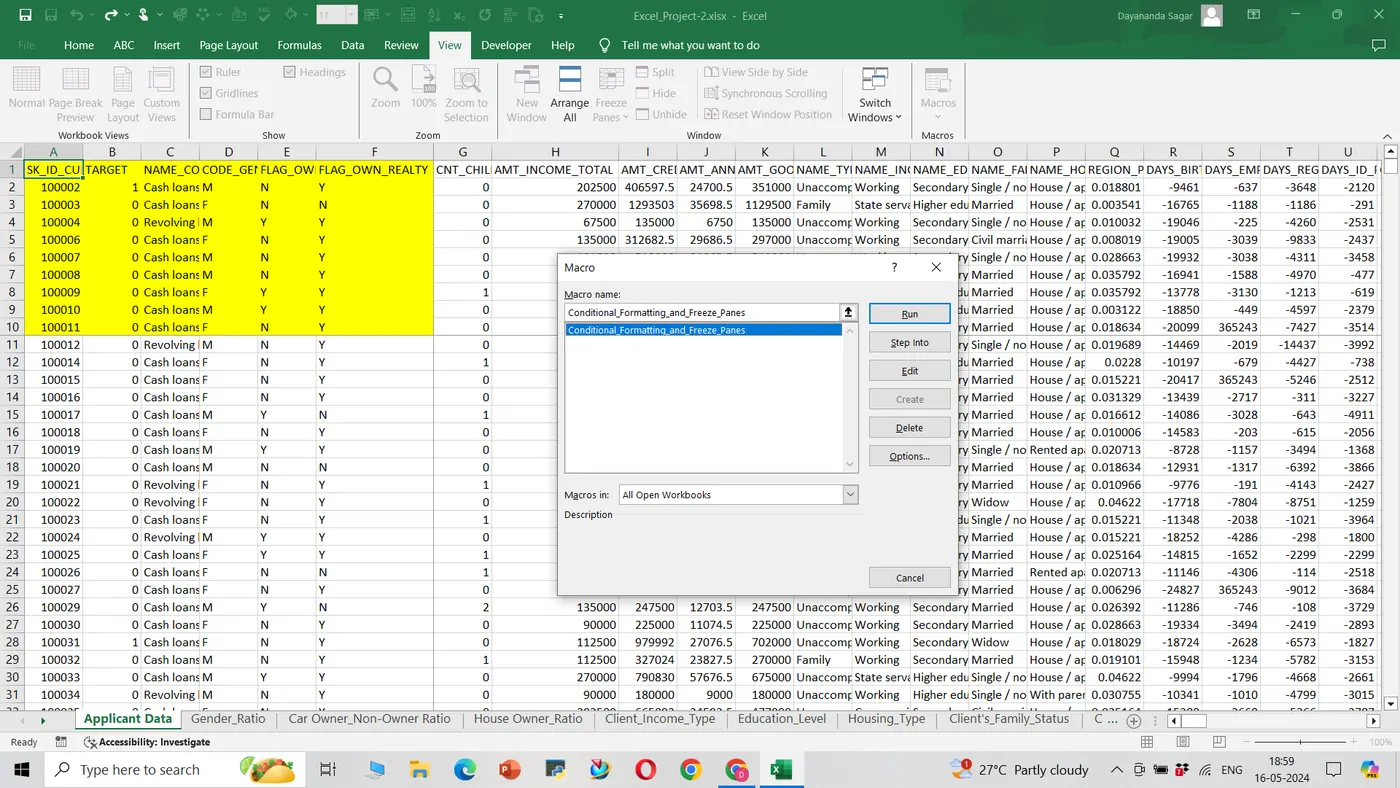
- Create a macro for conditional formatting & freezing panes
In My Excel without using specific functions like Unique, Filter and Sort. Here's a theoretical answer:
Data Setup: Start by organizing data, with each row representing a client and columns containing information such as client name, gender, income, and loan amount.
- Unique: Use unique function to get the unique values from the specific field such as =
=Unique(A2:C305712)
3. Filtering: Use Excel's filtering feature to filter out only the rows where the gender is female.
=Filter(A2:C305712,A2:A305712=A3,"")
4. Sorting: After filtering, sort the filtered data based on either income or loan amount. Select the column you want to sort by and choosing the sorting option
=Sort(B2:C305712,1,-1)
- Create a macro for conditional formatting & freezing panes
Created a macro for conditional formatting and freezed panes for top 10 rows and 6 columns. Attached the sceenshot below
- Create VBA Code to convert selected data into pdf from applicant data
Sub ExportSelectionToPDF()
Dim rng As Range
Dim ws As Worksheet
Dim fileName As String
If TypeName(Selection) <> "Range" Then
MsgBox "Please select a range first.", vbExclamation
Exit Sub
End If
Set rng = Selection
Set ws = ThisWorkbook.Worksheets.Add
rng.Copy ws.Range("A1")
fileName = Application.GetSaveAsFilename( _
InitialFileName:=ThisWorkbook.Path & "\SelectedData", _
FileFilter:="PDF Files (*.pdf), *.pdf")
If fileName = "False" Then
MsgBox "Export canceled.", vbInformation
Exit Sub
End If
ws.ExportAsFixedFormat Type:=xlTypePDF, fileName:=fileName
Application.DisplayAlerts = False
ws.Delete
Application.DisplayAlerts = True
MsgBox "Selected data has been exported to PDF successfully.", vbInformation
End Sub
Check Spelling mistakes in the workbook using VBA Code
Sub SpellingMistakes()
Dim cell As Range
For Each cell In ActiveSheet.UsedRange
If Not cell.HasFormula And Len(cell.Value) > 0 Then
If Not Application.CheckSpelling(word:=cell.Value) Then
cell.Interior.Color = RGB(255, 0, 0)
End If
End If
Next cell
End Sub