Report Creation of the Model using Tcl/Tk
OBJECTIVE
To create a macro for generating a report of the FE model we created in the Hypermesh, So that we will get the details about the model in an excel format.The report will gave us the idea about the failed elemnts and its count,empty entities and the unused materials and unused properties.
PROBLEM STATEMENT
Creating a report after the model is analysed is mandatory.It will also have the details about the model meshed and its connections.Here we try to automate this process using a tcl macro.So that the entire idea about the meshed model can be obtained.The report will contain the details about the empty and unused entities in the model. It will be having details about the componenets names and its ids and the matrials and properties assigned to it and also the element count of the mesh assosiated with the components.
TCL MACRO
set cid [open "project2.csv" w]

set systemTime [clock seconds]
puts $cid "The time is: [clock format $systemTime -format %H:%M:%S]"
puts $cid [clock format $systemTime -format {Today is: %A, the %d of %B, %Y}]
puts $cid "Solver_Profile [hm_getsolver]"
*createmark comps 1 "all"
puts $cid "Count of Comp : [ hm_marklength comps 1]"
*createmark mats 1 "all"
puts $cid "Count of mats : [ hm_marklength mats 1]"

*createmark props 1 "all"
puts $cid "Count of props : [ hm_marklength props 1]"


*createmark comps 1 "all"
set compid [hm_getmark comps 1]
puts $cid "Comp_id,Comp_name,thickness,property_name,Material_name,element_count"


foreach i $compid {
*createmark elements 1 "by collector id" $i
set element_num [hm_marklength elements 1]

set comp_name [ hm_entityinfo name comps $i ]
set thickness [ hm_getthickness comps $i ]

#Quering the Property name
set prop_name [hm_getvalue comps id =$i dataname = property.name]


#Quering the material name
set mat_name [hm_getvalue comps id =$i dataname = material.name]
if { $mat_name == {} } { set mat_name empty }


puts $cid $i,$comp_name,$thickness,$prop_name,$mat_name,$element_num

}

puts $cid ""
puts $cid "Empyty_component"

*EntityPreviewEmpty comps 1
set emp [hm_getmark comps 1]

foreach j $emp {
set emp_name [hm_entityinfo name comps $j]
puts $cid $emp_name

}
puts $cid ""
puts $cid Empty_Material_list
puts $cid "id,name"
*EntityPreviewUnused mats 1
set mat_id [hm_getmark mats 1]

foreach a $mat_id {
set material_name [ hm_getvalue mats id = $a dataname = name ]
lappend mat_id $a
puts $cid "$a,$material_name"
}
puts $cid ""
puts $cid Empty_Property_list
puts $cid "id,name"
*EntityPreviewUnused props 1
set prop_id [hm_getmark props 1]

foreach b $prop_id {
set property_name [hm_getvalue props id = $b dataname = name]
lappend prop_id $b
puts $cid "$b,$property_name"
}

puts $cid ""
# Number of Quad Elements
*createmark elements 1 "by config" quad4 quad8
set quad [hm_marklength elements 1]
puts $cid "Quad_Elements,$quad"

#Number of Tria Elements
*createmark elements 1 "by config" tria3 tria6
set tria [hm_marklength elements 1]
puts $cid "Tria_Elements,$tria"

# Elements Failing for the Quality and Duplicates
puts $cid ""
*createmark elements 1 "all"
set dup [hm_getduplicateelements 1 2 0 ]
set dupn [llength $dup ]
puts $cid "Duplicate Element,$dupn"


set warpage [hm_getstring Warpage= "Enter the value of the warpage" ]
*createmark elements 1 "all"
*createmark elements 2
*elementtestlength elements 1 $warpage 2 1 2 0 "2D Warpage"
*maskentitymark elems 2
*maskreverse elems
*createmark elements 1 "displayed"
set fail [hm_marklength elements 1]
puts $cid "Warpage,$warpage,$fail"
*unmaskall2


set aspect [hm_getstring Aspect= "Enter the value of the aspect" ]
*createmark elements 1 "all"
*createmark elements 2
*elementtestlength elements 1 $aspect 2 1 2 0 "2D Aspect"
*maskentitymark elems 2
*maskreverse elems
*createmark elements 1 "displayed"
set fail1 [hm_marklength elements 1]
puts $cid "Aspect,$aspect,$fail1"
*unmaskall2

set skew [hm_getstring skew= "Enter the value of the skew" ]
*createmark elements 1 "all"
*createmark elements 2
*elementtestlength elements 1 $skew 2 1 2 0 "2D Skew"
*maskentitymark elems 2
*maskreverse elems
*createmark elements 1 "displayed"
set fail2 [hm_marklength elements 1]
puts $cid "Skew,$skew,$fail2"
*unmaskall2


set minl [hm_getstring Min_Length= "Enter the value of the Minimum Length" ]
*createmark elements 1 "all"
*createmark elements 2
*elementtestlength elements 1 $minl 2 1 2 0 "Minimum Length"
*maskentitymark elements 2 0
*maskreverse elements
*createmark elements 1 "displayed"
set fail3 [hm_marklength elements 1]
puts $cid "Minimum Length,$minl,$fail3"
*unmaskall2

set maxl [hm_getstring Maximum_Length= "Enter the value of the Maximum Length" ]
*createmark elements 1 "all"
*createmark elements 2
*elementtestlength elements 1 $maxl 2 0 2 0 "Maximum Length"
*maskentitymark elements 2 0
*maskreverse elements
*createmark elements 1 "displayed"
set fail4 [hm_marklength elements 1]
puts $cid "Maximum Length,$maxl,$fail4"
*unmaskall2

set mint [hm_getstring Min_Tria_Angle= "Enter the value of the Minimum Angle of Tria  " ]
*createmark elements 1 "all"
*createmark elements 2
*elementtestinterangle elements 1 $mint 2 2 2 2 0 "Minangle"
*maskentitymark elements 2 0
*maskreverse elements
*createmark elements 1 "displayed"
set fail5 [hm_marklength elements 1]
puts $cid "Minimum Tria Angle,$mint,$fail5"
*unmaskall2

set maxt [hm_getstring Max_Tria_Angle= "Enter the value of the Maximum Angle of Tria  " ]
*createmark elements 1 "all"
*createmark elements 2
*elementtestinterangle elements 1 $maxt 2 2 0 2 0 "Maxangle"
*maskentitymark elements 2 0
*maskreverse elements
*createmark elements 1 "displayed"
set fail6 [hm_marklength elements 1]
puts $cid "Maximum Tria Angle,$maxt,$fail6"
*unmaskall2

set maxq [hm_getstring Max_quad_Angle= "Enter the value of the Maximum Angle of Quad  " ]
*createmark elements 1 "all"
*createmark elements 2
*elementtestinterangle elements 1 $maxq 2 2 0 2 0 "Maximum angle Quad"
*maskentitymark elements 2 0
*maskreverse elements
*createmark elements 1 "displayed"
set fail7 [hm_marklength elements 1]
puts $cid "Maximum Quad Angle,$maxq,$fail7"
*unmaskall2

set minq [hm_getstring Min_quad_Angle= "Enter the value of the Minimum Angle of Quad  " ]
*createmark elements 1 "all"
*createmark elements 2
*elementtestinterangle elements 1 $minq 0 2 1 2 0 " Min quad Angle "
*maskentitymark elements 2 0
*maskreverse elements
*createmark elements 1 "displayed"
set fail8 [hm_marklength elements 1]
puts $cid "Minimum Quad Angle,$minq,$fail8"
*unmaskall2


close $cid
TCL CODE EXPLANATION
set cid [open "project2.csv" w]
This is to open a csv file in the name project2 in the written mode and we set a file channel id to store information data into it.cid is the file channelid.
set systemTime [clock seconds]
puts $cid "The time is: [clock format $systemTime -format %H:%M:%S]"
puts $cid [clock format $systemTime -format {Today is: %A, the %d of %B, %Y}]
This is the TCL code for writting the clock time and the date in the user pc in the proper format in the opened file
puts $cid "Solver_Profile [hm_getsolver]"
hm_getsolver will output the solver name and puts $cid will write that solver name into the opened file.
*createmark comps 1 "all"
puts $cid "Count of Comp : [ hm_marklength comps 1]"
First we create mark of all comps and then the marklength will write in the number of the components into the opened file
*createmark mats 1 "all"
puts $cid "Count of mats : [ hm_marklength mats 1]"
First we create mark of all materials and then the marklength will write in the number of the materials into the opened file
*createmark props 1 "all"
puts $cid "Count of props : [ hm_marklength props 1]"
First we create mark of all properties and then the marklength will write in the number of the properties into the opened file
*createmark comps 1 "all"
set compid [hm_getmark comps 1]
First we create mark of all comps and then the getmark command will write in the ids of the components into the opened file
puts $cid "Comp_id,Comp_name,thickness,property_name,Material_name,element_count"
This will write Component id, component name,property name,material name and element count inot the csv file.The commas provided will ensure that the data will be saved in the seperate cells in the excel.
foreach i $compid {
*createmark elements 1 "by collector id" $i
set element_num [hm_marklength elements 1]
set comp_name [ hm_entityinfo name comps $i ]
set thickness [ hm_getthickness comps $i ]
set prop_name [hm_getvalue comps id =$i dataname = property.name]
set mat_name [hm_getvalue comps id =$i dataname = material.name]
if { $mat_name == {} } { set mat_name empty }
puts $cid $i,$comp_name,$thickness,$prop_name,$mat_name,$element_num
}
Here with the foreach loop we will excute the set of commands.Inside it we use the hm_enitiyinfo command to get the name of the component and the hm_getthickness to get the thickness of the components .Hm_getvalue with dataname as material.name will write the material assigned with the component and the dataname as property.name will outputs the property name asigned with the component.
puts $cid ""
This will create a blank cell in between data
puts $cid "Empyty_component"
This will write as Empty component in the writting file
*EntityPreviewEmpty comps 1
set emp [hm_getmark comps 1]
EntityPreviewEmpty will mark all the empty entities.And the ids of the empty componenets is written to the emp variable.
foreach j $emp {
set emp_name [hm_entityinfo name comps $j]
puts $cid $emp_name
}
Using the foreach loop and with the hm_entityinfo name will extract the name of the empty components. And it will be written into the writting file.
puts $cid ""
puts $cid Empty_Material_list
puts $cid "id,name"
*EntityPreviewUnused mats 1
set mat_id [hm_getmark mats 1]
Unused materials will be saved in the mark and its id will be extracted with hm_getmark.
foreach a $mat_id {
set material_name [ hm_getvalue mats id = $a dataname = name ]
lappend mat_id $a
puts $cid "$a,$material_name"
}
Using the foreach loop for evry unused materials we extract the materials name using the hm_getvalue for all the ids of unused materials and then the ids and name of the material will be written into the file.
puts $cid ""
puts $cid Empty_Property_list
puts $cid "id,name"
*EntityPreviewUnused props 1
set prop_id [hm_getmark props 1]
Unused properties will be saved in the mark and its id will be extracted with hm_getmark.
foreach b $prop_id {
set property_name [hm_getvalue props id = $b dataname = name]
lappend prop_id $b
puts $cid "$b,$property_name"
}
Using the foreach loop for evry unused Properties we extract the properties name using the hm_getvalue for all the ids of unused properties and then the ids and name of the properties will be written into the file.
*createmark elements 1 "by config" quad4 quad8
set quad [hm_marklength elements 1]
puts $cid "Quad_Elements,$quad"
First we created a mark of elements by the configuration quad 4 and quad8 and its count is ouput by the hm_marklength and then we write it into the writting file
*createmark elements 1 "by config" tria3 tria6
set tria [hm_marklength elements 1]
puts $cid "Tria_Elements,$tria"
First we created a mark of elements by the configuration tria3 and tria6 which are the first order and second order tria elements and its count is ouput by the hm_marklength and then we write it into the writting file.
*createmark elements 1 "all"
set dup [hm_getduplicateelements 1 2 0 ]
set dupn [llength $dup ]
puts $cid "Duplicate Element,$dupn"
set warpage [hm_getstring Warpage= "Enter the value of the warpage" ]
*createmark elements 1 "all"
*createmark elements 2
*elementtestlength elements 1 $warpage 2 1 2 0 "2D Warpage"
*maskentitymark elems 2
*maskreverse elems
This is the usual code we created to get the elements test for warpage and then those elements will be save in a ouput mark and we just mark that elements in that mark and then mask that elements and then reverse to get that elements on display.
*createmark elements 1 "displayed"
set fail [hm_marklength elements 1]
puts $cid "Warpage,$warpage,$fail"
*unmaskall2
hm_marklength will output the count of failed elements.And we write this into the writting file.
This exact same code is done for aspect ratio, skew and jacobian.
set minl [hm_getstring Min_Length= "Enter the value of the Minimum Length" ]
*createmark elements 1 "all"
*createmark elements 2
*elementtestlength elements 1 $minl 2 1 2 0 "Minimum Length"
*maskentitymark elements 2 0
*maskreverse elements
*createmark elements 1 "displayed"
set fail3 [hm_marklength elements 1]
puts $cid "Minimum Length,$minl,$fail3"
*unmaskall2
set maxl [hm_getstring Maximum_Length= "Enter the value of the Maximum Length" ]
*createmark elements 1 "all"
*createmark elements 2
*elementtestlength elements 1 $maxl 2 0 2 0 "Maximum Length"
*maskentitymark elements 2 0
*maskreverse elements
*createmark elements 1 "displayed"
set fail4 [hm_marklength elements 1]
puts $cid "Maximum Length,$maxl,$fail4"
*unmaskall2
This is the code for checking for the minimum length quality of the elements.
Syntax for the command *elementtestlength is *elementtestlength entities markmask length outputmark wantmin dimension contour title .
The only differance in with the other commands for quality check is that this is having the input wantmin.This is totell the command whether we need to check for the minimum length or for the maximum length of the elements.If we need to check for the minimum length , then we need to give the want min as a non -zero value to it. And for getting the results of the maximum length quality we need to supply the value of wantmin as zero
set mint [hm_getstring Min_Tria_Angle= "Enter the value of the Minimum Angle of Tria " ]
*createmark elements 1 "all"
*createmark elements 2
*elementtestinterangle elements 1 $mint 2 2 2 2 0 "Minangle"
*maskentitymark elements 2 0
*maskreverse elements
*createmark elements 1 "displayed"
set fail5 [hm_marklength elements 1]
puts $cid "Minimum Tria Angle,$mint,$fail5"
*unmaskall2
set maxt [hm_getstring Max_Tria_Angle= "Enter the value of the Maximum Angle of Tria " ]
*createmark elements 1 "all"
*createmark elements 2
*elementtestinterangle elements 1 $maxt 2 2 0 2 0 "Maxangle"
*maskentitymark elements 2 0
*maskreverse elements
*createmark elements 1 "displayed"
set fail6 [hm_marklength elements 1]
puts $cid "Maximum Tria Angle,$maxt,$fail6"
*unmaskall2
This procedure is for checking the minimum angle of the tria elements in the model.
Synatx for the command is *elementtestinterangle entities markmask testangle trias outputmark wantmin dimension contour title .
Trias in the input is to ask the code to check for the angle of quad or tria elements.If value of trias is given as non zero then the code will check for the tria elements and the value is zero then it will check for the QUAD elements angle. Similarly the value of wantmin , if it is non zero then the code will check for the smallest tria of quad angle and if it is zero then the largest angle of the respective element will be checked.
close $cid
This will close the writting file
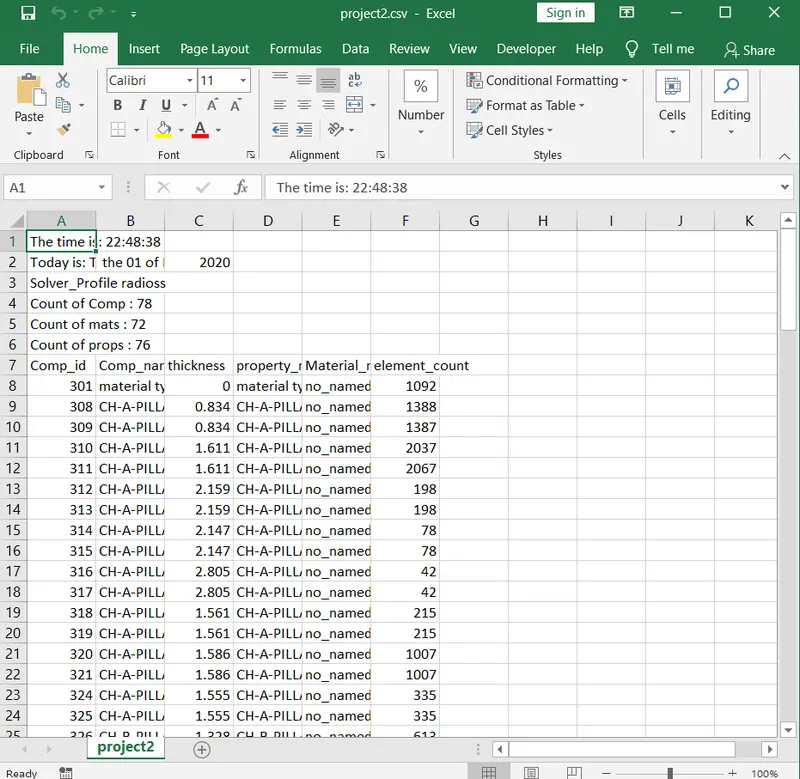
Fig 1 Sample Report Created in Excel
CONCLUSION
The macro for the project creation in excel using the tcl is made and this made the life of the CAE engineer easier in creating the final report after the analysis is done.This macro can be used to get the details of the meshed model .This macro can be further modified to incorporate further details about the analysis in the report like the deck setup details.