Project 2
2)
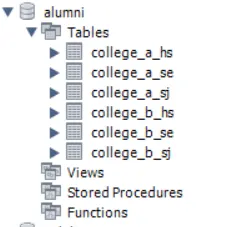
Q5) Import all the records of tables (College_A_HS, College_A_SE, College_A_SJ, College_B_HS, College_B_SE, College_B_SJ) into MS Excel. (submit Excel file for this question)
ANS:
a)We have to install excel mysql connector
b)In excel we have go in data tab and at right side mysql for excel new tab is present
c)select this tab and double click on local instance of mysql80 and provide password for same as while connecting in mysal workbench
d)After that we can see the all schemas and select alumni schema and you can easily import all tables College_A_HS, College_A_SE, College_A_SJ, College_B_HS, College_B_SE, College_B_SJ respectively.
Q13)Import the created views (College_A_HS_V, College_A_SE_V, College_A_SJ_V, College_B_HS_V, College_B_SE_V, College_B_SJ_V) into MS Excel and make pivot chart for location of Alumni.
ANS
We have to install excel mysql connector
b)In excel we have go in data tab and at right side mysql for excel new tab is present
c)select this tab and double click on local instance of mysql80 and provide password for same as while connecting in mysal workbench
d)After that we have to double click on alumni schema and go to view and import respective view College_A_HS_V, College_A_SE_V, College_A_SJ_V, College_B_HS_V, College_B_SE_V, College_B_SJ_V.
e)we can make pivot chat by selecting respective rowes, it is in insert tab PiovatTable.