Project 11
Aim: To detect objects in the image using Tensorflow API
Coding:
1. Import the necessary modules like cv2, numpy, os, tensorflow and get_files from tensorflow keras
2. create functions to read classes from coco.names files (file is attached below)
3. create another function to download model from tensorflow detection model zoo model url
4. create a function to load a model from downloaded model and save the pre-trained models in a directory
5. create a function to get and draw bounding boxes of objects using the saved model
6. create a function to predict the image that passes through boundingboxes function and save the detected image
7. Model URL from tensorflow detector model zoo (efficientdet_d4_coco17_tpu-32)
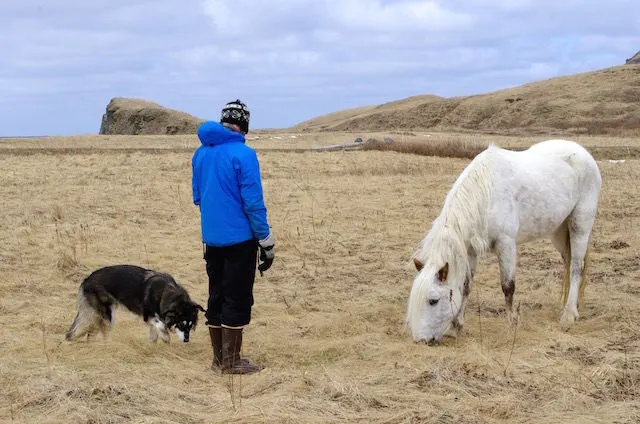
8. Image used to predict
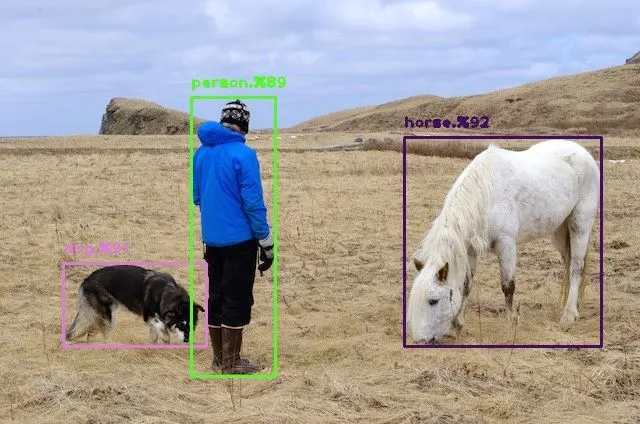
9. Image output
Conclusion:
The efficient D4 1024X1024 model Detected the objects person, dog and horse with 90% accuracy.
Detection.py file code with all the functions defined
#import necessary modules
import cv2
import numpy as np
import os
import tensorflow as tf

from tensorflow.python.keras.utils.data_utils import get_file

#seeding to numpy to select random colors for classes
np.random.seed(30)

class Detector:
    def __init__(self):
        pass

    #functions to read classes from file coco.names
    def readClasses(self, classesFilePath):
        with open(classesFilePath, 'r') as f:
            self.classesList = f.read().splitlines()

        #colors list
        self.colorlist = np.random.uniform(low=0, high=255, size=(len(self.classesList), 3))


       # print(len(self.classesList), len(self.colorlist))

    #function to download model from the tensorflow model zoo url
    def downloadModel(self, modelurl):
        #getting filename from url
        filename = os.path.basename(modelurl)
        #modelname from url
        self.modelname = filename[:filename.index('.')]
        # print(filename)
        # print(self.modelname)
        #creating a directory to save trained models from model url
        self.cachedir = './pretrained_models'
        os.makedirs(self.cachedir, exist_ok=True)

        get_file(fname=filename, origin=modelurl, cache_dir=self.cachedir,
        cache_subdir='checkpoints', extract=True)

    #to load the model
    def loadModel(self):
        print('Loading model' + self.modelname)
        #clears session in gpu cache
        tf.keras.backend.clear_session()

        #loading the model
        self.model = tf.saved_model.load(os.path.join(self.cachedir, 'checkpoints', self.modelname, 'saved_model'))

        print('loaded' + self.modelname + 'successfully')
        return self.model

    #getting bounding boxes, scores of objects in the image and detecting and drawing BBoxes and writing scores and classes on image
    def boundingboxes(self, image, threshold=0.5):

        #converting the image from BGR 2 RGB and tensor form to pass through the model
        inputTensor = cv2.cvtColor(image.copy(), cv2.COLOR_BGR2RGB)
        inputTensor = tf.convert_to_tensor(inputTensor, dtype=tf.uint8)
        inputTensor = inputTensor[tf.newaxis,...]

        #calling the model created and passing the image tensor
        detections = self.model(inputTensor)
        print(len(detections))

        #getting Bounding box, class indxs and class score from detections
        bboxs = detections['detection_boxes'][0].numpy()
        classidxs = detections['detection_classes'][0].numpy().astype(np.int32)
        classScore = detections['detection_scores'][0].numpy()
        print(len(bboxs))

        h, w, c = image.shape

        #applying NMS on bboxs to get the accurate bboxs
        bboxidxs = tf.image.non_max_suppression(bboxs, classScore, max_output_size=100,
        iou_threshold=threshold, score_threshold=threshold)


        # print(len(bboxidxs))
        # print('indxs')
        # print(bboxidxs)

        if len(bboxidxs) != 0:
            for i in bboxidxs:
                #getting the bbox based on the bboxidxs produced using NMS
                bbox = tuple(bboxs[i].tolist())
                print(bbox)
                classConfidence = round(100*classScore[i])
                classIndex = classidxs[i]

                #text and color for BBOX
                classLabelText = self.classesList[classIndex]
                classColor = self.colorlist[classIndex]

                displayText = '{}.%{}'.format(classLabelText, classConfidence)

                #coordinates to draw bbox on objects detected
                ymin, xmin, ymax, xmax = bbox
                xmin, xmax, ymin, ymax = (int(xmin*w), int(xmax*w), int(ymin*h), int(ymax*h))

                #drawing bbox and writing text
                cv2.rectangle(image, (xmin,ymin), (xmax, ymax), color = classColor, thickness=2)
                cv2.putText(image, displayText, (xmin, ymin-10), cv2.FONT_HERSHEY_PLAIN, 1, classColor, 2)
        return image

    #to predict the image
    def prediction(self, imPath, threshold=0.5):
        #reads the image
        image = cv2.imread(imPath)

        #passing the image through boundingboxes function
        bboxImage = self.boundingboxes(image, threshold)

        #saving and showing the image
        cv2.imwrite(self.modelname+'.jpg', bboxImage)
        cv2.imshow('image', bboxImage)
        cv2.waitKey(0)
Code part 2: main.py to read the files and images and work with detector class functions
#import modules fro detection file
from detection import *
#URL of model to dowload model from the tensorflow model zoo
modelurl = 'http://download.tensorflow.org/models/object_detection/tf2/20200711/efficientdet_d4_coco17_tpu-32.tar.gz'
#modelurl = 'http://download.tensorflow.org/models/object_detection/tf2/20200711/ssd_resnet50_v1_fpn_640x640_coco17_tpu-8.tar.gz'
#modelurl = 'http://download.tensorflow.org/models/object_detection/tf2/20200711/ssd_resnet152_v1_fpn_1024x1024_coco17_tpu-8.tar.gz'

#classes file in coco.names
classFile = 'coco.names'

#initializing Detector class from detection.py
detector = Detector()

#reading classes using reading function in detector
detector.readClasses(classFile)

#to download the model from url
detector.downloadModel(modelurl)

#loading the downloaded model for pretrained checkpoints
model = detector.loadModel()

#providing the image path and threshold for IoU and score thresholds
imagePath = "./test/person.jpg"
threshold = 0.25
#finally passing the image to predict the objects and drawing bounding boxes
detector.prediction(imagePath, threshold)
coco.names files is uploaded.