Project 1 - V&V SW Analysis - I
Test Objectives
Validate that the mobile phone meets the defined user stories.
Ensure the user interface (UI) and functional aspects are working correctly.
Verify that the phone meets customer and product owner expectations.
Identify defects and usability issues before UAT.
Scope of Testing
Functional testing
Usability testing
UI/UX testing
Performance testing (basic responsiveness checks)
In Scope Features
Functional testing
Usability testing
UI/UX testing
Performance testing (basic responsiveness checks)
Out of Scope Features
Internal implementation
External appearance
power and charging functionalities
Roles and Responsibilities
Functional testing - Mr/Mrs A and team
Usability testing - Mr/Mrs B and team
UI/UX testing - Mr/Mrs C and team
Performance testing (basic responsiveness checks) -Mr/Mrs D and team
Schedule of tests
Test Planning - 12/03/2025 (1 week)
Test case execution - 3/04/2025 (2 weeks)
Defect reporting and fixing - 13/04/2025 (1 week)
Regression testing (basic responsiveness checks) - 23/04/2025 (1 week)
Assumptions
The mobile phone prototype is available for testing.
The operating system and UI components are stable enough for black-box testing.
Testers have access to a functional test environment.
The device will have a touch-responsive UI with no hard buttons.
The required applications (Call, Dictionary, etc.) are pre-installed and operational.
Users will interact with the phone using touch gestures only.
Functional specifications will remain unchanged during the test cycle.
Any defects found will be logged and addressed in subsequent test cycles.
Risks
Hardware limitations
UI inconsistencies
touch responsiveness issues
Mitigation/Contingency plans
Ensure compatibility with design specifications
Conduct multiple UI tests and feedback cycles
Conduct performance test and optimize UI
Test Methodology
Equivalence Partitioning: Test inputs will be divided into valid and invalid partitions to ensure coverage of different input scenarios.
Boundary Value Analysis: Edge cases will be tested, such as the first and last app in the grid and minimum/maximum values in input fields.
State Transition Testing: Various states of the phone (powered off, powered on, app open/close transitions) will be tested.
Use Case Testing: End-to-end user workflows will be tested, such as powering on the phone, making a call, and searching in the dictionary.
UI Testing: Verification of button placements, font styles, icon locations, and overall responsiveness of the interface.
Exploratory Testing: Testers will manually explore the UI and features to uncover unexpected issues.
Test Approach
- A black-box testing approach will be used, where test cases will be designed based on system requirements without knowing the internal code structure.
Test Items
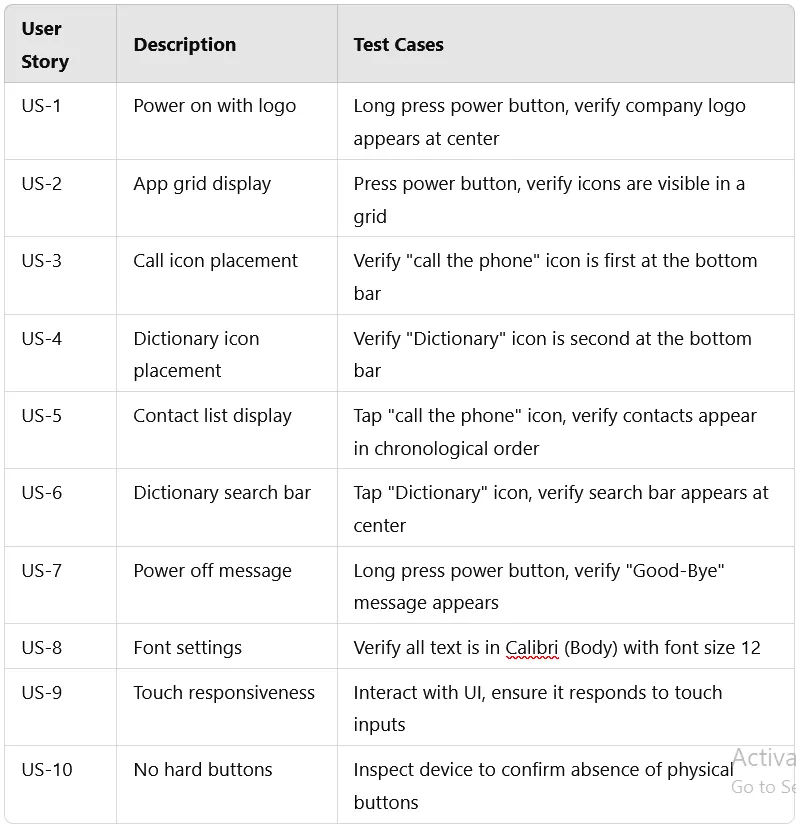
Entry criteria
The mobile phone prototype is available for testing.
The operating system and UI components are stable enough for black-box testing.
Testers have access to a functional test environment.
The device will have a touch-responsive UI with no hard buttons.
The required applications (Call, Dictionary, etc.) are pre-installed and operational.
Users will interact with the phone using touch gestures only.
Functional specifications will remain unchanged during the test cycle.
Any defects found will be logged and addressed in subsequent test cycles.
Exit Criteria
All critical and major defects fixed.
All test cases executed with a pass rate of at least 95%.
UI and usability issues resolved.
Approval from stakeholders to move to UAT.
Test Environment
Test device: Prototype of the new mobile phone
OS: Custom operating system under development
Tools: Manual testing tools (e.g., logging and debugging tools for reporting)
Test Data: Dummy contacts and dictionary words for verification
Defect Tracking
Defects will be logged using a defect tracking tool (e.g., Jira, Bugzilla, or a proprietary tool).
Each defect will be categorized based on severity (Critical, Major, Minor, Cosmetic).
Defect reports will include steps to reproduce, screenshots, logs, and expected vs. actual results.
Defect resolution will be tracked, and retesting will be performed after fixes.
Weekly defect review meetings will be conducted to ensure progress.
Effort Estimation Effort estimation is based on the complexity and number of test cases:
Test Case Design: 1 week (based on 50+ test cases)
Test Execution: 2 weeks (manual execution with defect logging)
Regression Testing: 1 week (retesting after defect fixes)
Total estimated effort: ~4 weeks with a team of 2-3 testers
Test Automation
Due to the black-box nature, UI automation tools will be considered (e.g., Appium, Selenium for web-based components, or Espresso/XCUITest for mobile apps).
Automation scope includes:
Power on/off functionality
UI responsiveness tests
App launching and navigation tests
Basic input validation tests (dictionary search, contact selection)
Automation will be implemented in parallel with manual testing and will focus on regression and repetitive test cases.
Test scripts will be executed on multiple test devices and simulators for compatibility checks.
Test Deliverables
Test cases
Test execution reports
Defect reports
Final test summary report