Project 1 - V&V SW Analysis - I
Project-1
Write a Test plan to test features of a new mobile phone (Blackbox test) that needs to be implemented based on the following requirements. (The product is still in the development stage and is yet to be UA (User Acceptance ) tested. Every other thing to be included in the test plan can be hypothetical.
US-1: As a Product Owner, when long pressed the power button of the phone shall switch on with a company logo at the center of the screen.
US- 2: As a Customer, when the power button is pressed my phone is switched ON and all my icons of the APPS shall be present in the grid
US- 3: As a Product owner, when the phone is powered ON, I shall see the "call the phone" icon as the first icon at the bottom bar of my screen.
US- 4: As a Product owner, when the phone is powered ON, I shall see the "Dictionary" icon as the second icon at the bottom bar of my screen.
US- 5: As a Product owner, when I Clicked my "call the phone" icon, all the contacts shall be visible based on chronological order.
US- 6: As a Product owner, when I Click my "Dictionary icon, a search bar appears in the middle of the screen to let me search the meanings of the words I desire.
US- 7: As a Product owner, when I long pressed my "power on" button, my phone shall be switched off saying "Good-Bye” Message.
US-8: As a product owner, my font in the mobile shall always be ''Calibri (Body)" and shall be of size 12.
US-9: As a Customer, I need my UI to be touch-responsive.
US-10: As a customer, my mobile phone should have no hard buttons.
Ans:
Test plan – Software Testing :
In software testing, documentation is very important. Testing should be documented to provide efficient resource control monitoring.
What is a Test Plan :
A test plan is a document that consists of all future testing-related activities. It is prepared at the project level and in general, it defines work products to be tested, how they will be tested, and test type distribution among the testers. Before starting testing there will be a test manager who will be preparing a test plan.
In any company whenever a new project is taken up before the tester is involved in the testing the test manager of the team would prepare a test Plan.
- The test plan serves as the blueprint that changes according to the progressions in the project and stays current at all times.
- It serves as a base for conducting testing activities and coordinating activities among a QA team.
- It is shared with Business Analysts, Project Managers, and anyone associated with the project.
| Factors | Roles |
| Who writes Test Plans? | Test lead, Test Manager, Test Engineer. |
| Who reviews the Test Plan? | Test Lead, Test Manager, Test Engineer, Customer, Development Team. |
| Who approves the Test Plan? | Customer, Test Manager. |
| Who writes Test Cases? | Test Lead, Test Engineer. |
| Who reviews Test Cases? | Test Engineer, Test Lead, Customer, Development Team. |
| Who approves Test Cases? | Test Manager, Test Lead, Customer. |
Why are Test Plans Important:
(1): Quick guide for the testing process:
The test plan serves as a quick guide for the testing process as it offers a clear guide for QA engineers to conduct testing activities.
(2): Helps to avoid out-of-scope functionalities:
The test plan offers detailed aspects such as test scope, test estimation, strategy, etc.
(3): Helps to determine the time, cost, and effort:
The Test serves as the blueprint to conduct testing activities thus it helps to deduce an estimate of time, cost, and effort for the testing activities.
(4): Provide a schedule for testing activities:
A test plan is like a rule book that needs to be followed, it thus helps to schedule activities that can be followed by all the team members.
(5): Test plan can be reused:
The test plan documents important aspects like test estimation, test scope, and test strategy which are reviewed by the Management Team and thus can be reused for other projects.
Types of Test Plans:
(1): Master Test Plan:
This type of test plan includes multiple test strategies and has multiple levels of testing. It goes into great depth on the planning and management of testing at the various test levels and thus provides a bird’s eye view of the important decisions made, tactics used, etc. It includes a list of tests that must be executed, test coverage, the connection between various test levels, etc.
(2): Phase Test Plan:
This type of test plan emphasizes any one phase of testing. It includes further information on the levels listed in the master testing plan. Information like testing schedules, benchmarks, activities, templates, and other information that is not included in the master test plan is included in the phase test plan.
(3): Specific Test Plan:
This type of test plan is designed for specific types of testing especially non-functional testing for example plans for conducting performance tests or security tests.
Components and Attributes of Test Plan:
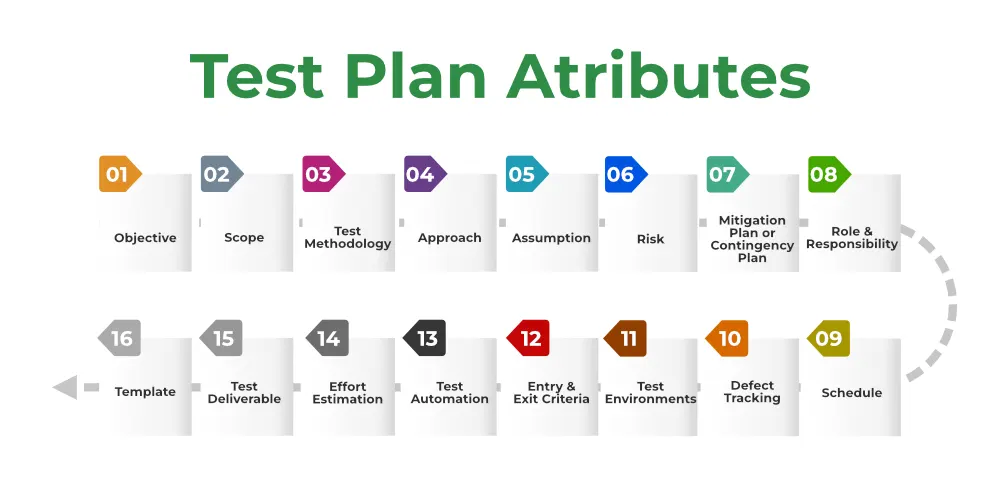
(1): Objective:
It describes the aim of the test plan, whatever the good process and procedure we are going to follow to give quality software to customers. The overall objective of the test is to find as many defects as possible and to make software bug-free. The test objective must be broken into components and sub-components. In every component following activities should be performed.
- List all the functionality and performance to be tested.
- Make goals and targets based on the application feature.
(2): Scope:
It consists of information that needs to be tested concerning an application. The scope can be divided into two parts:
- In-Scope: The modules that are to be tested rigorously.
- Out Scope: The modules that are not to be tested rigorously.
Example: In an application A, B, C, and D features have to be developed, but the B feature has already been designed by other companies. So the development team will purchase B from that company and perform only integrated testing with A, B, and C.
(3): Testing Methodology:
The methods that are going to be used for testing depend on application to application. The testing methodology is decided based on the feature and application requirements. Since the testing terms are not standard, we should define what kind of testing will be used in the testing methodology.
(4): Approach:
The approach of testing different software is different. It deals with the flow of applications for future reference. It has two aspects:
- High-Level Scenarios: For testing critical features high-level scenarios are written. For Example, login to a website, and book from a website.
- The Flow Graph: It is used when we want to make benefits such as converging and merging easy.
(5): Assumption:
In this phase, certain assumptions will be made.
Example:
- The testing team will get proper support from the development team.
- The tester will get proper knowledge transfer from the development team.
- Proper resource allocation will be given by the company to the testing department.
(6): Risk:
All the risks that can happen if the assumption is broken. For Example, in the case of wrong budget estimation, the cost may overrun. Some reasons that may lead to risk are:
- The Test Manager has poor management skills.
- Hard to complete the project on time.
- Lack of cooperation.
(7): Mitigation Plan:
If any risk is involved then the company must have a backup plan, the purpose is to avoid errors. Some points to avoid risk are:
- Test priority is to be set for each test activity.
- Managers should have leadership skills.
- Training course for the testers.
(8): Roles and Responsibilities:
All the responsibilities and roles of every member of a particular testing team have to be recorded.
Example:
- Test Manager: Manages the project, takes appropriate resources, and gives project direction.
- Tester: Identify the testing technique, verify the test approach, and save project costs.
(9): Schedule:
Under this, it will record the start and end date of every testing-related activity. For Example, writing the test case date and ending the test case date.
(10): Defect Tracking:
It is an important process in software engineering as lots of issues arise when you develop a critical system for business. If there is any defect found while testing that defect must be given to the developer team. There are the following methods for the process of defect tracking:
- Information Capture: In this, we take basic information to begin the process.
- Prioritize: The task is prioritized based on severity and importance.
- Communication: Communication between the identifier of the bug and the fixer of the bug.
- Environment: Test the application based on hardware and software.
(11): Test Environments:
It is the environment that the testing team will use i.e. the list of hardware and software, while testing the application, the things that are said to be tested will be written under this section. The installation of software is also checked under this.
Example:
- Software configuration on different operating systems, such as Windows, Linux, Mac, etc.
- Hardware Configuration depends on RAM, ROM, etc.
(12): Entry and Exit Criteria:
The set of conditions that should be met to start any new type of testing or to end any kind of testing.
Entry Condition:
- Necessary resources must be ready.
- The application must be prepared.
- Test data should be ready.
Exit Condition:
- There should not be any major bugs.
- Most test cases should be passed.
- When all test cases are executed.
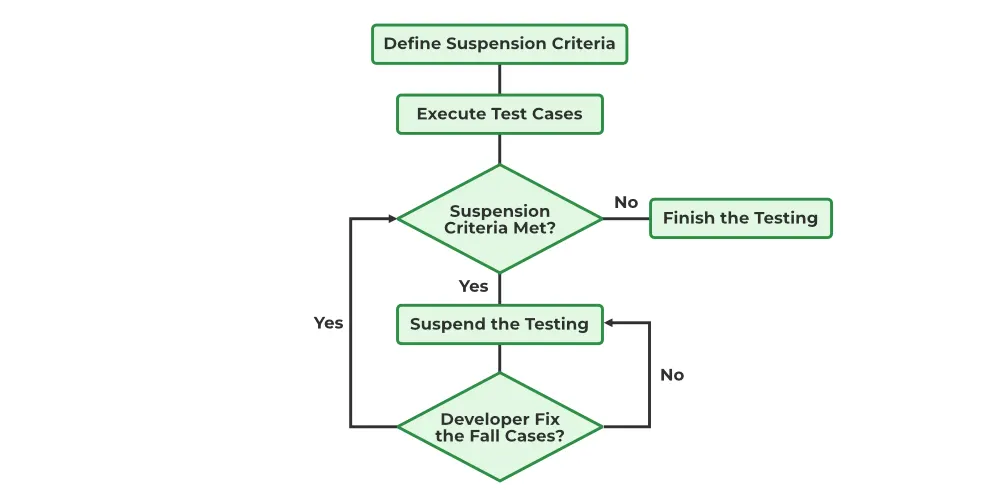
Example: If the team member reports that 45% of the test cases failed, then testing will be suspended until the developer team fixes all defects.
(13): Test Automation:
It consists of the features that are to be automated and which features are not to be automated.
- If the feature has lots of bugs then it is categorized as Manual Testing.
- If the feature is frequently tested then it can be automated.
(14): Effort Estimation:
This involves planning the effort that needs to be applied by every team member.
(15): Test Deliverables:
This is the outcome from the testing team that is to be given to the customers at the end of the project.
Before the testing phase:
- Test plan document.
- Test case document.
- Test design specification.
During the testing phase:
- Test scripts.
- Test data.
- Error logs.
After the testing phase:
- Test Reports.
- Defect Report.
- Installation Report.
It contains a test plan, defect report, automation report, assumption report, tools, and other components that have been used for developing and maintaining the testing effort.
(16): Template:
This is followed by every kind of report that is going to be prepared by the testing team. All the test engineers will only use these templates in the project to maintain the consistency of the product.
How to create a Test Plan:
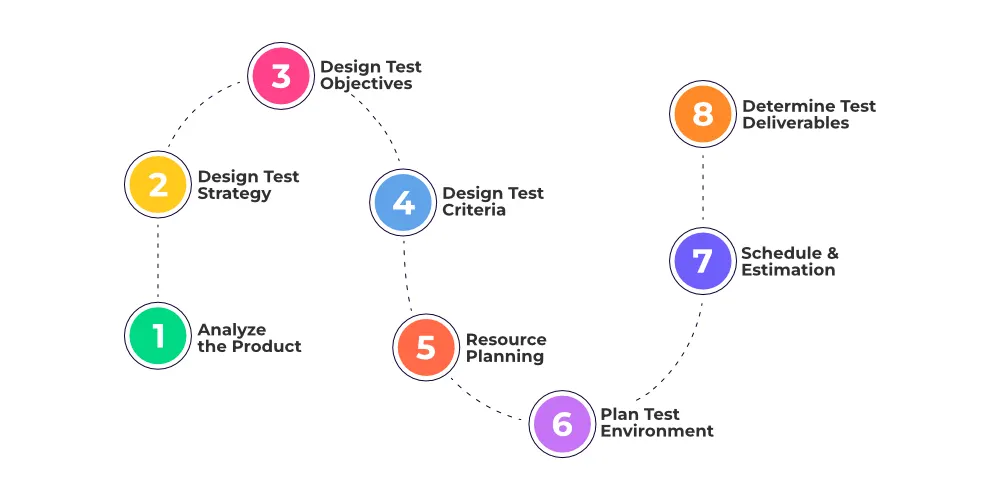
(1): Analyze the product:
This phase focuses on analyzing the product, Interviewing clients, designers, and developers, and performing a product walkthrough.
This stage focuses on answering the following questions:
- What is the primary objective of the product?
- Who will use the product?
- What are the hardware and software specifications of the product?
- How does the product work?
(2): Design the test strategy:
The test strategy document is prepared by the manager and details the following information:
- Scope of testing which means the components that will be used and tested in the project.
- Type of testing which means different types of tests that will be used in the project.
- Risks and issues that will list all the possible risks that may occur during testing.
- Test logistics mentions the names of the testers and the tests that will be run by them.
(3): Define test objectives:
This phase defines the objectives and expected results of the test execution. Objectives include:
- A list of software features like functionality, GUI, performance standards, etc.
- The ideal expected outcome for every aspect of the software that needs testing.
(4): Define test criteria:
Two main testing criteria determine all the activities in the testing project:
- Suspension criteria: Suspension criteria define the benchmarks for suspending all the tests.
- Exit criteria: Exit criteria define the benchmarks that signify the successful completion of the test phase. These are expected results and must match before moving to the next stage of development.
(5): Resource planning:
This phase aims to create a detailed list of all the resources required for project completion. For example, human effort, hardware and software requirements, all infrastructure needed, etc.
(6): Plan test environment:
This phase is very important as the test environment is where the QA's run their tests. The test environments must be real devices, installed with real browsers and operating systems so that testers can monitor software behavior in real user conditions.
(7): Schedule and Estimation:
Break down the project into smaller tasks and allocate time and effort for each task. This helps in efficient time estimation. Create a schedule to complete these tasks in the designated time with a specific amount of effort.
(8): Determine test deliverables:
Test deliverables refer to the list of documents, tools, and other equipment that must be created, provided, and maintained to support testing activities in the project.
| Deliverables required before testing | Deliverables required during testing | Deliverables required after testing |
| Test Plan | Test Scripts | Test Results |
| Test Design | Simulators | Defect Reports |
| Test Data | Release Notes | |
| Error and Execution Logs |
As per our Project here we are using Blackbox testing to test the features of a new mobile phone:
Black-box Testing:
Black-box testing is a type of software testing in which the tester is not concerned with the implementation details of the software but rather focuses on validating the functionality based on the provided specifications or requirements. It can be done in the following ways:
(1): Syntax-Driven Testing:
This type of testing is applied to systems that can be syntactically represented by some language. For example, language can be represented by context-free grammar. In this, the test cases are generated so that each grammar rule is used at least once.
(2): Equivalence partitioning:
It is often seen that many types of inputs work similarly so instead of giving all of them separately we can group them and test only one input from each group. The idea is to partition the input domain of the system into several equivalence classes such that each member of the class works similarly, i.e., if a test case in one class results in some error, other members of the class would also result in the same error.
(3): Boundary value analysis:
Boundaries are very good places for errors to occur. Hence, if test cases are designed for boundary values of the input domain then the efficiency of testing improves and the probability of finding errors also increases. For example – If the valid range is 10 to 100 then test for 10,100 also apart from valid and invalid inputs.
(4): Cause-effect graphing:
This technique establishes a relationship between logical input called causes with corresponding actions called the effect. The causes and effects are represented using Boolean graphs. The following steps are followed:
- Identify inputs (causes) and outputs (effect).
- Develop a cause-effect graph.
- Transform the graph into a decision table.
- Convert decision table rules to test cases.
For example, in the following cause-effect graph:
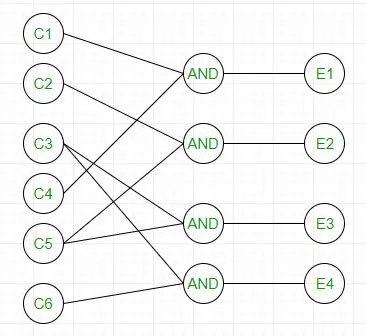
It can be converted into a decision table like:
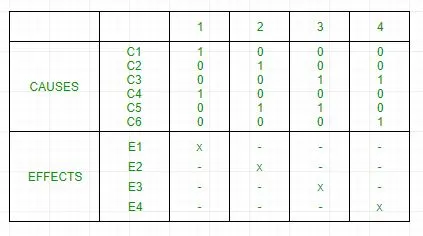
Each column corresponds to a rule which will become a test case for testing. So there will be 4 test cases.
(5): Requirement-based testing:
This includes validating the requirements given in the SRS of a software system.
(6): Compatibility testing:
The test case results not only depend on the product but also on the infrastructure for delivering functionality. When the infrastructure parameters are changed it is still expected to work properly. Some parameters that generally affect the compatibility of software are:
- Processor (Pentium 3, Pentium 4) and several processors.
- Architecture and characteristics of machine (32-bit or 64-bit).
- Back-end components such as database servers.
- Operating System (Windows, Linux, etc).
Black Box Testing Type:
(1): Functional Testing:
It determines the system’s software functional requirements.
(2): Regression Testing:
It ensures that the newly added code is compatible with the existing code i.e. a new software update has no impact on the functionality of the software. This is carried out after a system maintenance operation and upgrades.
(3): Nonfunctional Testing:
Nonfunctional testing is also known as NFT. This testing is not functional testing of software. It focuses on the software’s performance, usability, and scalability.
Tools Used for Black Box Testing:
- Appium
- Selenium
- Microsoft Coded UI
- Applitools
- HP QTP.
What can be identified by Black Box Testing:
- Discovers missing functions, incorrect functions & interface errors
- Discover the errors faced in accessing the database
- Discovers the errors that occur while initiating & terminating any functions.
- Discovers the errors in the behavior of the software.
Features of black box testing:
(1): Independent testing:
Black box testing is performed by testers who are not involved in the application's development, which helps ensure that testing is unbiased and impartial.
(2): Testing from a customer perspective:
Black box testing is conducted from the perspective of an end user, which helps to ensure that the application meets customer requirements and is easy to use.
(3): No knowledge of internal code:
Testers performing black box testing do not have access to the application’s internal code, which allows them to focus on testing the application’s external behavior and functionality.
(4): Requirements-based testing:
Black box testing is typically based on the application’s requirements, which helps to ensure that the application meets the required specifications.
(5): Different testing techniques:
Black box testing can be performed using various testing techniques, such as functional testing, usability testing, acceptance testing, and regression testing.
(6): Easy to automate:
Black box testing is easy to automate using various automation tools, which helps to reduce the overall testing time and effort.
(7): Scalability:
Black box testing can be scaled up or down depending on the size and complexity of the application being tested.
(8): Limited knowledge of application:
Testers performing black box testing have limited knowledge of the application being tested, which helps to ensure that testing is more representative of how the customers will interact with the application.
As per our Project based on the following customer requirements we have developed a Test plan to test the features of a new mobile phone:
TEST PLAN:
if(owner long press the power button)
{
open the company logo at the center;
}
else if(customer press the power button)
{
open the apps in the grid;
}
else if(owner power on the phone)
{
shows call the phone icon on the first position at the bottom;
}
else if(owner power on the phone)
{
shows the Dictionary icon in the second position at the bottom;
}
else if( owner click on call the phone icon)
{
contacts appear in chronological order;
}
else if(owner click on Dictionary icon)
{
the search bar appears at the center;
}
else if(owner long press power on button)
{
displays goodbye and gets switched off;
}
else if(owners phone font)
{
always in Calibri with the size of 12;
}
else if(customer requirement touch responsive)
{
reflects on touch;
}
else ( customer requirement no hard buttons)
{
touch screen sensitive;
}
Uses of this project:
(1): Project-Specific Testing Goals:
The test plan outlines the testing goals and objectives specific to the project. For example, it may emphasize certain critical functionalities, user scenarios, and performance metrics that are particularly important for the success of the project.
(2): Technology and Platform Considerations:
The project involves specific technologies, frameworks, and platforms. The test plan addresses the testing considerations associated with these elements. It ensures that the testing approach is aligned with the project's technical requirements.
(3): Integration and Interoperability Testing:
The project involves multiple components with other systems, the test plan details how integration and interoperability testing will be conducted. It may include information about APIs, third-party integrations, and data exchange between different modules.
(4): User Acceptance Testing (UAT):
UAT is part of the project's testing activities, the test plan specifies the criteria and processes for UAT. It outlines how customers will be involved in the testing process and ensures that the software meets their expectations before release.
(5): Regulatory Compliance:
The project must adhere to specific regulatory standards, the test plan includes details on how testing activities will ensure compliance. This is crucial in sectors such as finance, healthcare, and government where regulatory standards are stringent.
(6): Security Testing:
In projects where security is a critical concern, the test plan outlines how security testing will be performed. It may include penetration testing, vulnerability assessments, and measures to ensure the software's resistance to security threats.
(7): Performance and Scalability:
For projects where performance and scalability are key considerations, the test plan addresses how performance testing will be conducted. It outlines scenarios, benchmarks, and measures to ensure the software meets performance requirements under various conditions.
(8): Localization and Internationalization:
The project targets a global audience, the test plan includes considerations for localization and internationalization testing. It ensures that the software functions correctly across different languages, regions, and cultural contexts.
(9): Data Management and Privacy:
In projects dealing with sensitive data, the test plan addresses data management and privacy concerns. It includes guidelines for handling and protecting user data and outlines testing activities related to data privacy.
(10): Mobile-Specific Testing:
For projects involving mobile applications, the test plan considers mobile-specific testing aspects, such as testing on various devices, screen sizes, and operating systems. It may also cover mobile-specific functionalities like touch gestures and device orientation.
(11): Accessibility Testing:
If accessibility is a priority, the test plan includes provisions for accessibility testing. It ensures that the software is usable by individuals with disabilities, complying with accessibility standards.
(12): Documentation and Reporting:
The test plan outlines how testing activities will be documented and reported. It includes details on test reporting formats, defect tracking, and communication channels for conveying testing progress to stakeholders.