Project 1 - Parsing NASA thermodynamic data
AIM:
To write a Matlab program to extract the 14 co-efficients from NASA thermodynamic data file and to calculates the enthalpy, entropy and specific heats for all the species in the data file and thereafter plotting the graphs of every species and to find the molecular mass of the same.
FILE PARSING:
Parsing in computer languages refers to syntactic analysis of inputing data normally from a file into its components parts in order to facilitate the writing of compilers and interpreters. It can be used to describe split or separation
Parsing a file means reading in a data stream of some sort and building an in memory model of the semantic content of that data. This aims at facilitating performing some kind of transformation on the data.
The plots for enthalphy,enthropy and specific heat for each species will be plotted and will be stored in seperate file.
OBJECTIVE:
- To write a Matlab code to extract the data from the file(Thermo.dat) using Fopen and fgetl functions.
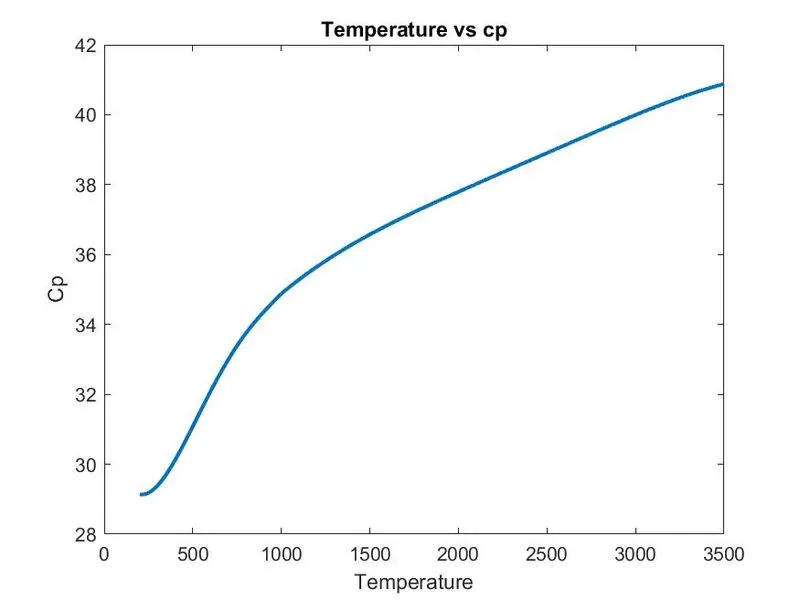
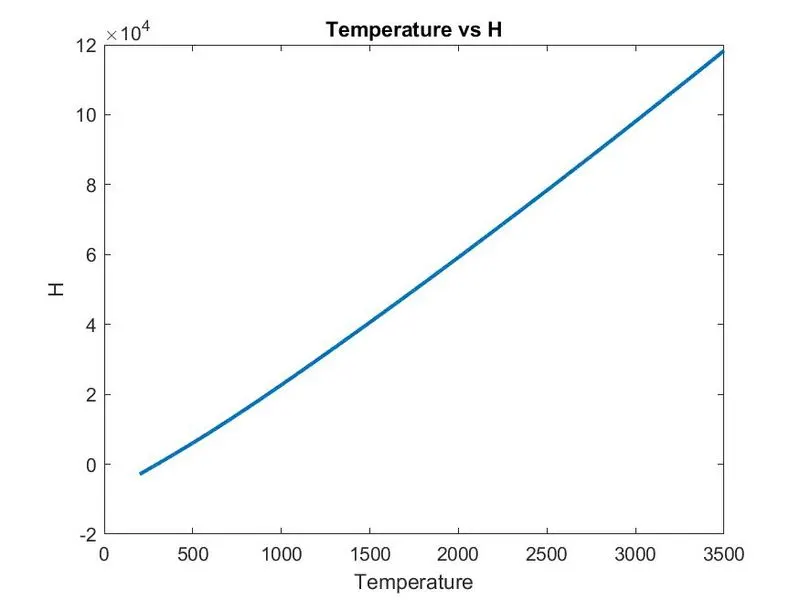
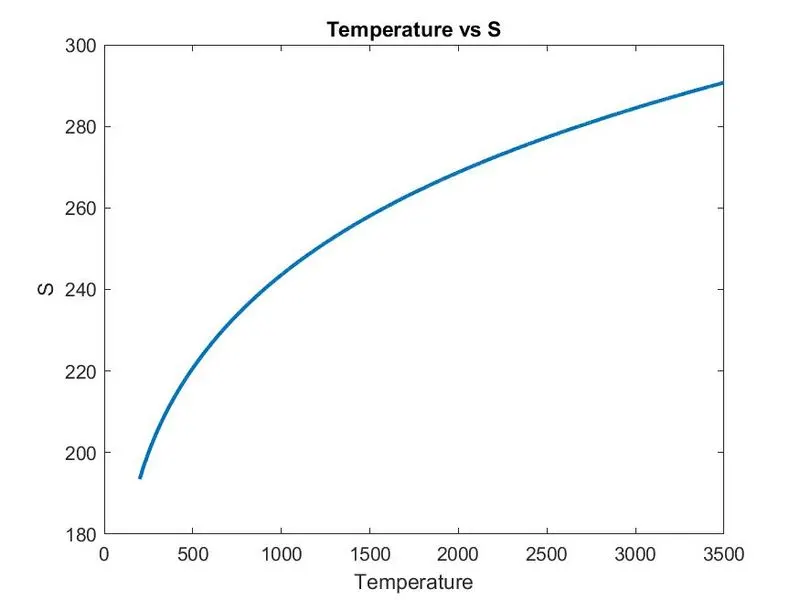
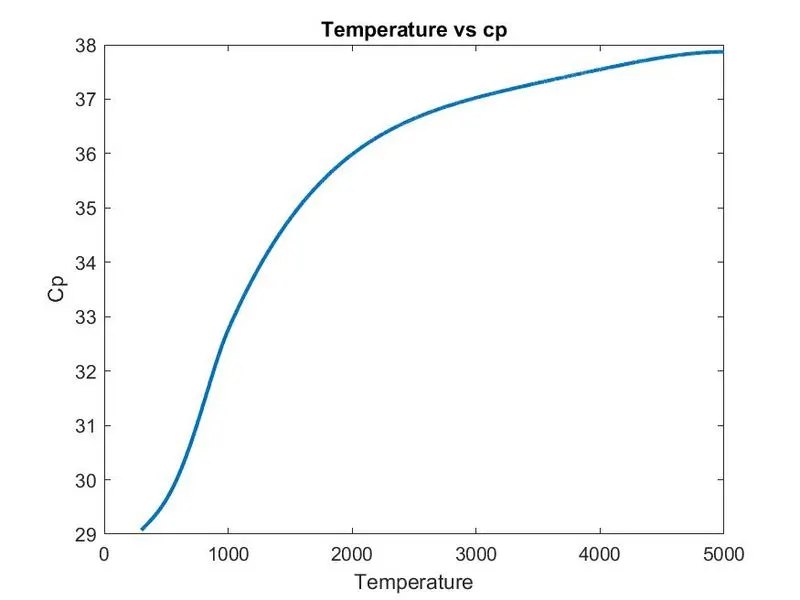
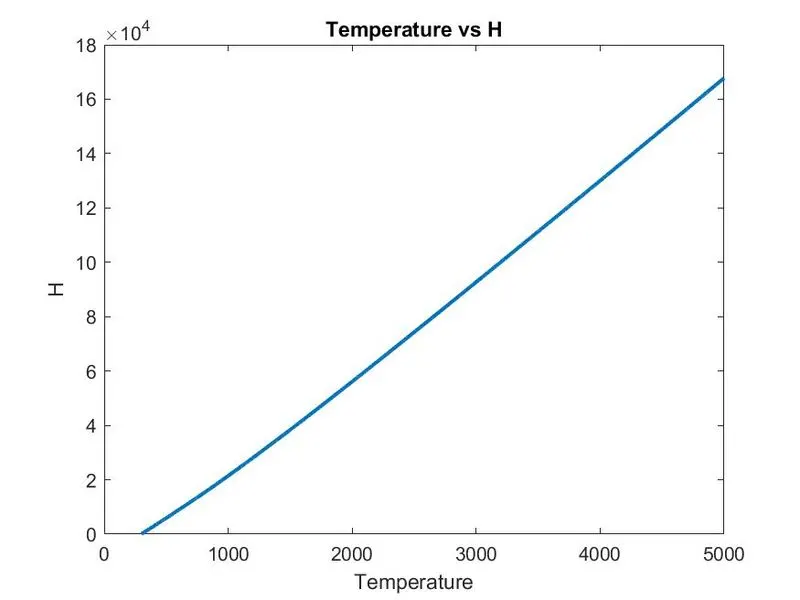
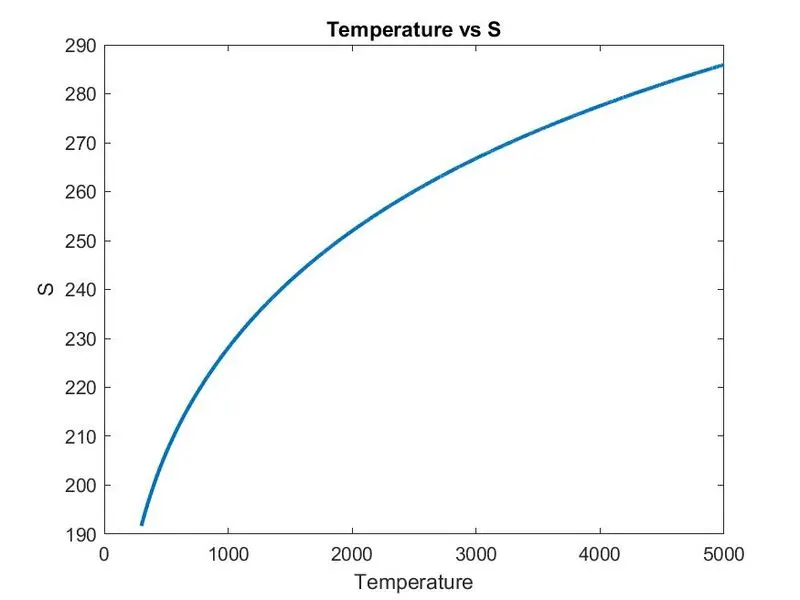
- To calculate and plot the Cp,H,S for the all the gas species for a entire range of the given local temperature.
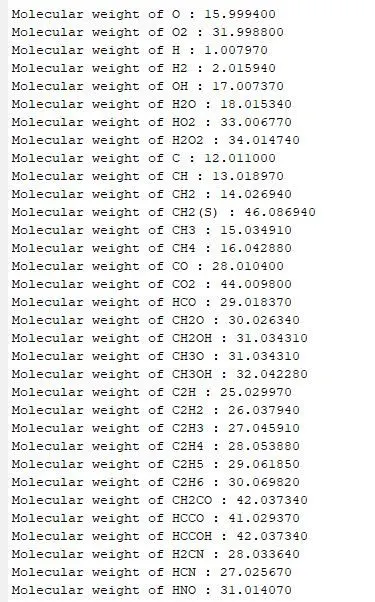
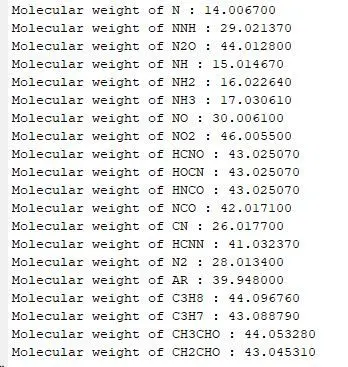
- Calculate the molecular weight of the species and display on command window.
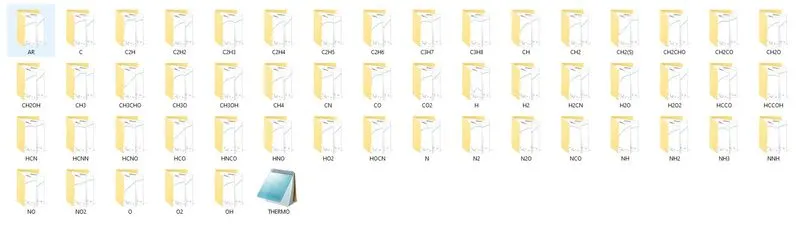
- Save the plots for each species and save them in a seperate folder(generated automatically).
- Attached plot for O2, N2 & Co2.
PROGRAM CODE:
1. clear all
close all
clc
These functions help to clear and close all the commands,plots and graph shown in the window.
2. f1 = fopen('THERMO.dat','r')
fopen function helps to extract the data files or provide information about the opened file stored in the computer into matlab software.
3. fgetl(f1)
fgetl command allows to read each line. Repeating the fgetl again allows to read the next succesive lines and helps to read the specified line in the file.
4. t = fgetl(f1);
species = strsplit(t,' ');
species_name = species{1};
The required line having the local temperature ranges have been assigned to a variable t.strsplit allows to split the line wherever spacing is given into various parts.So that all the words will be seperated and stored as strings in a variable called species
"O" "L" "1/90O" '1" "G" "200.000" "3500.000" "1000.000" "1"
species{1} indicates the first string in the above line which is "O" which will be stored in species name.
5. lower_temp = str2num(species{end-3});
mid_temp = str2num(species{end-1});
high_temp = str2num(species{end-2});
temperature = (lower_temp:high_temp);
Similarly the species{end-3}, species{end-1}, species{end-2} indicates the values 200,1000 and 3500 respectivily.
6. coeff_1 = fgetl(f1);
m = findstr(coeff_1,'E');
a1 = coeff_1(1:m(1)+3);
a1 = str2num(a1);
a2 = coeff_1(m(1)+4:m(2)+3);
a2 = str2num(a2);
a3 = coeff_1(m(2)+4:m(3)+3);
a3 = str2num(a3);
a4 = coeff_1(m(3)+4:m(4)+3);
a4 = str2num(a4);
a5 = coeff_1(m(4)+4:m(5)+3) ;
a5 = str2num(a5);
The next line gives the coefficient values for solving the equation.Since the value has to be stored in each variables
The simplest way of extracting the coeff is using the findstr command where E is taken as the letter to find and wherever E is located in the line will be specified. The locations of m is stored in variable m.
So by this way each number can be extracted.For example
2.56942078E+00-8.59741137E-05 4.19484589E-08-1.00177799E-11 1.22833691E-15
If we have to get the first value '2.56942078E+00' then 1: m(1)+3 will give the number. The next number '-8.59741137E-05' starts from m(1)+4 and ends in m(2)+3. Similarly it goes on.
7. Just like the above steps,the next two lines also has to be read and the coefficient values has to be printed.After all the 14 values has been read, next is to seperate the values on the basis of lower and higher temprature ranges. If the temperature is higher than the mid temperature, then first seven coeff values has to be taken else the next seven values needs to be taken if the temperature is higher than the mid temperature.
8. r = 8.314;
a = [a1 a2 a3 a4 a5 a6 a7 a8 a9 a10 a11 a12 a13 a14];
r represents universal gas constant which is 8.314. All the coefficient values are made in an array, so that each values can be extracted
9. for T =(lower_temp:high_temp)
if T<=mid_temp
a1 = a(8);
a2 = a(9);
a3 = a(10);
a4 = a(11);
a5 = a(12);
a6 = a(13);
a7 = a(14);
else
a1 = a(1);
a2 = a(2);
a3 = a(3);
a4 = a(4);
a5 = a(5);
a6 = a(6);
a7 = a(7);
end
As explained above, each values are assigned depending on the above condition. All the coefficient values will be stored in variables a1,a2,a3....a7.
10. cp(j) = ((a1 + a2*T + a3*T^2 + a4*T^3 + a5*T^4)*r);
H(j) = ((a1 + a2*T/2 + a3*T^2/3 + a4*T^3/4 + a5*T^4/5 +a6/T)*(r*T));
S(j) = ((a1*log(T) + a2*T + a3*T^2/2 + a4*T^3/3 + a5*T^4/4 +a7)*r);
These are the formulas or equation for specific heat, enthalpy and entropy. All the coefficient values are inputted in this equation.
11. Next is the function for calculating molecular mass of each species which is given below:
elems = ["H","C","N","O","S","A"]; #All the species have been kept inside an array
atomic_masses = [1.00797,12.011,14.0067,15.9994,32.06,39.948]; # The corresponding atomic mass of each species is inputted in the respective order.
molecular_weight = 0; # The mol_weight is initially given as zero.
for i=1:length(species_name)
[num,status] = str2num(species_name(i));
if(status)
molecular_weight = molecular_weight + (atomic_masses(n)*(num-1));
else
for k=1:length(elems)
if species_name(i) == elems(k)
molecular_weight = molecular_weight + atomic_masses(k);
n=k;
end
end
end
end
M_weight = molecular_weight;
fprintf('Molecular weight of %s : %f\n',species_name,M_weight)
The for loop can be explained with an example of CH2OH. First the length of species name is taken,ie. the first letter which is C.
[num,status] = str2num(species_name(i)); If the string is a character, then the status will be zero and if the string is a number the status will be one and the value will be stored in the num variable. If the status is one, then it will read the if command or it will move to the else command. Since the string is C, then the else command will be executed.
species_name(i) == elems(k) # if the species name and the elements in the array comes same,the mol_weight is calculated using the next given equation. The value of k means on which position the atomic mass stands. Here teh value of k is 2 as C is in the second position and it is assigned to a variable n.
If the string is a number, if command will be executed.
molecular_weight = molecular_weight + (atomic_masses(n)*(num-1));
Last, the total calculated molecular weight of the component is stored in a variable M_weight and the value of each species is printed in the command window.
12. mkdir(char(species_name));
mkdir is a function to create folder in the matlab. Here all 53 files will be formed for each species.
13. Last three graphs of (i) temp vs Cp (ii) temp vs H (iii) temp vs S are plotted for each species. url function is given to understand the path for location. saveas function helps to save the graph in the specified location.
clear all
close all
clc
% Extracting THERMO file
f1 = fopen('THERMO.dat','r')
% to skip the first five lines
fgetl(f1);
fgetl(f1);
fgetl(f1);
fgetl(f1);
fgetl(f1);
for k=1:53
cp = 0;
H = 0;
S = 0;
t = fgetl(f1);
species = strsplit(t,' ');
species_name = species{1};
% defining the local temperature ranges
lower_temp = str2num(species{end-3});
mid_temp = str2num(species{end-1});
high_temp = str2num(species{end-2});
temperature = (lower_temp:high_temp);


% Extracting all the coefficients
coeff_1 = fgetl(f1);
m = findstr(coeff_1,'E');
a1 = coeff_1(1:m(1)+3);
a1 = str2num(a1);
a2 = coeff_1(m(1)+4:m(2)+3);
a2 = str2num(a2);
a3 = coeff_1(m(2)+4:m(3)+3);
a3 = str2num(a3);
a4 = coeff_1(m(3)+4:m(4)+3);
a4 = str2num(a4);
a5 = coeff_1(m(4)+4:m(5)+3) ;
a5 = str2num(a5);

coeff_2 = fgetl(f1);
n = findstr(coeff_2,'E');
a6 = coeff_2(1:m(1)+3);
a6 = str2num(a6);
a7 = coeff_2(m(1)+4:m(2)+3);
a7 = str2num(a7);
a8 = coeff_2(m(2)+4:m(3)+3);
a8 = str2num(a8);
a9 = coeff_2(m(3)+4:m(4)+3);
a9 = str2num(a9);
a10 = coeff_2(m(4)+4:m(5)+3);
a10 = str2num(a10);

coeff_3 = fgetl(f1);
p = findstr(coeff_3,'E');
a11 = coeff_3(1:m(1)+3);
a11 = str2num(a11);
a12 = coeff_3(m(1)+4:m(2)+3);
a12 = str2num(a12);
a13 = coeff_3(m(2)+4:m(3)+3);
a13 = str2num(a13);
a14 = coeff_3(m(3)+4:m(4)+3);
a14 = str2num(a14);

% R in  J⋅K−1⋅mol−1
r = 8.314;

a = [a1 a2 a3 a4 a5 a6 a7 a8 a9 a10 a11 a12 a13 a14];

% Function for high and low temp coeff
j=1;
for T =(lower_temp:high_temp)
if T<=mid_temp

    a1 = a(8);
    a2 = a(9);
    a3 = a(10);
    a4 = a(11);
    a5 = a(12);
    a6 = a(13);
    a7 = a(14);
else

    a1 = a(1);
    a2 = a(2);
    a3 = a(3);
    a4 = a(4);
    a5 = a(5);
    a6 = a(6);
    a7 = a(7);
end

%Formulas to calculate Cp,H,S
cp(j) = ((a1 + a2*T + a3*T^2 + a4*T^3 + a5*T^4)*r);
H(j) = ((a1 + a2*T/2 + a3*T^2/3 + a4*T^3/4 + a5*T^4/5 +a6/T)*(r*T));
S(j) = ((a1*log(T) + a2*T + a3*T^2/2 + a4*T^3/3 + a5*T^4/4 +a7)*r);

j=j+1;

end

% Finding Molecular mass
elems = ["H","C","N","O","S","A"];
atomic_masses = [1.00797,12.011,14.0067,15.9994,32.06,39.948];
molecular_weight = 0;
for i=1:length(species_name)
    [num,status] = str2num(species_name(i));
    if(status)
        molecular_weight = molecular_weight + (atomic_masses(n)*(num-1));
    else
        for k=1:length(elems)
            if species_name(i) == elems(k)
                molecular_weight = molecular_weight + atomic_masses(k);
                n=k;
            end
        end
    end
end
M_weight = molecular_weight;
fprintf('Molecular weight of %s : %f\n',species_name,M_weight)

% Creating folder for each species
mkdir(char(species_name));

% Graph plot for Cp and saving
figure()
plot(temperature,cp,'linewidth',2)
title('Temperature vs cp');
xlabel('Temperature');
ylabel('Cp');
url1 = sprintf('C:/Users/Skill_Lync/Desktop/LISHON_SKILL-LYNC/MATLAB INTRO/FILE PARSING/%s/temp vs cp.jpg',species_name);
saveas(gcf,url1);

% Graph plot for H and saving
figure()
plot(temperature,H,'linewidth',2);
title('Temperature vs H');
xlabel('Temperature');
ylabel('H');
url2 = sprintf('C:/Users/Skill_Lync/Desktop/LISHON_SKILL-LYNC/MATLAB INTRO/FILE PARSING/%s/temp vs H.jpg',species_name);
saveas(gcf,url2);

% Graph plot for S and saving
figure()
plot(temperature,S,'linewidth',2);
title('Temperature vs S');
xlabel('Temperature');
ylabel('S');
url3 = sprintf('C:/Users/Skill_Lync/Desktop/LISHON_SKILL-LYNC/MATLAB INTRO/FILE PARSING/%s/temp vs S.jpg',species_name);
saveas(gcf,url3);


k=k+4;
end
MOLECULAR MASS OF EACH SPECIES:
GRAPH PLOT FOR O2:
GRAPH PLOT FOR N2:
GRAPH PLOT FOR CO2:
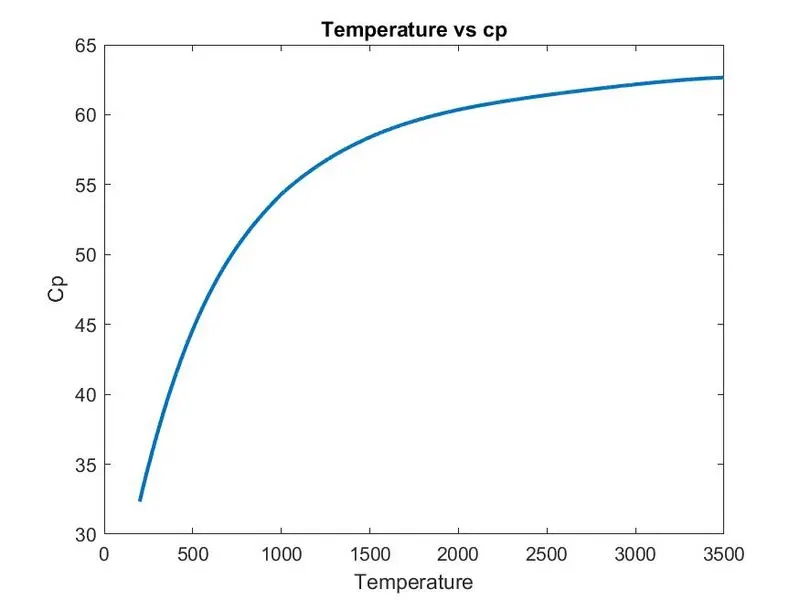
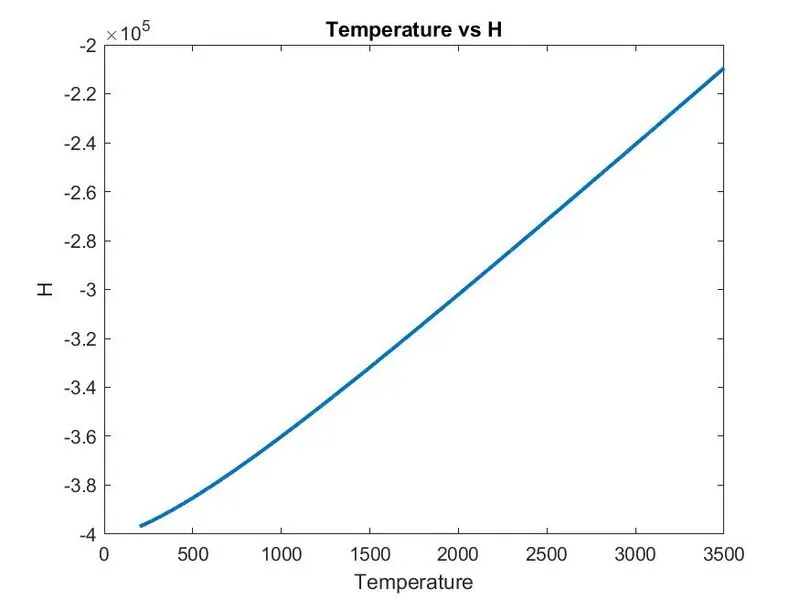
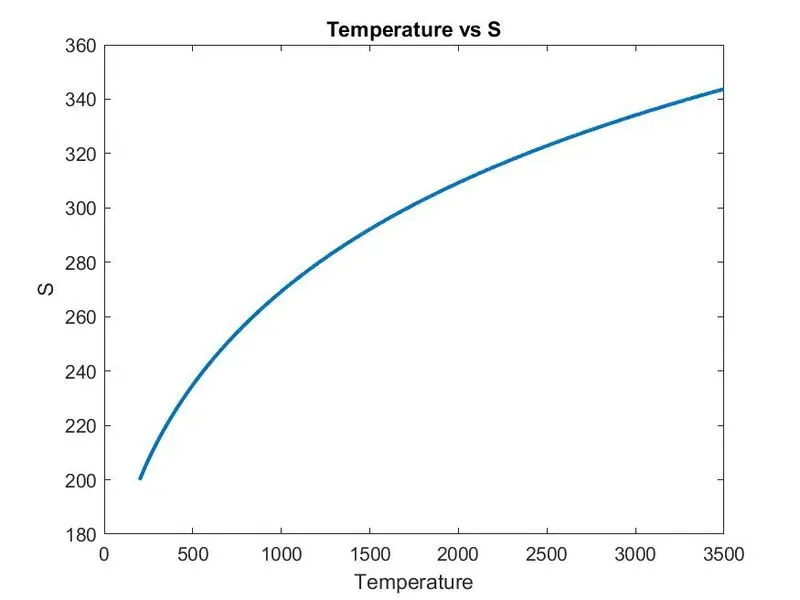
FOLDER CONTAINING PLOTS OF EACH SPECIES:
ERRORS FORMED
: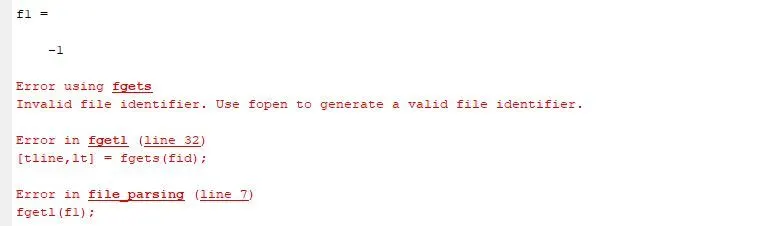
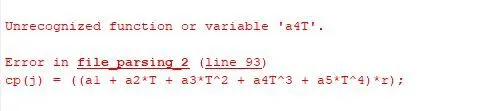

The normal syntax errors with error in case sensitive characters and paranthesis errors are encountered during the time of coding.
CONCLUSION:
- Learned about new syntax and function like FOPEN,FGETL,STRSPLIT,FINDSTR which can be effectivily used for many other coding purposes.
- Able to create a matlab code from an external file data.