Project 1 - Parsing NASA thermodynamic data
File Parsing in MATLAB
Aim:
Calculation of thermodynamic data from the NASA data file using file parsing in MATLAB.
Objective:
- To read the NASA data file containing the species value.
- To calculate the species molecular weight using file parsing method in MATLAB.
- To plot specific heat, entropy and enthalpy with respect global temperature.
- To store species graph with respect to temperature in separate folder.
Description:
To read and write the data from or to the data file or text file is one of the important tasks of engineer to create meaningful plot. This can be done by file parsing using any programming language or scripting software. In file parsing we are writing the data into the file or we can take the data from file to make suitable function for our use. Most of the time engineering data from the software is stored in the either text file or data file, this data can be used to validate the simulation or make changes in it.
To read the file and write, MATLAB has certain syntax for the file parsing. Certain syntax extracts the data in very convenient way from data file or text file. Some of the example those syntaxes are:
- fopen(‘filename.txt.’,’w’) – This syntax is used to create the certain file and ‘w’ means writing into the file.
- fopen(‘filename.txt’,’r’) – This syntax is used to open certain file and read the data from it.
- fprintf(f1,’Hello world’) – This syntax means to create sentence ‘Hello world’ in the file.
- fgetl(f1,(1)) – This syntax is used to extract the first line from the data file or text file.
The similar kind of syntax we are going to use in our program to make it easy to read and create the appropriate function to calculate the required output.
The equation which are used to calculate the thermodynamic data for each species are given by:
`Cp=R*(a1+a2*T+a3*T^2+a4*T^3+a5*T^4 )`
`H=R*T*(a1+a2*T/2+a3*T^2/3+a4*T^3/4+a5*T^4/5+(a6)/T)`
`S=R* (a1* logT+a2*T+a3*T^2/2+a4*T^3/3+a5*T^4/4+a7 )`
Explanation of Code:
- The code is divided in several functions and the main program code. The function has the coefficient which are going to calculate the specific heat, enthalpy and entropy of species for higher and lower temperature range.
- In each function we are providing the ‘if ‘and ‘else’ statement to calculate the species parameter depend on the global medium temperature range. If the temperature is greater than medium temperature then coefficient calculate for global higher temperature else it will calculate for global lower temperature. In each of the function of specific heat, enthalpy and entropy same thing is repeated.
- In function of molecular weight, first we write some pre-defined elements in the function and their atomic weight simultaneously. Then we use species variable to take the all the species from data file. To make the variable uppercase we used upper command. Then we use for loop all the length of species and then similar for loop used for the number of species to make sure the species don’t get repeated we use ‘strcmp’ command to compare the species from both loops. If the variable gets repeated it will not store and if not repeated or newly approached in the loop then it will store as variable which is later use for the calculation of molecular weight.
- After completing the functions, we move to code main code in which the data from the data file can be read. In the start of code, we use molar gas constant and then first header line we skip using ‘fgetl’ command.
- Then we use next line to get the global temperature and stored it variables. To change the string to number we used ‘str2num’ command. Then we have created the array of temperature ranging from global low temperature to global high temperature with 1000 value in between them.
- Then we skipped the other three comments files from data file and moved to create a loop which will read all the data from file. After entering into loop, we used ‘fgetl’ command to get the local temperature and then stored in respective variable.
- Then from next three line we have extracted the 14 coefficients in which 7 are high temperature coefficient and other are lower temperature coefficients. It was done by ‘str2num’ command using special logic using delimiter in the string.
- After finding out each coefficient we have called the function to calculate specific heat, enthalpy and entropy along with molecular weight of species.
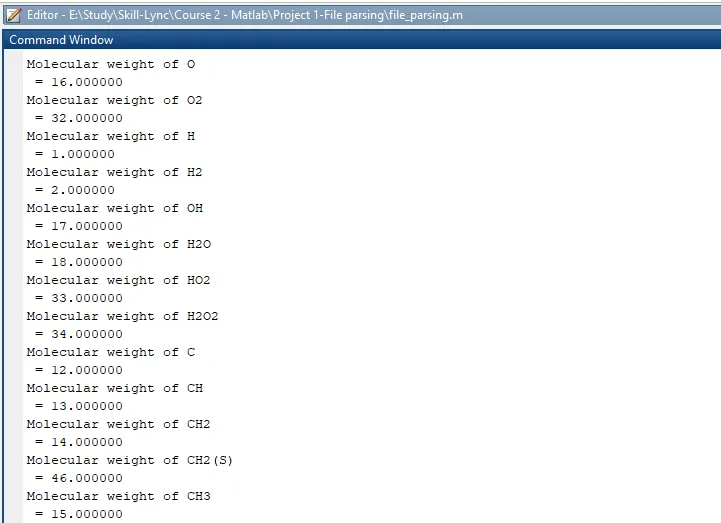
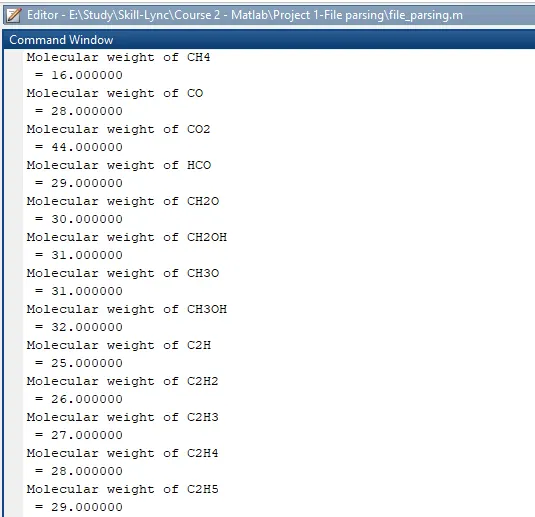
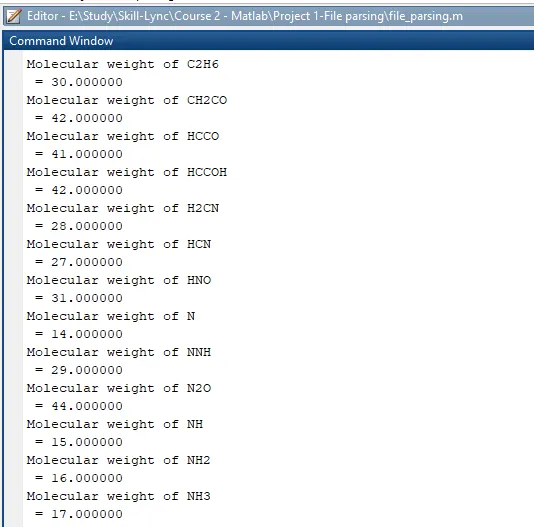
- To store the result, we navigate to certain folder in our data base and created the folder to store all the plots which are plotted for temperature vs specific heat, enthalpy and entropy for each of the species. We make sure that molecular weight to be displayed in the command window by not providing semi colon after the function in ‘fprintf’ command.
The code for each function and main code is given as follows.
Function of specific heat
function cp = specific_heat(a1,a2,a3,a4,a5,a8,a9,a10,a11,a12,T,R,global_mid_temp)

% Calculation of specific heat for global higher and lower temperature

if (T>= global_mid_temp)
    cp = R*(a1+(a2*T)+(a3*(T).^2)+(a4*(T).^3)+(a5*(T).^4));
else
    cp = R*(a8+(a9*T)+(a10*(T).^2)+(a11*(T).^3)+(a12*(T).^4));
end
end
Function for Enthalpy
function H = Enthalpy(a1,a2,a3,a4,a5,a6,a8,a9,a10,a11,a12,a13,T,R,global_mid_temp)

% Calculation of Enthalpy for global higher and lower temperature

if (T>= global_mid_temp)
    H = R*((a1*T)+((a2*(T).^2)/2)+((a3*(T).^3)/3)+((a4*(T).^4)/4)+((a5*(T).^5)/5)+a6);
else
    H = R*((a8*T)+((a9*(T).^2)/2)+((a10*(T).^3)/3)+((a11*(T).^4)/4)+((a12*(T).^5)/5)+a13);
end
end
Function for Entropy
function S = Entropy(a1,a2,a3,a4,a5,a7,a8,a9,a10,a11,a12,a14,T,R,global_mid_temp)

% Calculation of Enthalpy for global higher and lower temperature

if (T>= global_mid_temp)
    S = R*(a1.*log(T)+(a2*T)+((a3*(T).^2)/2)+((a4*(T).^3)/3)+((a5*(T).^4)/4)+a7);
else
    S = R*(a8.*log(T)+(a9*T)+((a10*(T).^2)/2)+((a11*(T).^3)/3)+((a12*(T).^4)/4)+a14);
end
end
Function for Molecular weight
function molecular_wt = wt(species_name)

Elements = ['H' 'C' 'O' 'N' 'A' 'S'];
Atomic_wt = [1 12 16 14 40 32];
species = upper(species_name);

molecular_wt = 0;

for i = 1:length(species)
    for j = 1:length(Elements)
        if strcmp(species(i),Elements(j))
            molecular_wt = molecular_wt + Atomic_wt(j);
            k = j;
        else
            n = str2double(species(i));
            if (n>1)
                molecular_wt = molecular_wt+Atomic_wt(k)*(n-1);
                break
            end
        end
    end
end
end
Main Code
clear all
close all
clc

R = 8.314;      % Molar gas constant

% Opening DAT file 'r' means reading the file
f1 = fopen('THERMO.DAT','r');

% Skipping first header line from data file.
C = fgetl(f1);

% Finding Global Temperature from the DAT file
Temperature = fgetl(f1);
All_temperature = str2num(Temperature);
global_low_temp = All_temperature(:,1);
global_mid_temp = All_temperature(:,2);
global_high_temp = All_temperature(:,3);

% Temeprature range for which value need to calculated
T = linspace(global_low_temp,global_high_temp,1000);

% Skipping 3 Header lines
L1 = fgetl(f1);
L2 = fgetl(f1);
L3 = fgetl(f1);

% Calculation of Species and plotting for Cp, H and S

for i = 1:53

    % Getting species temperature
    L4 = fgetl(f1);
    L = strsplit(L4,' ');
    name_of_species = (L{1});
    low_temp = str2num(L{end-3});
    mid_temp = str2num(L{end-2});
    high_temp = str2num(L{end-1});

    % Finding co-efficient from data file.

    L5 = fgetl(f1);
    a = findstr(L5,'E');

    a1 = str2num(L5(1:a(1)+3));
    a2 = str2num(L5(a(1)+4:a(2)+3));
    a3 = str2num(L5(a(2)+4:a(3)+3));
    a4 = str2num(L5(a(3)+4:a(4)+3));
    a5 = str2num(L5(a(4)+4:a(5)+3));

    L6 = fgetl(f1);
    a = findstr(L6,'E');

    a6 = str2num(L6(1:a(1)+3));
    a7 = str2num(L6(a(1)+4:a(2)+3));
    a8 = str2num(L6(a(2)+4:a(3)+3));
    a9 = str2num(L6(a(3)+4:a(4)+3));
    a10 = str2num(L6(a(4)+4:a(5)+3));

    L7 = fgetl(f1);
    a = findstr(L7,'E');
    a11 = str2num(L7(1:a(1)+3));
    a12 = str2num(L7(a(1)+4:a(2)+3));
    a13 = str2num(L7(a(2)+4:a(3)+3));
    a14 = str2num(L7(a(3)+4:a(4)+3));


    % Calculation of Specific heat, Enthalpy and Entropy

    Cp = specific_heat(a1,a2,a3,a4,a5,a8,a9,a10,a11,a12,T,R,global_mid_temp);
    H = Enthalpy(a1,a2,a3,a4,a5,a6,a8,a9,a10,a11,a12,a13,T,R,global_mid_temp);
    S = Entropy(a1,a2,a3,a4,a5,a7,a8,a9,a10,a11,a12,a14,T,R,global_mid_temp);

    % Calculation of Molecular weight
    Molecular_wt = wt(name_of_species);
    fprintf('Molecular weight of %s\n = %f\n',name_of_species,Molecular_wt)

    % Plotting for Specific Heat, Enthalpy and Entropy

    cd('E:\Study\Skill-Lync\Course 2 - Matlab\Project 1-File parsing')
    mkdir(name_of_species);         % Creation of folder for species
    cd(name_of_species);

    figure(1);
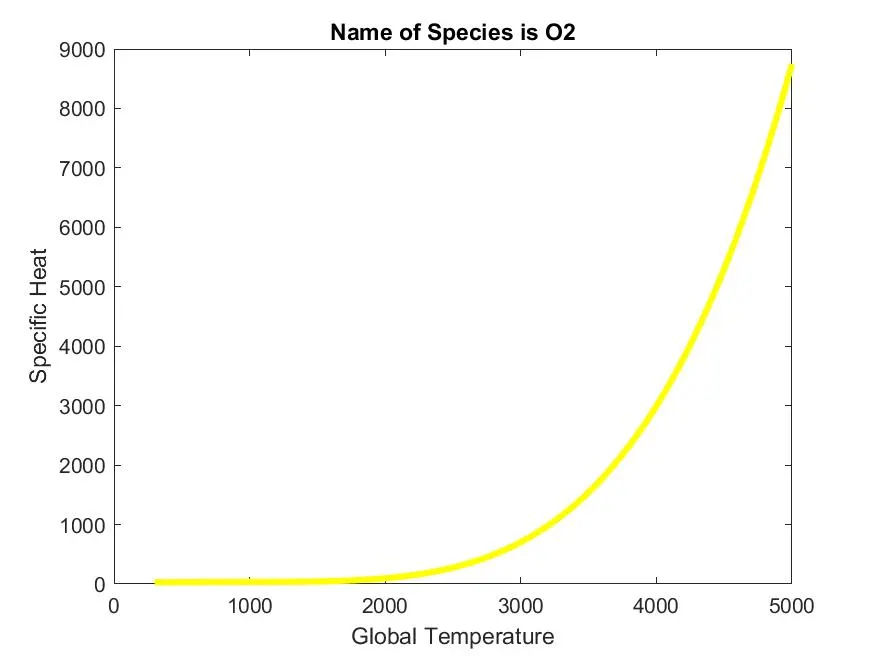
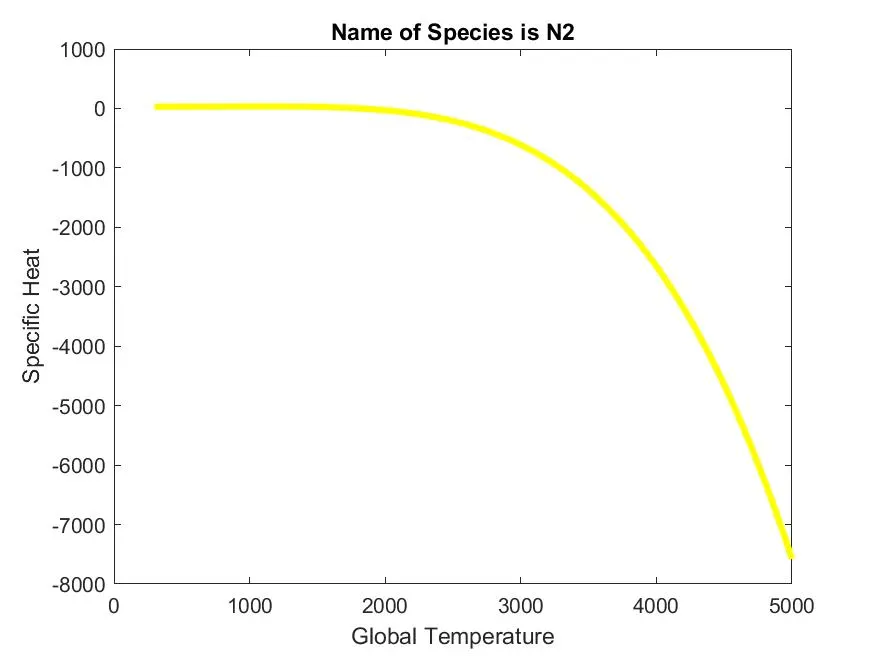
    plot(T,Cp,'linewidth',3,'color','y')
    xlabel('Global Temperature')
    ylabel('Specific Heat')
    title(sprintf('Name of Species is %s',name_of_species));
    saveas(figure(1),'Specific Heat.jpg');

    figure(2);
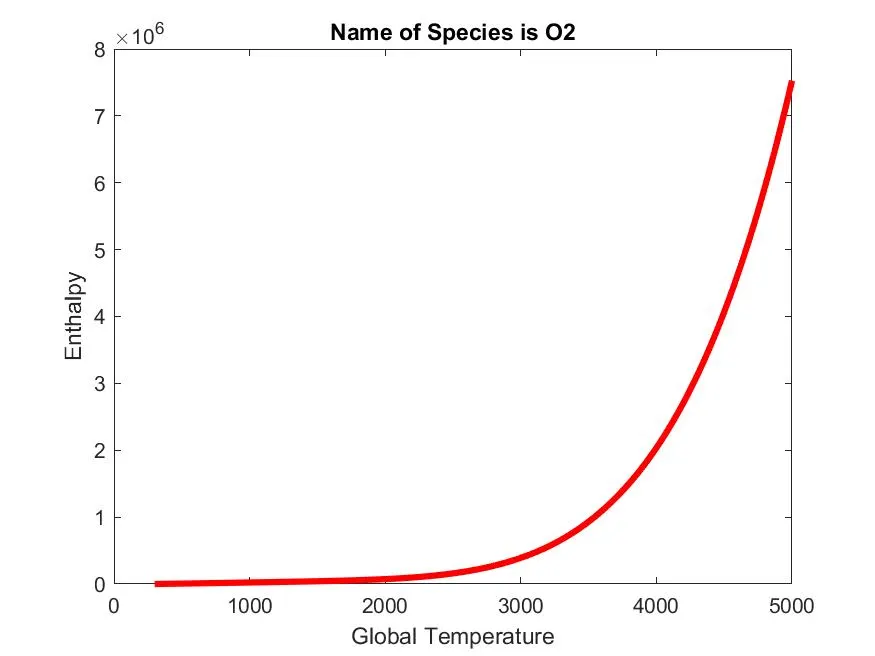
    plot(T,H,'linewidth',3,'color','r')
    xlabel('Global Temperature')
    ylabel('Enthalpy')
    title(sprintf('Name of Species is %s',name_of_species));
    saveas(figure(2),'Enthalpy.jpg');

    figure(3);
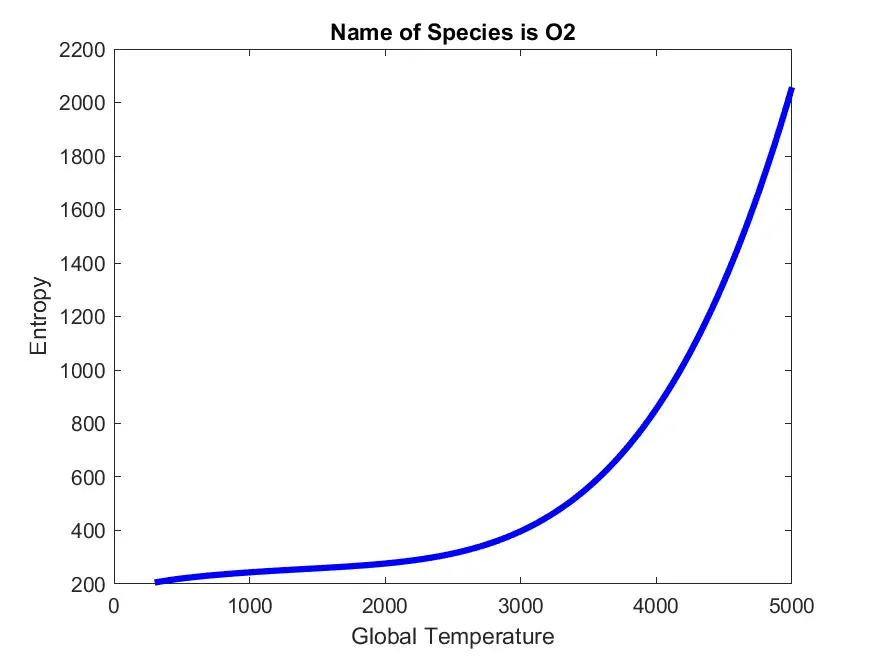
    plot(T,S,'linewidth',3,'color','b')
    xlabel('Global Temperature')
    ylabel('Entropy')
    title(sprintf('Name of Species is %s',name_of_species));
    saveas(figure(3),'Entropy.jpg');

    cd('E:\Study\Skill-Lync\Course 2 - Matlab\Project 1-File parsing')

end
Inference from Plots.
A] Oxygen (O2)
- Specific heat for Oxygen with respect to temperature
- Enthalpy for Oxygen with respect to Temperature
- Entropy for Oxygen with respect to temperature
B] Nitrogen (N2)
- Specific heat of Nitrogen with respect to temperature
- Enthalpy of Nitrogen with respect to temperature
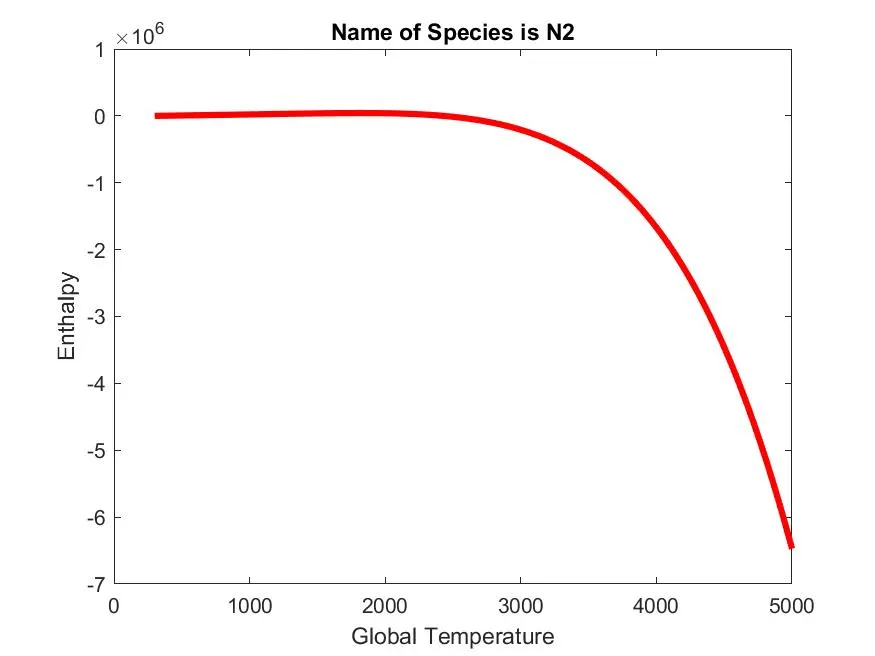
- Entropy for Nitrogen with respect to Temperature
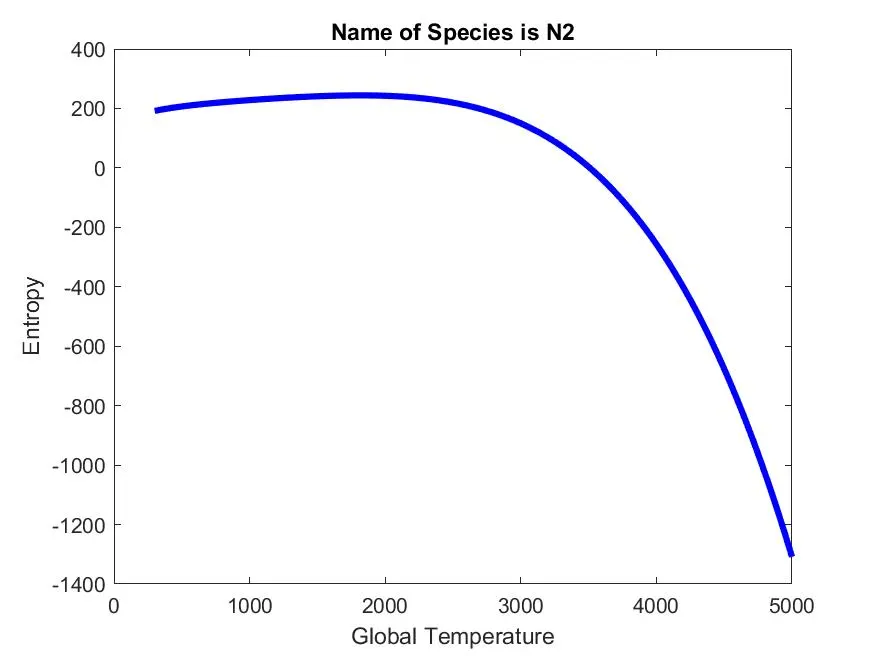
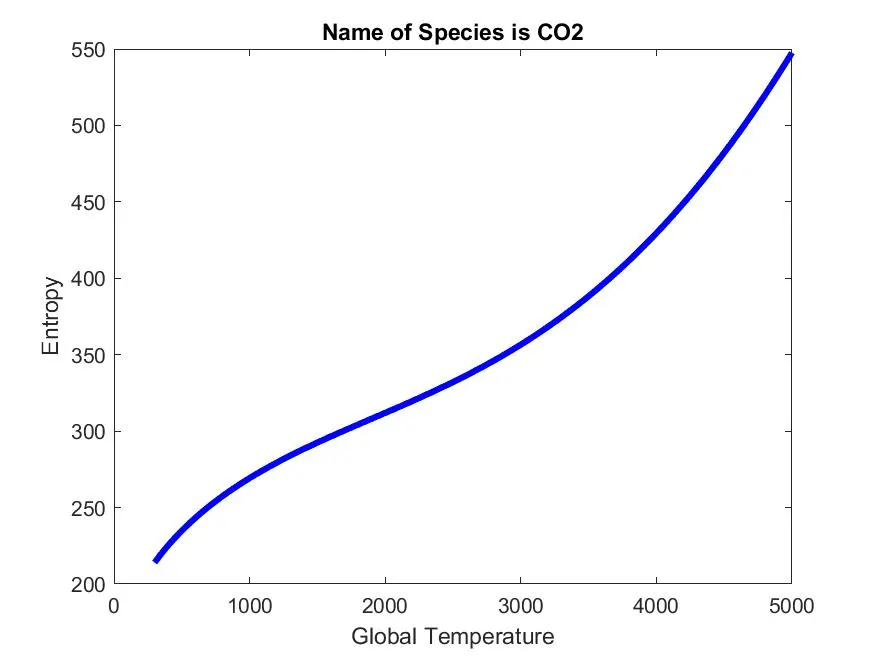
C] Carbon Di-oxide (CO2)
- Specific heat of Carbon di-oxide with respect to temperature
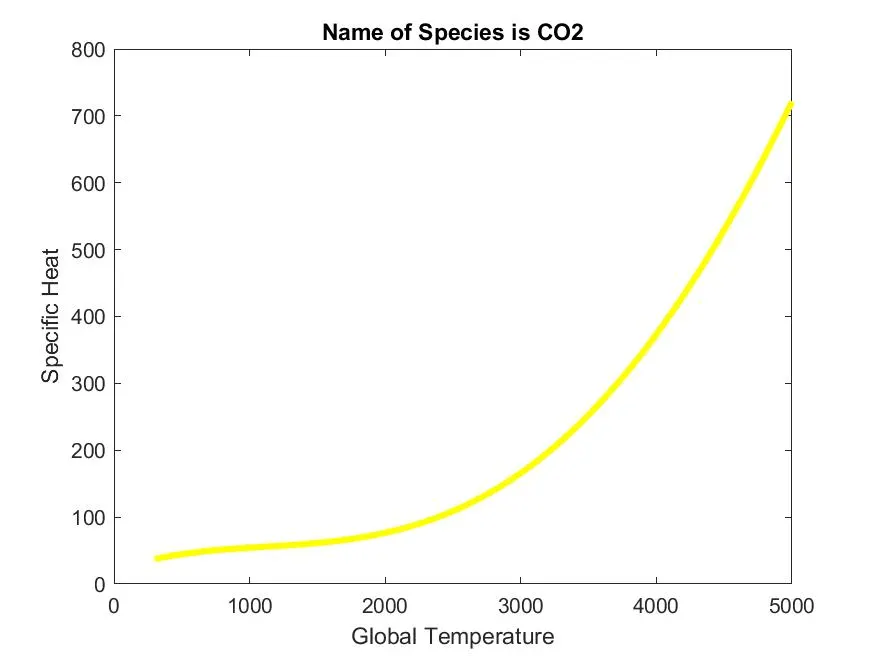
- Enthalpy of Carbon di-oxide with respect to Temperature
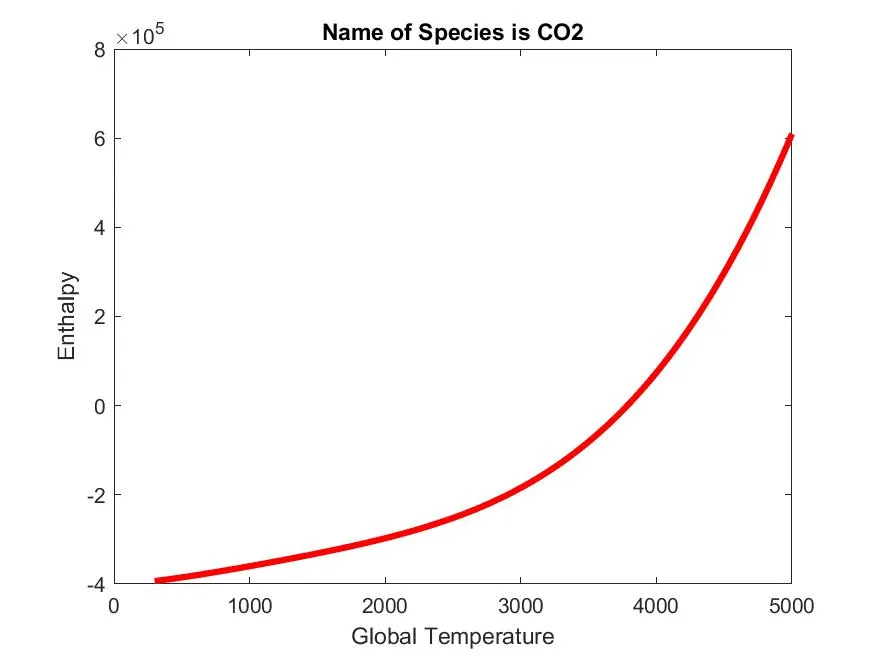
- Entropy of Carbon di-oxide with respect to Temperature
Molecular Weight of Species:
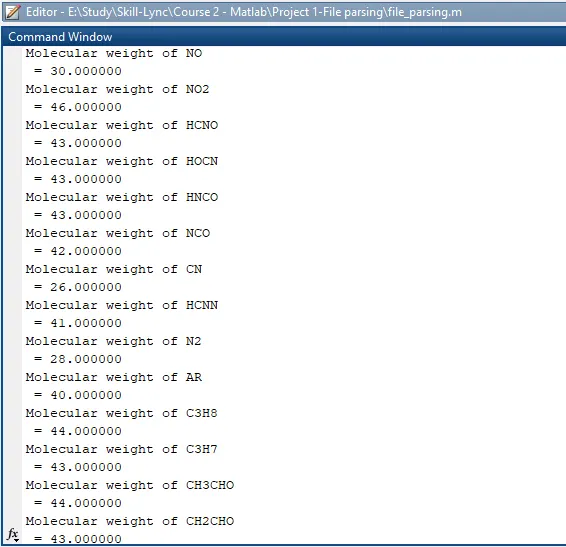
Screeshot of Directory

Errors in code
1) Error 1
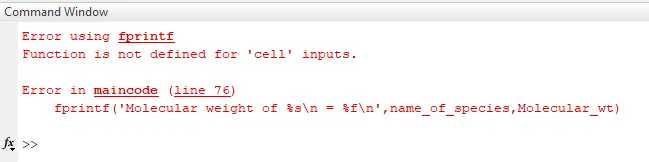
This error is arise because of not using curly brackets during changing the string to number format. It was quite difficult to find the error is, it was clarified by checking each and every statement of code.
Conclusion:
So, we have used various file parsing command in the MATLAB to extract the data from 'THERMO.DAT' file and plotted the various result to calculate the thermodynamic properties.