Project 1 - Parsing NASA thermodynamic data
Aim: To parse NASA's thermodynamic data to extract documented coefficients and to evaluate the polynomials which define the thermodynamic properties such as Cp, H and S.
Objectives:
- To write a function that extracts the 14 coefficients and calculates the enthalpy, entropy and specific heats for all the species in the data file.
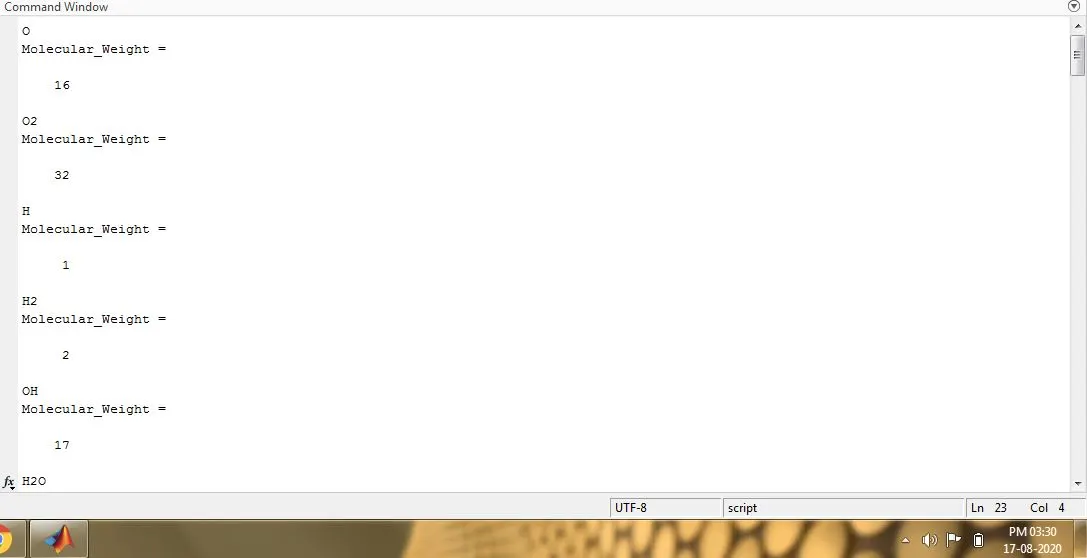
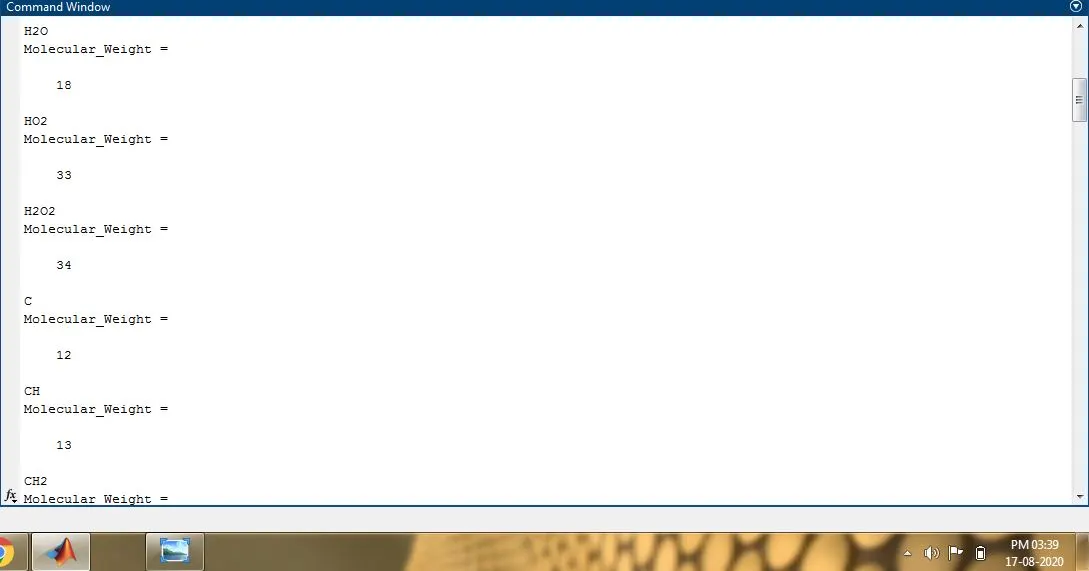
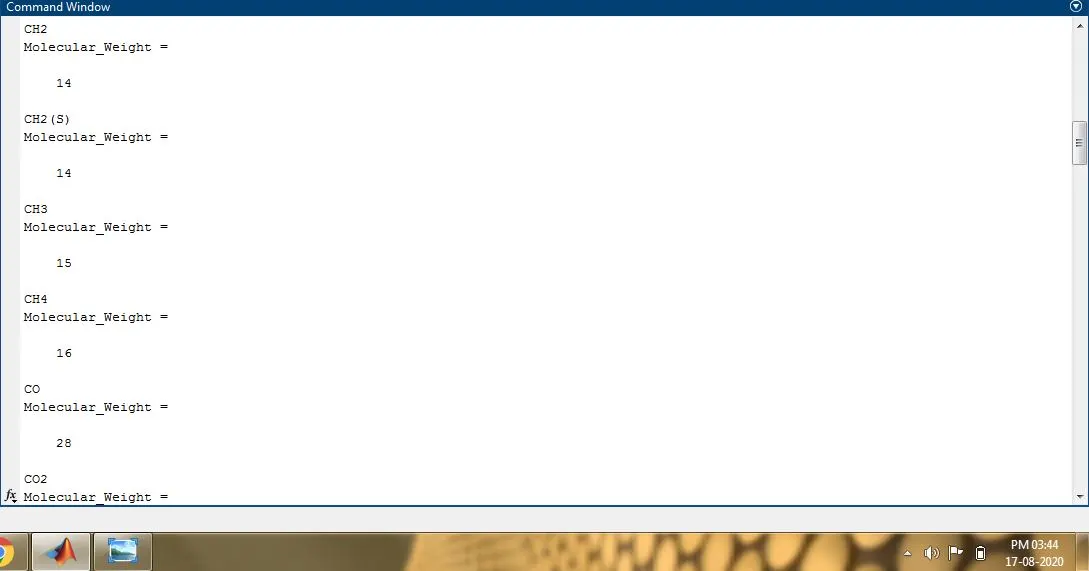
- To write a function which calculates the molecular weight of each species.
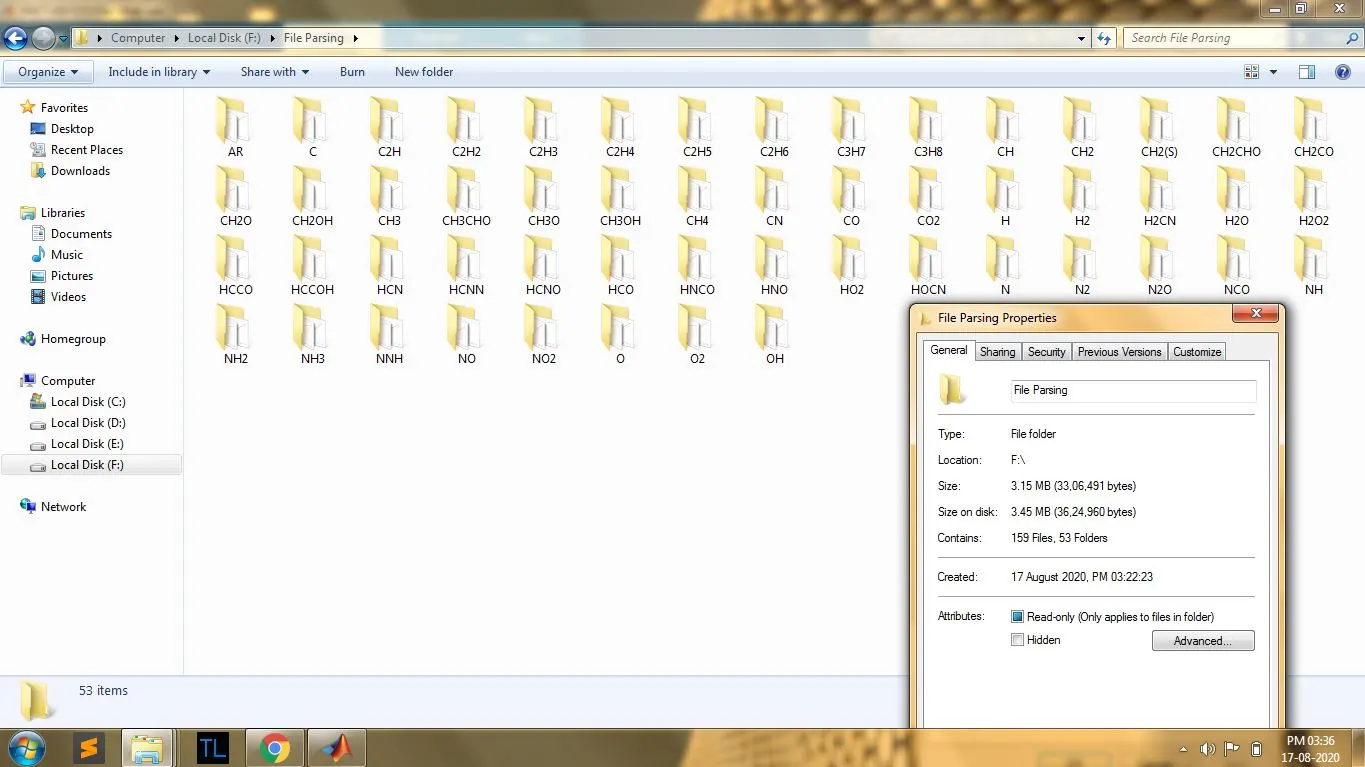
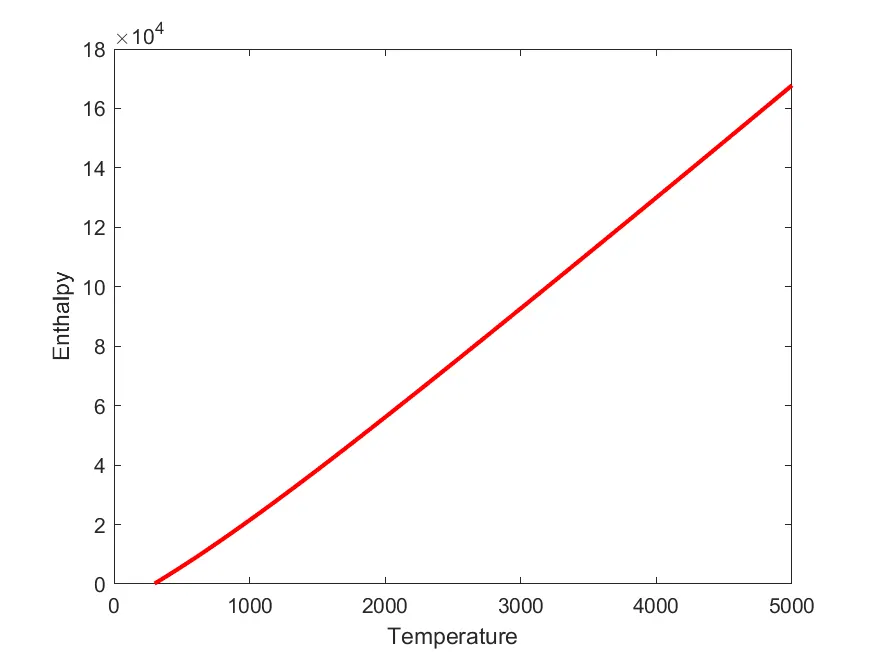
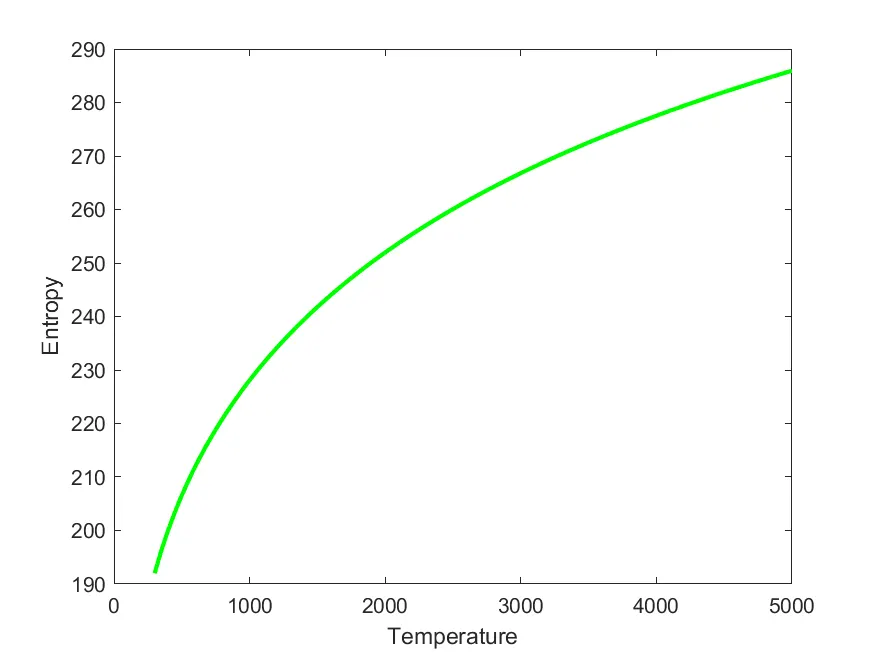
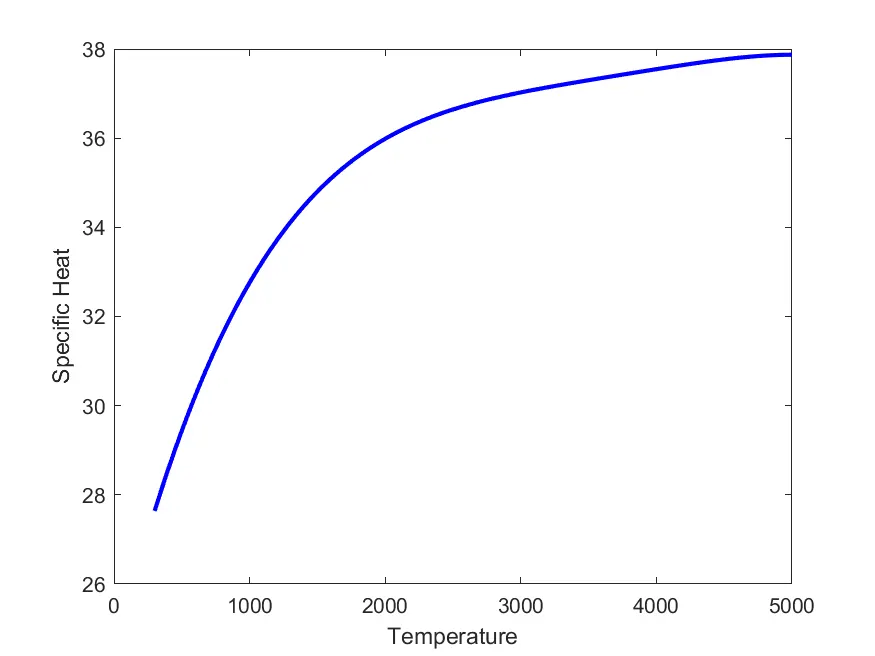
- To plot the Cp, Enthalpy and Entropy for the local temperature range which is unique for each individual species and to save it as images automatically with appropriate names and dump them in separate folders for each species with a suitable name.
NASA's Polynomial to calculate the thermodynamic properties for 1000+ species:

Matlab Code:
clear all
close all
clc

% NASA Thermodynamic Data Analysis through File Parsing
% By Arjun Damodar

% Main Program - reading the NASA thermodynamic data; Plot the Cp, Enthalpy and Entropy for the local temperature range
% ....Save the plots as images with appropriate names and dump them in separate folders for each species with suitable name

file = fopen('THERMO.dat','r'); % Opens the file in read mode
filename = fgetl(file); %Reads the header line
firstline = fgetl(file); % Reads the line after header which contains temperature values

% Extracting global temperature values from first line
temp_range = strsplit(firstline,' ');
g_low_temp = str2num(temp_range{2});
g_med_temp = str2num(temp_range{3});
g_high_temp = str2num(temp_range{4});

for i = 1:3
    a = fgetl(file); %Skips next 3 lines after the firstline
end

for j = 1:53 % number of species is 53, so loop run 53 times covering each species

    line_1 = fgetl(file);
    A = strsplit(line_1,' ');
    compounds = (A{1});
    G = strfind(line_1,'G');
    local_low_temp = str2double(line_1(G+3:G+10));
    local_high_temp = str2double(line_1(G+12:G+20));
    local_med_temp = str2double(line_1(G+22:G+30));
    T = linspace(local_low_temp,local_high_temp,100);

    line_2 = fgetl(file);
    L2 = strfind(line_2,'E');
    a1 = str2num(line_2(1:L2(1)+3));
    a2 = str2num(line_2(L2(1)+4:L2(2)+3));
    a3 = str2num(line_2(L2(2)+4:L2(3)+3));
    a4 = str2num(line_2(L2(3)+4:L2(4)+3));
    a5 = str2num(line_2(L2(4)+4:L2(5)+3));

    line_3 = fgetl(file);
    L3 = strfind(line_3,'E');
    a6 = str2num(line_3(1:L3(1)+3));
    a7 = str2num(line_3(L3(1)+4:L3(2)+3));
    A1 = str2num(line_3(L3(2)+4:L3(3)+3));
    A2 = str2num(line_3(L3(3)+4:L3(4)+3));
    A3 = str2num(line_3(L3(4)+4:L3(5)+3));

    line_4 = fgetl(file);
    L4 = strfind(line_4,'E');
    A4 = str2num(line_4(1:L4(1)+3));
    A5 = str2num(line_4(L4(1)+4:L4(2)+3));
    A6 = str2num(line_4(L4(2)+4:L4(3)+3));
    A7 = str2num(line_4(L4(3)+4:L4(4)+3));

    % Creating specific folders for saving species data and plots

    mkdir(['F:File Parsing',compounds]);
    cd(['F:File Parsing',compounds]);

    % Calling Function to get Cp,H,S values

    [Cp,H,S] = coefficients(a1,a2,a3,a4,a5,a6,a7,A1,A2,A3,A4,A5,A6,A7,T,g_med_temp);

    % Plotting

    figure(1)
    plot(T,Cp,'b','linewidth',2);
    xlabel('Temperature');
    ylabel('Specific Heat');
    image_1 = sprintf("Specific Heat Vs Temperature of [%s].png",compounds);
    saveas(gca,image_1);

    figure (2)
    plot(T,H,'r','linewidth',2);
    xlabel('Temperature');
    ylabel('Enthalpy');
    image_2 = sprintf("Enthalpy Vs Temperature of [%s].png",compounds);
    saveas(gca,image_2);

    figure (3)
    plot(T,S,'g','linewidth',2);
    xlabel('Temperature');
    ylabel('Entropy');
    image_3 = sprintf("Entropy Vs Temperature of [%s].png",compounds);
    saveas(gca,image_3);

    cd(['F:File Parsing',compounds]);

    % Calling function to get molecular weight of the species

    fprintf(compounds);
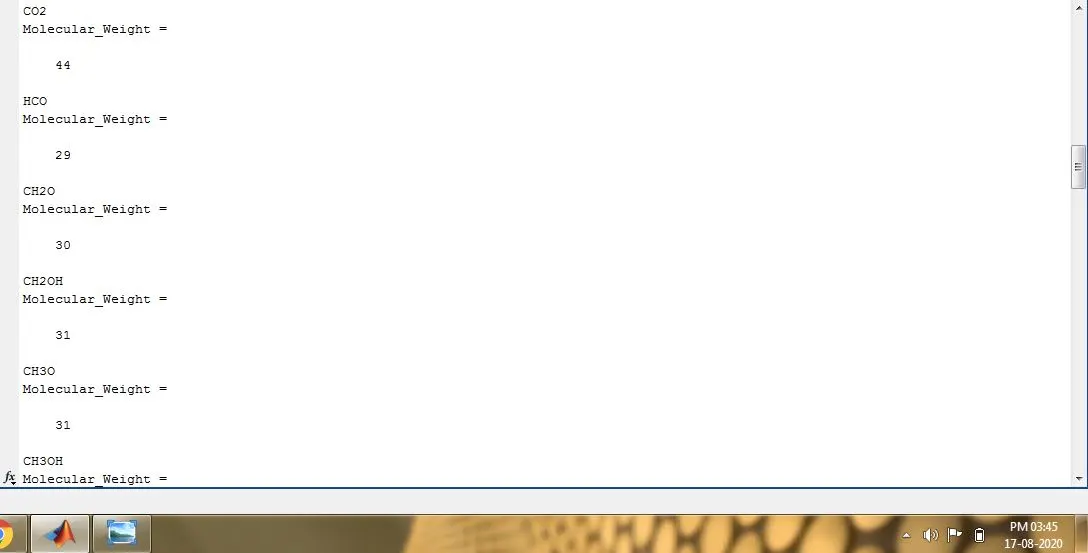
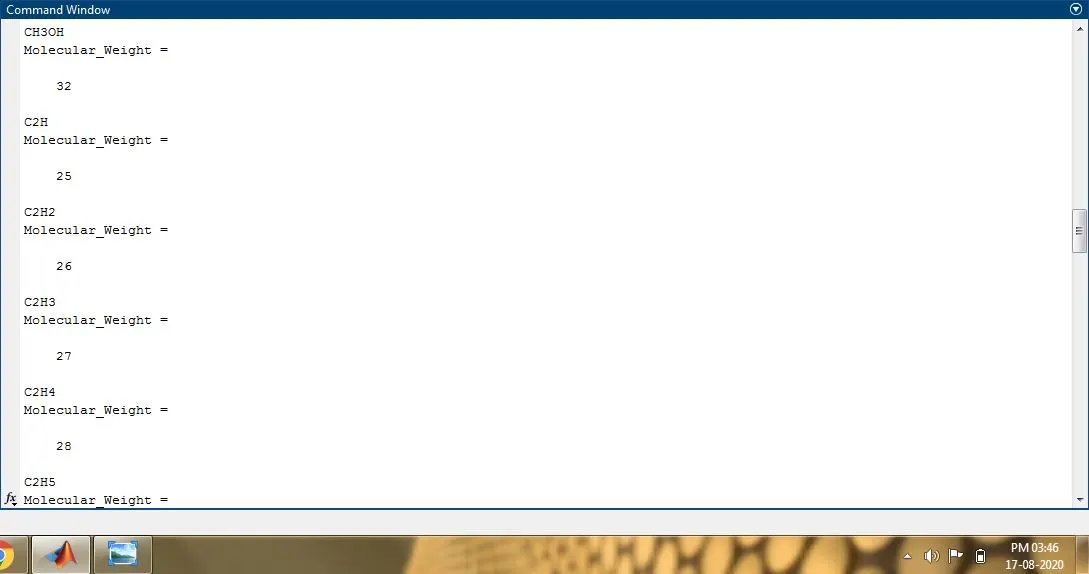
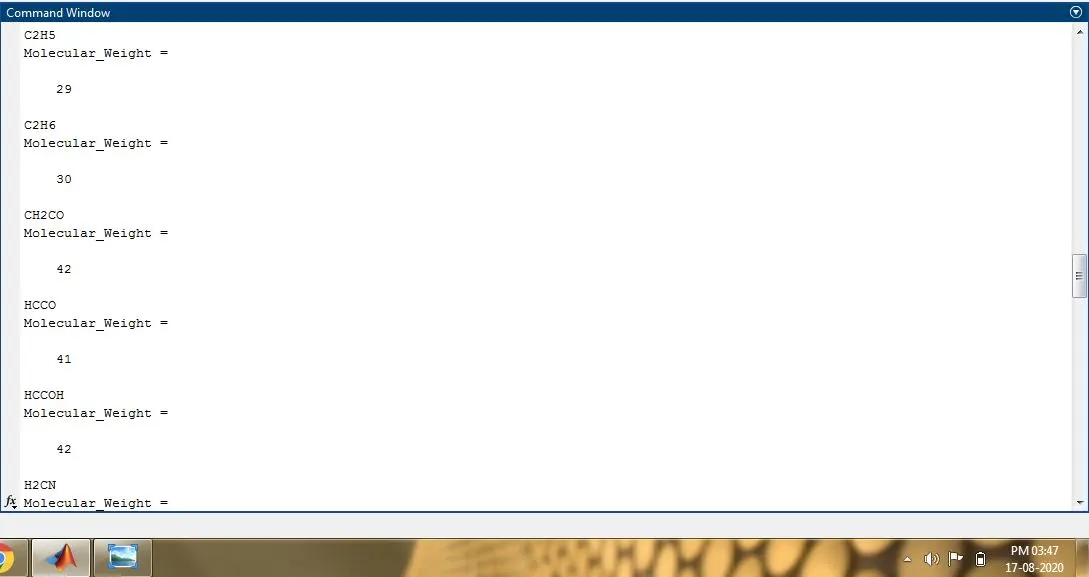
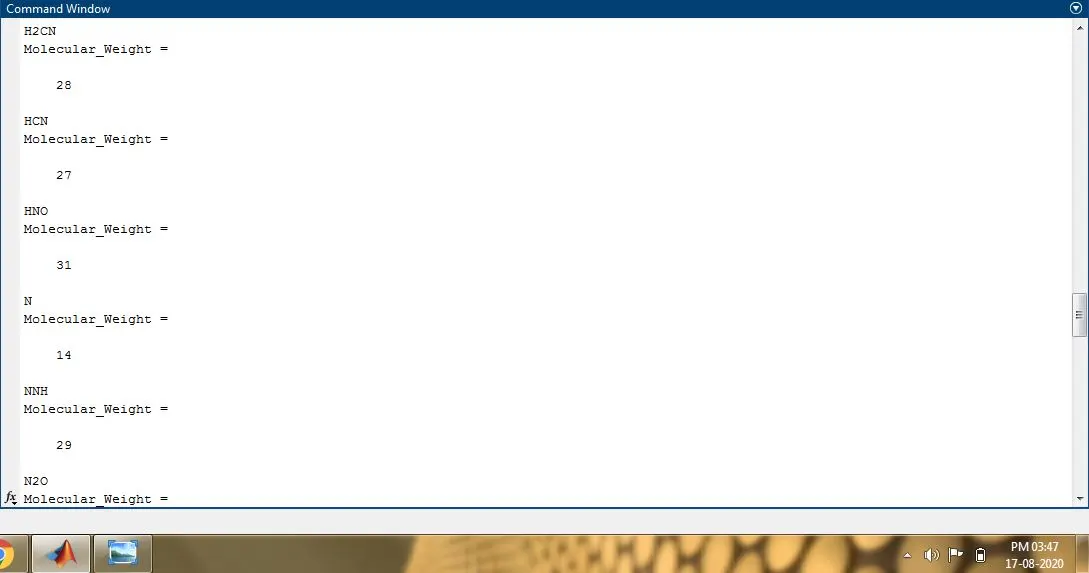
    Molecular_Weight = molecular_weight(compounds)


end
fclose(file);

% Function that extracts the 14 co-efficients and calculates the Enthalpy (H), Entropy (S) and Specific Heat (Cp)
%... for all the species in the data file

function[Cp,H,S] = coefficients(a1,a2,a3,a4,a5,a6,a7,A1,A2,A3,A4,A5,A6,A7,T,g_med_temp)
%a1-a7 are high temp coeffcients; A1-A7 are low temperature coefficients; T - Temperature;
R = 8.314; % Universal Gas Constant
for i = 1:length(T)
    if T(i)> g_med_temp
        Cp = (a1+(a2.*T)+(a3.*T.^2)+(a4.*T.^3)+(a5.*T.^4)).*R;
        H = (a1+(a2.*T./2)+(a3.*(T.^2)./3)+(a4.*(T.^3)./4)+(a5.*(T.^4)./5)+(a6./T)).*(R*T);
        S = (a1.*log(T)+(a2.*T)+(a3.*(T.^2)./2)+(a4.*(T.^3)./3)+(a5.*(T.^4)./4)+a7).*R;
    else
        Cp = (A1+(A2.*T)+(A3.*T.^2)+(A4.*T.^3)+(A5.*T.^4))*R;
        H = (A1+(A2.*T./2)+(A3.*(T.^2)./3)+(A4.*(T.^3)./4)+(A5.*(T.^4)./5))+(A6./T).*(R*T);
        S = (A1.*log(T)+(A2.*T)+(A3.*(T.^2)./2)+(A4.*(T.^3)./3)+(A5.*(T.^4)./4)+A7).*R;

    end
end
end

% Function to calculate the molecular weight of the compounds/species made out of elements suchs as
%..Hydrogen(H), Nitrogen(N), Oxygen(O, Carbon (C) and Argon(Ar)

function[M] = molecular_weight(compounds)
atoms = {'H','C','N','O','AR'};
atomic_weights = [1 12 14 16 40];
M = 0;
for i = 1:length(compounds)
    for j = 1:length(atoms)

        % To compare the alphabets of compounds with that of atoms
        if (strcmp(compounds(i),atoms(j))==1)
            M = M + atomic_weights(j);
            pos = j;
        end
    end
    n = str2num(compounds(i));
    if n>1
        M = M + atomic_weights(pos)*(n-1);
    end
end
end
Explanation of the code:
Main Program:
1. The Matlab script is divided into 3 parts, one is the main program and the other two are functions used to extract coefficients and evaluate the thermodynamic properties and to calculate the molecular weight.
2. Using 'fopen()' the given thermodynamic file is opened.
3. The 'fgetl()' command is used to read the data line by line.
4. The 'strsplit(str,delimiter)'in-built function splits str at the delimiters specified by delimiter.
5. Global temperature values have been extracted and assigned in suitably named variables.
6. The first 'for' loop runs for 3 times and skips 3 lines after the line having global temperature values.
7. The next 'for' loop runs for 53 times since there are 53 species with 14 coefficients each.
8. According to the data file given, each species contains 4 lines of information, where the first line (line_1) has the details of local temperature values and the second (line_2), third (line_3) and fourth line (line_4) contains a number of 5, 5, 4 coefficients respectively, having a total of 14 for each species.
9. From line_1, the species name is read and stored in a string array named as compounds. Also, the local temperature values were extracted.
10. The 'strfind( function searches str,pattern)'str for occurrences of pattern. The strfind function executes a case-sensitive search.
-
If
stris a character vector or a string scalar, thenstrfindreturns a vector of typedouble. -
If
stris a cell array of character vectors or a string array, thenstrfindreturns a cell array of vectors of typedouble.
11. The 'str2double( converts the text in str)'str to double-precision values. str contains text that represents real or complex numeric values. str can be a character vector, a cell array of character vectors, or a string array. If str is a character vector or string scalar, then the output is a numeric scalar. If str is a cell array of character vectors or a string array, then output is a numeric array that is the same size as str.
12. The str2num( ) converts a character array or string scalar to a numeric matrix.
13. Using these functions all the four lines including local temperature values and coefficients were read and assigned to suitable variables.
Note: The 'str2num' function does not convert cell arrays or nonscalar string arrays and is sensitive to spacing around + and - operators. In addition, str2num uses the eval function, which can cause unintended side effects when the input includes a function name. This can be avoided by using str2double.
14. The 'mkdir()' is used to create the folder(directory) and 'cd()' is used to store the plots inside the directory assigning the path.
15. Function to extract coefficients is called.
16. Graphs were plotted and saved using saveas(gca, filename), where gca returns the current axes or chart for the current figure, which is typically the last one created or clicked with the mouse.
16. Function to calculate the molecular weight is called.
Function - 1
1. The function to extract 14 coefficients is defined with 14 variables.
2. The extracted global medium temperature is used with if condition to divide the coefficients.
3. a1 to a7 contains high temp coefficients and A1 to A7 stores low temp coefficients.
4. The coefficient values were used to calculate the values of Cp, H and S.
Function - 2
1. This function calculates the molecular weight of each species.
2. Atoms were defined in the form of strings.
3. The atomic weights of each atom were stored in an array.
4. strcmp( compares s1,s2)s1 and s2 and returns 1 (true) if the two are identical and 0 (false) otherwise. Text is considered identical if the size and content of each are the same.
5. The molecular weights were calculated every time the if condition returns 1.
Results:
Screenshot of the folder:
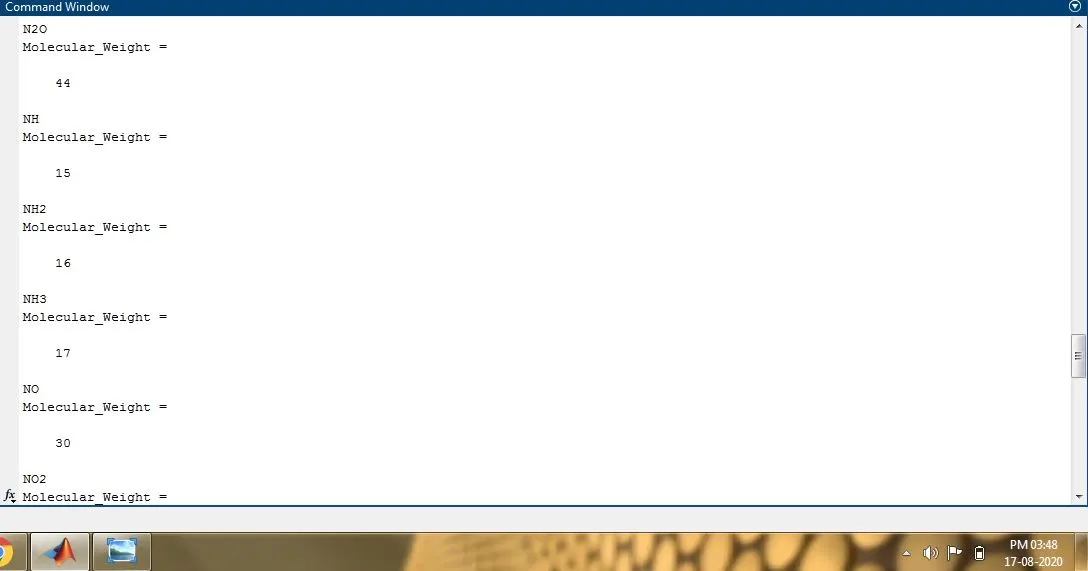
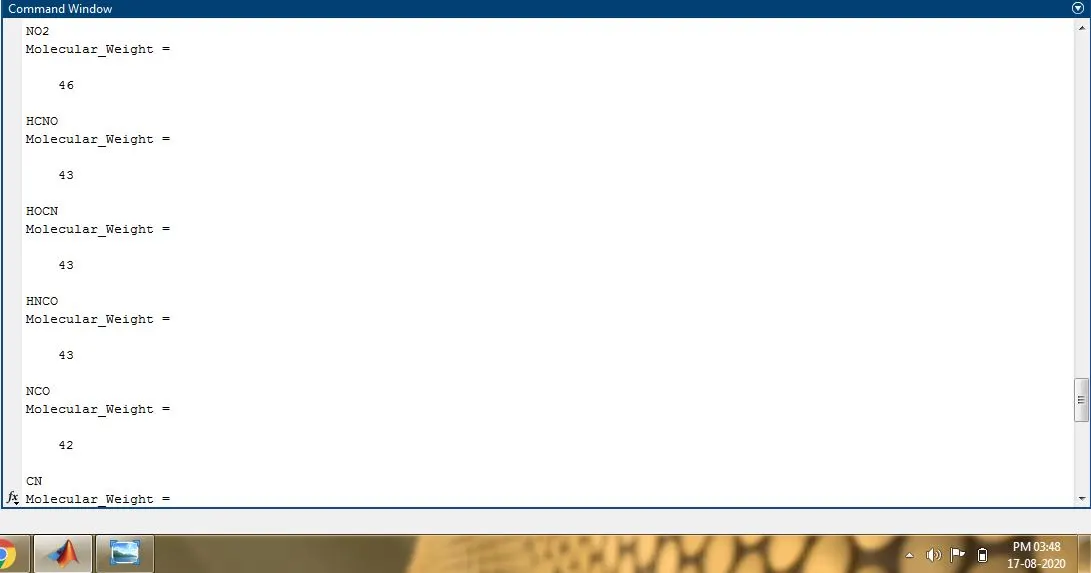
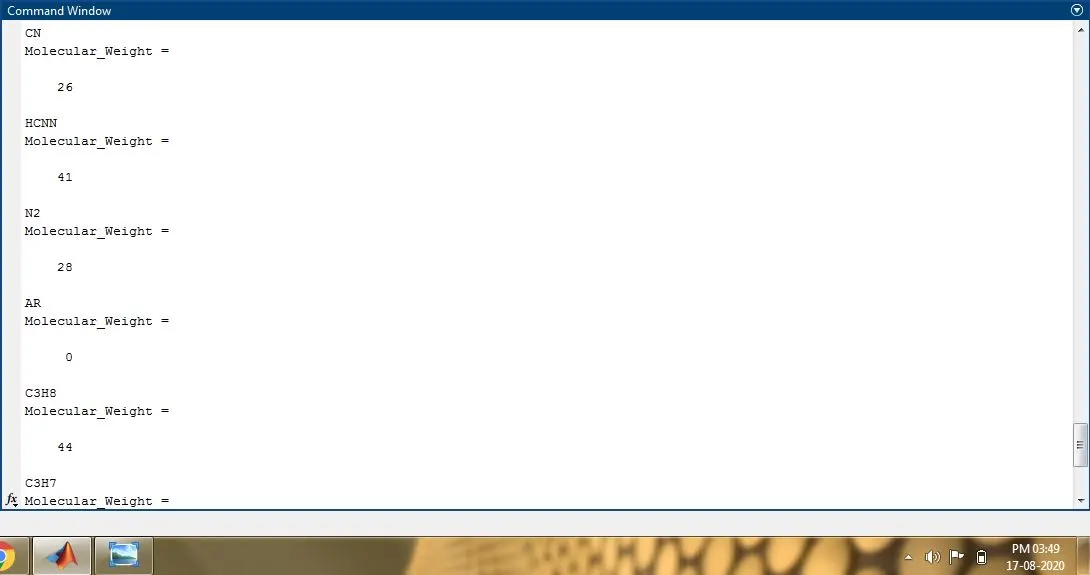
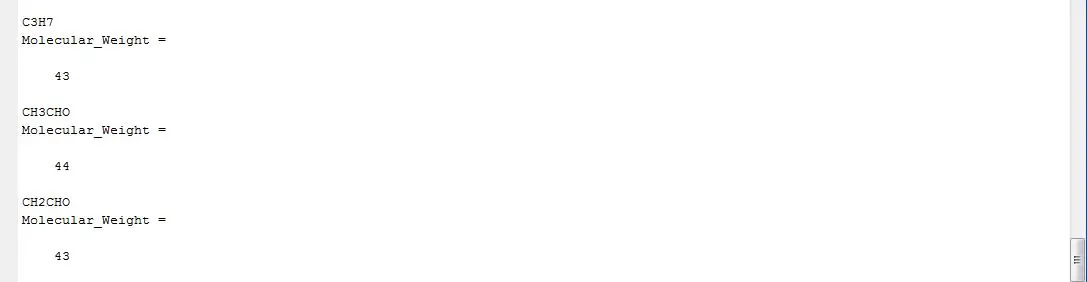
Molecular weights of the species:
Plots for N2, O2 and CO2:
N2:
O2:
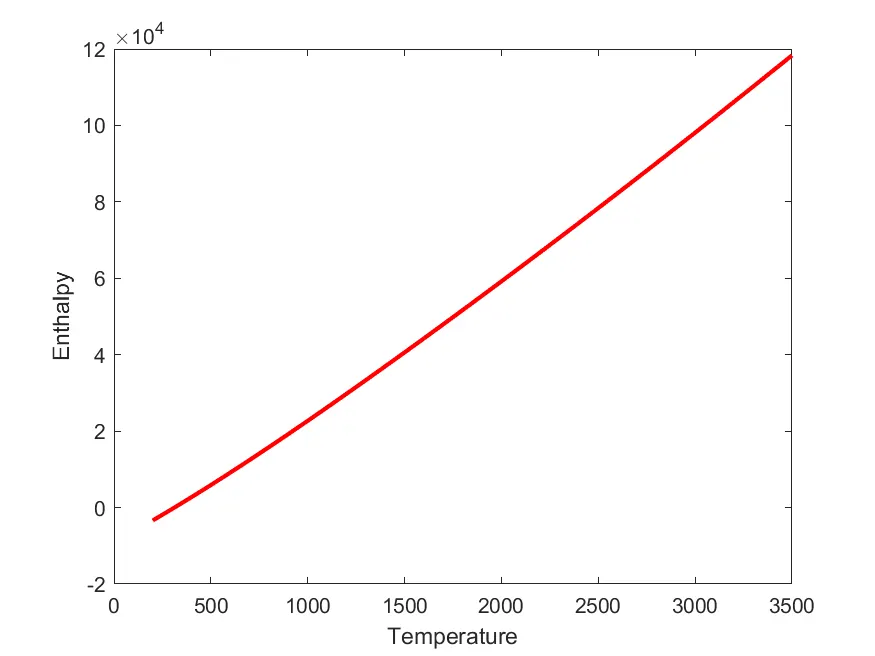
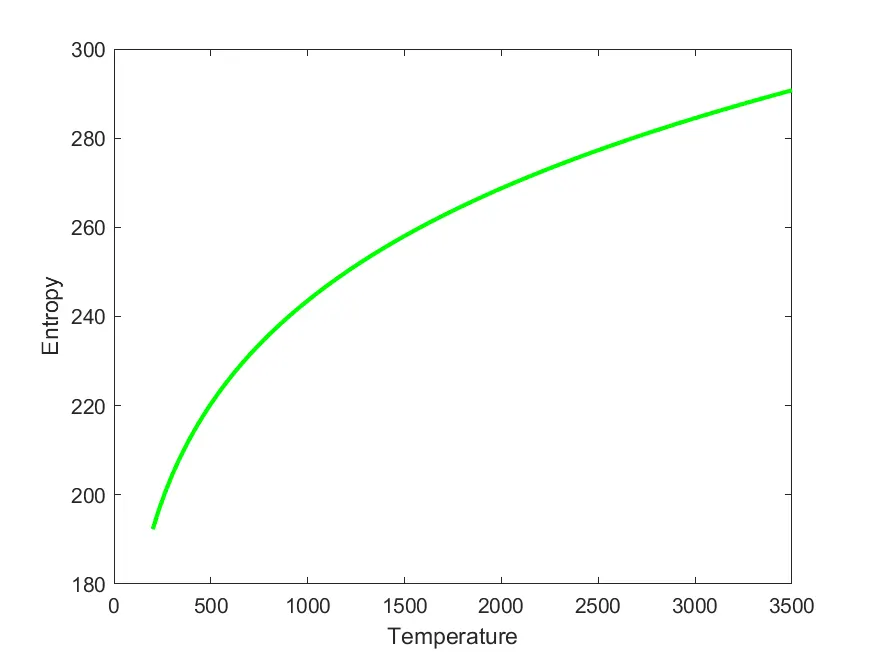
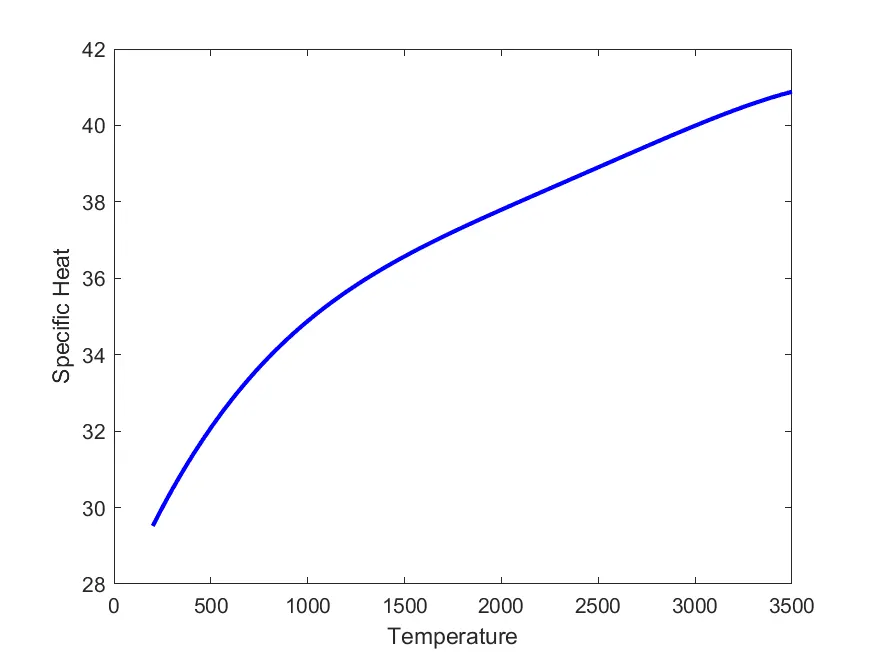
CO2:
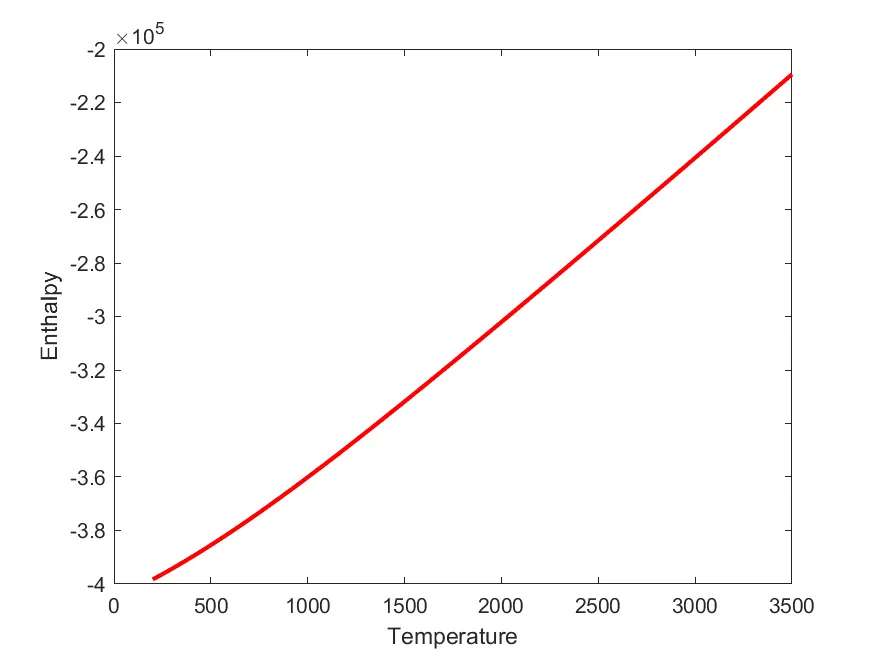
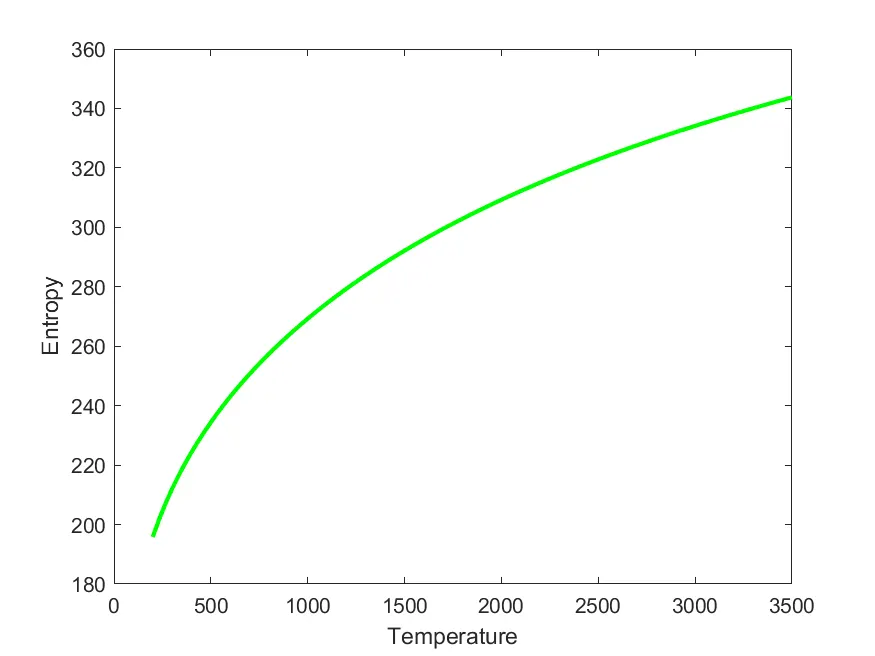
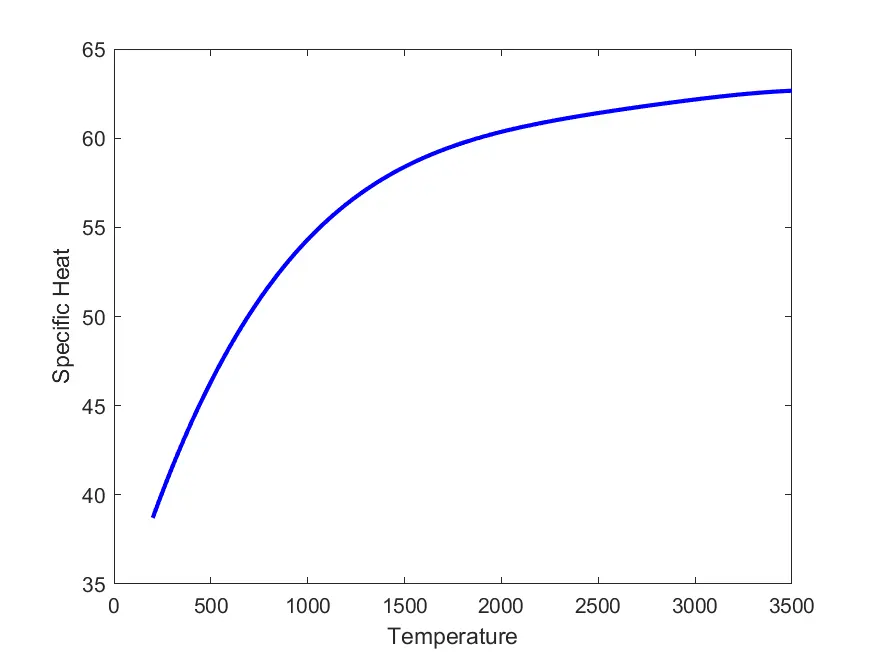
Error Faced: The 'linspace' command with local temperature ranges when used with 'str2num' in line_1 stops the 'for' loop in the 18th iteration which then rectified by replacing 'str2num' with 'str2double'.
Conclusion:
The given thermodynamic data is read and the relationship of Cp, H and S with Temperature for 53 species has been plotted and studied along with the calculation of the molecular weight of the species.
Learning outcome:
- Parsing and manipulating data from a file
- Creating and navigating to folders in Matlab
- Plotting and saving plots automatically
- Usage of conditionals
- Creating modular codes that can work for different inputs
References:
https://www.mathworks.com/matlabcentral/answers/52243-why-str2double-is-preferred-over-str2num
https://www.mathworks.com/help/matlab/ref/strsplit.html
https://www.mathworks.com/help/matlab/ref/strfind.html
https://www.mathworks.com/help/matlab/ref/saveas.html
https://www.mathworks.com/help/matlab/ref/gca.html#:~:text=example,of%20the%20axes%20or%20chart.