Project 1 - Interfacing a 16*2 LCD with Arduino using I2C protocol
Connecting two arduino's with I2C communication protocol and printing the recieved message on LCD
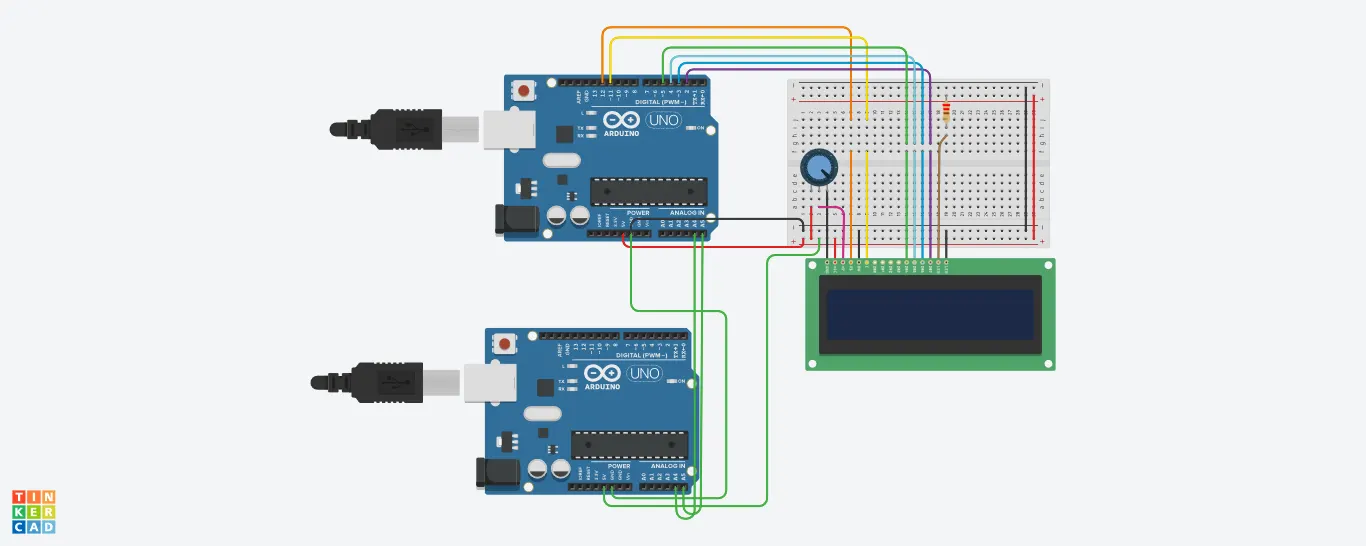
Pin connections
Both Arduinos:
- 5V: Connect to the 5V pin on each Arduino board.
- GND: Connect to the GND pin on each Arduino board.
- SDA: Connect the SDA pin of one Arduino to the SDA pin of the other Arduino.
- SCL: Connect the SCL pin of one Arduino to the SCL pin of the other Arduino.
-
Arduino Uno:
- SDA: A4
- SCL: A5
- connections between slave arduino and LCD
- LCD RS pin to digital pin 12
* LCD Enable pin to digital pin 11
* LCD D4 pin to digital pin 5
* LCD D5 pin to digital pin 4
* LCD D6 pin to digital pin 3
* LCD D7 pin to digital pin 2
* LCD R/W pin to ground
* LCD VSS pin to ground
* LCD VCC pin to 5V
* 10K resistor:
* ends to +5V and ground
* wiper to LCD VO pin (pin 3)
- LCD RS pin to digital pin 12
code for mater arduino
#include <Wire.h>
void setup() {
Wire.begin(); // join I2C bus (address optional for master)
Serial.begin(9600); // start serial for output
}
void loop() {
Wire.beginTransmission(8); // transmit to device #8 (slave)
Wire.write(millis() / 1000); // sends five bytes
Wire.endTransmission(); // stop transmitting
delay(500);
}
code for slave arduino
/*
LiquidCrystal Library - Hello World
Demonstrates the use a 16x2 LCD display. The LiquidCrystal
library works with all LCD displays that are compatible with the
Hitachi HD44780 driver. There are many of them out there, and you
can usually tell them by the 16-pin interface.
This sketch prints "Hello World!" to the LCD
and shows the time.
The circuit:
* LCD RS pin to digital pin 12
* LCD Enable pin to digital pin 11
* LCD D4 pin to digital pin 5
* LCD D5 pin to digital pin 4
* LCD D6 pin to digital pin 3
* LCD D7 pin to digital pin 2
* LCD R/W pin to ground
* LCD VSS pin to ground
* LCD VCC pin to 5V
* 10K resistor:
* ends to +5V and ground
* wiper to LCD VO pin (pin 3)
Library originally added 18 Apr 2008
by David A. Mellis
library modified 5 Jul 2009
by Limor Fried (http://www.ladyada.net)
example added 9 Jul 2009
by Tom Igoe
modified 22 Nov 2010
by Tom Igoe
This example code is in the public domain.
http://www.arduino.cc/en/Tutorial/LiquidCrystal
*/
// include the library code:
#include <LiquidCrystal.h>
#include <Wire.h>
// initialize the library with the numbers of the interface pins
LiquidCrystal lcd(12, 11, 5, 4, 3, 2);
void setup() {
Wire.begin(8); // join i2c bus with address #8
Wire.onReceive(receiveEvent); // register event
Serial.begin(9600);
// set up the LCD's number of columns and rows:
lcd.begin(16, 2);
// Print a message to the LCD.
lcd.print("hello, world!");
}
void loop() {
// set the cursor to column 0, line 1
// (note: line 1 is the second row, since counting begins with 0):
// delay a bit
delay(50);
}
void receiveEvent(int howMany) {
lcd.setCursor(0, 1);
while (1 < Wire.available()) { // loop through all but the last
char c = Wire.read(); // receive byte as a character
lcd.print(c); // print the character
}
int x = Wire.read(); // receive byte as an integer
lcd.println(x); // print the integer
}
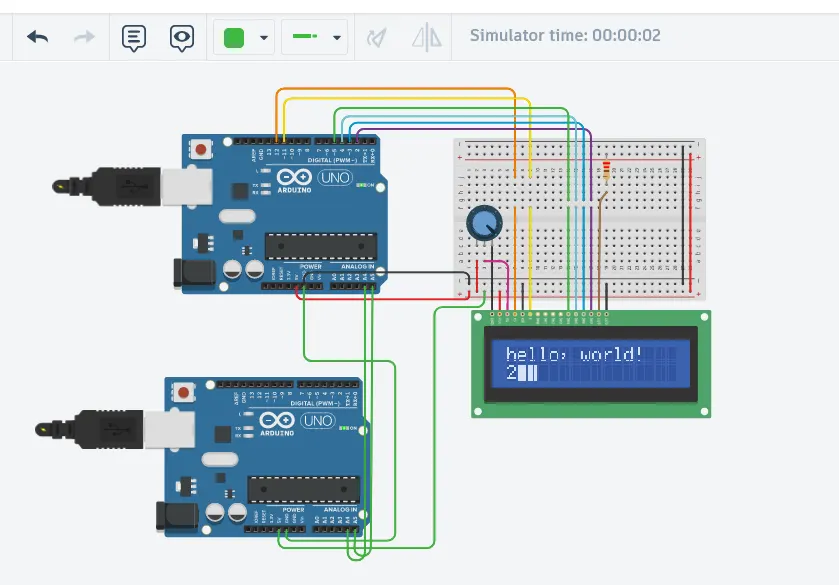
output of the circuit after simulating