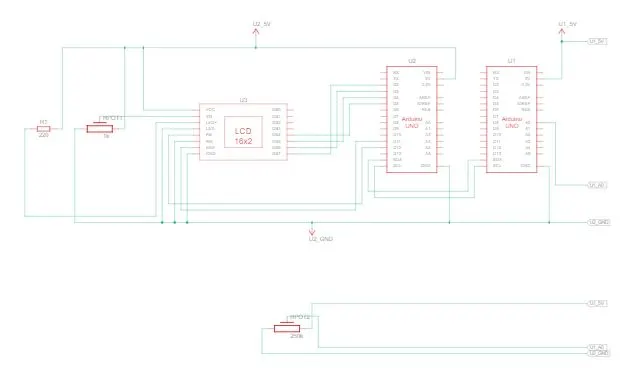
Project 1 - Interfacing a 16*2 LCD with Arduino using I2C protocol
MASTER CODE:
#include
void setup()
{
pinMode(A0, INPUT); // connect input as a potentiometer
Serial.begin(9600);
Wire.begin(); //I2C communication
}
void loop()
{
float value=analogRead(A0);
signed int voltage=(value*100)/1024;
Wire.beginTransmission(1);
Wire.write(voltage);
Wire.endTransmission();
delay(50);
}
SLAVE CODE:
#include
#include
LiquidCrystal lcd(12,11,5,4,3,2); //Define LCD Module Pins (RS,EN,D4,D5,D6,D7)
void setup()
{
Serial.begin(9600);//Begins Serial Communication at 9600 baud rate
Wire.begin(1);
Wire.onReceive(LCD); // LCD display write
lcd.begin(16,2);
}
void loop()
{
delay(50);
}
void LCD(int y)
{
signed int voltage=Wire.read();
lcd.setCursor(0,0);
lcd.print("voltage :");
lcd.setCursor(9,0);
lcd.print(voltage);
Serial.print("voltage value in Volt\n");
Serial.println(voltage);
delay(50);
}
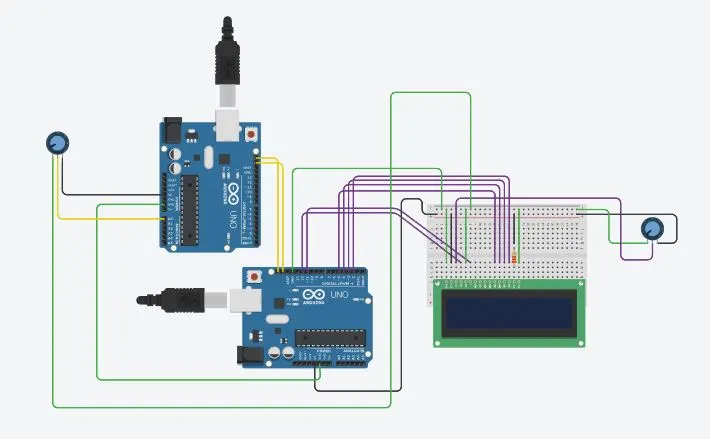
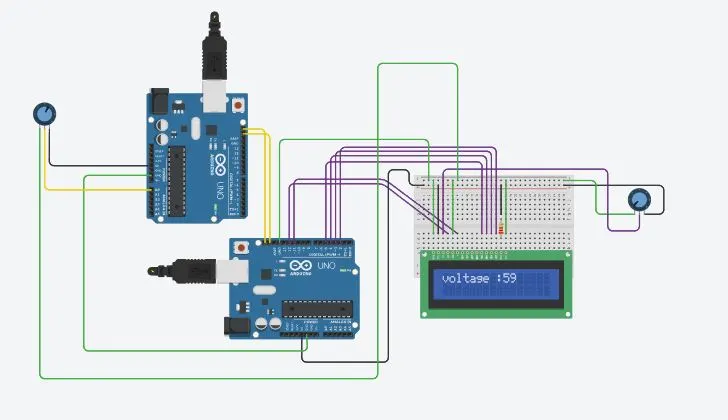
CIRCUIT: