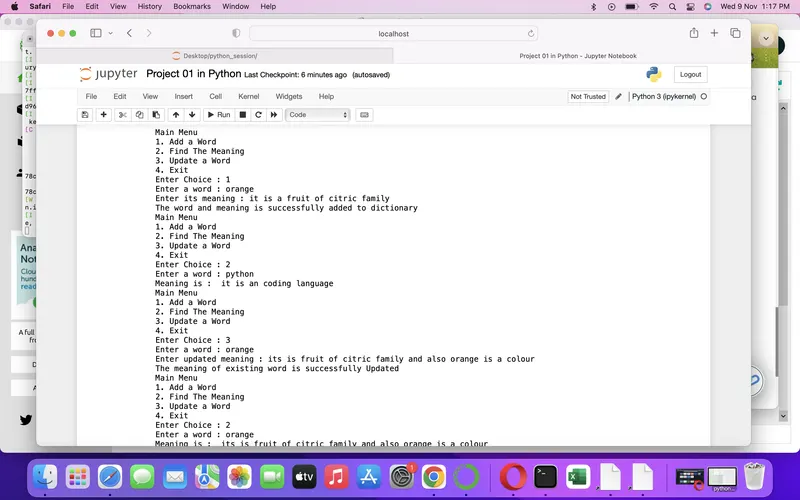
Project 1 - English Dictionary App & Library Book Management System
Project 01 ENGLISH DICTIONARY APP
def display_msg():
print('Main Menu')
print('1. Add a Word')
print('2. Find The Meaning')
print('3. Update a Word')
print('4. Exit')
import json
f = open('words.txt','w')
dictionary = {'python':'it is an coding language','apple': 'it is an fruit','mother':'the person who gave birth to us'}
# here im giving only 3 words and meaning for Example
json.dump(dictionary,f)
f.close()
# by above code adding an dictionary data to a file by serialization method
while True:
display_msg()
n = input('Enter Choice : ')
if n == '1' :
import json
f = open('words.txt','a+') # here 'a+' is used for appending our new word to dictionary it can't affect old data
word = input('Enter a word : ')
meaning = input('Enter its meaning : ')
dictionary[word] = meaning
json.dump(dictionary,f)
f.close()
print('The word and meaning is successfully added to dictionary')
elif n == '2':
f = open('words.txt','r')
word = (input('Enter a word : '))
if word in dictionary :
print('Meaning is : ',dictionary[word])
else:
print('The Word not found')
f.close()
elif n == '3' :
import json
f = open('words.txt','w') # here 'w' used for overwrite on old meaning of words
word = input('Enter a word : ')
updated_meaning = input('Enter updated meaning : ')
dictionary[word] = updated_meaning
json.dump(dictionary,f)
f.close()
print('The meaning of existing word is successfully Updated')
elif n == '4':
print('The Program is successfully closed \nThank you')
break
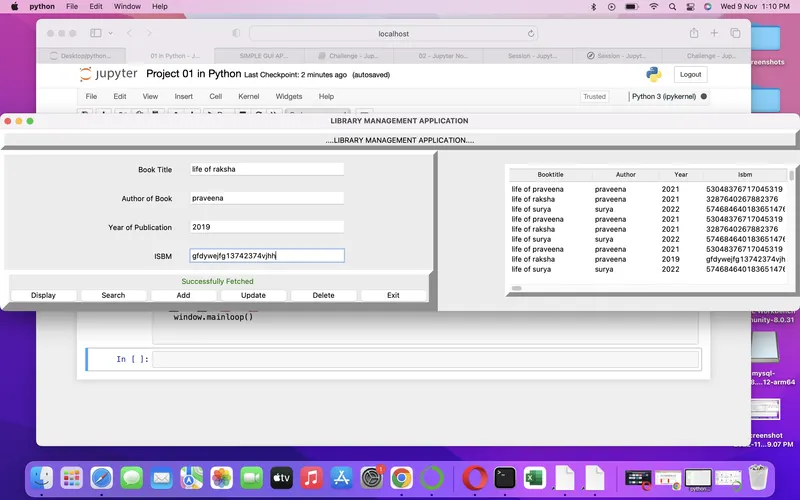
PROJECT 1B LIBRARY MANAGEMENT APPLICATION
# import Libraries
from tkinter import *
import sqlite3
import tkinter.ttk as ttk
import tkinter.messagebox as tkMessagebox
# creating an window
window=Tk()
window.title('LIBRARY MANAGEMENT APPLICATION')
# creating CRUD
def Database():
global conn,cursor
conn=sqlite3.connect('books.db')
cur=conn.cursor()
cur.execute('CREATE TABLE IF NOT EXISTS book (Sno INTEGER PRIMARY KEY AUTOINCREMENT, Booktitle TEXT, Author TEXT, Year INTEGER,Isbm TEXT)')
def Create():
if BOOKTITLE.get()=="" or AUTHOR.get()=="" or YEAR.get()=="" or ISBM.get()=="":
txt_result.config(text="Please enter all the fields",fd='red')
else:
Database()
conn=sqlite3.connect('books.db')
cur=conn.cursor()
cur.execute('INSERT INTO book(Booktitle,Author,Year,Isbm) VALUES(?,?,?,?)',(str(BOOKTITLE.get()),str(AUTHOR.get()),str(YEAR.get()),str(ISBM.get())))
conn.commit()
BOOKTITLE.set=""
AUTHOR.set=""
YEAR.set=""
ISBM.set=""
cur.close()
conn.close()
txt_result.config(text='This Book is Added !',fg='green')
def Read():
Database()
conn=sqlite3.connect('books.db')
cur=conn.cursor()
cur.execute('SELECT * FROM book ORDER BY Booktitle ASC' )
rows=cur.fetchall()
for data in rows:
tree.insert('','end',values=(data[1],data[2],data[3],data[4]))
conn.close()
txt_result.config(text='Successfully Fetched ',fg='green')
def Search():
Database()
b=str(BOOKTITLE.get())
conn=sqlite3.connect('books.db')
cur=conn.cursor()
cur.execute('SELECT * FROM book WHERE Booktitle = ?',(b,))
rows=cur.fetchall()
for data in rows:
tree.insert('','end',values=(data[1],data[2],data[3],data[4]))
conn.close()
def Add():
Database()
b=str(BOOKTITLE.get())
a=str(AUTHOR.get())
y=str(YEAR.get())
i=str(ISBM.get())
conn=sqlite3.connect('books.db')
cur=conn.cursor()
cur.execute('INSERT INTO book values(NULL,?,?,?,?)',(b,a,y,i))
conn.commit()
conn.close()
def Update():
Database()
b=str(BOOKTITLE.get())
a=str(AUTHOR.get())
y=str(YEAR.get())
i=str(ISBM.get())
conn=sqlite3.connect('books.db')
cur=conn.cursor()
cur.execute('UPDATE book SET Author = ?,Year = ?, Isbm = ? WHERE Booktitle = ?',(a,y,i,b))
conn.commit()
conn.close()
def Delete():
Database()
b=str(BOOKTITLE.get())
conn=sqlite3.connect('books.db')
cur=conn.cursor()
cur.execute('DELETE FROM book WHERE Booktitle = ?',(b,))
conn.commit()
conn.close()
def Exit():
result=tkMessagebox.askquestion('Do you want to exit ? (y/n)',icon='warning')
if result=='yes':
window.destroy()
exit()
# Variables
BOOKTITLE=StringVar()
AUTHOR=StringVar()
YEAR=StringVar()
ISBM=StringVar()
# FRAME
Top=Frame(window,width=900,height=50,bd=8,relief='raise')
Top.pack(side=TOP)
Left=Frame(window,width=300,height=500,bd=8,relief='raise')
Left.pack(side=LEFT)
Right=Frame(window,width=300,height=500,bd=8,relief='raise')
Right.pack(side=RIGHT)
Forms=Frame(Left,width=300,height=450)
Forms.pack(side=TOP)
Buttons=Frame(Left,width=300,height=500,bd=8,relief='raise')
Buttons.pack(side=BOTTOM)
# Labels
txt_title=Label(Top,width=900,text='....LIBRARY MANAGEMENT APPLICATION....')
txt_title.pack()
txt_booktitle=Label(Forms,text='Book Title',bd=15)
txt_booktitle.grid(row=0,stick='e')
txt_author=Label(Forms,text='Author of Book',bd=15)
txt_author.grid(row=1,stick='e')
txt_year=Label(Forms,text='Year of Publication',bd=15)
txt_year.grid(row=2,stick='e')
txt_isbm=Label(Forms,text='ISBM',bd=15)
txt_isbm.grid(row=3,stick='e')
txt_result=Label(Buttons)
txt_result.pack(side=TOP)
# ENTRY
Booktitle=Entry(Forms,textvariable=BOOKTITLE,width=30)
Booktitle.grid(row=0,column=1)
Author=Entry(Forms,textvariable=AUTHOR,width=30)
Author.grid(row=1,column=1)
Year=Entry(Forms,textvariable=YEAR,width=30)
Year.grid(row=2,column=1)
Isbm=Entry(Forms,textvariable=ISBM,width=30)
Isbm.grid(row=3,column=1)
# Buttons
btn_Display=Button(Buttons,width=10,text='Display',command=Read)
btn_Display.pack(side=LEFT)
btn_Search=Button(Buttons,width=10,text='Search',command=Search)
btn_Search.pack(side=LEFT)
btn_Add=Button(Buttons,width=10,text='Add',command=Add)
btn_Add.pack(side=LEFT)
btn_Update=Button(Buttons,width=10,text='Update',command=Update)
btn_Update.pack(side=LEFT)
btn_Delete=Button(Buttons,width=10,text='Delete',command=Delete)
btn_Delete.pack(side=LEFT)
btn_Exit=Button(Buttons,width=10,text='Exit',command=Exit)
btn_Exit.pack(side=LEFT)
# List Widgets
scrollbary=Scrollbar(Right, orient=VERTICAL)
scrollbarx=Scrollbar(Right, orient=HORIZONTAL)
tree=ttk.Treeview(Right,columns=('Booktitle','Author','Year','Isbm'))
scrollbary.config(command=tree.yview)
scrollbary.pack(side=RIGHT, fill=Y)
scrollbarx.config(command=tree.xview)
scrollbarx.pack(side=BOTTOM, fill=X)
tree.heading('Booktitle',text='Booktitle',anchor=W)
tree.heading('Author',text='Author',anchor=W)
tree.heading('Year',text='Year',anchor=W)
tree.heading('Isbm',text='Isbm',anchor=W)
tree.column('#0', stretch=NO, minwidth=0, width=0)
tree.column('#1', stretch=NO, minwidth=0, width=150)
tree.column('#2', stretch=NO, minwidth=0, width=120)
tree.column('#3', stretch=NO, minwidth=0, width=80)
tree.column('#4', stretch=NO, minwidth=0, width=150)
tree.pack()
if __name__=='__main__':
window.mainloop()