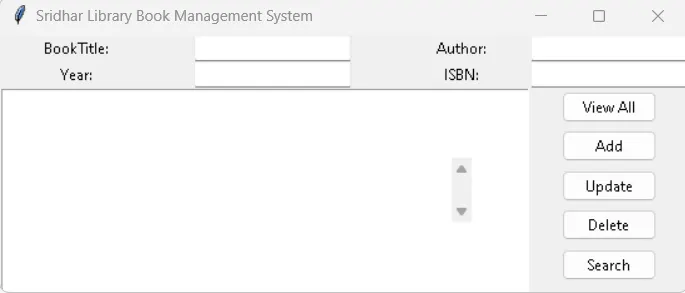
Project 1 - English Dictionary App & Library Book Management System
import tkinter as tk
from tkinter import ttk
def view_command():
list_box.delete(0, tk.END)
for row in search_book(title_text.get(), author_text.get(), year_text.get(), isbn_text.get()):
list_box.insert(tk.END, row)
def add_command():
global year_text # Declare year_text as a global variable
title = title_text.get()
author = author_text.get()
year_str = year_text.get()
isbn = isbn_text.get()
# Validate year input
try:
year = int(year_str) if year_str else None
except ValueError:
# Handle invalid year input (non-integer value)
tk.messagebox.showerror("Error", "Invalid year value. Please enter a valid year.")
return
# Clear the input fields after adding the book
title_text.delete(0, tk.END)
author_text.delete(0, tk.END)
year_text.delete(0, tk.END)
isbn_text.delete(0, tk.END)
def update_command():
selected_row = list_box.curselection()
if selected_row:
selected_id = list_box.get(selected_row[0])[0]
# Get the updated information entered by the user from the Tkinter Entry widgets
title = title_text.get()
author = author_text.get()
year = int(year_text.get()) # Convert to an integer since the year is stored as an integer in the database
isbn = isbn_text.get()
# Clear the input fields after updating the book
title_text.delete(0, tk.END)
author_text.delete(0, tk.END)
year_text.delete(0, tk.END)
isbn_text.delete(0, tk.END)
def delete_command():
selected_row = list_box.curselection()
if selected_row:
selected_id = list_box.get(selected_row[0])[0]
delete_book(selected_id)
view_command()
def search_command():
view_command()
# Create the main Tkinter window
root = tk.Tk()
root.title("Sridhar Library Book Management System")
# Create labels and entry widgets for input
title_label = ttk.Label(root, text="BookTitle:")
title_label.grid(row=0, column=0)
title_text = ttk.Entry(root)
title_text.grid(row=0, column=1)
author_label = ttk.Label(root, text="Author:")
author_label.grid(row=0, column=2)
author_text = ttk.Entry(root)
author_text.grid(row=0, column=3)
year_label = ttk.Label(root, text="Year:")
year_label.grid(row=1, column=0)
year_text = ttk.Entry(root)
year_text.grid(row=1, column=1)
isbn_label = ttk.Label(root, text="ISBN:")
isbn_label.grid(row=1, column=2)
isbn_text = ttk.Entry(root)
isbn_text.grid(row=1, column=3)
# Create buttons for various operations
view_button = ttk.Button(root, text="View All", command=view_command)
view_button.grid(row=2, column=3)
add_button = ttk.Button(root, text="Add", command=lambda: add_command)
add_button.grid(row=3, column=3)
update_button = ttk.Button(root, text="Update", command=update_command)
update_button.grid(row=4, column=3)
delete_button = ttk.Button(root, text="Delete", command=delete_command)
delete_button.grid(row=5, column=3)
search_button = ttk.Button(root, text="Search", command=search_command)
search_button.grid(row=6, column=3)
# Create a listbox to display the records
list_box = tk.Listbox(root, height=10, width=70)
list_box.grid(row=2, column=0, rowspan=6, columnspan=3)
# Create a scrollbar for the listbox
scrollbar = ttk.Scrollbar(root)
scrollbar.grid(row=2, column=2, rowspan=6)
list_box.configure(yscrollcommand=scrollbar.set)
scrollbar.configure(command=list_box.yview)
root.mainloop()