Project 1 _Creating an Architectural plan for the provided plot size and develop relevant basic structural drawings
Commands Used in this challenge:
Line, Xpline, Polyline, Rectangle, Circle, Arc, Trim, Move, Offset, Hatch, Layer, Matchproperties, Multileader, Fillet, Copy, Explode, Dimlinear, breakline, Hide pallets/show pallets (on and off).
AIM- To draw a residential building of dimension 60'x20' (18.3m x 6m) with following drawings:
1. Architectural Drawing (Floor Plan, Elevations, and Sections)
2. Structural Drawing (Column, Bean, Footing Plan)
INTRODUCTION-
The residential building to be drawn with plot dimensions 60'x20'. The plot is east facing. The building has the following rooms.
Ground Floor
Living Room, Kitchen, Main Bedroom, Puja Room, Staircase to first floor.
First Floor
Living Room, Bedroom 2, Guest room, Balcony, Staircase to roof.
Specifications/Dimensions
Wall Thickness of main walls is taken as 9"
Internal wall thickness is taken as 4.5"
Columns are 9"x12" / 12"x9" respectively
Beams are 9"x9"
Main Gate dimension 5'8"
Main Door/ Entrance dimension 3'
Bedroom Doors dimension 2'6"
Toilet and Puja Room door dimensions 2'3"
Window 1- 3'x4'5"
Window 2- 3'x5'5"
Window 3- 1'5"x4'5"
Ventilator- 1'6"x2'
Staircase
Tread- 10", Riser- 6"
Railing height- 2'9"
Height of compound wall- 6'
Compound wall thickness- 9"
PROCEDURE-
- Create New Autocad file.
- Take units as Imperial (feet and inches)
- Open grid and snap settings
- Change snap and grid spacing to 1
- Change major line every grid line to 10
- turnoff adaptive grid
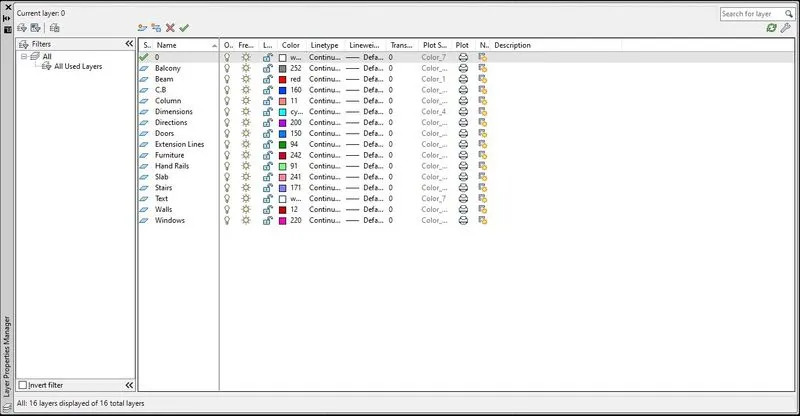
Create Layers
Open Layer properties and create new layers by clicking on new layer or right click on any layer and select new layer to create new layer
Layers are created as follows:
Step 2: Creating Plot Drawing
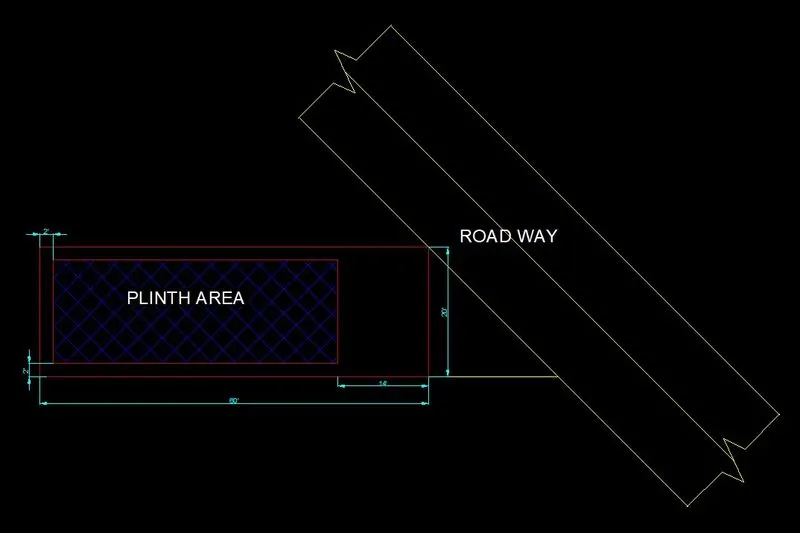
Draw a rectangle of dimensions 60’x20’ at any point on the screen. Take offset from all sides of the rectangle drawn to distance of 2’. Trim off the extra portions of inner rectangle. Now take offset of 14' from the right side of the rectangle. Now, draw a line of 20' from the bottom right corner towards east side as per direction. Draw the roadway of width 20’ along with center alignment line. Add relative text to the plot drawing. Hatch the plinth area using hatch type ANS137 and hatch scale 10.

Step 3: Creating Ground Floor Plan View
Creating Walls:
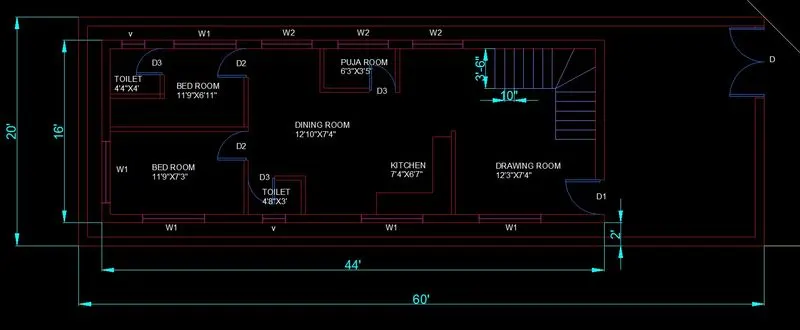
Change the current layer to walls layer. Draw a rectangle of dimensions 60’x20’ at any point on the screen. Offset the left and bottom line of rectangle drawn to distance of 2’ right and up respectively. Offset the top line of rectangle drawn to distance of 2’ to downwards. Offset the right edge line of rectangle drawn to distance of 14’ to right hand side. Take inner walls of thickness 4.5”. Offset the last offset line to a distance of 4.5”. Offset the left inner wall edge to a distance of 14’. Offset the last offset line to a distance of 4.5”. Offset the last offset line to a distance of 4.5”. Trim off the extra lines to obtain the figure as shown below. Take all room dimensions as specified.
Create the main door opening of the dimension 3’. Create the door openings of the puja room, main bedroom and toilet in main bedroom. Trim the extra portions.
GROUND FLOOR IS VISUALISED BELOW:
STAIRCASE:
Change layer to Stairs. Using the above stair dimensions Tread- 10". Offset the line to distance of 10" to upwards. Change the direction of stairs after 5 Treads. Draw 6 treads lines of width 10" taking as offset. Now, draw two lines on the approach during the change of direction.
Creating Doors and Windows:
First create doors and windows blocks separately and then add them to the drawing wherever required.
Doors: Create all doors using arc and rectangle of required dimensions.
D: 5'8" wide (Main Gate)
D1: 3' wide (Main door)
D2: 2'6" wide (Bedroom door)
D3: 2'3" wide (Toilet and Puja room door)
Windows and Ventilators:
W1: 4'5"
W2: 5'5"
W3: 1'5"
Ventilator: 2'
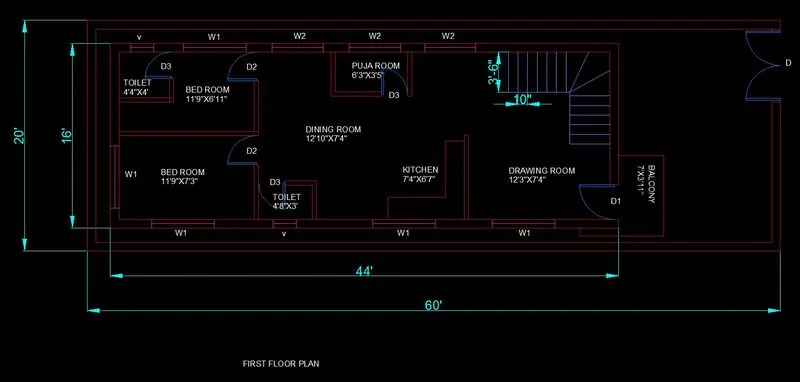
Step 4: Creating First Floor Plan View
Follow the same procedure as the ground floor.
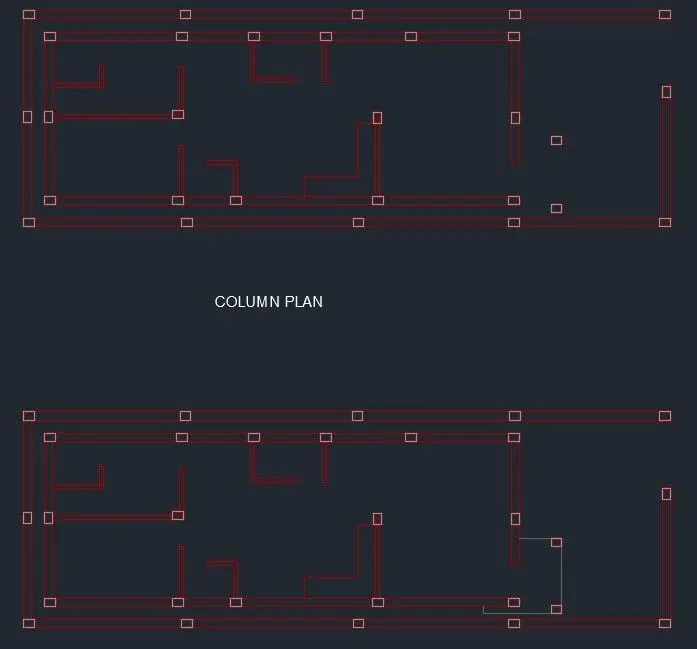
COLUMN PLAN LAYOUT
Freeze all the layers except these layers: Wall and columns. Now, copy all the visible layers to the other side of the drawing and name it as column plan layout. All the columns are of size 12"x9" and 9"x12" as specified before. The column plan layout is shown in the below figure.
Draw the columns at all necessary points/positions.
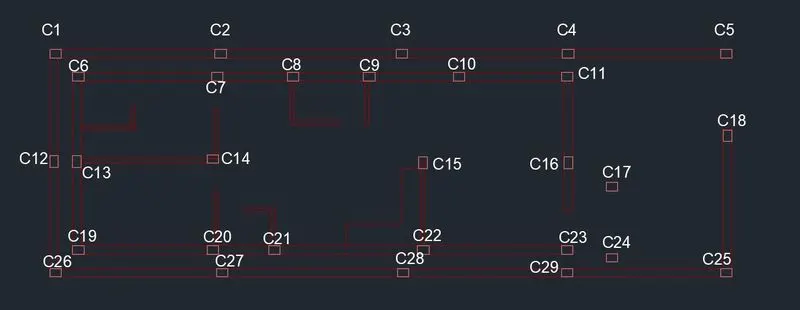
All columns are named in the following manner.
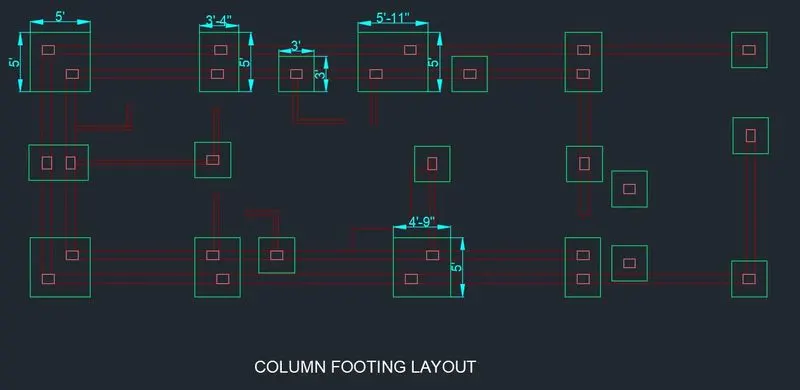
Footing layout:
Draw the column layout again or copy the layout from above. Now as per the design loads, specify the required column footing for the stability of the building. The attached drawing is below.
Dimension of all footings drawn is
5'x5' (Combined Footing)
3'4"x5' (Strap footing)
3'x3' (Isolated Footing)
5'11"x5' (Combined Footing)
4'9"x5' (Combined Footing)
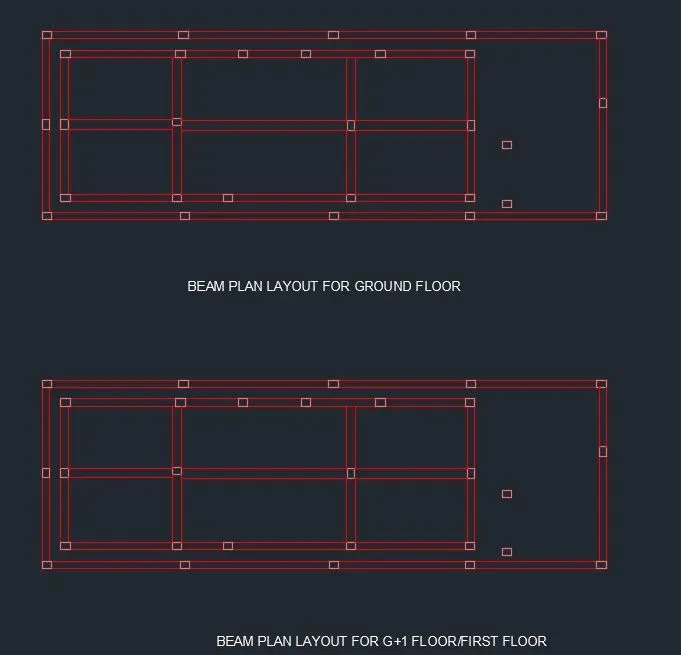
Beam Layout:
Copy the column plan layout and change the current layer to beam.
Dimension of all beams are
9"x9"
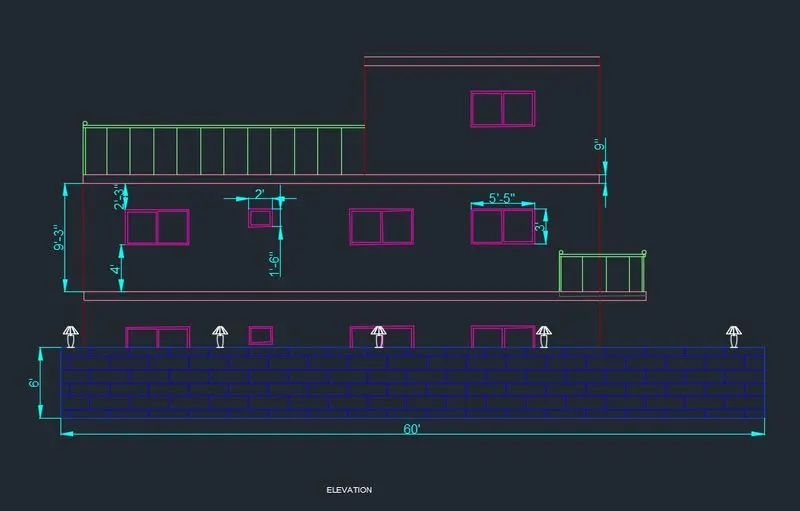
ELEVATONS:
For Elevation,
- Change the current layer to extension lines
- Create vertical extension line at all the wall edge points
- Draw all the wall
- Each floor height is taken as 9'3"
- All dimensions are taken as per specification.
- Windows are 5'5"x3' and Ventilators are 2'x1'6"
- Compound Wall height is 6'
- Trim the extra portions which are unnecessary.
SECTION:
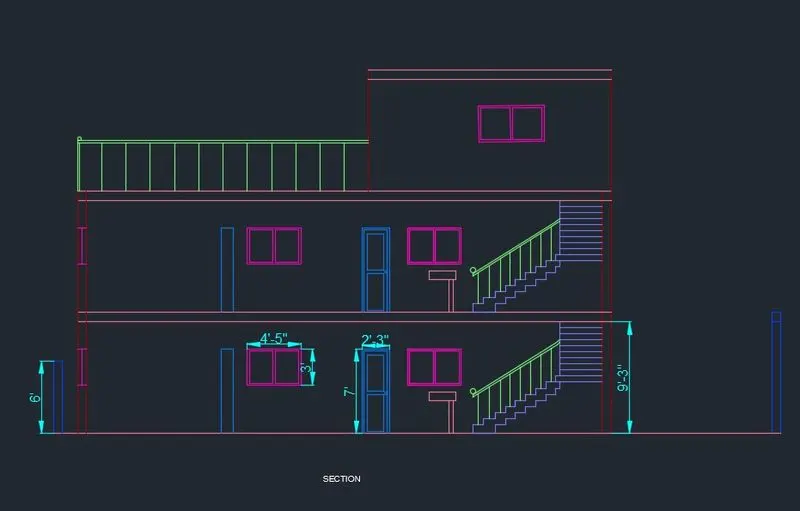
For Section A-A as specified, draw extension lines from the plan and then place the windows, doors, railings and stairs all in their specified places as per the plan. All dimensions to be taken as per the specification. Trim all extra portions which are unnecessary.
TOTAL AREA: 1200 sq ft.
TOTAL PERIMETER: 160 ft.
COMPOUND AREA: 704 sq ft.
PERIMETER OF COMPOUND AREA: 120 ft.
All dimensions are in feet and inches.
Result:
Residential G+1 floor design consists of plot drawing, plan view, center line drawing, column and beam layouts, elevation view and section views are drawn. In Ground Floor, the residential house consist of 2 Bedrooms, 1 Kitchen, 1 Drawing room, 1 Puja Room, 2 Toilets. In First Floor, the residential house consist of 2 Bedrooms, 1 Kitchen, 1 Drawing room, 1 Puja Room, 2 Toilets and 1 Balcony.
All rooms directions are followed as per the Vaastu Shastra. Final CAD file is attached.