Project 1- Building a Master TCL/TK Macro
AIM
To create a master macro to perform the following operations such as QualityCheck,Weld, Reflect, Normals check, etc
CODE
NORMALS
- *setnormalsdisplaytpe is used to display the type of visualization whether with direction of normal (0)or color(1)
- Then the elements displayed in were selected using *createmark command
- Normals were displayed for the selected element with color representation using *normalsdisplay elems
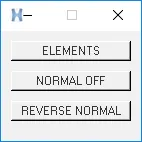
- Functions were created for the reversing the normals and select the elements using proc and these functions are called by assigning the respective buttons
- To reverse the normals of the selected elements *normalsreverse command is used
- hm_framework is used to create a separate tab
QUALITY CHECK
To check elements quality criteria hypermesh provides various commands. Using this command failing elements can be easily identified.
STEPS TO IDENTIFY AND CREATE TEMP NODES:
- Create a mark for displayed elements.
- Use element test command for respected quality criteria and save failed elements on separate mark ID.
- Create temp nodes for displayed nodes.
TCL_MODIFY COMMANDS
*elementtestwarpage -Check warpage for elements.
*elementtestaspect -Check aspect ratio of elements.
*elementtestskew -Check skew anlge of elements.
*elementtestlength -Check Min/Max length with respect to selection.
*elementtestinterangle -Check Min/Max angle for Quad/Tria with respect to selection.
*elementtesttetcollapse -Check tet collapse for 3D elements.
MIDLINE
- GET LIST:
- Entities are selected by the user by the command “createlistbypathpanel”.
- This creates a list of selected entities (here lines) in the selected order.
- Firsts set of lines are saved as a source and the second set of lines stored as a target.
- START LOOP:
- “Foreach” loop has been initiated and lists are assigned to variables.
- CREATE MID-LINE:
- Midline is created for a pair of marked lines by using the command “*linescreatemidline”.
- Created lines ID save in a different variable.
- COMBINE:
- New lines ID is appending to a variable.
- By using combine “*linecombine” new line and previous line combined.
REFLECT
- Create a macro that will reflect the given multicomponent FE part with ease.
- It should be independent of the deck
- The only inputs allowed are, original CAD comp, reflected CAD comp, and original FE comps.
- The name of the component should also be taken as input from the user. Also, ask the user to suffix the name with an “_” by displaying a help string
- First, in order to create components and property and to assign respective property to the component, I have used (*createentity, *setvalue, *propertyupdate) in two different procedures in the name of solver profile.

- Then parent component and target componet is marked using (*createmarkpanel comp)
- The elements are copied into the user-defined component using (*copymark)
- The centroid of the target component and parent component found using (hm_centroid ) command which gives an output of coordinates of centroid then the node is added to the centroid of the component using (*createnode)
- The two nodes in between two centroid node are created using (*createnodebetweennodescreate)
- The plane is created using (*createplane )command with obtained plane coordinate obtained previously in a mark id
- And Then the elements were reflected using the (*reflectmarkwithoption)
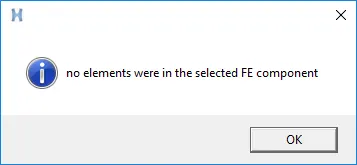
- Then the null condition is defined if there are no elements in parent component using if condition with an popup say that there is no elements in the selected component using (tk_messagebox) command
#master GUI
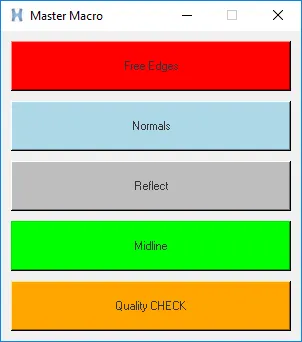
set a .master
catch  {destroy $a}
toplevel $a
wm title $a "Master Macro"
wm geometry $a 300x310+200+200
wm resizable $a 0 0
wm deiconify $a

#freeedges button
button $a.01 -text "Free Edges" -bg "Red" -command Edges ; place $a.01 -x 10 -y 10 -width 280 -height 50
proc Edges {} {
*setdisplayattributes 4 1
set ::a1 {}
set ::b {}
proc Freeedges {} {
*createmark comps 1 "free_edges"
set ::a1 [hm_getmark comps 1]
if {$::a1=={}} {
*createmark elements 1 "displayed"
*findedges1 elements 1 0 0 0 30
*setvalue comps name={^edges} name={free_edges}
*createmark elems 1 "displayed"
*equivalence elems 1 0.5 0 0 30
*equivalence elems 1 0.5 3 0 30
*createmark nodes 1 "retrieve"
*nodemarkaddtempmark 1
} else {
tk_messageBox -message  "FREE EDGES already exists" -icon info -type ok
}
}
proc T_connec {} {
*createmark comps 2 "T_connections"
set ::b [hm_getmark comps 2]
if {$::b=={}} {
*createmark elements 1 "displayed"
*findedges1 elements 1 1 0 0 30
*setvalue comps name={^edges} name={T_connections}
*createmark components 1 "T_connections"
*createmark elems 1 "displayed"
*setvalue comps mark=1 color=#FFFF00
*equivalence elems 1 0.5 0 0 30
*equivalence elems 1 0.5 3 0 30
*createmark nodes 1 "retrieve"
*nodemarkaddtempmark 1
} else {
tk_messageBox -message  "T_Cons already exists" -icon info -type ok
}
}
proc hide {} {
*createmark components 1 "free_edges"
*createmark components 2 "T_connections"
*createstringarray 1 "elements_on" "geometry_on"
*hideentitybymark 1 1 1
*hideentitybymark 2 1 1
*setdisplayattributes 2 1
}
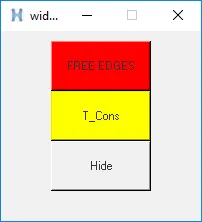
set b .widget
catch {destroy $b}
toplevel $b
wm geometry $b 200x190+750+250
wm resizable $b 0 0
wm deiconify $b
button $b.1 -text "FREE EDGES" -bg "red" -command Freeedges
place $b.1 -x 50 -y 10 -width 100 -height 50
button $b.2 -text "T_Cons" -bg "#FFFF00" -command T_connec
place $b.2 -x 50 -y 60 -width 100 -height 50
button $b.3 -text "Hide"  -command hide
place $b.3 -x 50 -y 110 -width 100 -height 50
}
#normals button
button $a.02 -text "Normals" -bg "light blue" -command Normals ; place $a.02 -x 10 -y 70 -width 280 -height 50
proc Normals {} {

proc x {} {
*setnormalsdisplaytype 1
*createmark elements 1 "displayed"
*normalsdisplay elements 1
*clearmark elems 1
*createmarkpanel elems 1
set ::b [hm_getmark elems 1]
}
proc y {} {
*setnormalsdisplaytype 1
*createmark elements 1 "displayed"
*normalsdisplay elements 1
*clearmark elems 1
if {$::d == {}} {
set popup [tk_messageBox -message "No elements were selected"]
} else {
eval *createmark elems 1 $::b
*normalsreverse elems 1
*createmark elements 1 "displayed"
*normalsdisplay elements 1
}
}
set c .normal
catch {destroy $c}
toplevel $c
wm geometry $c 140x110+750+250
wm resizable $c 0 0
wm deiconify $c
button $c.01 -text "ELEMENTS" -command x ;               place $c.01 -x 10 -y 10 -width 120 -height 20
button $c.02 -text "NORMAL OFF"  -command {*normalsoff}; place $c.02 -x 10 -y 40 -width 120 -height 20
button $c.03 -text "REVERSE NORMAL" -command y ;         place $c.03 -x 10 -y 70 -width 120 -height 20
}
#reflect button
button $a.03 -text "Reflect" -bg "grey" -command Reflect; place $a.03 -x 10 -y 130 -width 280 -height 50
proc Reflect {} {
proc optistruct {c_name T} {
*createentity comps includeid=0 name= $c_name
*createentity props cardimage=PSHELL includeid=0 name=$c_name
*setvalue props name=$c_name STATUS=1 95=$T
*createmark components 1 "$c_name"
*propertyupdate components 1 "$c_name"
}
proc radioss {c_name T} {
*createentity comps cardimage=Part includeid=0 name=$c_name
*createentity props cardimage=P1_SHELL includeid=0 name=$c_name
*setvalue props name=$c_name STATUS=1 431=$T
*createmark components 1 "$c_name"
*propertyupdate components 1 "$c_name"
}
proc reflect {} {
# Inputs
set name [hm_getstring Componentname "Enter the component name followed by_ "]
*createmarkpanel comps 1 "Select the Parent component that to be reflected"
set p_comp [hm_getmark comps 1]
*createmarkpanel comps 1 "Select the Target component "
set T_comp [hm_getmark comps 1]
*createmarkpanel comps 1 "Select the component with FE"
set Fe_comp [hm_getmark comps 1]
set profile [hm_info templatetype]

# component name_duplicating_elems
foreach i $Fe_comp {
set T [hm_getthickness comps $i]
set c_name $name$T
$profile $c_name $T
set oc_name [hm_entityinfo name comps $i]
*createmark elems 1 $oc_name
*copymark elems 1 $c_name
*displaycollectorwithfilter comps "off" "$oc_name" 1 0
}
*createmark elems 2 "displayed"
*autocolorwithmark comps 2

#centroid
*clearmark 1 *clearmark 2
*createmark surfaces 1 "by collector" $p_comp
set p_cog [hm_getcentroid surfaces 1]
*createnode [lindex $p_cog 0] [lindex $p_cog 1] [lindex $p_cog 2]
puts $p_cog
*createmark node 1 -1
set p_node [hm_getmark node 1]
puts $p_node
*createmark surfaces 1 "by collector" $T_comp
set T_cog [hm_getcentroid surfaces 1]
*createnode [lindex $T_cog 0] [lindex $T_cog 1] [lindex $T_cog 2]
*createmark node 1 -1
set T_node [hm_getmark node 1]
*clearmarkall 1

#Defining Plane LCS
set plane [hm_getdistance nodes $p_node $T_node 0]
puts $plane
#baseNode
*createnodesbetweennodes $p_node $T_node 1
*createmark node 1 -1
set B_node [hm_getmark node 1]
set B_node_lcs [hm_nodevalue $B_node]

#Reflect
*clearmarkall 1
*createmark elems 1 "displayed"
*createplane 1 [lindex $plane 1] [lindex $plane 2] [lindex $plane 3] [lindex $B_node_lcs 0 0] [lindex $B_node_lcs 0 1] [lindex $B_node_lcs 0 2]
*reflectmarkwithoption elems 1 1 0
}
reflect
}
#midline button
button $a.04 -text "Midline" -bg "green" -command Midline; place $a.04 -x 10 -y 190 -width 280 -height 50
proc Midline {} {
*createlistbypathpanel lines 1
set lines_1 [hm_getlist lines 1]
*createlistbypathpanel lines 2
set lines_2 [hm_getlist lines 2]


set a1 {}

foreach i $lines_1 j $lines_2 {

*createlist lines 1 $i
*createlist lines 2 $j
   *linescreatemidline 1 1 2 2
*createmark lines 1 -1
set a [hm_getmark lines 1]
lappend a1 $a
}
set b [llength $a1]
set b1 [lindex $a1 0]
puts "$b1"
for { set n 1} {$n < $b } {incr n} {
set b2 [lindex $a1 $n]
puts "$b2"
*linecombine $b1 $b2 0
*createmark line 1 -1
set b1 [hm_getmark lines 1]
}
}
#Qc button
button $a.05 -text "Quality CHECK" -bg "orange" -command QC; place $a.05 -x 10 -y 250 -width 280 -height 50
proc QC {} {
*clearmarkall 1 ; *clearmarkall 2
*unmaskall2
*nodecleartempmark
# $min_l
proc min_length {} {
*unmaskall2
*nodecleartempmark
# *clearmarkall 1 ; *clearmarkall 2
set min_l [hm_getstring "2D length <" ]
*createmark elems 1 "displayed"
*elementtestlength elems 1 $min_l 2 1 2 0 "2D length <"
*maskentitymark elements 2 0
*maskreverse elements
*createmark nodes 1 "displayed"
*nodemarkaddtempmark 1
*unmaskall2

}
# $max_l
proc max_length {} {
*unmaskall2
*nodecleartempmark
set max_l [hm_getstring "2D length >" ]
*createmark elems 1 "displayed"
*createmark elems 2
*elementtestlength elems 1 $max_l 2 0 2 0 "2D length >"
*maskentitymark elements 2 0
*maskreverse elements
*createmark nodes 1 "displayed"
*nodemarkaddtempmark 1
*unmaskall2
}
# $warp
proc warpage {} {
*unmaskall2
*nodecleartempmark
set warp [hm_getstring "warpangle" ]
*createmark elems 1 "displayed"
*createmark elems 2
*elementtestwarpage elems 1 $warp 2 2  0 "Warpage"
*maskentitymark elements 2 0
*maskreverse elements
*createmark nodes 1 "displayed"
*nodemarkaddtempmark 1
}
# $asp_r
proc aspect_ratio {} {
*unmaskall2
*nodecleartempmark
set asp_r [hm_getstring "Aspect Ratio" ]
*createmark elems 1 "displayed"
*createmark elems 2
*elementtestaspect elems 1 $asp_r 2 2  0 "Aspect ratio "
*maskentitymark elements 2 0
*maskreverse elements
*createmark nodes 1 "displayed"
*nodemarkaddtempmark 1
}
# $skew
proc skewness {} {
*unmaskall2
*nodecleartempmark
set skew [hm_getstring "Skew" ]
*createmark elems 1 "displayed"
*createmark elems 2
*elementtestskew elems 1 $skew 2 2  0 "Skewness"
*maskentitymark elements 2 0
*maskreverse elements
*createmark nodes 1 "displayed"
*nodemarkaddtempmark 1
}
# $jac
proc jacobian {} {
*unmaskall2
*nodecleartempmark
set jac [hm_getstring "Jacobian" ]
*createmark elems 1 "displayed"
*createmark elems 2
*elementtestjackobian elems 1 $jac 2 2  0 "jacobian"
*maskentitymark elements 2 0
*maskreverse elements
*createmark nodes 1 "displayed"
*nodemarkaddtempmark 1
}
# $min_t_
proc min_t_angle {} {
*unmaskall2
*nodecleartempmark
set min_t [hm_getstring "minimum tria angle" ]
*createmark elems 1 "displayed"
*createmark elems 2
*elementtestinterangle elems 1 $min_t 1 2 1 2  0 "minimum tria angle"
*maskentitymark elements 2 0
*maskreverse elements
*createmark nodes 1 "displayed"
*nodemarkaddtempmark 1
}
# $max_t
proc max_t_angle {} {
*unmaskall2
*nodecleartempmark
set max_t [hm_getstring "maximum tria angle" ]
*createmark elems 1 "displayed"
*createmark elems 2
*elementtestinterangle elems 1 $max_t 1 2 0 2  0 "maximum tria angle"
*maskentitymark elements 2 0
*maskreverse elements
*createmark nodes 1 "displayed"
*nodemarkaddtempmark 1
}
# $min_q
proc min_q_angle {} {
*unmaskall2
*nodecleartempmark
set min_q [hm_getstring "minimum quad angle" ]
*createmark elems 1 "displayed"
*createmark elems 2
*elementtestinterangle elems 1 $min_q 0 2 1 2  0 "minimum quad angle"
*maskentitymark elements 2 0
*maskreverse elements
*createmark nodes 1 "displayed"
*nodemarkaddtempmark 1
}
# $max_q
proc max_q_angle {} {
*unmaskall2
*nodecleartempmark
set max_q [hm_getstring "maximum maximum angle" ]
*createmark elems 1 "displayed"
*createmark elems 2
*elementtestinterangle elems 1 $max_q 1 2 0 2  0 "maximum quad angle"
*maskentitymark elements 2 0
*maskreverse elements
*createmark nodes 1 "displayed"
*nodemarkaddtempmark 1
}
# #GUI
set d .element
catch [destroy $d]
toplevel $d
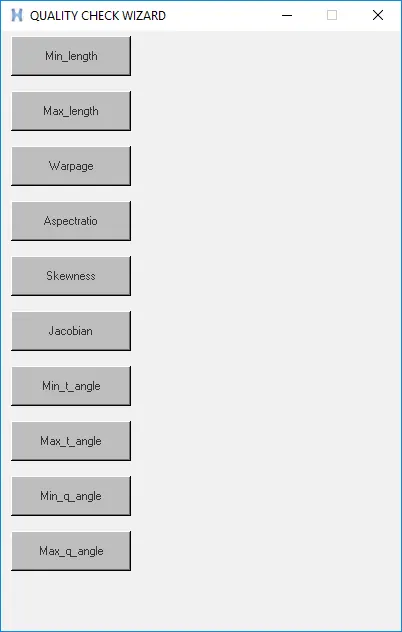
wm title $d "QUALITY CHECK WIZARD"
wm geometry $d 400x600+100+300;
wm resizable $d 0 0
wm deiconify $d
set C "min_length max_length warpage aspect_ratio skewness jacobian min_t_angle max_t_angle min_q_angle max_q_angle "
set R [llength $C]
set L " Min_length Max_length Warpage Aspectratio Skewness Jacobian Min_t_angle Max_t_angle Min_q_angle Max_q_angle "
set n 0
set a1 10
set a2 5
# puts $R
set b1 140
set b2 5
set n 0
# button loop
for {set i 1} {$i <= $R} {incr i} {

button $d.$i -text [lindex $L $n ] -bg grey -command [lindex $C $n ] ; place $d.$i -x $a1 -y $a2 -width 120 -height 40;
set n [expr {$n+1}]
set a2 [expr {$a2+55}]
}
}
button $a.06 -text "Quality CHECK" -bg "orange" -command QC; place $a.05 -x 10 -y 250 -width 280 -height 50
RESULT
MASTER
FREE EDGES
NORMALS CHECK
QUALITY WIZ