Simulating System Behavior of a Continuous Stirring Tank Reactor using MATLAB
The Continuous Stirring Tank Reactor (CSTR) model is as shown below:
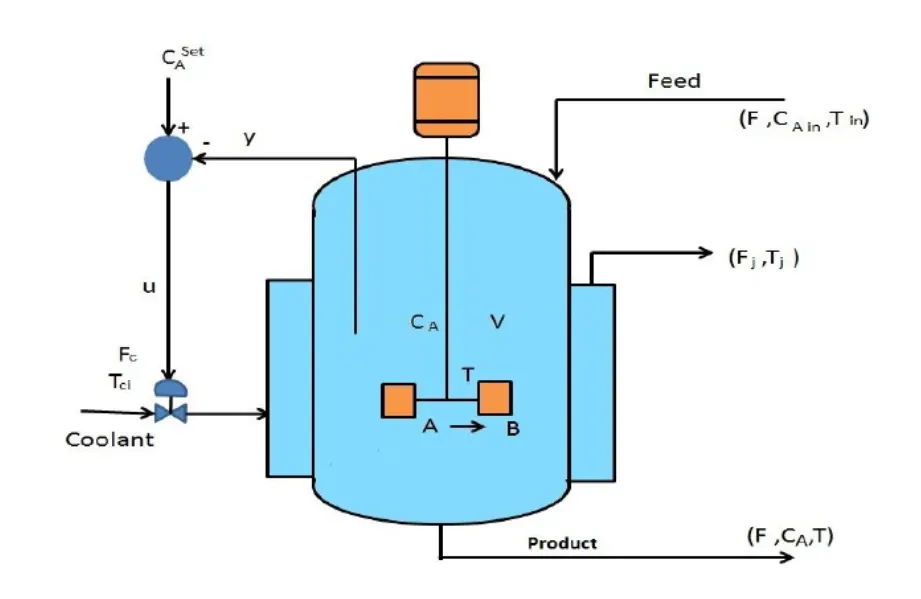
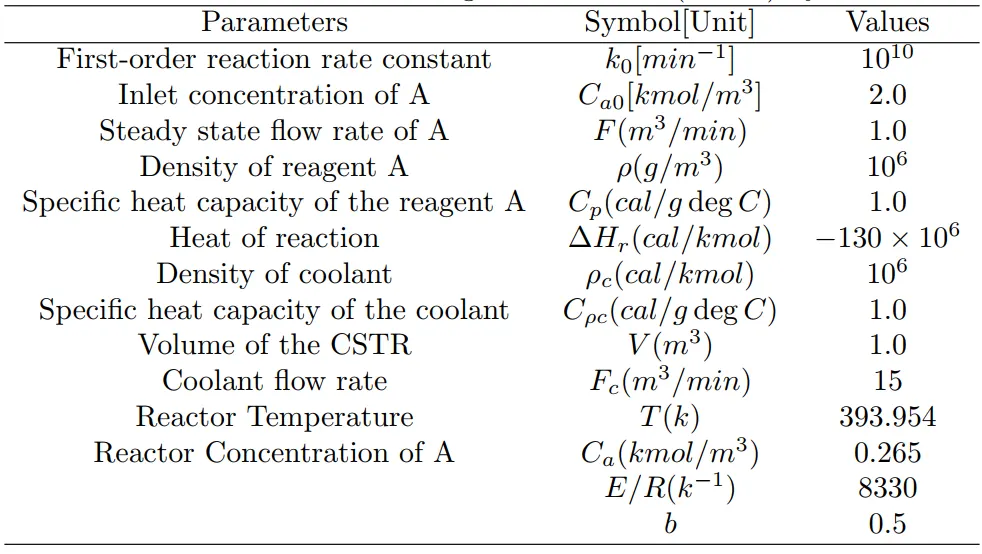
The CSTR model parameters are as shown below:
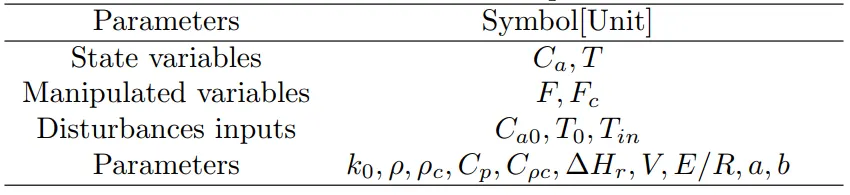
Variable description of CSTR model parameters is as shown below:
The non-linear dynamics of the CSTR model is governed by the following equations.
`(dC_a)/dt=F/V(C_(a0)-C_a)-k_0exp(-E/(RT))C_a`
`(dT)/dt=F/V(T_0-T)+( -DeltaH_r)/(rhoC_p)exp(-E/(RT))C_a-Q/(VrhoC_p)`
where,
`Q =(aF_c^(b+1))/(F_c+(aF_c^b)/(2rho_cC_(rhoc)))(T-T_("in"))`
Case1:
The behavior of the system for extra model parameters as shown below:
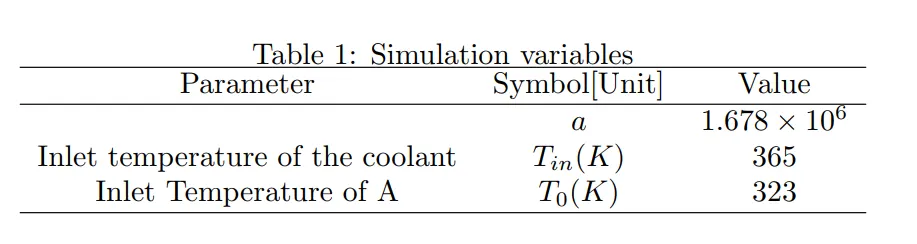
and the following initial conditions are used.
`0.2646-epsilon_1<=C_a(0)<=0.2646+epsilon_1`
`393.95-epsilon_2<=T(0)<=393.95+epsilon_2`
where `epsilon_1in[0,0.05] " & "epsilon_2in[0,4]`
Note: `epsilon_1` and `epsilon_2` are random numbers.
The function for solving the governing equation of CSTR bypassing the state variables for Case1 is as shown below.
function xdot = cstr_model1(t,x)
%% THE PARAMETERS
k0 =  1*10^10;
Ca0 = 2.0;
F = 1;
rho = 1*10^6;
Cp = 1.0;
dH = -130*10^6;
rhoc = 1*10^6;
Cpc = 1.0;
V = 1;
Fc  = 15;
T = 393.954;
Ca = 0.265;
ER  = 8330;
b = 0.5;
%% Variable
a = 1.678*10^6;
Tin = 365;
T0 = 323;
%% THE MODEL
Q = (a*Fc^(b+1))/(Fc + (a*Fc^b)/(2*rhoc*Cpc))*(x(2) - Tin);
xdot(1) = F/V*(Ca0 - x(1)) - k0*exp((-ER)*(1/x(2)))*x(1);
xdot(2) = F/V*(T0 - x(2)) + -dH/(rho*Cp)*exp((-ER)*(1/x(2)))*x(1) - Q/(rho*Cp);
xdot = xdot';
end
Case2:
The behavior of the system for extra model parameters as shown below:
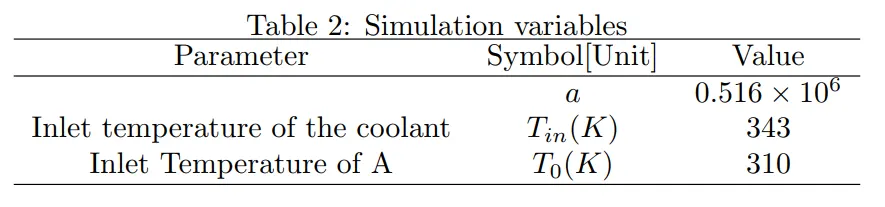
and the following initial conditions are used.
`0.1598-epsilon_1<=C_a(0)<=0.1598+epsilon_1`
`404.736-epsilon_2<=T(0)<=404.736+epsilon_2`
where `epsilon_1in[0,0.05] " & "epsilon_2in[0,4]`
Note: `epsilon_1` and `epsilon_2` are random numbers.
The function for solving the governing equation of CSTR bypassing the state variables for Case2 is as shown below.
function xdot = cstr_model2(t,x)
%% THE PARAMETERS
k0 =  1*10^10;
Ca0 = 2.0;
F = 1;
rho = 1*10^6;
Cp = 1.0;
dH = -130*10^6;
rhoc = 1*10^6;
Cpc = 1.0;
V = 1;
Fc  = 15;
T = 393.954;
Ca = 0.265;
ER  = 8330;
b = 0.5;
%% Variable
a = 0.516*10^6;
Tin = 343;
T0 = 310;
%% THE MODEL
Q = (a*Fc^(b+1))/(Fc + (a*Fc^b)/(2*rhoc*Cpc))*(x(2) - Tin);
xdot(1) = F/V*(Ca0 - x(1)) - k0*exp((-ER)*(1/x(2)))*x(1);
xdot(2) = F/V*(T0 - x(2)) + -dH/(rho*Cp)*exp((-ER)*(1/x(2)))*x(1) - Q/(rho*Cp);
xdot = xdot';
end
How to select a random number between the domain in MATLAB?
For say, our domain is [min, max] and by using a "rand" command in MatLab a random number is generated between (0,1). In order to obtain the random number in [min,max] following manipulations are performed.
`"random in [min,max]" = min+(max-min)*"rand"`
For Eg., `epsi_1`for case1 is a random number between [0,0.05] is selected as below.
`epsi_1 = 0+(0.05-0)*"rand"`
How to select an initial value for the conditions between the given domain?
For Eg., in case1 `C_a` varies between `[0.2646-epsi_1,0.2646+epsi_1]`
In order to select a random number for a variable in the above domain following formula is used.
`(0.2646-eps1)+((0.2646+eps1)-(0.2646-eps1))"rand"`
which is reduced is as shown below.
`0.2646+(2*"rand"-1)epsi_1`
Solving the Model using ODE45:
Once the initial conditions and time interval are set. we use ode45 predefined ODE solver which uses a six-stage,fifth-order Runge-Kutta(4,5) formula.
For determining the variables for the next time step, initial conditions are passed through the function and ode45 selects the appropriate time step within the desired tolerances and throws the output. And, this output is used as input to the subsequent time interval. This loop is iterated until the final time is reached.
The base code for both the cases is as shown below:
Base Code:
%% case (a)
random_x01_1=0+(0.05-0)*rand;   %generating random numbers for eps_1 between 0 & 0.05
random_x01_2=0+(4-0)*rand;      %generating random numbers for eps_2 between 0 & 4

x01(1) = 0.2646 + random_x01_1*(2*rand-1); % setting initial conditon for Ca(0)
x01(2) = 393.95 + random_x01_2*(2*rand-1); % setting initial conditon for T(0)
[t1,x1] = ode45('cstr_model1', [0,10], x01); % solving the ODE


%% case (b)
random_x02_1=0+(0.05-0)*rand;   %generating random numbers for eps_1 between 0 & 0.05
random_x02_2=0+(4-0)*rand;      %generating random numbers for eps_2 between 0 & 4
x02(1) = 0.1598 + random_x02_1*(2*rand-1); % setting initial conditon for Ca(0)
x02(2) = 404.736 + random_x02_2*(2*rand-1); % setting initial conditon for T(0)
[t2,x2] = ode45('cstr_model2', [0,10], x02); % solving the ODE
Post-processing:
Once the solutions are obtained for the non-linear equations from the given initial conditions results are processed in MatLab as shown below.
%% plotting the results
% case (a)
figure(1)
subplot(211)
plot(t1,x1(:,1),'LineWidth',2)
xlabel('time'); ylabel('Ca')
grid on
subplot(212)
plot(t1,x1(:,2),'LineWidth',2)
grid on
xlabel('time'); ylabel('T')

% case(b)
figure(2)
subplot(211)
plot(t2,x2(:,1),'LineWidth',2)
xlabel('time'); ylabel('Ca')
grid on
subplot(212)
plot(t2,x2(:,2),'LineWidth',2)
grid on
xlabel('time'); ylabel('T')
Results & Discussion:
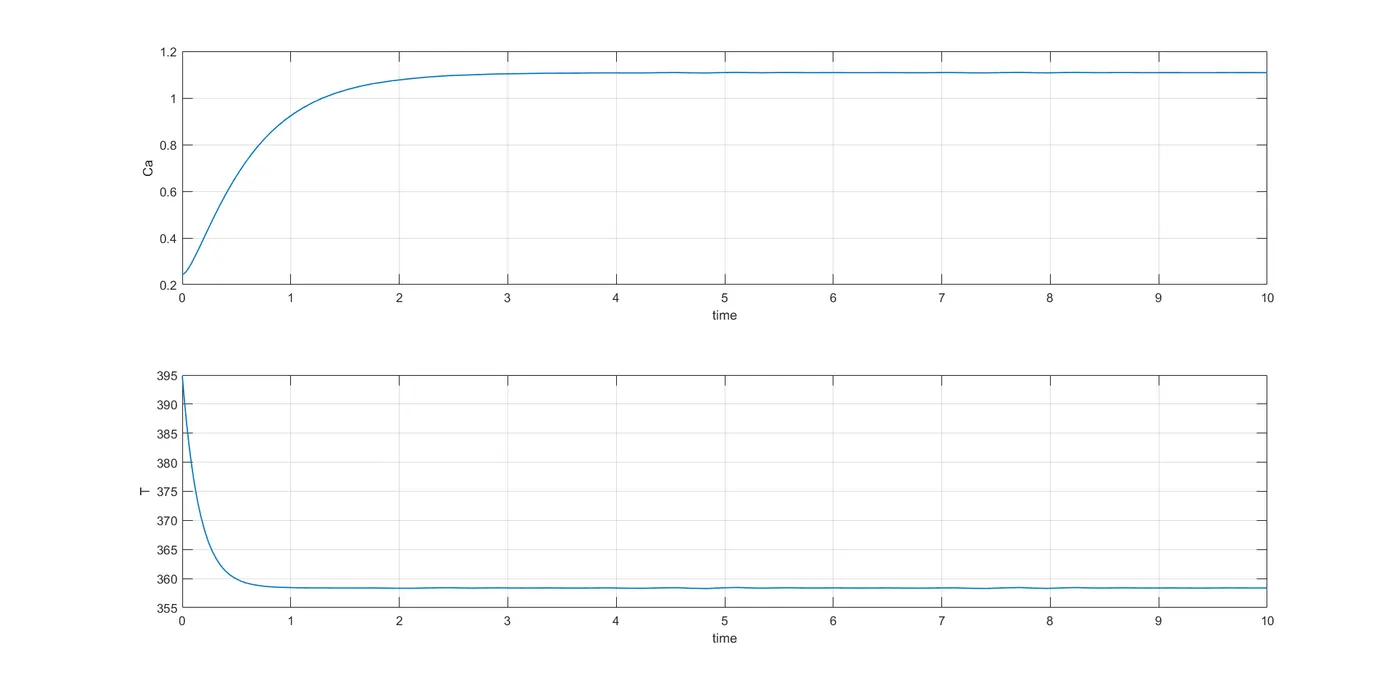
Case1:
Case2:
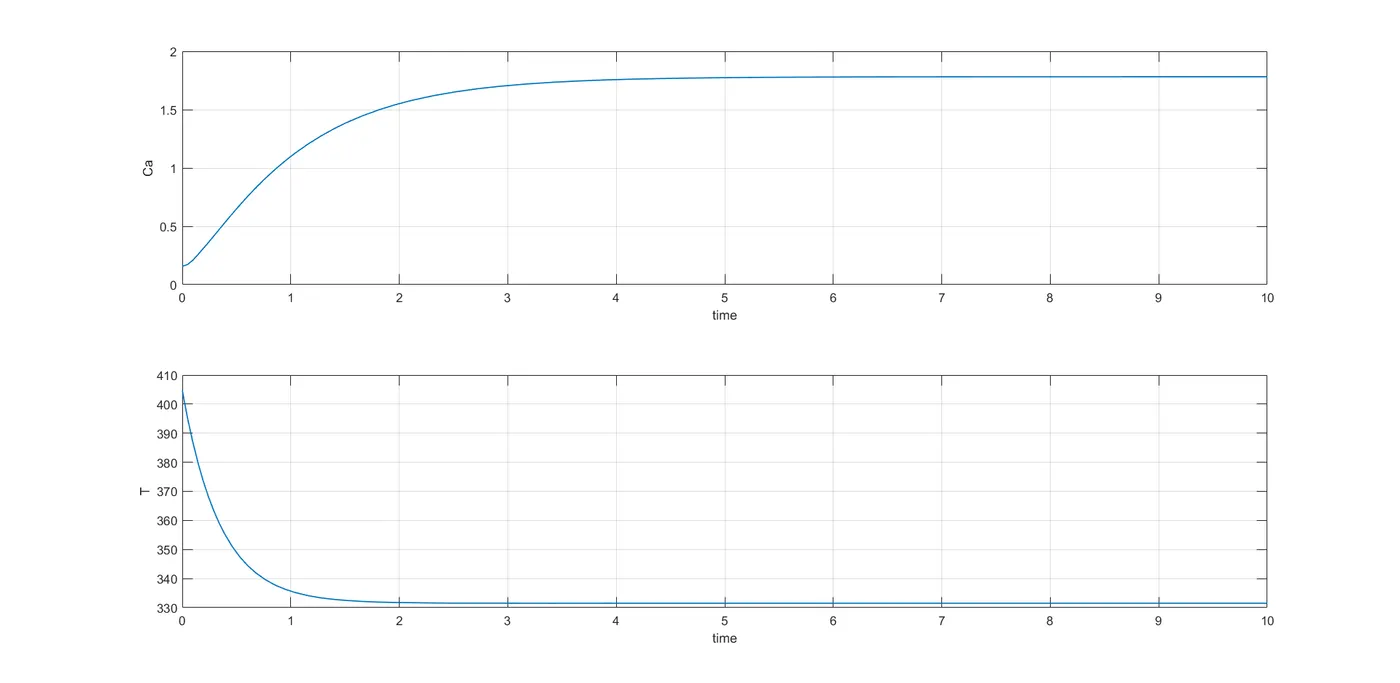
If the reactor concentration A at the initial condition is less, at the end of the time interval it settles to a higher value to balance out the concentration throughout the system (A+B), the same is observed with temperature variation as well.