Forward kinematic of 2R robotic arm using Python
FORWARD KINEMATIC OF 2R ROBOTIC ARM
AIM – Write python program to simulate the forward kinematics of a 2R Robotic Arm and create an animation file of the plot made.
OBJECTIVES-
- Write a program to simulate the forward kinematics of a 2R Robotic Arm.
- Create an animation file of the plots made using ImageMagick.
INTRODUCTION-
A robotic arm is a type of mechanical arm, usually programmable, with similar functions to a human arm; the arm may be the sum total of the mechanism or may be part of a more complex robot. The links of such a manipulator are connected by joints allowing either rotational motion or translational displacement. The links of the manipulator can be considered to form a kinematic chain. The terminus of the kinematic chain of the manipulator is called the end effector and it is analogous to the human hand.
Welding, spray painting and assembly of components are operations which involve usage of 2R robotic arm.
PROCEDURE-
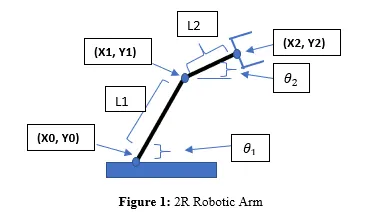
- Let us assume starting point of link 1 to be (X0, Y0), connector of link1 and link 2 to be (X1, Y1) and coordinates of manipulator be (X2, Y2).
- Let length of link1 is l1 and length of link is l2.
- Point (X0, Y0) = (0, 0) is fixed at base of robotic arm. Now, from normal trigonometric relations we have,
|
X1= l1*cos(theta1) |
Y1=l1*sin(theta1) |
|
X2= X1 + l2*cos(theta2) |
Y2=Y1 + l2*sin(theta2) |
- Append value of both theta1 and theta2 to remain between 0° and 90°.
- We plot both links by plotting their starting and end point.
"""
Program to simulate forward kinematics of 2R robotic arm
by Sushant Kumar Mishra
"""

import math
import matplotlib.pyplot as plt

#inputs

#Length of 1st link(m)
l1=1.0
#Length of 2nd link(m)
l2=0.5

#Coordinate of base
x0=0
y0=0

n=10
theta_start=0
theta_end=math.pi/2

theta1=[]
theta2=[]

for i in range(0,n):
	tmp= theta_start + i*(theta_end-theta_start)/(n-1)
	theta1.append(tmp)
	theta2.append(tmp)

ct=1
for t1 in theta1:
	for t2 in theta2:
		#Link1 and link 2 connector
		x1=l1*math.cos(t1)
		y1=l1*math.sin(t1)

		#Coordinates of manipulator
		x2=x1+l2*math.cos(t2)
		y2=y1+l2*math.sin(t2)

		filename='test%05d.png'%ct
		ct=ct+1

		plt.figure()
		plt.plot([x0,x1],[y0,y1])
		plt.plot([x1,x2],[y1,y2])
		plt.xlim([0,2])
		plt.ylim([0,2])
		plt.savefig(filename)
ANIMATION:
CONCLUSION AND EXPLANATIONS-
- One of the common mistakes to avoid is to use (math.pi)/2 instead of 90 because our code is taking angle values by default in degrees.
- Position of command plt.savefig(filename) must be outside the loop else empty plots will be obtained.
- Also, we must limit x axis and y axis to fixed values to create plots only in 1st quadrant with same scale.
- Give proper file name to each plot else their order will get mixed up while creating animation.
- Thus, we obtain animation of 2R Robotic Arm by stitching images in .gif file format.