This Simulation Shows The Flow Around a Cylinder
PROBLEM SPECIFICATION:
Simulate the flow over a cylinder and explain the phenomenon of Kármán Vortex Street using ANSYS Fluent.
PART-I:-
- Simulate the flow with the steady and unsteady case and calculate the Strouhal Number for Re= 100.
PART-II:-
- Calculate the coefficient of drag and lift over a cylinder by setting the Reynolds number to 10,100,1000,10000 & 100000. (Run with steady solver)
- Discuss the effect of Reynolds number on the coefficient of drag. [we should validate Results with any standard literature and error should be within 5 %]
Expected results:-
- In both approaches, show that the flow has converged. What quantities or plots need to be looked at determining that the flow has converged?
- Plots of the coefficient of drag and lift.
- Plots to show vortex shedding behind the cylinder.
- Mention the preferred material at the end of the challenge submission page.
NOTE: Vary the velocity of the flow to change the Reynolds number.
Setting the reference values in Fluent is necessary to get the correct values of drag and lift.
THEORY:
In fluid dynamics, a Kármán vortex street (or a von Kármán vortex street) is a repeating pattern of swirling vortices, caused by a process known as vortex shedding, which is responsible for the unsteady separation of flow of a fluid around blunt bodies. It is named after the engineer and fluid dynamicist Theodore von Kármán, and is responsible for such phenomena as the "singing" of suspended telephone or power lines and the vibration of a car antenna at certain speeds. von Karman vortices form nearly everywhere that fluid flow is disturbed by an object. [1]
As a fluid particle flows toward the leading edge of a cylinder, the pressure on the particle rises from the free stream pressure to the stagnation pressure. The high fluid pressure near the leading edge impels flow about the cylinder as boundary layers develop about both sides. "As a fluid particle flows toward the leading edge of a cylinder, the pressure on the particle rises from the free stream pressure to the stagnation pressure. The high fluid pressure near the leading edge impels flow about the cylinder as boundary layers develop about both sides. Since the innermost portion of the shear layers, which is in contact with the cylinder, moves much more slowly than the outermost portion of the shear layers, which is in contact with the free flow, the shear layers roll into the near wake where they fold on each other and coalesce into discrete swirling vortices. A regular pattern of vortices called a vortex street trail aft in the wake." Von Karman vortices form at all scales of fluid motion.
A vortex street will form only at a certain range of flow velocities, specified by a range of Reynolds numbers (Re), typically above a limiting Re value of about 90. The (global) Reynolds number for a flow is a measure of the ratio of inertial to viscous forces in the flow of a fluid around a body or in a channel, and may be defined as a non-dimensional parameter of the global speed of the whole fluid flow:
`Re_L=(VL)/ν`
`Re_L=(ρVL)/μ`
where,
V= the free stream flow velocity (m/s)
L= characteristic length parameter of the body or channel (m)
`ρ=` the reference fluid density `((kg)/m^3)`
`nu=` kinematic viscosity (=dynamic viscosity/density=`mu/rho`) `(m^2/s)`
For common flows (the ones which can usually be considered as incompressible or isothermal), the kinematic viscosity is everywhere uniform over all the flow field and constant in time, so there is no choice on the viscosity parameter, which becomes naturally the kinematic viscosity of the fluid being considered at the temperature being considered. On the other hand, the reference length is always an arbitrary parameter, so particular attention should be put when comparing flows around different obstacles or in channels of different shapes: the global Reynolds numbers should be referred to the same reference length. This is actually the reason for which the most precise sources for airfoil and channel flow data specify the reference length at the Reynolds number. The reference length can vary depending on the analysis to be performed: for a body with circle sections such as circular cylinders or spheres, one usually chooses the diameter; for an airfoil, a generic non-circular cylinder or a bluff body or a revolution body like a fuselage or a submarine, it is usually the profile chord or the profile thickness, or some other given widths that are in fact stable design inputs; for flow channels usually, the hydraulic diameter about which the fluid is flowing. For an aerodynamic profile, the reference length depends on the analysis. In fact, the profile chord is usually chosen as the reference length also for the aerodynamic coefficient for wing sections and thin profiles in which the primary target is to maximize the lift coefficient or the lift/drag ratio (i.e. as usual in thin airfoil theory, one would use the chord Reynolds as the flow speed parameter for comparing different profiles). For fairings and struts the parameter is usually the dimension of internal structure to be streamlined (let us think for simplicity it is a beam with circular section), and the primary target is to minimize the drag coefficient or the drag/lift ratio. The main design parameter which becomes naturally also a reference length is therefore the profile thickness (the profile dimension or area perpendicular to the flow direction), rather than the profile chord.
The range of Re values will vary with the size and shape of the body from which the eddies are being shed, as well as with the kinematic viscosity of the fluid. Over a large `Re_d` range, (47 to 105 for circular cylinders; reference length is d: diameter of the circular cylinder) eddies are shed continuously from each side of the circle boundary, forming rows of vortices in its wake. The alternation leads to the core of a vortex in one row being opposite the point midway between two vortex cores in the other row, giving rise to the distinctive pattern shown in the picture. Ultimately, the energy of the vortices is consumed by viscosity as they move further downstream, and the regular pattern disappears.
When a single vortex is shed, an asymmetrical flow pattern forms around the body and changes the pressure distribution. This means that the alternate shedding of vortices can create periodic lateral (sideways) forces on the body in question, causing it to vibrate. If the vortex shedding frequency is similar to the natural frequency of a body or structure, it causes resonance. It is this forced vibration that, at the correct frequency, causes suspended telephone or power lines to "sing" and the antenna on a car to vibrate more strongly at certain speeds.
In dimensional analysis, the Strouhal number (St, or sometimes Sr to avoid the conflict with the Stanton number) is a dimensionless number describing oscillating flow mechanisms. The parameter is named after Vincenc Strouhal, a Czech physicist who experimented in 1878 with wires experiencing vortex shedding and singing in the wind. The Strouhal number is an integral part of the fundamentals of fluid mechanics.
Strouhal number, `St=(f*l)/U`
where, `f=`frequency; `L=`characteristic length (diameter of the cylinder in our case); and `U=`flow velocity
Finally, defining the drag coefficient `(C_d)` and the lift coefficient `(C_L)` as:
`C_d=(2*F_d)/(ρ*V^2*A)` and `C_L=(2*F_L)/(ρ*V^2*A)`
where,
`F_d=`Drag Force (N)
`F_L`=Lift Force (N)
`rho=` density of the fluid `((kg)/m^3)`
`V=`Flow velocity`(m/s)`
`A=`Cross sectional area `(m^2)`
DESCRIPTION OF THE CASE:
This project is based on the analysis of external flow. More specifically, the study encompasses the modelling of laminar flow around a circular cylinder. The analytical solution of the same case modeled with the potential flow is known and easy to interpret; however, the physical mechanism which rules real flow around a circular cylinder, as well as its mathematical treatment, is highly complex. Some examples are the boundary layer detachment and oscillatory effects that without a CFD study would be very difficult to determine either analytically or experimentally. The case includes simulations made with two different Reynolds numbers to observe the behavior of the flow in such different regimes.
PHYSICS OF THE PROBLEM:
The problem encompasses a circular cylinder with a diameter of D=2m submerged in a stream with an undisturbed speed of V = 1 m/s (for our first part of the project), whereas for the second part of our project inlet velocity varies according to the different Reynolds numbers. The problem statement is shown in the below figure.
For this problem, there is no easy analytical solution to describe the behavior of the fluid (except for potential flow, which is an ideal case).
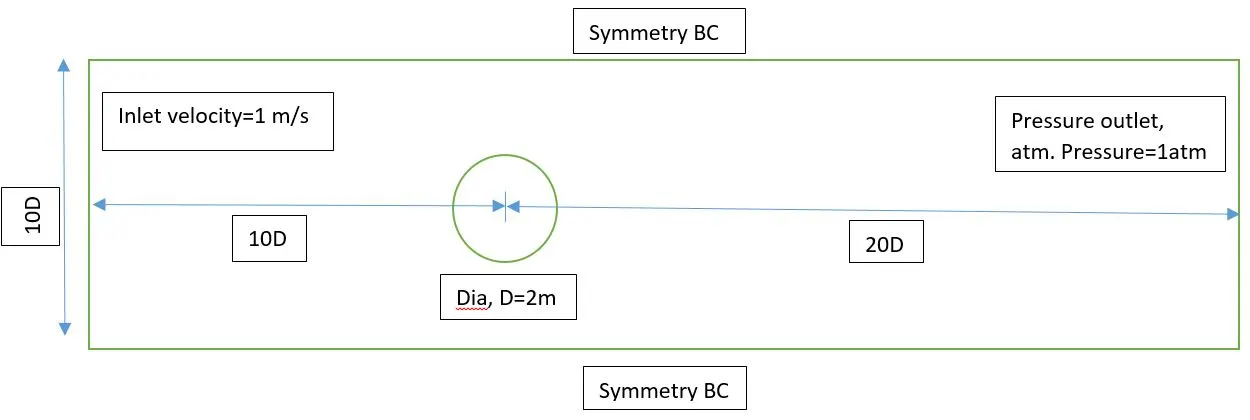
The behavior of the flow around a circular cylinder is very complex and highly dependent on the Reynolds number. The boundary layer in laminar regimes detaches at an angle of `θ=82^°` because of the existence of an adverse pressure gradient. Due to the symmetry of the cylinder, a curious phenomenon appears named von Karman street, consisting of alternate vortices emitted by the cylinder. The vortices are detached periodically, and it directly relates their frequency to the Strouhal number.
For external flow, the transition from the laminar regime to a turbulent regime occurs at `Re≈3×10^5`. However, the very complex structure of vortex shedding deserves special mention; the relation between the behavior of the flow and the Reynolds number is shown in the below figure:
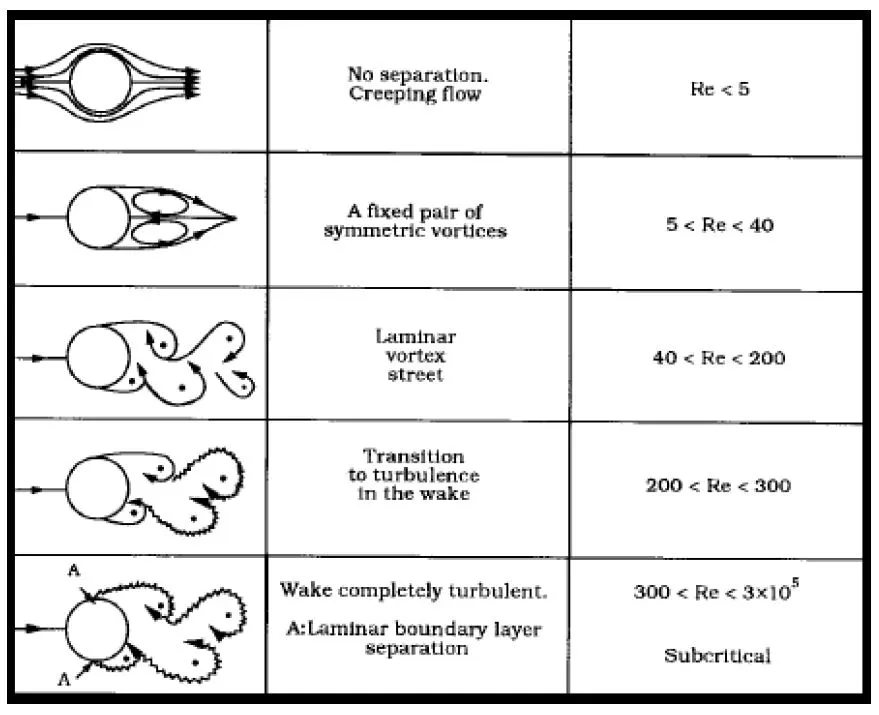
As the simulation is going to be run with laminar flow, the Reynolds number is going to be set 100 for the first part of the project. This will allow us to observe the von Karman street and its transition while guaranteeing that the whole fluid domain remains laminar. Here we will also calculate the Strouhal number for the transient case and run the simulation for both steady and unsteady cases. For the second part of the project, the Reynolds number is going to be set as 10,100,1000,10000 & 100000. This will allow us to show the effect of increasing Reynolds number on the coefficient of drag and lift.
PRE-PROCESSING:
Geometry:
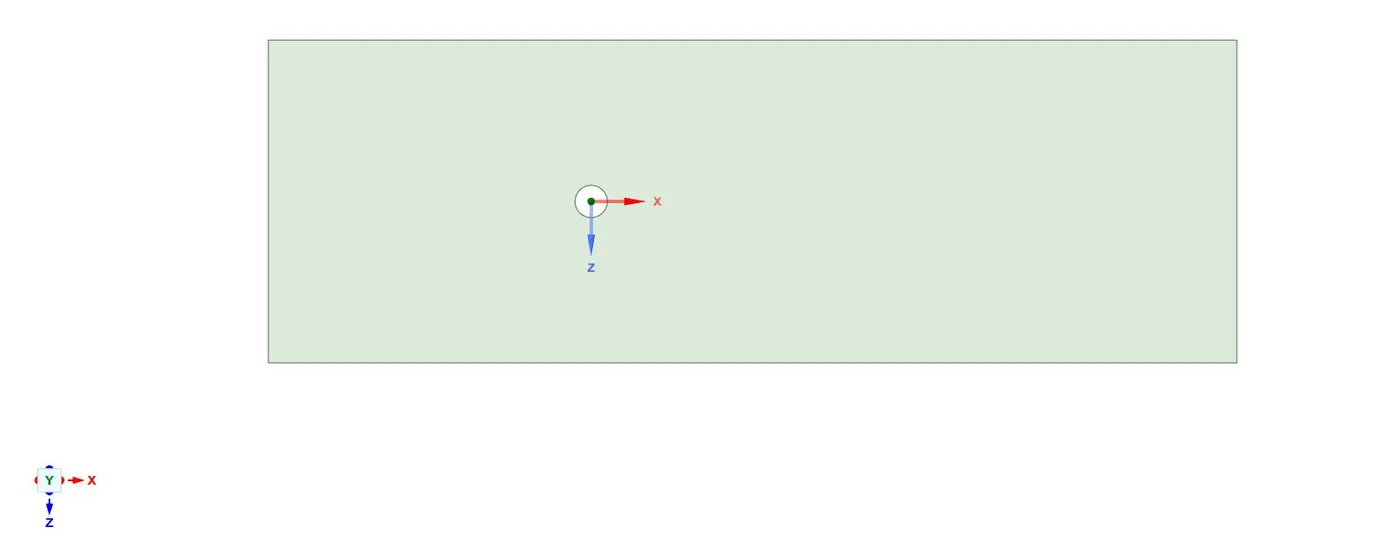
We use SpaceClaim for geometry creation. Geometry dimensions are the same as shown in the ‘Physics of the Problem’ section. To create the geometry into the surface, we are using the ‘Pull tool’ available in SpaceClaim. While creating the geometry make sure that the origin is located at the center of the circle. A snippet of the final geometry from SpaceClaim is shown below:
Meshing:
We use ANSYS inbuilt Meshing tool for the discretization of our flow domain for solving. For this project; we want our mesh to be triangular dominant, and we’ll use a few more important refinements to simulate the flow behavior correctly. The mesh for the study of the cylinder will not be uniform. Some areas of the domain need to contain a higher cell density (mainly the walls of the cylinder and its prolongation).
NOTE: On the walls and downstream of the cylinder it is necessary to have a highly refined mesh. It will allow the user to compute the drag coefficient and to observe the von Karman street both with high accuracy. However, if the simulation is too much time-consuming or it is done with a Reynolds number such that no vortices are generated, it is recommended to reduce the refinement of the mesh.
Adding method: Select the body and after selecting the body; in the method section just select the triangles. Now our mesh is triangular.
Element Size: Choosing element size is totally based on user experience. Here for this simulation, we’re using our element size to be 0.25m. For element size=0.25m, we’re getting a number of nodes=41534 and a number of elements=40642. Our element size is perfect and no need to decrease the element size more, because it does not make much difference in the solution, and if we decrease the element size below the 0.25m, it eventually increases the simulation time.
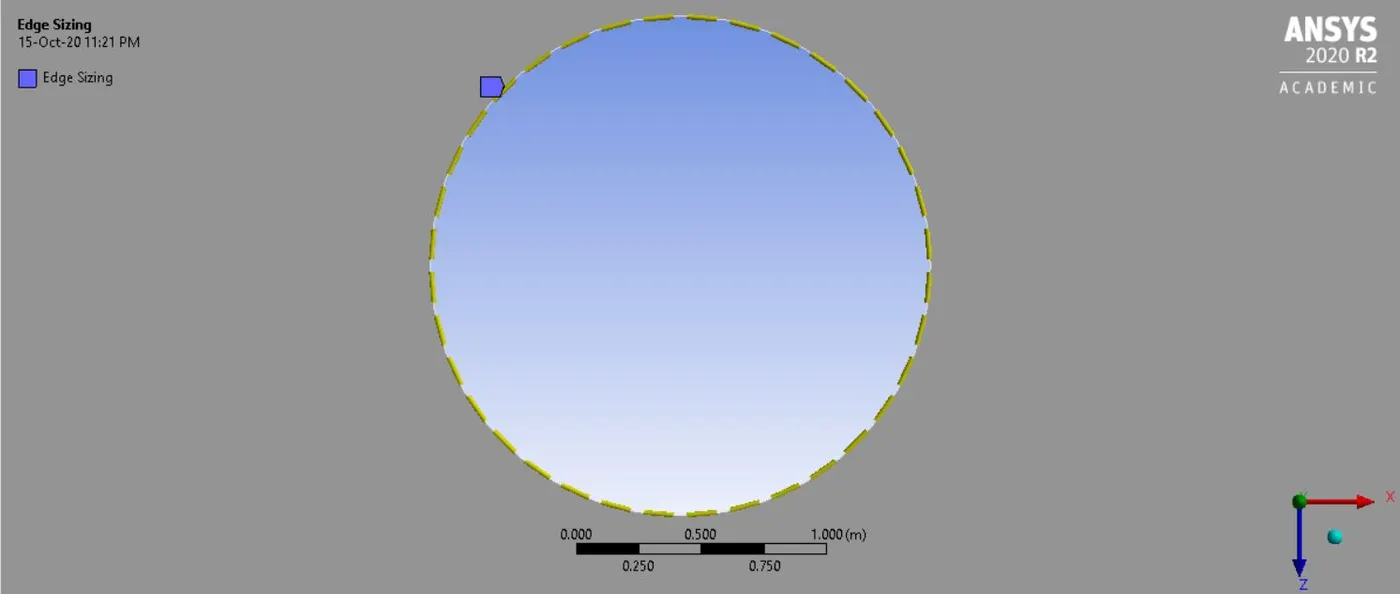
Sizing: With our default mesh, we can see after zooming to the circle it is looking more like a polygon (with maybe 12 or 13 faces). So, it’s not perfect and to be honest, we can never get a perfect circle unless we have an infinite number of edges. However, if we see our default mesh, we can notice that there are sharp corners that can affect the flow field. So, one thing we want to do in CFD is to make sure that our geometry–on top of which we are going to simulate the flow–is captured perfectly.
Here, we’re going to insert the ‘sizing method’. We use this option to precisely control the mesh. Select the edge of the circle, because the edge is what we want to control. In the type section, select; the number of divisions to be 36. Choosing 36 is more from the experience point of view, we can use a large number here–that would increase the mesh count. But in general, if we’ll have an edge for `10°` (360/36=10), that would give a smooth enough representation (and it’s good enough for engineering calculations).
Inflation Layers: Since the flow around the cylinder is really important, that’s why we make sure to take care of the region around the cylinder. To do that, we’ll use the inflation layer. So, the inflation layer helps us create a body-fitted mesh. Insert inflation layers in the mesh and in the boundary scoping method choose the geometry. In the boundary option, choose the circle (edge of your geometry) and for the inflation option and maximum layer, enter 5e-003m and 6, respectively. From the starting cell, the size of layers slowly increases, that happens because of the ‘growth rate’. As a default, we have a factor of 1.2, so there will be about 20% growth in every layer.
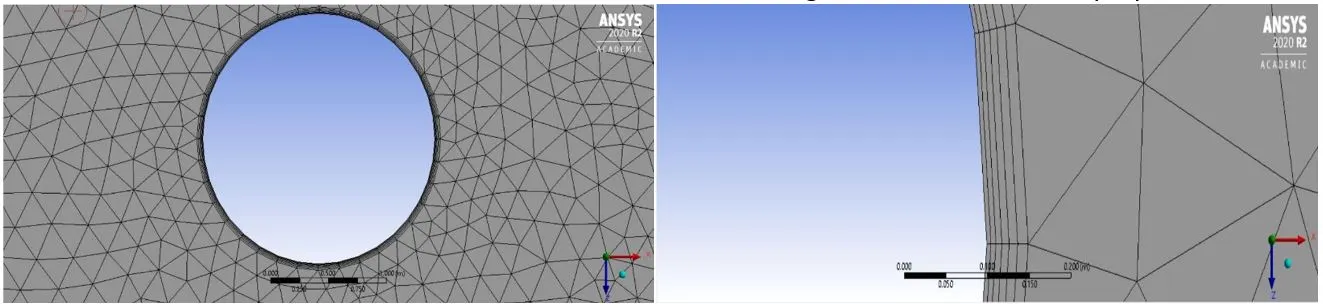
Our final mesh would look like this:
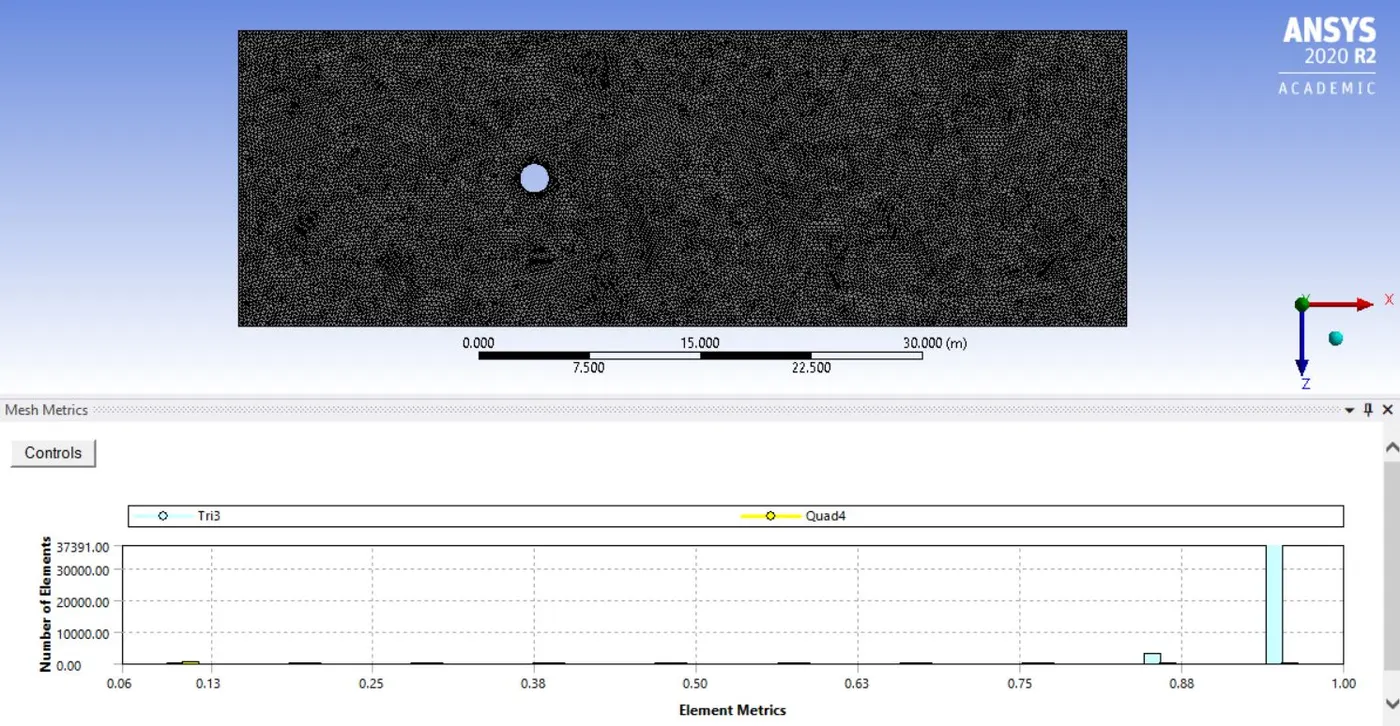
Case Setup in Fluent:
Setting Up Physics:
Time: Steady/Transient (for our first part of the project we’ll use both the solvers one by one and for the second part of the project we’ll use steady solver)
Type: Pressure Based
Velocity formulation: absolute
Viscous model: Laminar (for the Reynolds number 1000, 10000, and 100000, we’ll use the k-omega SST model)
Adding Material:
Copy air and save as new fluent fluid material with the name of ‘user-material’. To delete the pre-defined material, i.e. air in our case. Go to the cell zone, choose the surface, and click the edit option. Then choose user-material as our fluid material. Then in Materials, click create/edit; choose an air, and then press delete.
The density and viscosity of our ‘user-material’ would be 1 and 0.02 respectively.
Boundary Conditions:
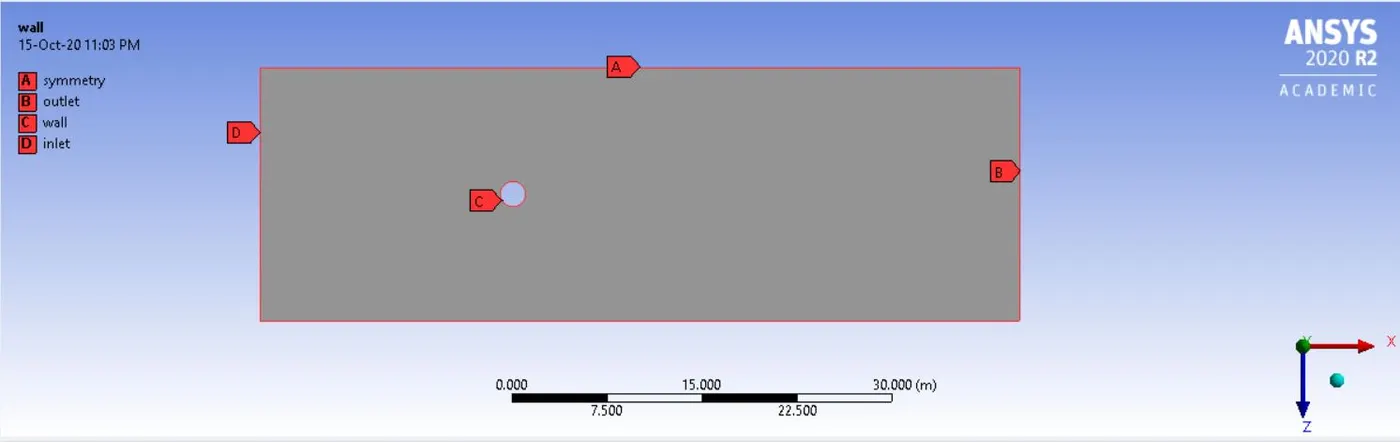
Part 1:
Inlet: velocity= 1m/s
Outlet: gauge pressure= 0Pa
Wall: No-slip
Symmetry: symmetry
Part 2: In the second part of the project, all the other boundary conditions will be the same except the inlet (velocity) condition.
Please refer to the below table for the inlet velocity (for different Reynolds numbers):

Adding Reports:
First, we’ll create a monitor point at a distance of 4D (8m) to the right side of the cylinder. The primary reason for creating a monitor-point to capture the vortex-shedding behind the cylinder. To create the monitor-point, click on the ‘Post-Processing’ tab and then click to surface. In the surface option, click on the point option to create a point. Coordinates of point will be (8, 0). Name the point as the monitor-point.
After creating the monitor-point go back to the solving tab. Click on ‘definitions’, then new, and then click on the surface report. In the surface report menu, we have to choose the ‘vertex average’ option. Here we are going to plot a vertex average of velocity. So in the fluid variables choose ‘velocity’ and for surfaces choose our created monitor-point.
In the same ‘definitions’ option, when we click on the new, we can also find the option for force report. In the force report option, we have to create two different plots, one for the coefficient of drag and another for the coefficient of lift. The procedure is straightforward and the same as the vertex average velocity plot, but here we have to select ‘wall’ as our surface option.
Reference Values:
Refer to the below-given snippet for the reference values:
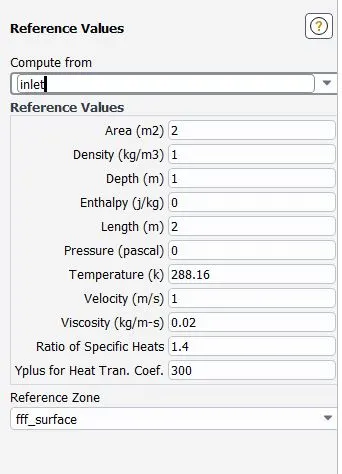
NOTE: In the above snippet, the value of velocity is going to change for the second part of the project. As we change the Reynolds number, our velocity is also going to change accordingly.
Initialization:
Use ‘hybrid’ initialization. This is an important step to get some initial values, and only after obtaining the initial values we can move to set up our contours for velocity and pressure in the post-processing tab.
Adding Contours:
Go to the ‘post-processing’ tab. Click on contours and add the contour for velocity. In surfaces section ‘select all’ and in options, don’t forget to check ‘filled’ option. Click on the save/display option and click compute before doing that. The same steps will be repeated for the pressure contours; except instead of velocity, this time we click the pressure option.
Solving:
In the solution tab, click on ‘Methods’ and select the below-given options:
Scheme: SIMPLE
Gradient: Least Squares Cell-Based
Pressure: Second Order
Momentum: Second order upwind
Adding animations:
Go to the ‘Activities’ tab, in the create section, click on ‘solution animation’. Name the animation as ‘velocity-animation’ and record for after every 10 iterations. Choose the contour for which you want to see the animation, here we are choosing ‘velocity contour’.
NOTE: For steady-state solver, we’re going to run the simulation for 1200 iterations. And, for transient-state solver: the time step size is 0.1sec, and the number of time steps is 600.
POST-PROCESSING:
PART-I:
Here we are comparing the results obtained from the two different setups, i.e. steady-state and transient. The aim behind doing that is to get an idea of using a steady-state or transient solver for a particular problem.
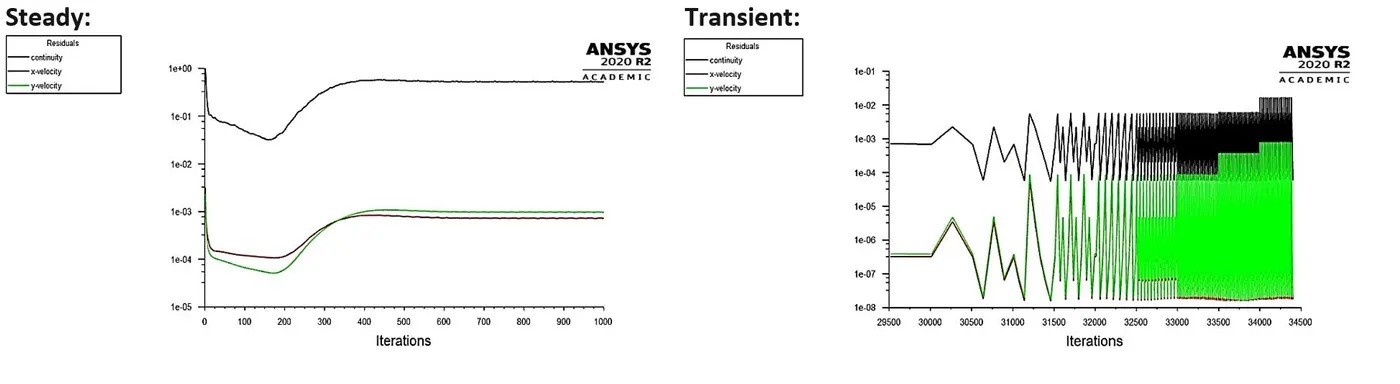
Residuals Plot:
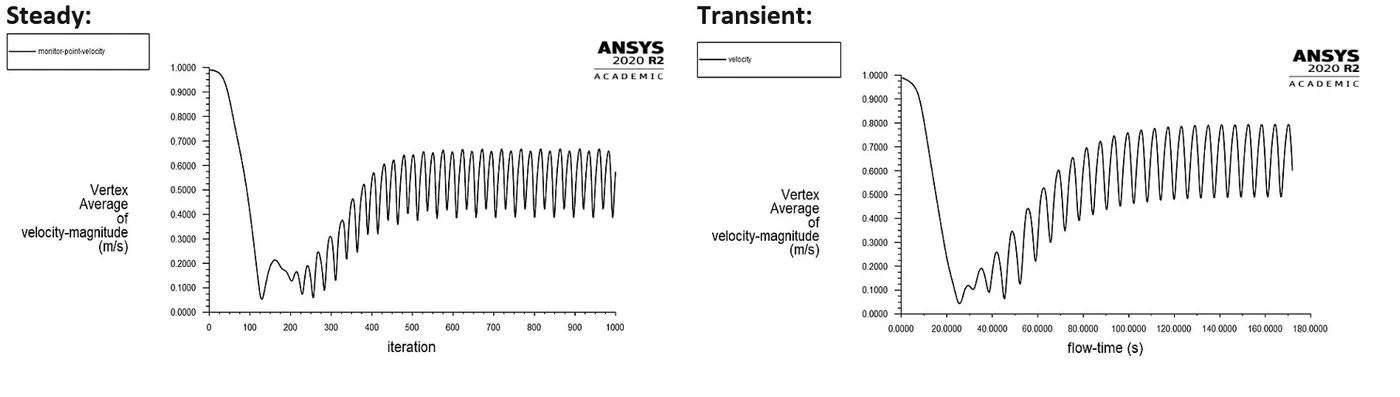
Plot for Vertex average of Velocity:
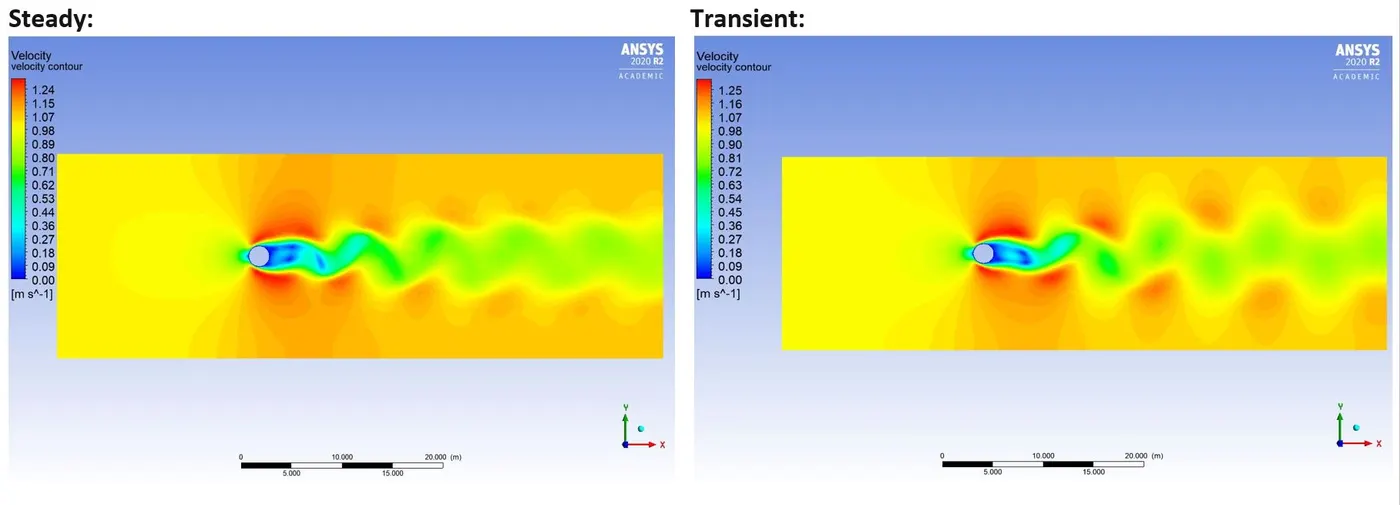
Velocity Contour:
Animation of flow around a cylinder:
Steady:
Transient:
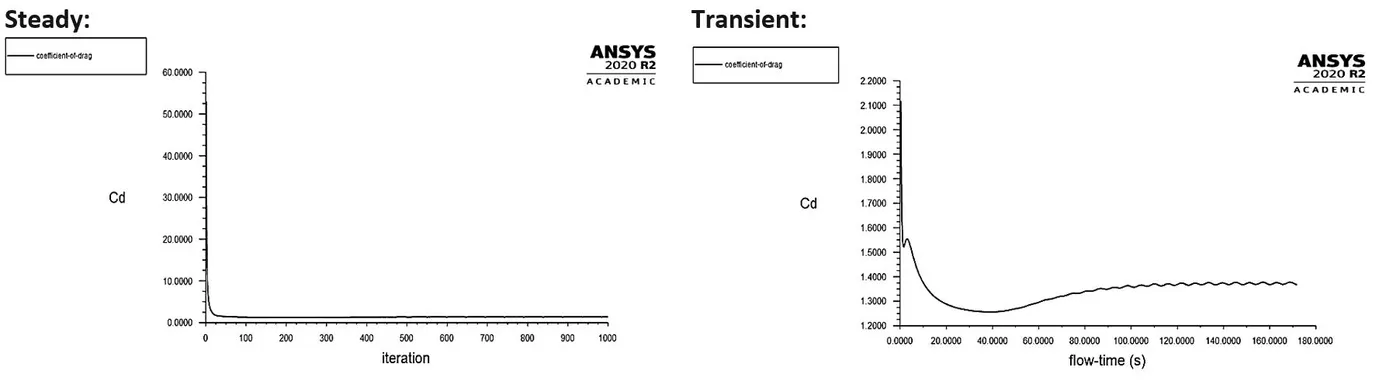
Coefficient of Drag plot:
Coefficient of Lift plot:
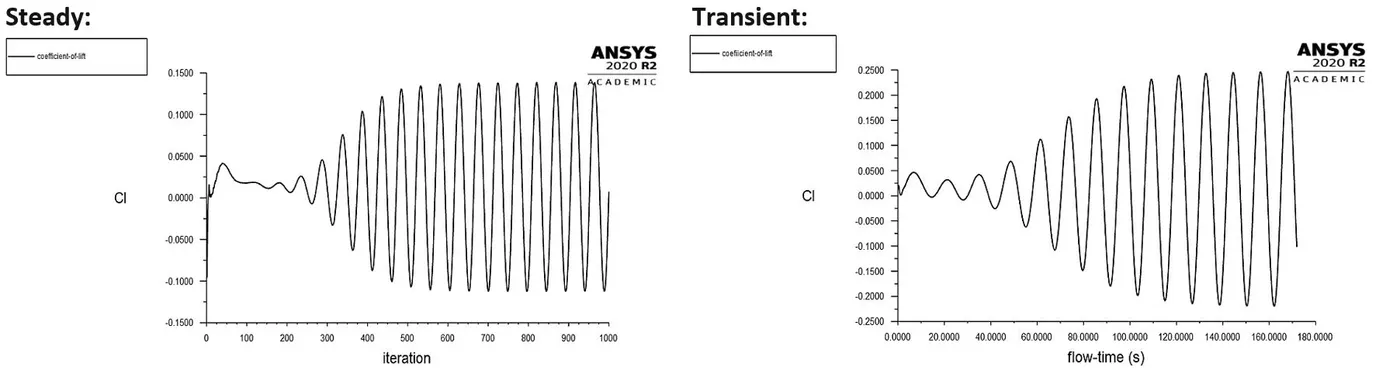
Steady-state simulations are typically performed to get conclusive answers. So, any intermediary solution that we get is not time accurate. Suppose, at 250 iterations, we get a particular value of velocity, then this value of velocity does not co-relate to a particular time. And this is all because of which we are not getting accurate results. We have seen vortex shedding but anyway we can’t calculate the frequency parameter–the vortex frequency–and that too Strouhal number. That’s why we need a Transient simulation.
In Transient simulation, we solve equations w.r.t. time. So at every time step, we solve equations accurately, meaning we can trust that results. Since it does the calculation for each time-steps, hence we can calculate the Strouhal number in this case.
Strouhal Number plot:
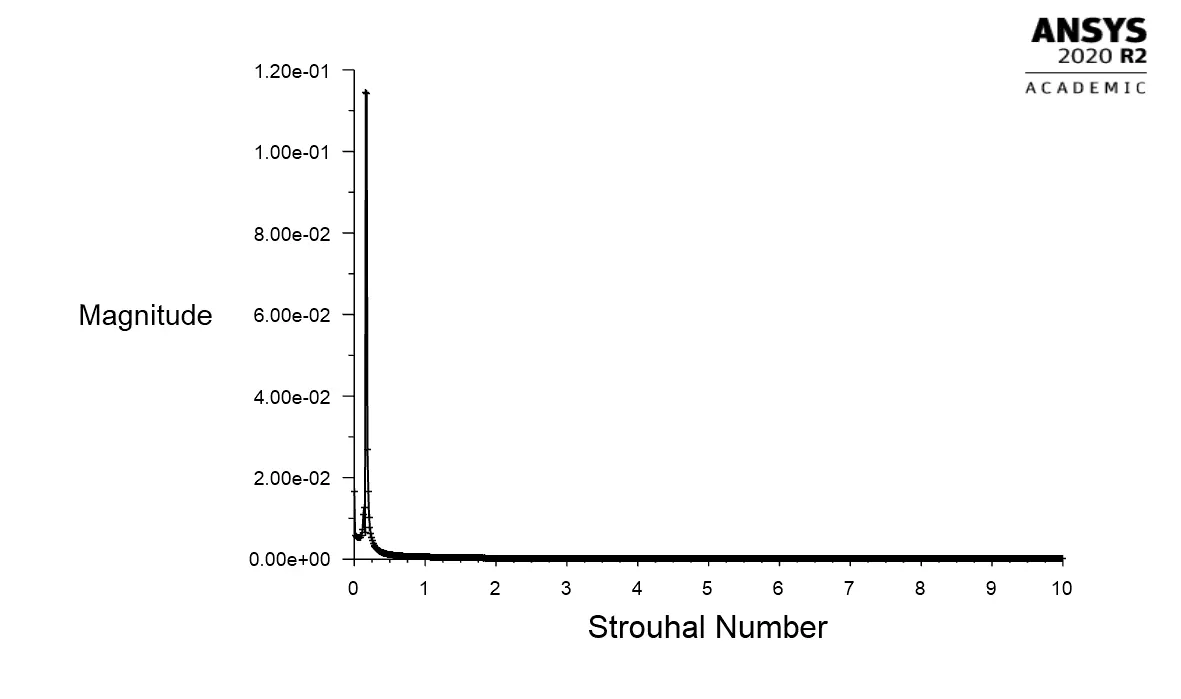
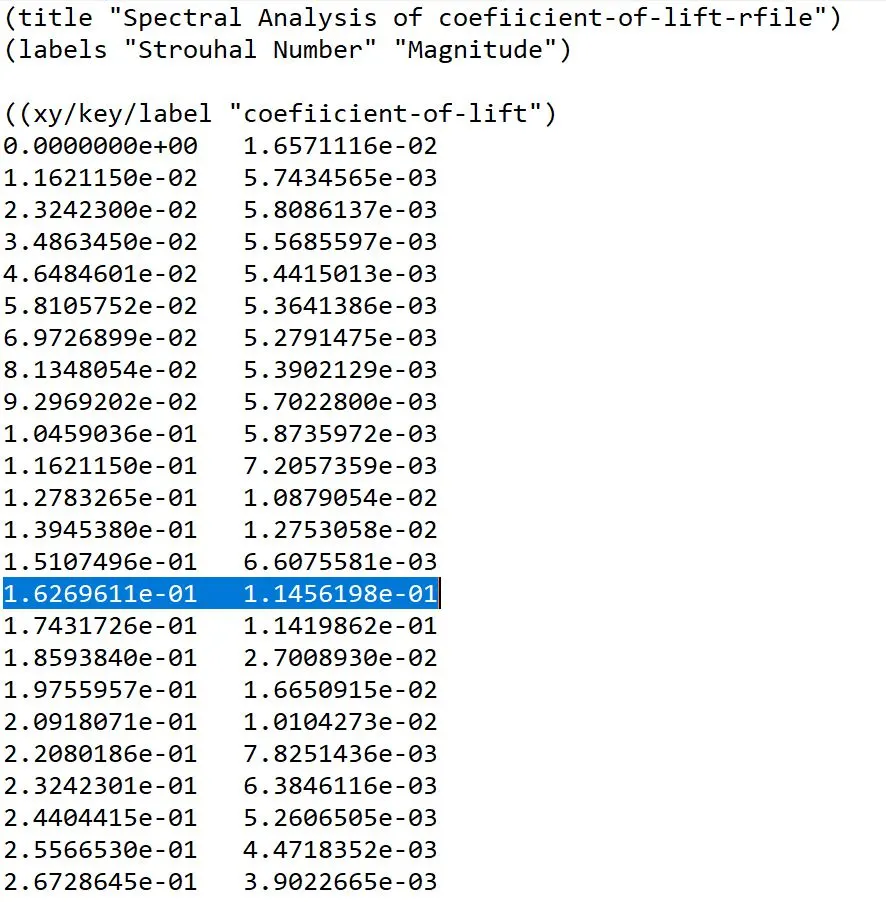
From the above data which is generated from the ANSYS Fluent, we can see that our Strouhal number is 0.16269611 (highlighted by the blue color).
CONCLUSION:
1. When we see the animations and velocity contours for both steady and transient simulations, we can observe that the transient simulations are much better in predicting & resolving the vortices. It is recommended to use the transient/unsteady-state solver for the simulations where it is necessary to solve the equations for each time-steps.
2. To get the idea of convergence in the steady-state solution, we can have a look at the plot of residuals. When we see the residuals plot in our case, we found that the solution gets steady at nearly 500 iterations, and that is where the solution gets converged. The plots for the vertex average of velocity, coefficient of drag plot, and coefficient of lift plot can verify the same.
3. For the unsteady state (transient) solution, we can’t get the idea of convergence by seeing the plot for residuals. Here we can see from our vertex average velocity plot that the solution gets steady at 120 secs. The same thing can be observed from the plot of the coefficient of drag and lift.
4. Using the transient state solver, we are getting the Vortex Shedding better because the solver is solving for each time step and requires more time to solve the entire domain to be converged. Comparatively the transient State is the best method to get the accurate result because it is time-dependent whereas the steady-state is independent of time. The transient simulation will be preferably chosen over steady-state simulation in this problem.
PART-II:
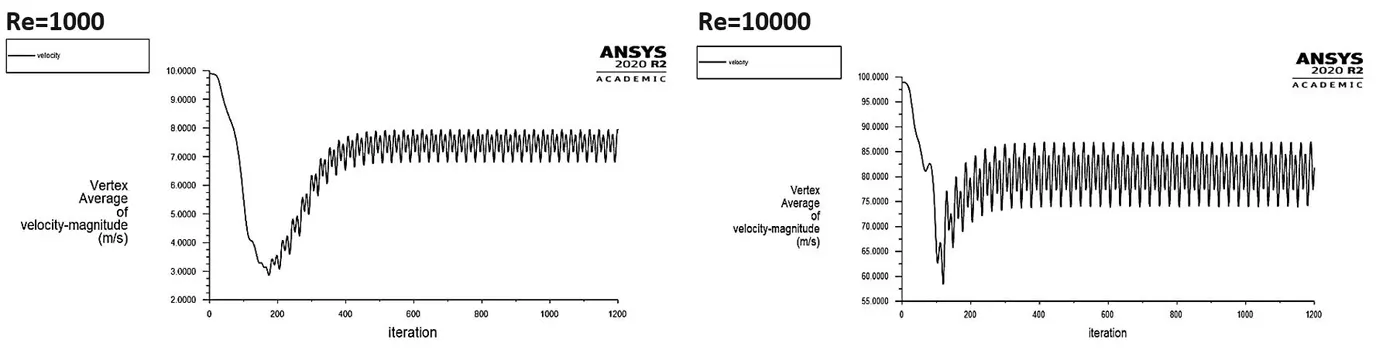
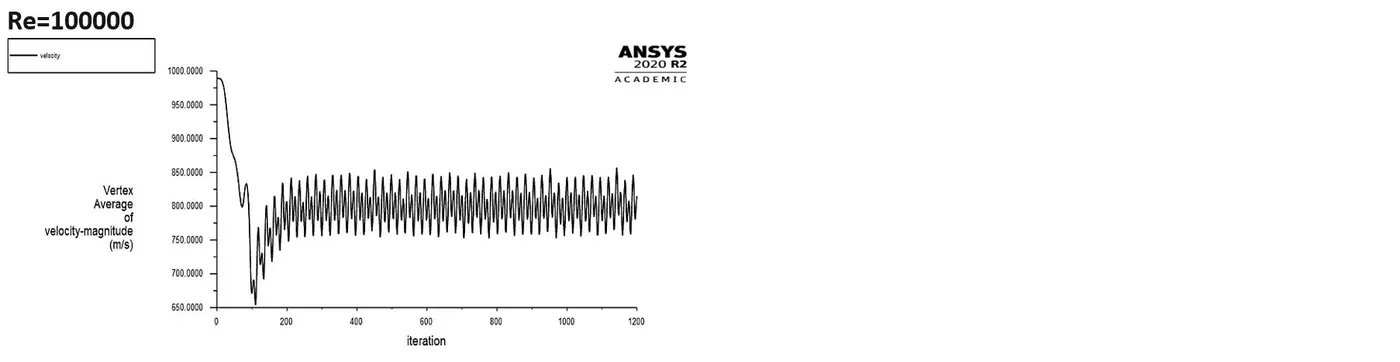
Plots for Vertex average of velocity:
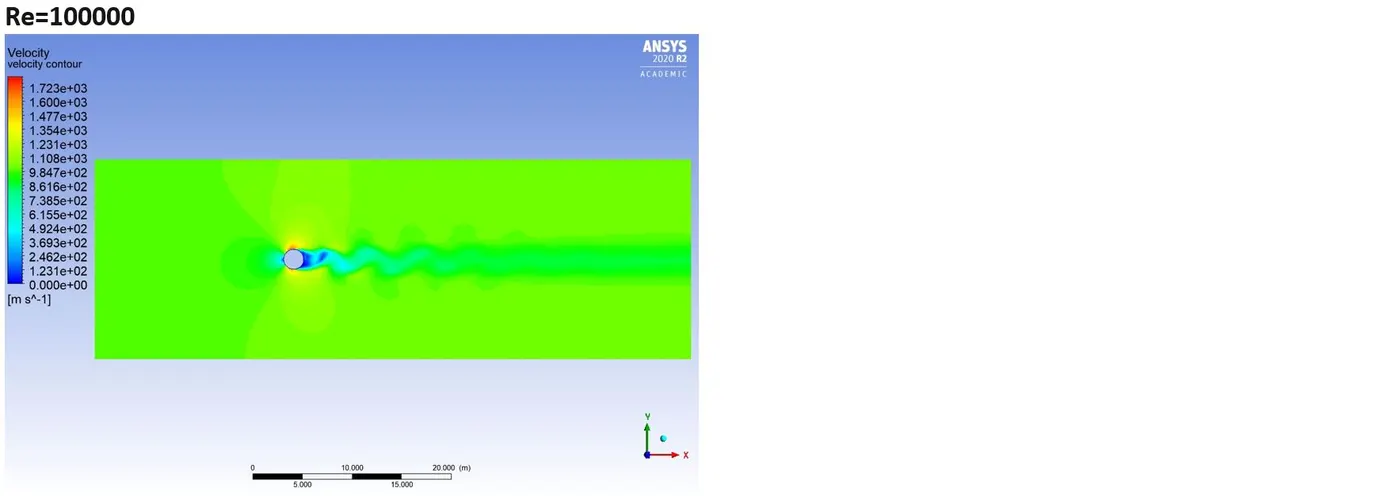
Velocity Contours:
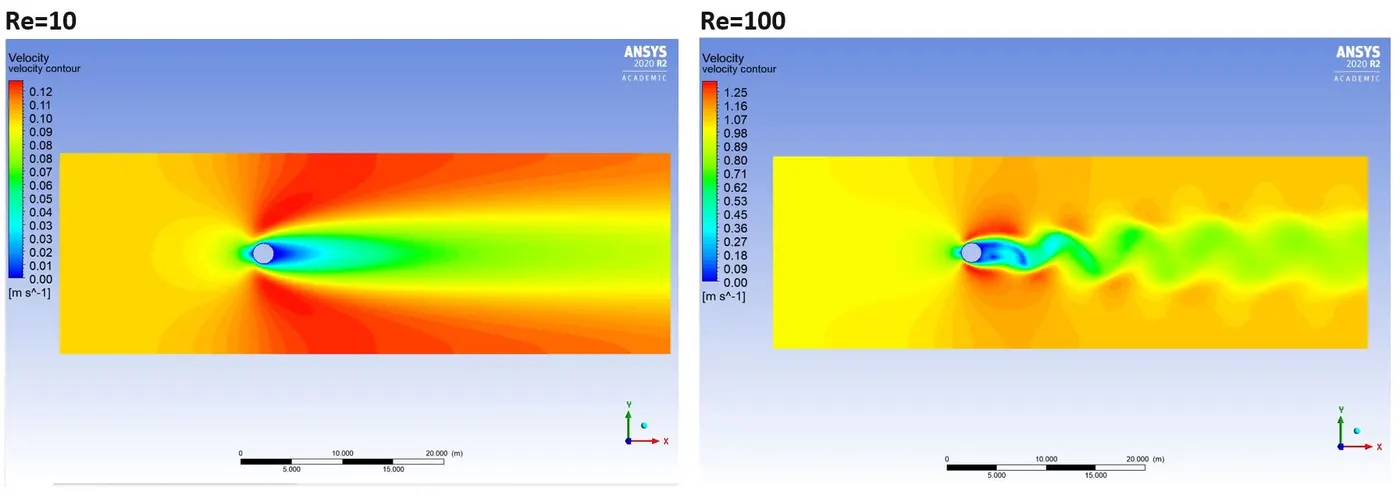
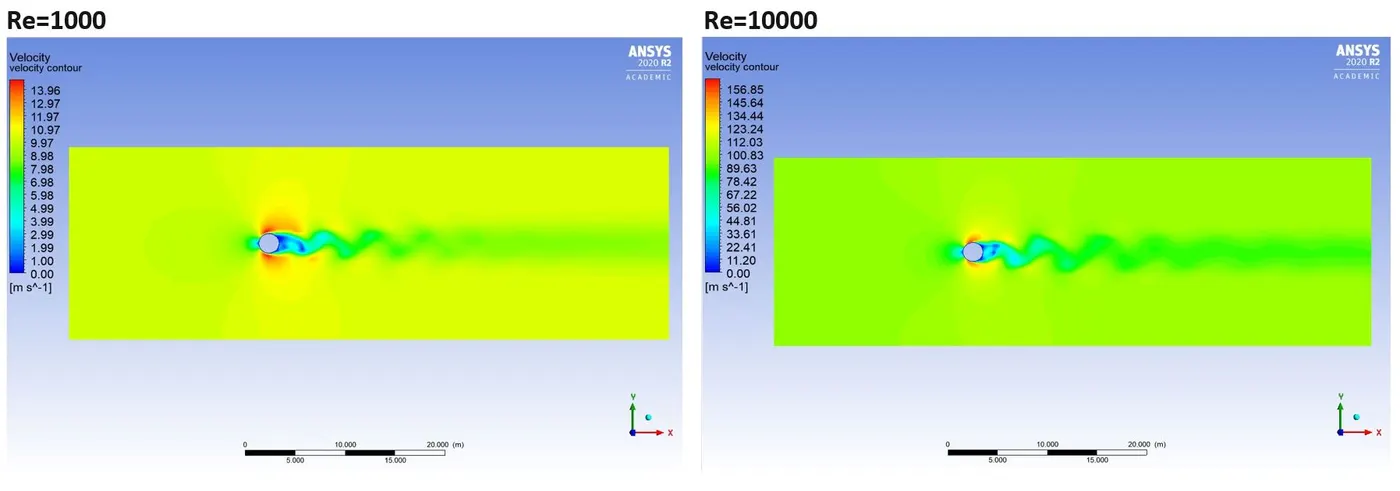
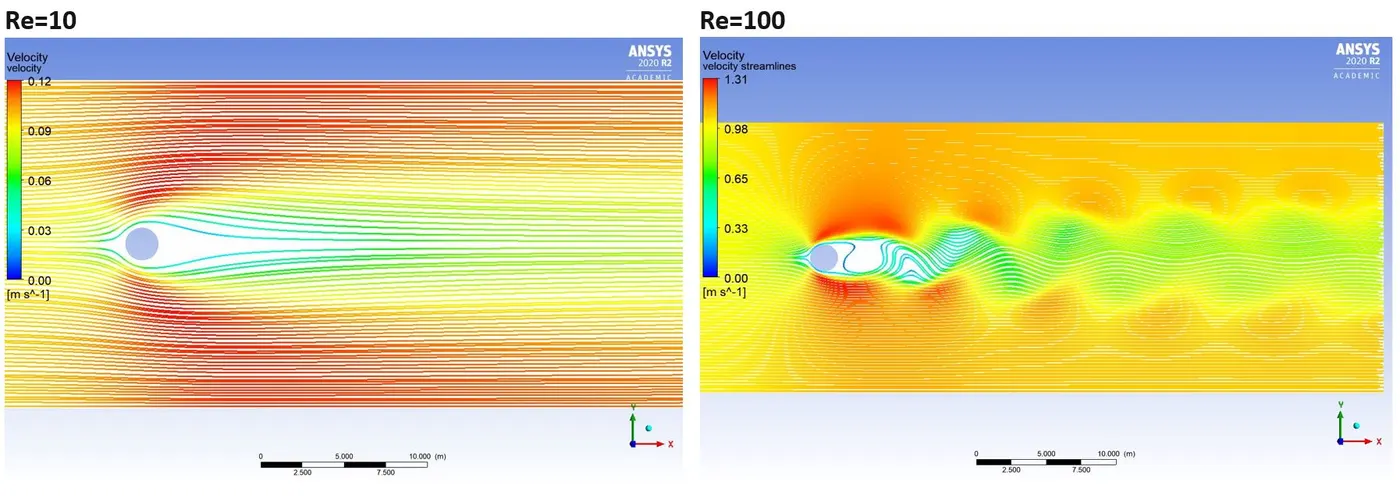
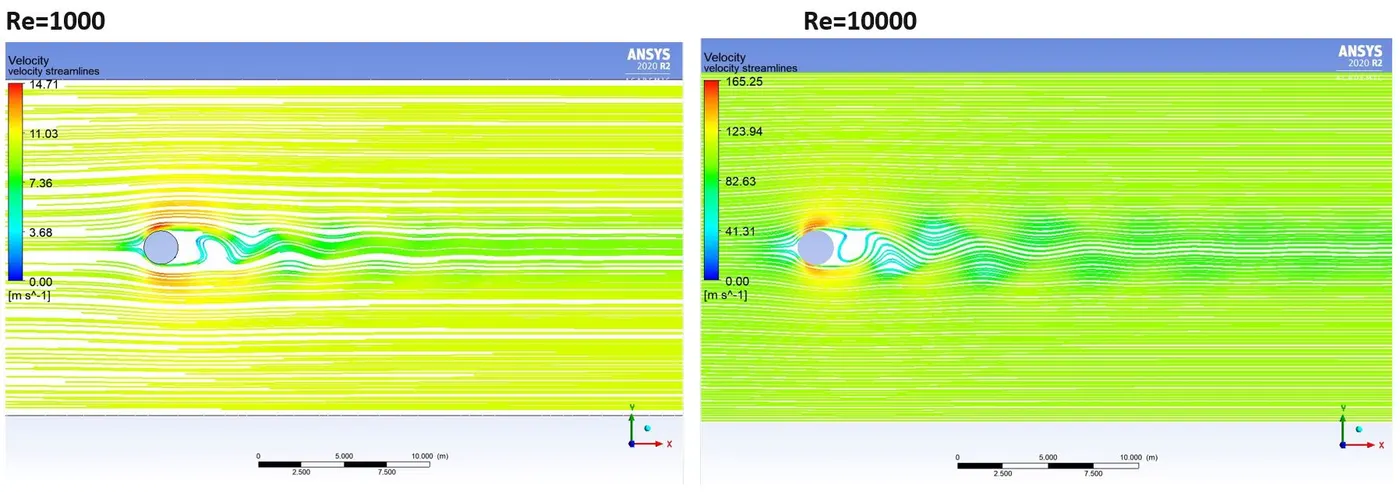
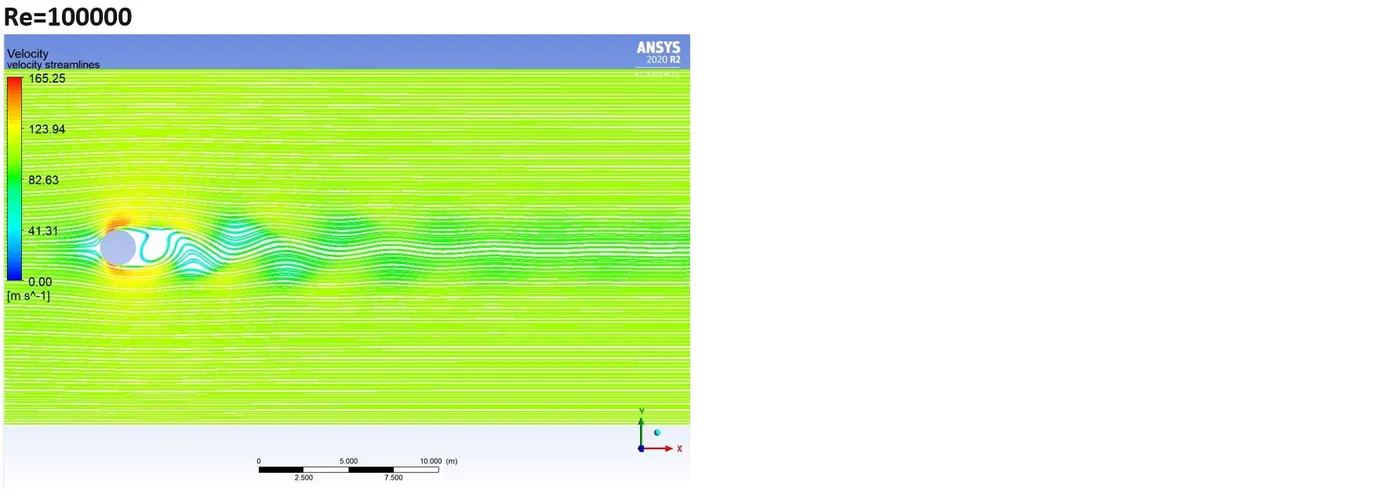
Velocity Streamlines:
Coefficient of drag plot:
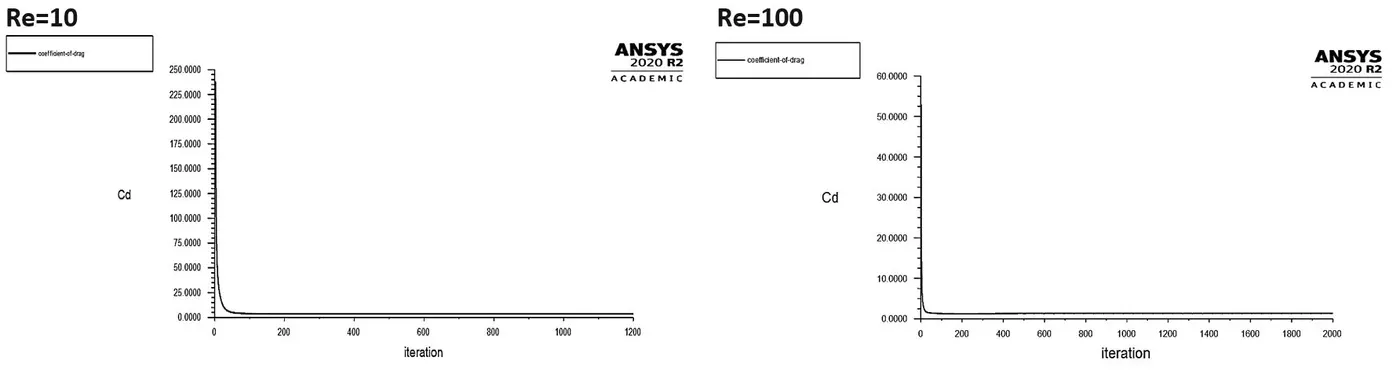
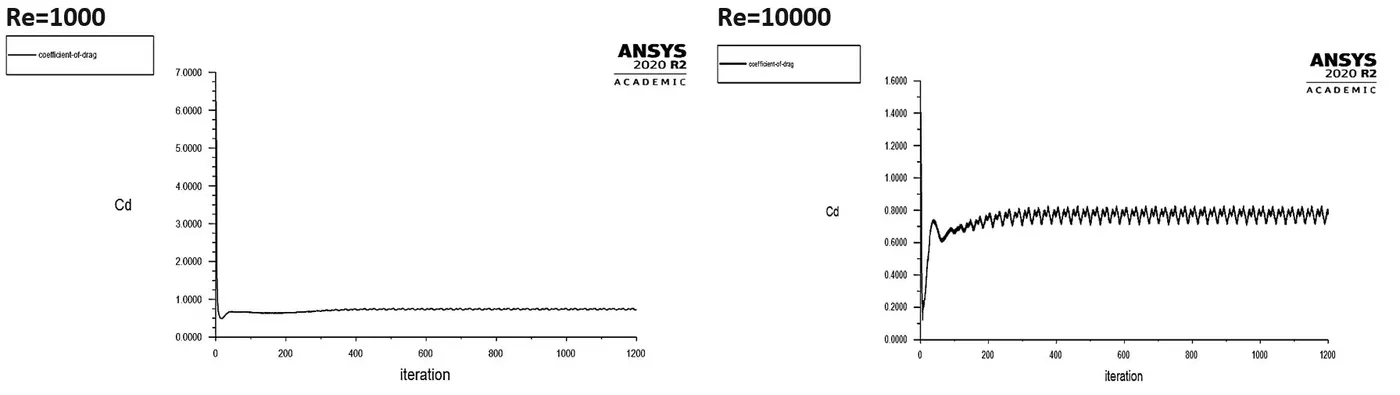
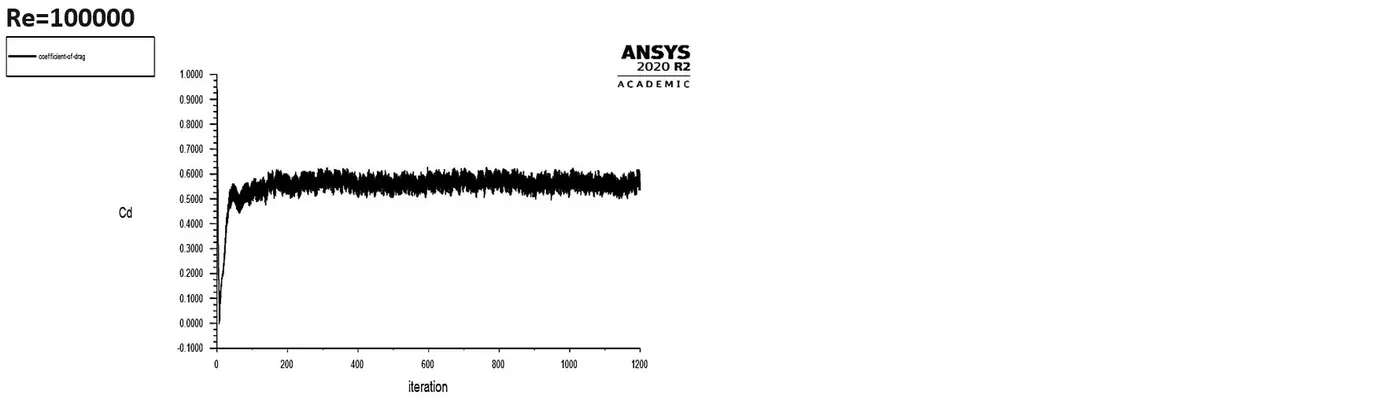
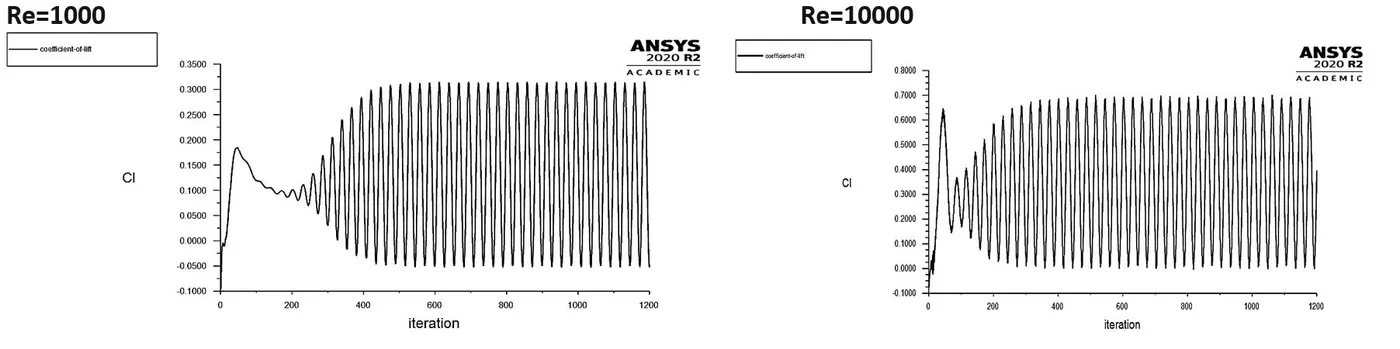
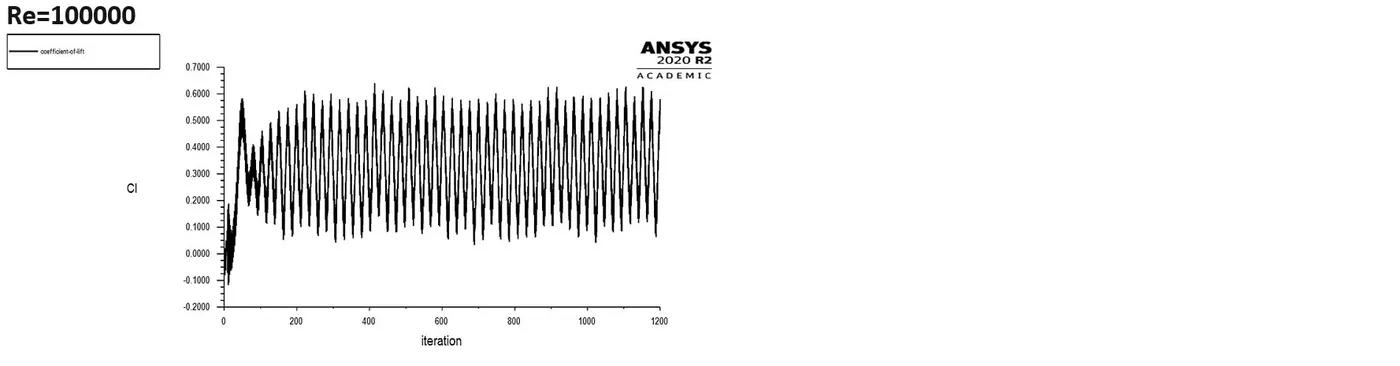
Coefficient of lift plot:
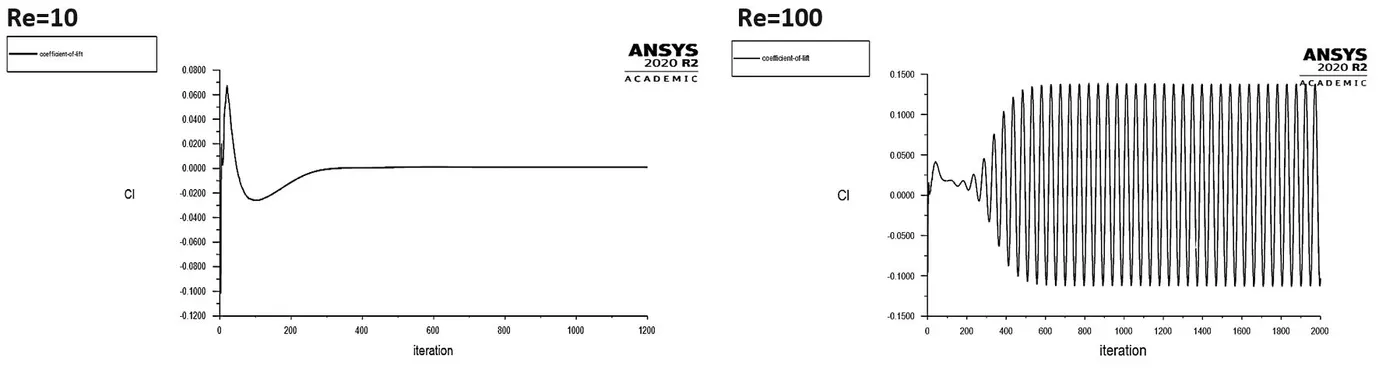

CONCLUSION:
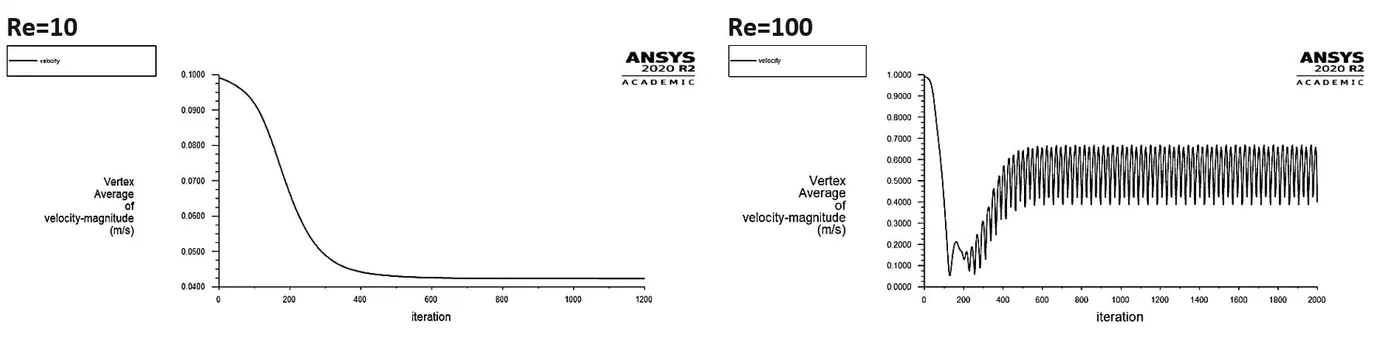
1. As the Reynold number is increased further, the vortices are shed alternately from the upper and lower cylinder surface at a definite frequency depending on the Reynolds number. And, for the values of Re greater than or equal to 1000; we can see the oscillations increase, and the wakes behind the cylinder are turbulent in nature while showing laminar boundary layer separation.
As Reynolds number keeps increasing, inertial forces starting to dominate over viscous forces. The coefficient of drag (Cd) starts decreasing and there is a significant fluctuation in the Coefficient of lift (Cl) and the Vertex average of Velocity magnitude at the monitoring point rises at the same time.
2. From the table we can notice that as we increase the Reynolds number, our Drag coefficient is decreasing whereas the Lift coefficient increasing. When we compare these results with the findings of Rajani et al. [2], we found that our results agreed reasonably well.
3. An anomaly can be noticed with the results obtained from the Re=10000 simulation. The values for Drag coefficients should be less than the value obtained with the Re=1000 simulation, and the value of the Lift coefficient should be less than the values obtained from the Re=100000 simulation.
4. From our velocity streamline plots, we can observe that with an increase in the Reynolds number, the flow is becoming more unsymmetrical. Increasing velocity eventually brings the turbulent drag up to and even higher than the laminar drag value.
References:
[1] https://en.wikipedia.org/wiki/Kármán_vortex_street
[2] B.N. Rajani, S. Majumdar, A. Kandasamy, Numerical simulation of laminar flow past a circular cylinder, Applied Mathematical Modelling 33 (2009) 1228–1247