Project: The Complete Front End Development
AIM: E-Commerce Website Of Swag Of India
INTRODUCTION
Education, An integral part of our Indian Society and it is important for every individual to succeed in his life and help bring change to our world. In a country with more than 1.3 billion people living, for everyone individual education is essential. To keep learning and developing themselves and helping our environment, economy, social life be sustainable.
Swag Of India is an interactive e-commerce solution providing users to best Clothes with best dells and discounts. Swag Of India is Website Sells of Clothes. Swag of india is best website for Childrens, ladies and Mens for collecting Clothes. Swag Of India id giving best Discounts to Users.
OBJECTIVES
Online Shopping is the process whereby consumers directly buy goods and services without any intermediary service over the internet. The goal of this website is to develop a web based interface for students of Jammu and Kashmir, the website would be easy to use and hence the shopping experience pleasant for the users. The main goal of this website is:
I. To develop an easy to use web based interface where students can search for products (books), view a complete description of the product and order the product.
II. A student can buy and sell books from home.
III. A student can get books on rent.
WEB-DEVELOPMENT:
Web development is a broad term for the work involved in developing a web site for the Internet (World Wide Web) or an intranet (a private network). Web development can range from developing the simplest static single page of plain text to the most complex web-based internet applications, electronic businesses, and social network services. A more comprehensive list of tasks to which web development commonly refers, may include web engineering, web design, web content development, client liaison, client-side/side scripting, web server and network security configuration, and e-commerce development. Among web professionals, "web development" usually refers to the main non-design aspects of building web sites: writing markup and coding. Most recently Web development has come to mean the creation of content management systems or CMS. These CMS can be made from scratch, proprietary or open source. In broad terms the CMS acts as middleware between the database and the user through the browser. A principle benefit of a CMS is that it allows non-technical people to make changes to their web site without having technical knowledge.
WEB-SITE
A website is a collection of related web pages, including multimedia content, typically identified with a common domain name, and published on at least one web server. A website may be accessible via a public Internet Protocol (IP) network, such as the Internet, or a private local area network (LAN), by referencing a uniform resource locator (URL) that identifies the site.
Websites have many functions and can be used in various fashions; a website can be a personal website, a commercial website for a company, a government website or a non-profit organization website. Websites are typically dedicated to a particular topic or purpose, ranging from entertainment and social networking to providing news and education. All publicly accessible websites collectively constitute the World Wide Web, while private websites, such as a company's website for its employees, and are typically a part of an intranet.
Web pages, which are the building blocks of websites, are documents, typically composed in plain text interspersed with formatting instructions of Hypertext Markup Language (HTML, XHTML). They may incorporate elements from other websites with
suitable markup anchors. Web pages are accessed and transported with the Hypertext Transfer Protocol (HTTP), which may optionally employ encryption (HTTP Secure, HTTPS) to provide security and privacy for the user. The user's application, often a web browser, renders the page content according to its HTML markup instructions onto a display terminal.
Hyperlinking between web pages conveys to the reader the site structure and guides the navigation of the site, which often starts with a home page containing a directory of the site web content. Some websites require user registration or subscription to access content. Examples of subscription websites include many business sites, news websites, academic journal websites, gaming websites, file-sharing websites, message boards, web-based email, social networking websites, websites providing real-time stock market data, as well as sites providing various other services. A web site consists of web pages which are interconnected to each other and contain various data and functionalities.
WEB-PAGE
A web page, or webpage, is a document that is suitable for the World Wide Web and web browsers. A web browser displays a web page on a monitor or mobile device. The web page is what displays, but the term also refers to a computer file, usually written in HTML or comparable markup language. Web browsers coordinate the various web resource elements for the written web page, such as style sheets, scripts, and images, to present the web page.
Typical web pages provide hypertext that includes a navigation bar or a sidebar menu to other web pages via hyperlinks, often referred to as links.
On a network, a web browser can retrieve a web page from a remote web server. On a higher level, the web server may restrict access to only a private network such as a corporate intranet or it provides access to the World Wide Web. On a lower level, the web browser uses the Hypertext Transfer Protocol (HTTP) to make such requests.
A static web page is delivered exactly as stored, as web content in the web server's file system, while a dynamic web page is generated by a web application that is driven by server side software or client-side scripting. Dynamic website pages help the browser (the client) to enhance the web page through user input to the server.
THE STEPS TO CREATE A WEB SITE
Creating a web site requires multiple steps which includes the following:
Creating a UI(User interface)
Scripting(Both at server end and client end)
Creating a backend or the database
FIG.1
UI DEVELOPMENT
Technologies that are mostly used to develop a User Interface are:
- HTML
- CSS
- Bootstrap.
HTML
Hypertext Markup Language (HTML) is the standard markup language for creating web pages and web applications. With Cascading Style Sheets (CSS) and JavaScript it forms a triad of cornerstone technologies for the World Wide Web. Web browsers receive HTML documents from a webserver or from local storage and render them into multimedia web pages. HTML describes the structure of a web page semantically and originally included cues for the appearance of the document.
HTML elements are the building blocks of HTML pages. With HTML constructs, images and other objects, such as interactive forms, may be embedded into the rendered page. It provides a means to create structured documents by denoting structural semantics for text such as headings, paragraphs, lists, links, quotes and other items.HTML can embed programs written in a scripting language such as JavaScript which affect the behavior and content of web pages. Inclusion of CSS defines the look and layout of content. The World Wide Web Consortium (W3C), maintainer of both the HTML and the CSS standards, has encouraged the use of CSS over explicit presentational HTML since 1997.
CSS
Cascading Style Sheets (CSS) is a style sheet language used for describing the presentation of a document written in a markup language. Although most often used to set the visual style of web pages and user interfaces written in HTML and XHTML, the language can be applied to any XML document, including plain XML, SVG and XUL, and is applicable to rendering in speech, or on other media. Along with HTML and JavaScript, CSS is a cornerstone technology used by most websites to create visually engaging webpages, user interfaces for web applications, and user interfaces for many mobile applications.
CSS is designed primarily to enable the separation of presentation and content, including aspects such as the layout, colors, and fonts. This separation can improve content accessibility, provide more flexibility and control in the specification of presentation characteristics, enable multiple HTML pages to share formatting by specifying the relevant CSS in a separate .css file, and reduce complexity and repetition in the structural content. hanges to the graphic design of a document (or hundreds of documents) can be applied quickly and easily, by editing a few lines in the CSS file they use, rather than by changing markup in the documents.
FIG.2
BOOTSTRAP
Bootstrap is a free and open-source front-end web framework for designing websites and web applications. It contains HTML and CSS-based design templates for typography, forms, buttons, navigation and other interface components, as well as optional JavaScript extensions. Unlike many web frameworks, it concerns itself with front-end development only.
Bootstrap is the second most-starred project on GitHub, with more than 107,000 stars and 48,000 forks.
Bootstrap, originally named Twitter Blueprint, was developed by Mark Otto and Jacob Thornton at Twitter as a framework to encourage consistency across internal tools. Before Bootstrap, various libraries were used for interface development, which led to inconsistencies and a high maintenance burden. According to twitter developer Mark Otto:
"A super small group of developers and I got together to design and build a new internal tool and saw an opportunity to do something more. Through that process, we saw ourselves build something much more substantial than another internal tool. Months later, we ended up with an early version of Bootstrap as a way to document and share common design patterns and assets within the company."
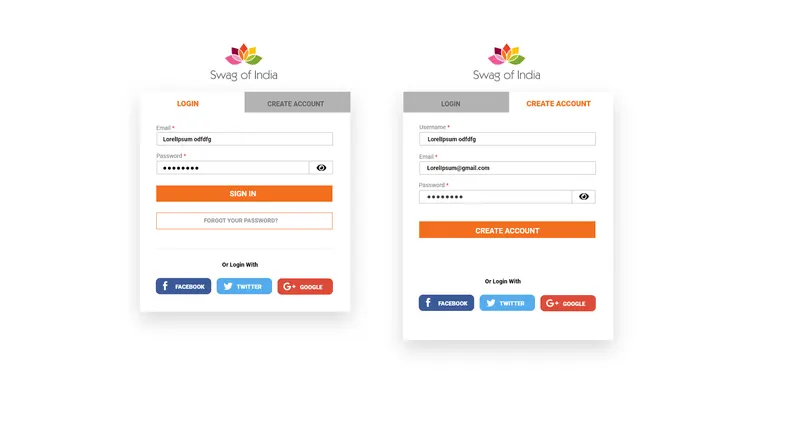
FIG.3 BOOSTRAP
SCRIPTING
There are two scripting methodologies.
1. Server side scripting: This scripting is done at the server end
2. Client side scripting: This scripting is done at the client end or the browser.
SERVER SIDE SCRIPTING
Server-side scripting is a technique used in web development which involves employing scripts on a web server which produce a response customized for each user's (client's) request to the website. The alternative is for the web server itself to deliver a static web page. Scripts can be written in any of a number of server-side scripting languages that are available (see below). Server-side scripting is distinguished from client-side scripting where embedded scripts, such as JavaScript, are run client-side in a web browser, but both techniques are often used together.
Server-side scripting is often used to provide a customized interface for the user. These scripts may assemble client characteristics for use in customizing the response based on those characteristics, the user's requirements, access rights, etc. Server-side scripting also enables the website owner to hide the source code that generates the interface, whereas with client-side scripting, the user has access to all the code received by the client. A down-side to the use of server-side scripting is that the client needs to make further requests over the network to the server in order to show new information to the user via the web browser. These requests can slow down the experience for the user, place more load on the server, and prevent use of the application when the user is disconnected from the server.
CLIENT SIDE SCRIPTING
Client-side scripting is changing interface behaviors within a specific web page in response to mouse or keyboard actions, or at specified timing events. In this case, the dynamic behavior occurs within the presentation. The client-side content is generated on the user's local computer system.
Such web pages use presentation technology called rich interfaced pages. Client-side scripting languages like JavaScript or ActionScript, used for Dynamic HTML (DHTML) and Flash technologies respectively, are frequently used to orchestrate media types (sound, animations, changing text, etc.) of the presentation. Client-side scripting also allows the use of remote scripting, a technique by which the DHTML page requests additional information from a server, using a hidden frame, XML Http Requests, or a Web service.
DATABASE
A database is an organized collection of data. It is the collection of schemas, tables, queries, reports, views, and other objects. The data are typically organized to model aspects of reality in a way that supports processes requiring information, such as modelling the availability of rooms in hotels in a way that supports finding a hotel with vacancies.
A database management system (DBMS) is a computer software application that interacts with the user, other applications, and the database itself to capture and analyze data. A general-purpose DBMS is designed to allow the definition, creation, querying, update, and administration of databases. Well-known DBMSs include MySQL, PostgreSQL, MongoDB, MariaDB, Microsoft SQL Server, Oracle, Sybase, SAP HANA, MemSQL and IBM DB2.
JAVA SCRIPT
JavaScript, often abbreviated as "JS", is a high-level, dynamic, untyped, and interpreted run-time language. It has been standardized in the ECMAScript language specification. Alongside HTML and CSS, JavaScript is one of the three core technologies of World Wide Web content production; the majority of websites employ it, and all modern Web browsers support it without the need for plug-ins. JavaScript is prototype-based with first-class functions, making it a multi-paradigm language, supporting object-oriented, imperative, and functional programming styles. It has an API for working with text, arrays, dates and regular expressions, but does not include any I/O, such as networking, storage, or graphics facilities, relying for these upon the host environment in which it is embedded.
JQUERY
JQuery is a cross-platform JavaScript library designed to simplify the client-side scripting of HTML. It is free, open-source software using the permissive MIT license. Web analysis indicates that it is the most widely deployed JavaScript library by a large margin.
jQuery's syntax is designed to make it easier to navigate a document, select DOM elements, create animations, handle events, and develop Ajax applications. jQuery also provides capabilities for developers to create plug-ins on top of the JavaScript library. This enables developers to create abstractions for low-level interaction and animation, advanced effects and high-level, themeable widgets. The modular approach to the jQuery library allows the creation of powerful dynamic web pages and Web applications.
AJAX
Ajax (also AJAX short for "asynchronous JavaScript and XML") is a set of Web development techniques using many Web technologies, on the client side to create asynchronous Web applications. With Ajax, Web applications can send data to and retrieve from a server asynchronously (in the background) without interfering with the display and behavior of the existing page. By decoupling the data interchange layer from the presentation layer, Ajax allows for Web pages, and by extension Web applications, to change content dynamically without the need to reload the entire page. In practice, modern implementations commonly substitute JSON for XML due to the advantages of being native to JavaScript.
JSON
In computing, JavaScript Object Notation or JSON ('dzeison/JAY-san), is an open standardfile format that uses human-readable text to transmit data objects consisting of attribute-value pairs and array data types (or any other serializable value). It is a very common data format used for asynchronous browser/server communication, including as a replacement for XML in some AJAX-style systems.
JSON is a language-independent data format. It was derived from JavaScript, but as of 2017 many programming languages include code to generate and parse JSON-format data. The official Internet media type for JSON is application/json. JSON filenames use the extension .json.
PROJECT
PROJECT (Advanced Technologies):
Name: E-Commerce Website Of Swag Of India Technologies Used:
➤ HTML
> CSS
➤ Bootstrap
> Java Script
> Jquery
> AJAX
TECHNICAL DETAILS:
Front end is designed using HTML, CSS and Bootstrap. Ajax used to perform behind the screen requests and JavaScript used to perform client side scripting
Backend is based on PHP+ MySql based RDB(Relational Data Base) model.
The SQL queries are run using the CI SQL library functions
Backend online host includes a centralized database resident on the server, the script which is built in PHP used to SQL query the database on user's request for transaction of data
The forms are made using the HTML, Bootstrap for designing and Php, sql for back-end
JavaScript, AJAX and JQuery used for client side scripting and PHP for the server side development
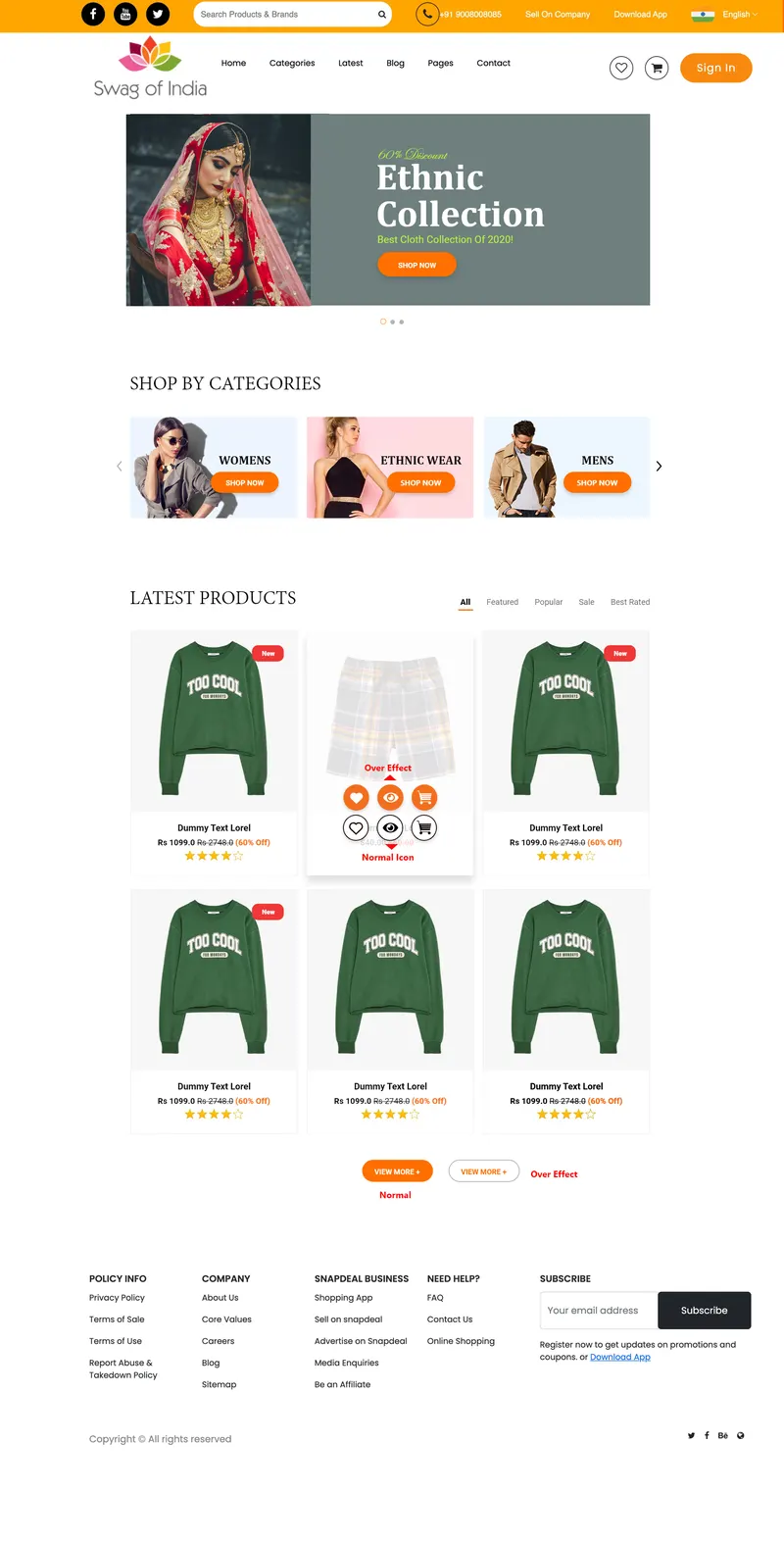
FIG.4 SWAG OF INDIA HOME PAGE

FIG.5 PRODUCT VIEW PAGE

FIG.6 CART PAGE
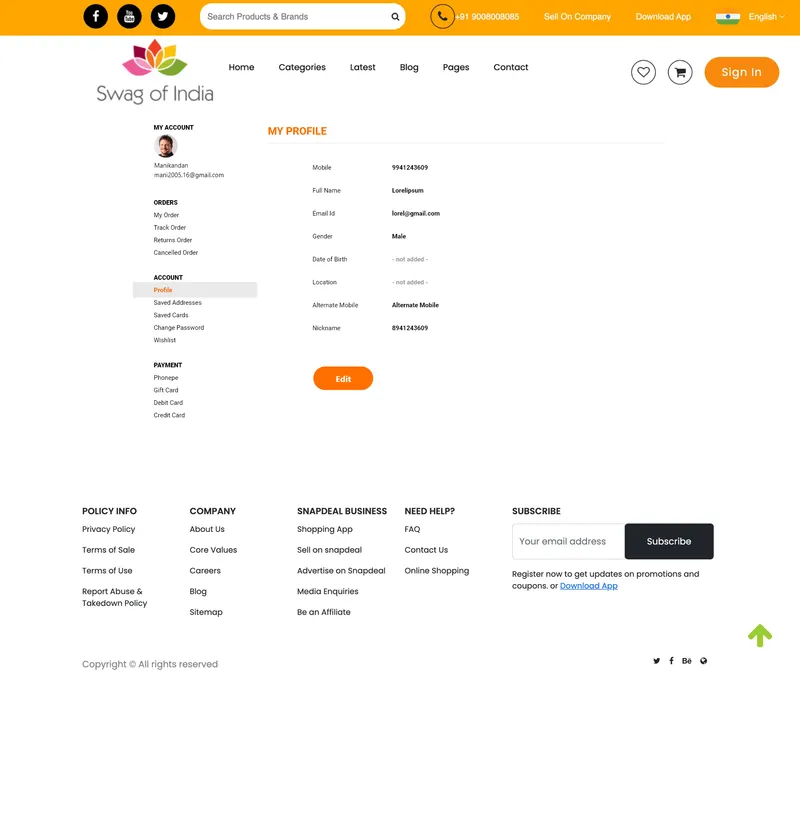
FIG.7 PROFILE PAGE
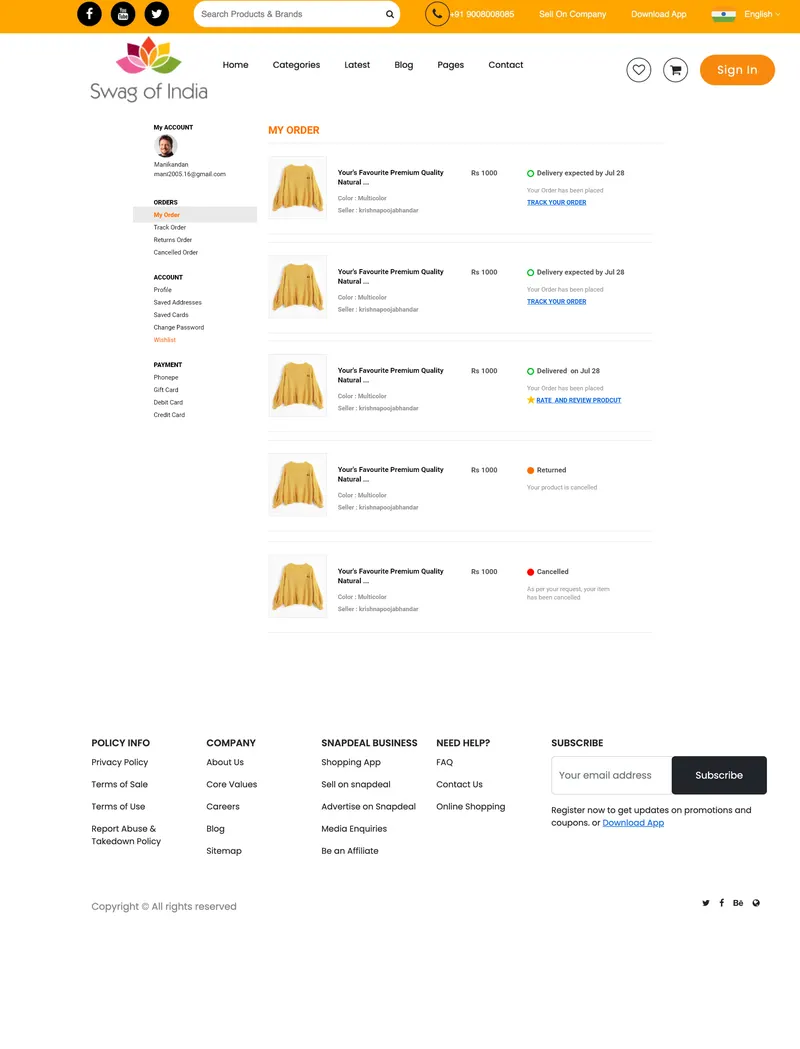
FIG.8 PROFILE PAGE
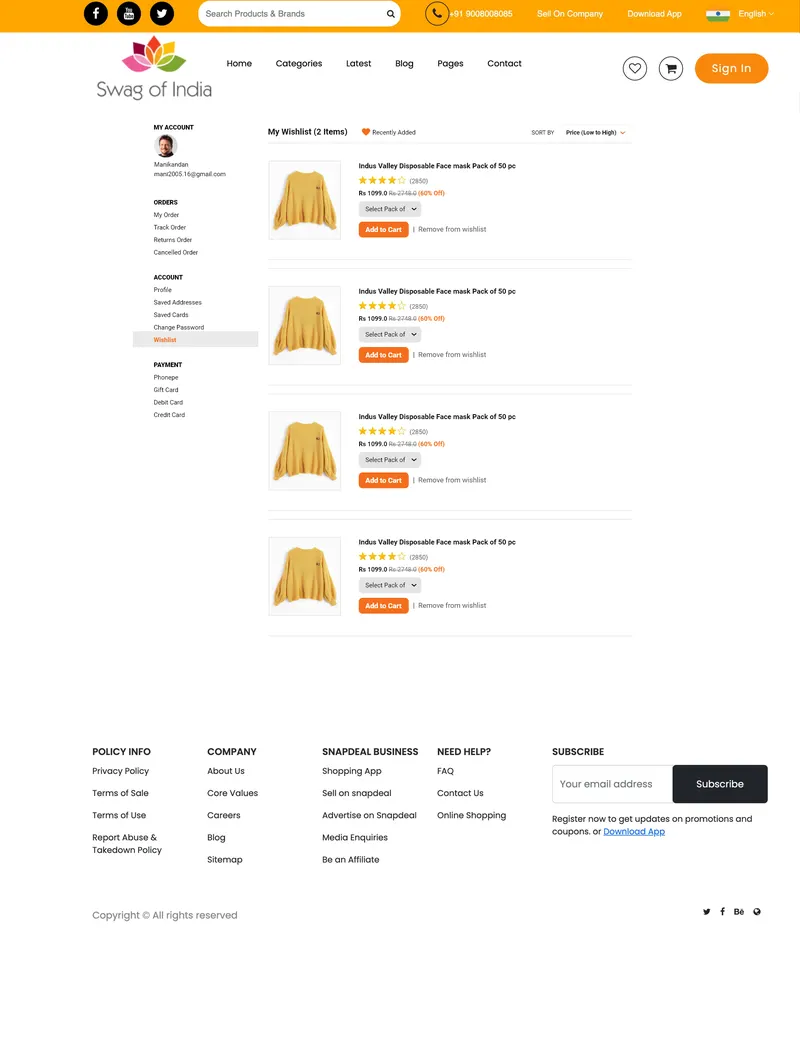
FIG.9 PROFILE PAGE