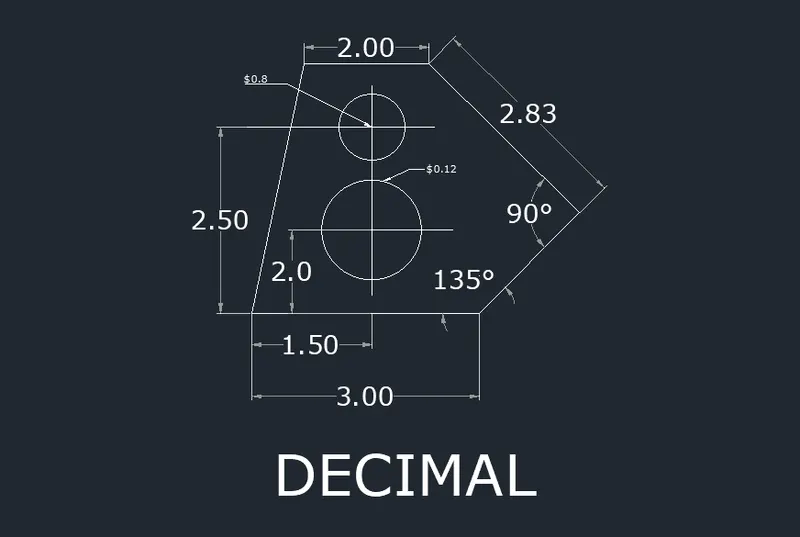
Drafting of various geometries using Chamfer, Fillet tool in AutoCad
Drafting of various geometries using Chamfer, Fillet tool in AutoCad:
Aim:
- To draw the given drawing using autocad software:
Procedure:
Step 1:
- In the command prompt type pl(poliline).
- In the command prompt type start point 3.0
- In the command prompt type @1.20
- In the command prompt type @0.80
- In the command prompt type @ 90'
- In the command prompt type @135'
step 2:
- In the command prompt type object snap.
- In the object snap ,click on END POINT,MID POINT
- Select the midpoint of line with dimension 3.00
- In the command prompt type @ 90'
- In the menu click here circle > center ,diameter.
- With the help of curser click on the endpoint of the previous line which is taken as the centre of the circle.
- In the command prompt type @1.20 diameter.
- Delete 1< 90 line.
step 3:
- In the command prompt type object snap.
- In the object snap ,click on END POINT,MID POINT
- Select the midpoint of line with dimension 3.00
- In the command prompt type @ 90'
- In the menu click here circle > center ,diameter.
- With the help of curser click on the endpoint of the previous line which is taken as the centre of the circle.
- In the command prompt type @0.80 diameter.
- Delete @2.50< 90 line.
Result: