Data Analysis using Python
Objective:
- Extract a plot between any two quantities from the given data file automatically.
- Compatibility check: Code should exit gracefully, if a non-compatible file is provided as an input.
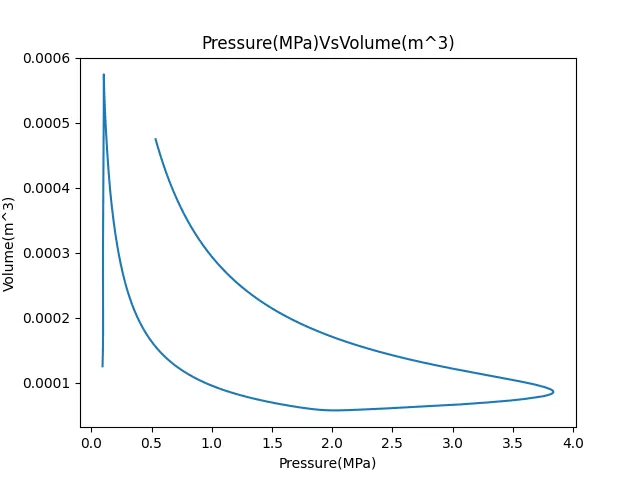
- Calculate the area under P-V diagram.
- Calculate the power output of an engine running at 1500 RPM.
- Calculate the specific fuel consumption for an engine which consumes 20 micro grams of fuel (per 1 stroke cycle).
Governing Equations:
Power = Area * no.of cylinders * (stroke/1000)
Work done = Area under P-V diagram
Specific fuel consumption = Fuel consumption * stroke * (3600/power) * 1000
Python Code:
"""
Data Analysis by Giridhar
"""

import matplotlib.pyplot as plt
import math
import numpy as np
from scipy.integrate import simps as simps, trapz as trapz


# File compatibility check:
try:
	open('engine_data.out')

except:
	print('File not recognized. Please provide a valid CONVERGE output file')

# Reading the file
line_count = 1
Pressure = []
Volume = []

for line in open('engine_data.out'):
	if '#' not in line:
		values = line.split()
		Pressure.append(float(line.split()[1]))
		Volume.append(float(line.split()[7]))
		number_of_columns = len(values)
		line_count = line_count + 1

# Basic Performance calculation:

# Area under the P-V diagram:
area = simps(Pressure, Volume)
print('Area under the curve: ' +str(area))
area = area*1e6
print('work done:'  +str(area) + ' J')

#Power Output
fuel_consumption = 20
n = 1
rpm = 1500
stroke_cycle = rpm/120

power = n*area*stroke_cycle/(1000)
print('power:  ' +str(power) + ' KW')
sfc = (fuel_consumption*pow(10, -6)*stroke_cycle*3600)/(power*1000)
print('sfc:' +str(sfc) + ' kg/hr.KW')

# Extracting Parameters and units
ct = 1
for line in open('engine_data.out'):
	if ct == 3:
		parameter = line.split()

	if ct == 4:
		unit = line.split()

	ct = ct + 1

# Numbering
for i in range(1,18):
	print(i, parameter[i], unit[i])

print('Provide the allocated number for variable along x axis:')
x=int(input())
print('Provide the allocated number for variable along y axis:')
y=int(input())

X = []
Y = []

ct = 1
for line in open('engine_data.out'):
	if ct == 3:
		x_parameter = line.split()[x]
		y_parameter = line.split()[y]

	if ct == 4:
		x_axis = x_parameter + line.split()[x]
		y_axis = y_parameter + line.split()[y]

	if '#' not in line:
		X.append(float(line.split()[x-1]))
		Y.append(float(line.split()[y-1]))

	ct = ct + 1

# Plotting:
plt.plot(X,Y)
plt.xlabel(x_axis)
plt.ylabel(y_axis)
plt.title(x_axis+ 'Vs' +y_axis)
plt.savefig(x_axis+'Vs'+y_axis+'.png')
plt.show()
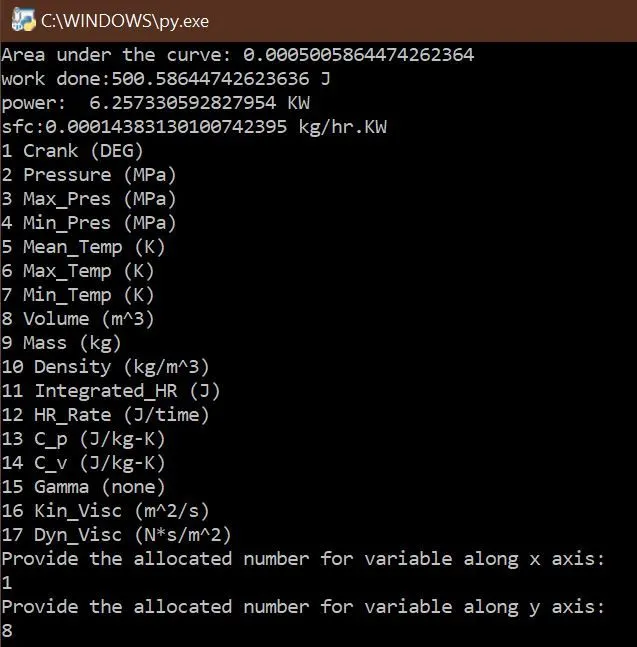
Basic Performance Calculation Output:

Compatability check: Compatible file is provided, so no compatability error.
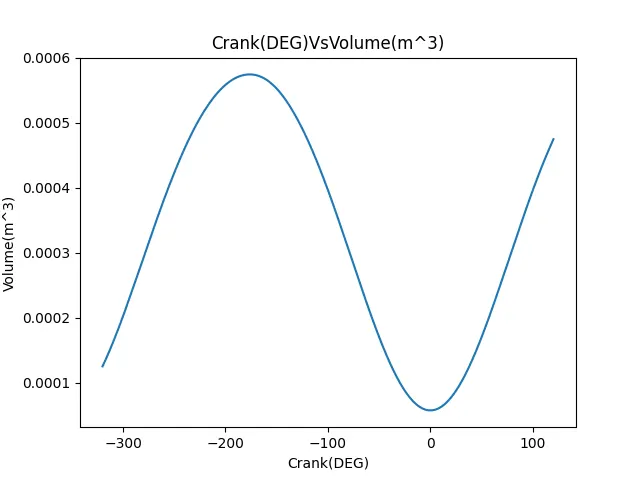
Data visualizer Output: As required, by directly inputing the column number 1 and 8 in Python, Crank angle vs Volume plot is extracted automatically as shown below.
P-V Diagram:
Python Code Explanation:
- Required modules are imported.
- File compatabilty has been checked.
- A for loop is created to read the provided file. Pressure and Volume are assigned with empty arrays outside for loop and append command is used inside for loop to extract those values which are required to calculate area.
- Power output of the engine, Specific fuel consumption and Area under P-V Diagram are defined for output calculation.
- Parameters and Units of the data provided are extracted and numbered.
- To determine inputs for x and y axis based on column number, print command is used. At the output, by assigning column numbers to x and y axis, the plot will be automatically generated.
- Required commands to plot, label and save the plot as per the column name are provided.
Conclusion:
All the objectives has been achieved.