Curve fitting
Program 1:
clear
close all
clc

%Collecting the data
data_set = load('data');
temp = data_set(:,1);
cp = data_set(:,2);

%Linear Curve Fitting
coeff = polyfit(temp,cp,1);
predicted_cp = polyval(coeff,temp);
plot(temp,cp,'linewidth',3)
hold on
plot(temp,predicted_cp,'linewidth',3)
xlabel('Temprature')
ylabel('Specific Heat')
legend('Original Dataset','Curve fit')

%Evaluating the goodness of linear fit
ssr = sum((predicted_cp-mean(cp)).^2)
sse = sum((cp - predicted_cp).^2)
sst = ssr + sse
r_square = ssr/sst
Program 2:
clear
close all
clc

%Collecting the data
data_set = load('data');
temp = data_set(:,1);
cp = data_set(:,2);

%Cubic Curve Fitting
coeff = polyfit(temp,cp,3);
predicted_cp = polyval(coeff,temp);
plot(temp,cp,'linewidth',3)
hold on
plot(temp,predicted_cp,'linewidth',3)
xlabel('Temprature')
ylabel('Specific Heat')
legend('Original Dataset','Curve fit')

%Evaluating the goodness of cubic fit
ssr = sum((predicted_cp-mean(cp)).^2)
sse = sum((cp - predicted_cp).^2)
sst = ssr + sse
r_square = ssr/sst
Explanation of the Code:
- Data have been collected with 'load()' command and stored it in the array named data_set.
- 1st column of the data set (data_set(:,1)), has the temperature values which are assigned to the array named 'temp'.
- 2nd Column of the data set ((data_set(;,2)) has the specific heat values which are assigned to the array named 'cp'.
- In Program 1, using 'polyfit()' function a linear polynomial which represents the curve fit is defined by providing the degree of order (n) as 1 in the syntax and likewise in Program 2, a cubic polynomial is defined by providing the degree of order (n) as 3 in the syntax, 'polyfit(x,y,n)', where x and y are the variables which are temperature and specific heat respectively in this case.
- The polyfit() function derives the values of the coefficients according to the degree of the polynomial and the coefficient values are stored in 'coeff'.
- Using the polyval() function, providing the coefficient and temperature values, the specific heat values were predicted and stored in 'predicted_cp'.
- Then the plotting of original data set with the given values and the curve fit with the predicted specific heat value is done.
- Evaluation of goodness of fit is done by calculating the R-Square value.
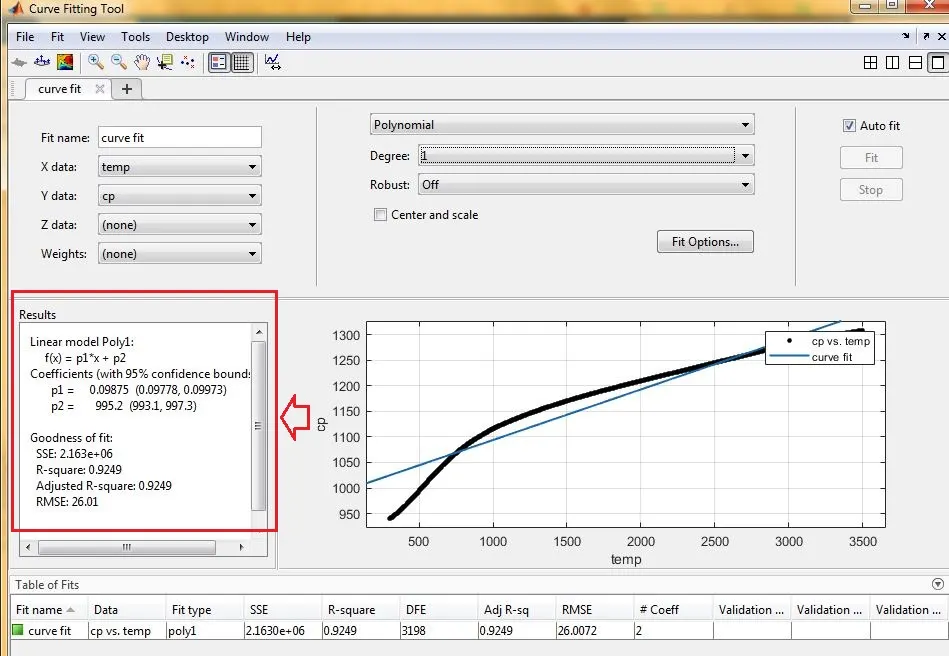
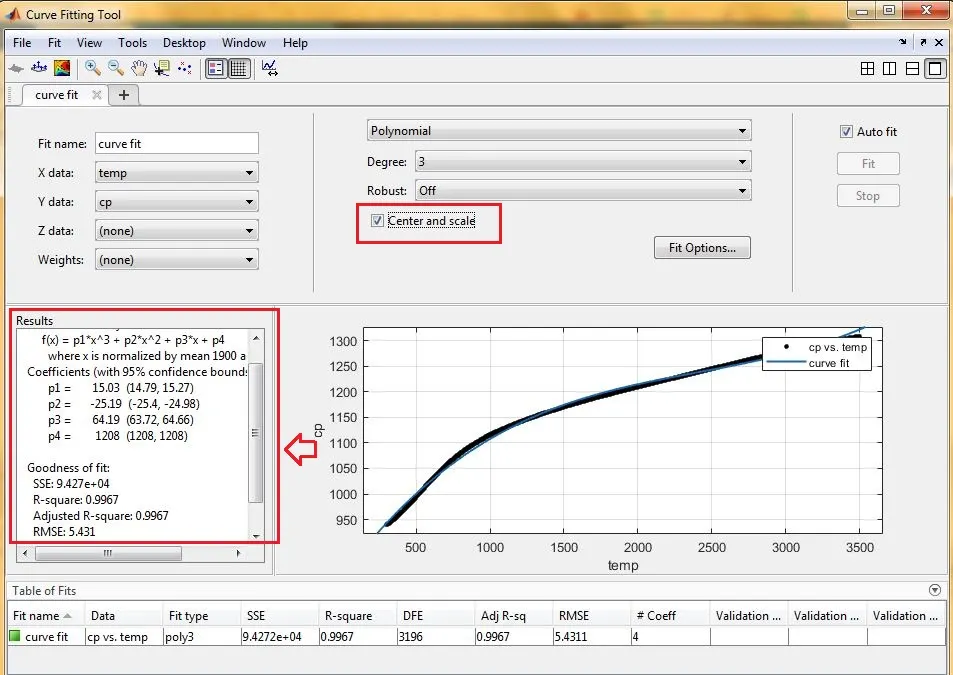
- Validation of the factors defining the goodness of fit is done by using the curve fitting tool. Use 'cftool' i the command window to open the curve fitting tool.
Results:
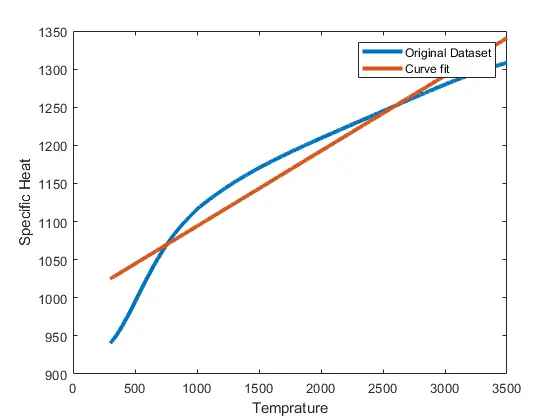
Program 1: Linear polynomial curve fit
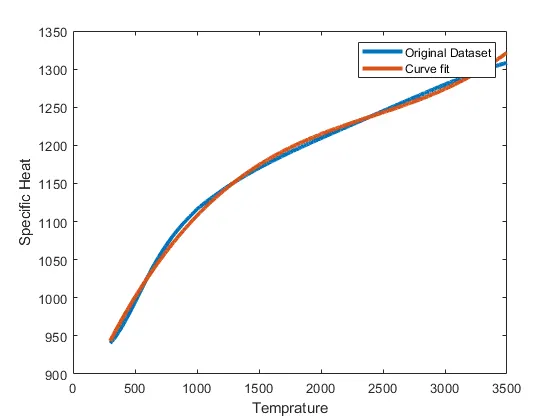
Program 2: Cubic polynomial curve fit
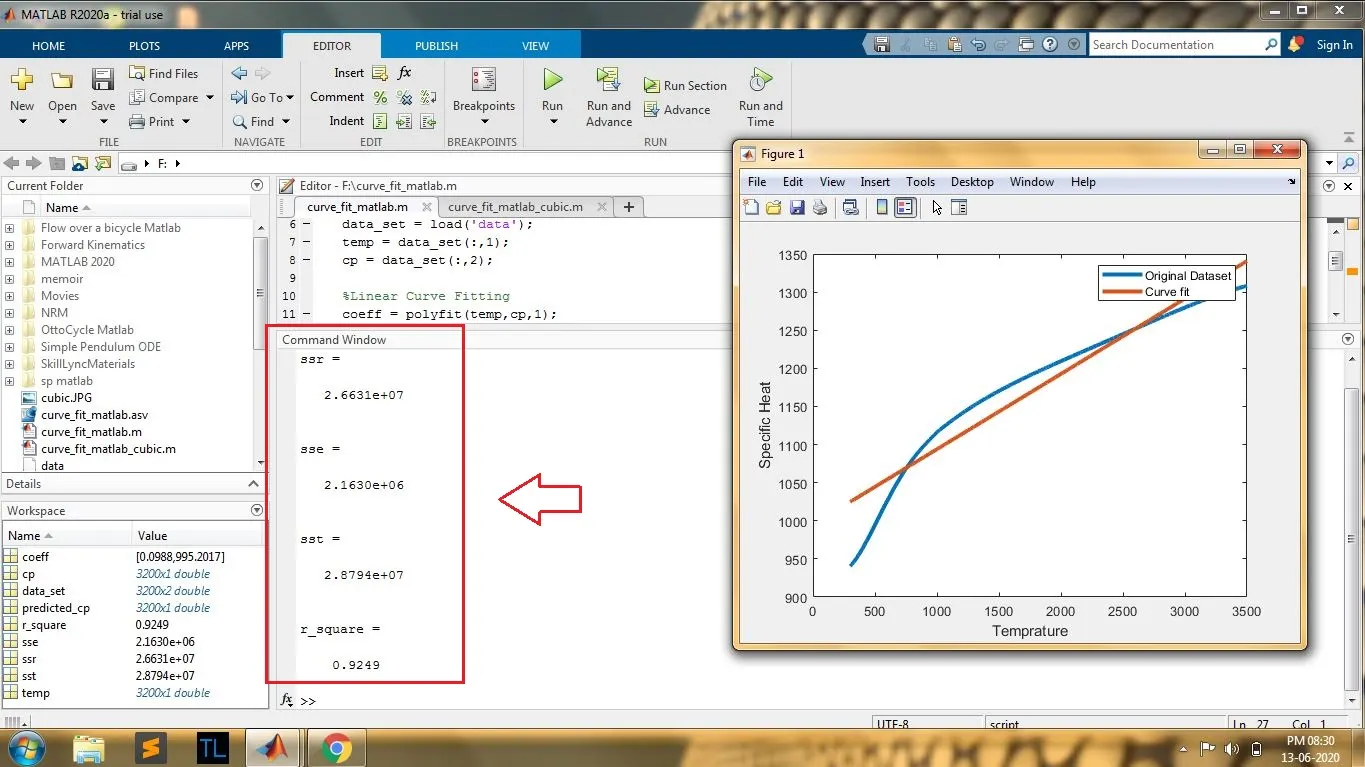
Screenshots showing the values of the factors defining the goodness of fit:
For Linear Polynomial:
For Cubic Polynomial:
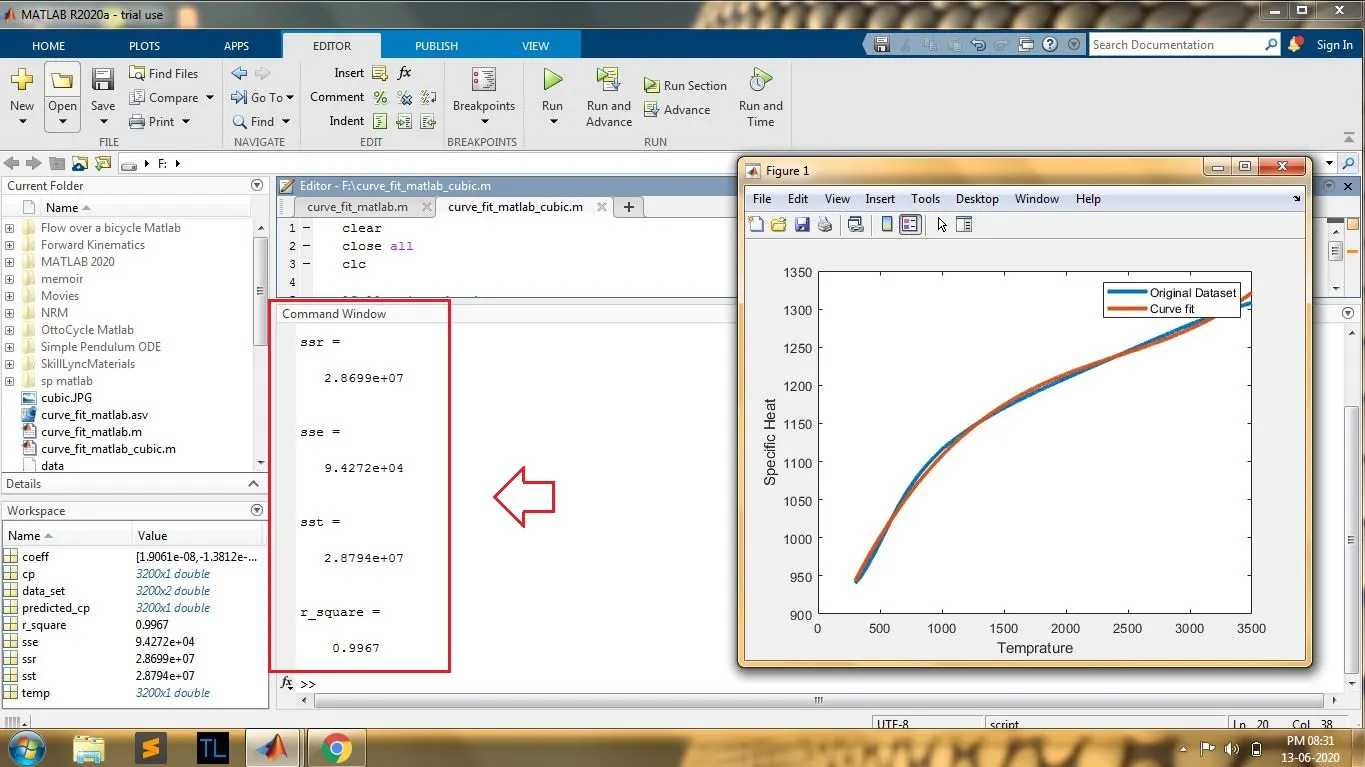
As we can see from the results, the R-Square value is greater and close to 1 (0.9967) for cubic fit when compared to the R-Square value of linear fit (0.9249), which means the cubic polynomial gives a better fit. Usually, if the R-Square value is equal or greater than 0.95, it can be taken as a good fit and if it is less than 0.95 it will be considered as a poor fit.
Badly Conditioned Polynomial Warning:
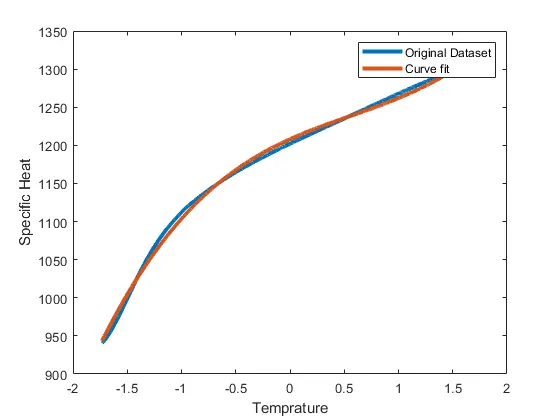
After running the Program 2, a warning will show up as shown below which can be avoided by using the normalize() command in the program or this can be done by selecting the centering and scaling option in curve fitting tool.

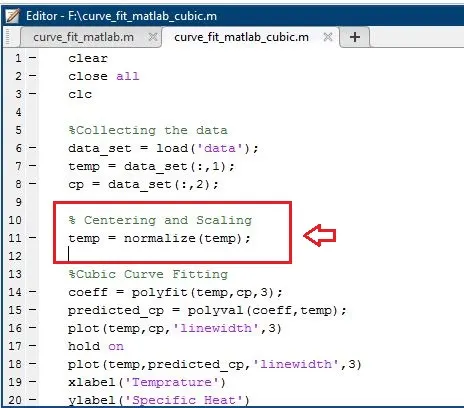
After using the command given above, the plot changes as shown below by scaling the x-axis.
Validation of goodness of fit with Curve Fitting Tool:
Linear Polynomial:
Cubic Polynomial:
Errors Faced:
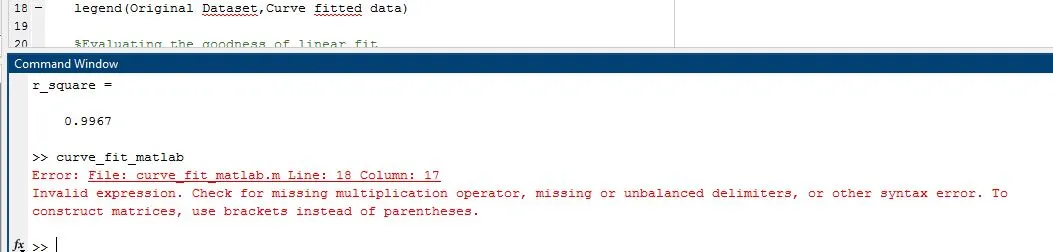
Syntax error - used hold() instead of hold on.
Q1) Explain the parameters used to measure the fitness characteristics for both the curves.
The major factors or parameters by which we can evaluate the goodness of fit are:
- The sum of squares due to error (SSE)
- R-square
- Adjusted R-square
- Root mean squared error (RMSE)
Sum of Squares Due to Error: This quantity measures the total deviation of the response values from the fit to the response values. It is also called the summed square of residuals and is usually labelled as SSE.
R-Square: This quantity measures how successful the fit is in explaining the variation of the data. R-square is the square of the correlation between the response values and the predicted response values.
R-Square = SSR/SST
where, SSR is the sum of squares of the regression and SST is the sum of squares about the mean.
SST = SSR + SSE
Adjusted R-Square: This quantity uses the R-square statistic defined above, and adjusts it based on the residual degrees of freedom. The residual degrees of freedom is defined as the number of response values n minus the number of fitted coefficients m estimated from the response values.
Root Mean Squared Error: This quantity is also known as the fit standard error and the standard error of the regression
https://skill-lync.com/projects/Curve-Fitting-and-criterion-to-choose-best-fit-41860
Q2) How to make a curve fit perfectly?
The perfect fit is when the error between the given values and the predicted value is zero, and when the curve touches each and every point representing the original set of values. When R-square = 1.
Q3) How to get the best fit?
It can be achieved by increasing the order of the polynomial. For best fit, R-square will be close to 1. But the method of increasing the polynomial order is not efficient since it leads to bad conditioning. So dividing the data into two different sets of values and decreasing the total number of values improves the goodness of fit even for lower-order polynomial. Or using exact interpolant instead of polynomial and spline fit as mentioned in the reference given below can get the best fit.
Q4) What could be done to improve the cubic fit?
Centering and scaling the X values by using the normalize() command can improve the existing cubic fit.
Other References:
https://in.mathworks.com/help/curvefit/evaluate-a-curve-fit.html
https://in.mathworks.com/help/curvefit/curve-fitting.html
https://in.mathworks.com/help/curvefit/curvefitting-app.html
https://in.mathworks.com/help/matlab/ref/double.normalize.html