Creation of geometries by Coordinate system methods using AutoCad
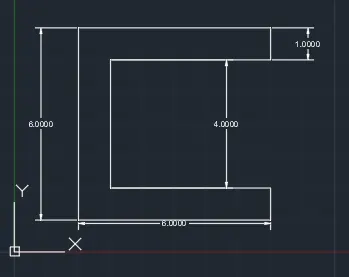
First solve this drawing using absolute coordinate systems:
Enter the line command ,
1. Then specify the first point: type 2,1 at command prompt and press enter (as a starting point)
2. Specify next point: at 8,1 and press enter
3. Specify the next point: at 8,2 and press enter
4. Specify the next point: at 5,2 and press enter
5. Specify the next point: at 3,6 and press enter
6. Specify the next point: at 8,6 and press enter
7. Specify the next point: at 8,7 and press enter
8. Specify the next point: at 8,2 and press enter
9. Specify the next point or close: select the close option press enter.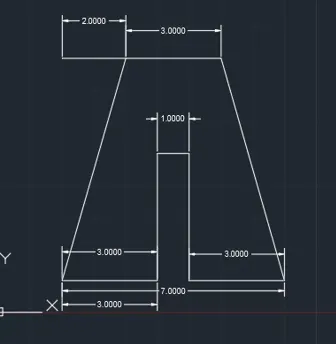
using absolute coordinate system:
Enter the line command ,
1. Then specify the first point: type 2,1 at command prompt and press enter (as a starting point)
2. Specify next point: at 5,1and press enter
3. Specify the next point: at 5,5 and press enter
4. Specify the next point: at 6,5 and press enter
5. Specify the next point: at 6,-5 and press enter
6. Specify the next point: at 6,9 and press enter
7. Specify the next point: at 9,7 and press enter
8. Specify the next point: at 7,-4 and press enter
9. Specify the next point or close: select the close option press enter.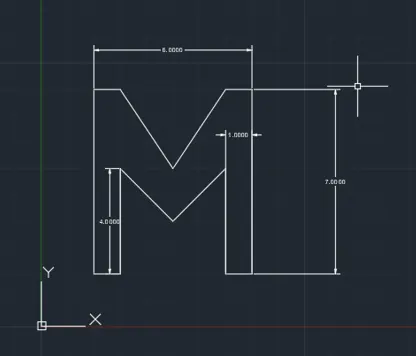
using absolute coordinate system:
Enter the line command ,
1. Then specify the first point: type 2,1 at command prompt and press enter (as a starting point)
2. Specify next point: at 2,8 and press enter
3. Specify the next point: at 3,8and press enter
4. Specify the next point: at 5,-8 and press enter
5. Specify the next point: at 7,8 and press enter
6. Specify the next point: at 8,8 and press enter
7. Specify the next point: at 8,-8 and press enter
8. Specify the next point: at 7,1 and press enter
9. Specify the next point: at 7,5 and press enter
10. Specify the next point: at 5,3 and press enter
11. Specify the next point: at 5,5 and press enter
12. Specify the next point: at 3,-5 and press enter
13. Specify the next point or close: select the close option press enter.
Then in RELATIVE COORDINATE METHOD:
Enter the line command ,
1. Then specify the first point: type 2,1 at command prompt and press enter (as a starting point)
2. Specify next point: at @1,0 and press enter
3. Specify the next point: at @0,4and press enter
4. Specify the next point: at @2,0 and press enter
5. Specify the next point: at @0,2 and press enter
6. Specify the next point: at @0,-2 and press enter
7. Specify the next point: at @1,0 and press enter
8. Specify the next point: at @0,7 and press enter
9. Specify the next point: at @1,0 and press enter
10. Specify the next point: at @0,-2 and press enter
11. Specify the next point: at @0,3 and press enter
12. Specify the next point: at @0,7 and press enter
13. Specify the next point or close: select the close option press enter.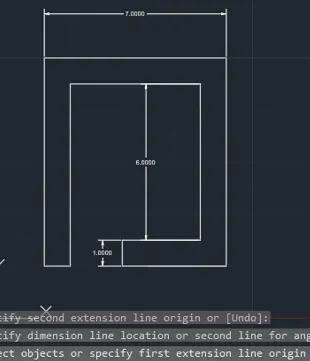
using absolute coordinate system:
Enter the line command ,
1. Then specify the first point: type 2,1 at command prompt and press enter (as a starting point)
2. Specify next point: at 2,9 and press enter
3. Specify the next point: at 9,9 and press enter
4. Specify the next point: at 5,-1 and press enter
5. Specify the next point: at 5,2 and press enter
6. Specify the next point: at 8,2 and press enter
7. Specify the next point: at 8,8 and press enter
8. Specify the next point: at -3,8 and press enter
9. Specify the next point or close: select the close option press enter.
Then in RELATIVE COORDINATE METHOD:
Enter the line command ,
1. Then specify the first point: type 2,1 at command prompt and press enter (as a starting point)
2. Specify next point: at @1,0 and press enter
3. Specify the next point: at @0,4and press enter
4. Specify the next point: at @2,0 and press enter
5. Specify the next point: at @0,2 and press enter
6. Specify the next point: at @0,-2 and press enter
7. Specify the next point: at @1,0 and press enter
8. Specify the next point: at @0,7 and press enter
9. Specify the next point: at @1,0 and press enter
10. Specify the next point: at @0,-2 and press enter
11. Specify the next point: at @0,3 and press enter
12. Specify the next point: at @0,7 and press enter
13. Specify the next point or close: select the close option press enter
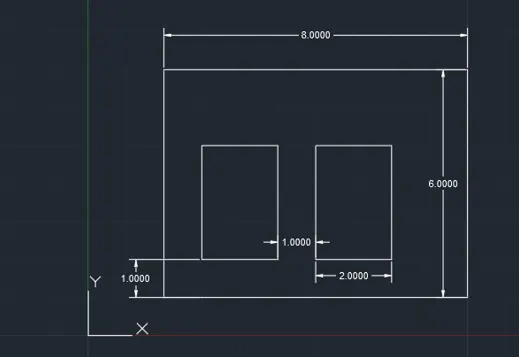
using absolute coordinate system:
Enter the line command ,
1. Then specify the first point: type 2,1 at command prompt and press enter (as a starting point)
2. Specify next point: at 2,6 and press enter
3. Specify the next point: at 2,10 and press enter
4. Specify the next point: at 10,10 and pressenter
5. Specify the next point: at 10,2 and press enter
again enter line specify first point 3,2 and press enter
6. Specify the next point: at 3,3 and press enter
7. Specify the next point: at 3,5 and press enter
8. Specify the next point: at 5,5 and press enter
9. Specify the next point or close: select the close option press enter.
10. Again enter line command specify first point 6,2
11. specify the next point :at 6,3 and press enter
12. Specify the next point : at 6,8 and presws enter
13. Specify the next point: at 8,1 and press enter
14. Specify the next point or close: select the close or undooption press enter.
Then in RELATIVE COORDINATE METHOD:
Enter the line command ,
1. Then specify the first point: type 2,1 at command prompt and press enter (as a starting point)
2. Specify next point: at @1,0 and press enter
3. Specify the next point: at @0,4and press enter
4. Specify the next point: at @8,0 and press enter
5. Specify the next point: at @0,10 and press enter
6. Specify the next point: at @-8,0 and press enter
7. Specify the next point: at 3,1 and press enter
8. Specify the next point: at @0,3 and press enter
9. Specify the next point: at @2,0 and press enter
10. Specify the next point: at @0,2 and press enter
12. Specify the next point: at 6,1 and press enter
13. Specify the next point: at @0,3 and press enter
14. Specify the next point: at @2,0 and press enter
15. Specify the next point: at @0,2 and press enter
13. Specify the next point or close: select the close option press enter.
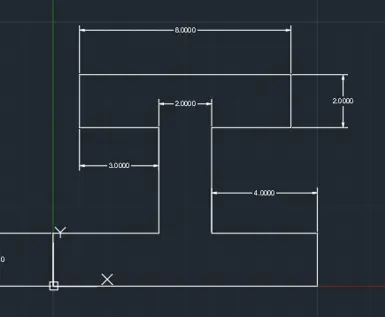
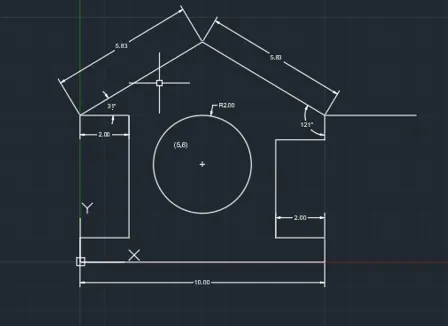
using absolute coordinate system:
Enter the line command ,
1. Then specify the first point: type 0,0 at command prompt and press enter (as a starting point)
2. Specify the next point: at 10,0 and press enter
3. Specify the next point: at 10,2 and press enter
4. Specify the next point: at 2,6 and press enter
5. Specify the next point: at 6,6 and press enter
6. Specify the next point: at 6,10 and press enter
7. Specify the next point: at 10,8 and press enter
8. Specify the next point: at 8,1 and press enter
9. Specify the next point: at 4,4 and press enter
10. Specify the next point: at 4,1 and press enter
11. Specify the next point or close: select the close or undo option press enter.
Then in RELATIVE COORDINATE METHOD:
Enter the line command ,
1. Then specify the first point: type 0,0 at command prompt and press enter (as a starting point)
2. Specify the next point: at @10,0 and press enter
3. Specify the next point: at @0,2and press enter
4. Specify the next point: at @-4,0 and press enter
5. Specify the next point: at @0,4 and press enter
6. Specify the next point: at @3,0 and press enter
7. Specify the next point: at 0,2 and press enter
8. Specify the next point: at @-8,0 and press enter
9. Specify the next point: at @0,-2 and press enter
10. Specify the next point: at @3,0 and press enter
13. Specify the next point: at @0,-4 and press enter
14. Specify the next point: at @0,-4 and press enter
15. Specify the next point: at @4,0 and press enter
13. Specify the next point or close: select the close option press enter.
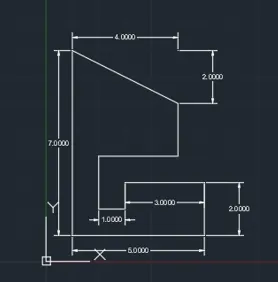
using absolute coordinate system:
Enter the line command ,
1. Then specify the first point: type 1,1 at command prompt and press enter (as a starting point)
2. Specify the next point: at 6,1 and press enter
3. Specify the next point: at 6,3 and press enter
4. Specify the next point: at 3,6 and press enter
5. Specify the next point: at 3,2 and press enter
6. Specify the next point: at 2,4 and press enter
7. Specify the next point: at 5,4 and press enter
8. Specify the next point: at 5,6 and press enter
9. Specify the next point: at 6,8 and press enter
10. Specify the next point: at 8,1 and press enter
11. Specify the next point or close: select the close or undo option press enter.
Then in RELATIVE COORDINATE METHOD:
Enter the line command ,
1. Then specify the first point: type 1,1 at command prompt and press enter (as a starting point)
2. Specify the next point: at @6,0 and press enter
3. Specify the next point: at @0,2and press enter
4. Specify the next point: at @-3,0 and press enter
5. Specify the next point: at @0,1 and press enter
6. Specify the next point: at @-1,0 and press enter
7. Specify the next point: at 0,2 and press enter
8. Specify the next point: at @3,0 and press enter
9. Specify the next point: at @0,2 and press enter
10. Specify the next point: at @4,0 and press enter
11. Specify the next point or close: select the close option press enter.
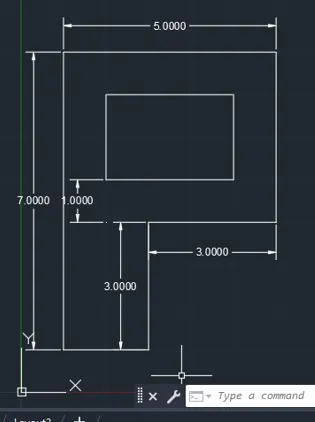
using absolute coordinate system:
Enter the line command ,
1. Then specify the first point: type 1,1 at command prompt and press enter (as a starting point)
2. Specify the next point: at 1,8 and press enter
3. Specify the next point: at 6,8 and press enter
4. Specify the next point: at 6,4 and press enter
5. Specify the next point: at 3,4 and press enter
6. Specify the next point: at 3,4 and press enter
7. Specify the next point: colse option and press enter
again line comman specify the first point 2,5 and enter press
8. Specify the next point: at 2,7and press enter
9. Specify the next point: at 5,7 and press enter
10. Specify the next point: at 5,5 and press enter
11. Specify the next point or close: select the close or undo option press enter.
Then in RELATIVE COORDINATE METHOD:
Enter the line command ,
1. Then specify the first point: type 1,1 at command prompt and press enter (as a starting point)
2. Specify the next point: at @2,0 and press enter
3. Specify the next point: at @0,3and press enter
4. Specify the next point: at @3,0 and press enter
5. Specify the next point: at @0,4 and press enter
6. Specify the next point: at @-5,0 and press enter
7. Specify the next point: at close the current point and
starts the line command specify first point again and press enter
8. Specify the next point: at @0,2 and press enter
9. Specify the next point: at @3,0 and press enter
10. Specify the next point: at @0,-2 and press enter
11. Specify the next point or close: select the close option press enter.