Creation of geometries by Coordinate system methods using AutoCad
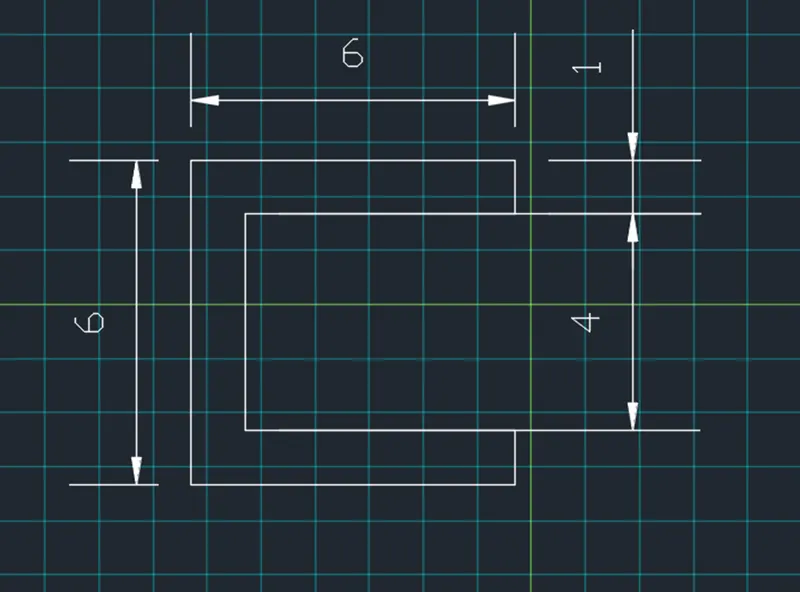
P1 Aim – to create geometries by absolute coordinate system
Set the units and limits as per the requirement
Set the draft setting
Take line command and enter 2,1 because in question mentioned that the line tat from the 2,1
Coordinate
Than enter 8,1
Than 8,2
Than 3,2
Than 3,6
Than 8,6
Than 8,7
Than 2,7
And choose close option to obtained the desired geometric
2)
Aim – to create geometries by relative coordinate system Procedure
Set the units and limits as per the requirement
Set the draft setting
Take line command and enter 2,1 because in question mentioned that the line tat from the 2,1
Coordinate
Than enter@ 6,0
Than@ 0,1
Than @-5,0
Than @0,4
Than @5,0
Than @0,1
Than @-6,0
And choose close option than obtained the desired geometric shape
Aim – to create geometries by relative polar coordinate system
Procedure
Set the units and limits as per the requirement
Set the draft setting
Take line command and enter 2,1 because in question mentioned that the line that from the 2,1
Coordinate
Than enter @6<0
Than @0<90
Than @5<180
Than @0<90
Than @5<0
Than @1<90
Than @6<180
And choose close option than obtained the desired geometric shape
Aim – to create geometries by direct distance entry method
Procedure
Set the units and limits as per the requirement
Set the grid setting
Take line command and enter 2,1 because in question mentioned that the line that from the 2,1
Coordinate
Than enter 6
Than 1
Than 5
Than 4
Than 5
Than 1
Than 6
Before entering the values the cursor should be placed in which direction we need the lines
And choose close option than obtained the desired geometric shape
P2 Aim– to create geometries by absolute coordinate system
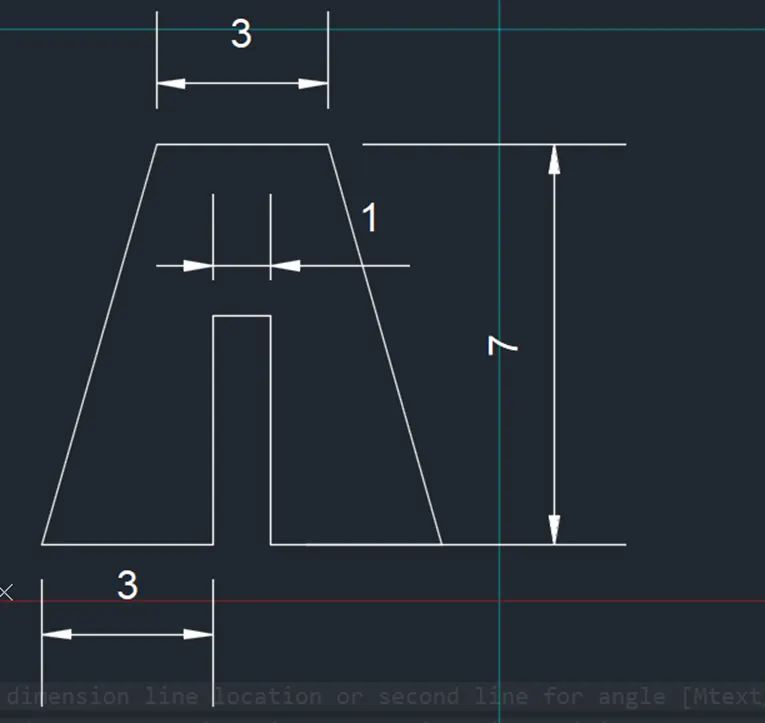
Procedure
Set the units and limits as per the requirement
Set the draft setting
Take line command and enter 2,1 because in question mentioned that the line tat from the 2,1
Coordinate
Than enter 5,1
Than 5,5
Than 6,5
Than 6,1
Than 9,1
Than 7,8
Than 4,8
And choose close option than obtained the desired geometric shape
Aim – to create geometrie by relative coordinate system
Procedure
Set the units and limits as per the requirement
Set the draft setting
Take line command and enter 2,1 because in question mentioned that the line tat from the 2,1
Coordinate
Than enter@ 3,0
Than@ 0,4
Than @1,0
Than @0,-4
Than @3,0
Than @-2,7
Than @-3,0
And choose close option than obtained the desired geometric shape
Aim – to create geometries by relative polar coordinate system
Procedure
Set the units and limits as per the requirement
Set the draft setting
Take line command and enter 2,1 because in question mentioned that the line that from the 2,1
Coordinate
Than enter @3<0
Than @0<90
Than @4<90
Than @1<0
Than @4<270
Than @3<0
Than press ESC
Than 4,8
Than @3<0
Than choose close option and press ESC and again take a line command from next point choose close option and than obtained the desired geometric shape
*Aim – to create geometries by direct distance entry
Procedure
Set the units and limits as per the requirement
Set the draft setting
Take line command and enter 2,1 because in question mentioned that the line that from the 2,1
Coordinate
Than enter 3
Than 4
Than 1
Than 4
Than 3
Than 4,8
Than 3
And choose close option than obtained the desired geometric shape
P4 Aim – to create geometries by absolute coordinate system
Procedure
Set the units and limits as per the requirement
Set the draft setting
Take line command and enter 2,1 because in question mentioned that the line tat from the 2,1
Coordinate
Than enter 2,9
Than 9,9
Than 9,1
Than 5,1
Than 5,2
Than 8,2
Than 8,8
Than 3,8
Than 3,1
And choose close option than obtained the desired geometric shape
P5
Aim – to create geometries by absolute coordinate system
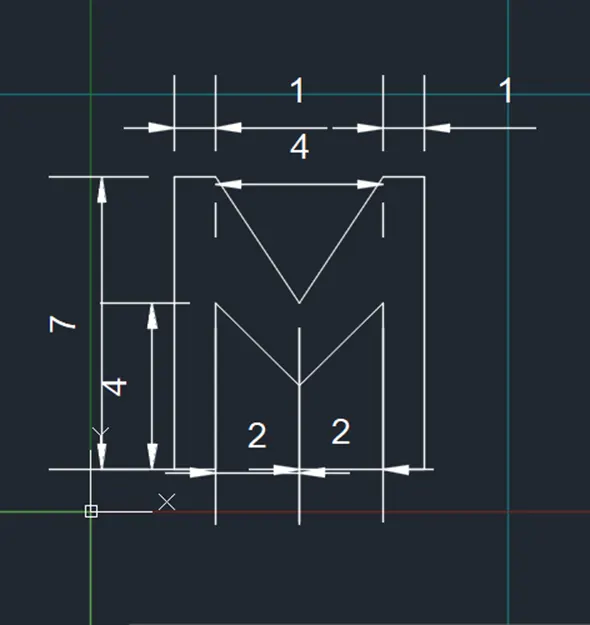
Procedure
Set the units and limits as per the requirement
Set the draft setting
Take line command and enter 2,1 because in question mentioned that the line tat from the 2,1
Coordinate
Than enter 2,8
Than 3,8
Than 5,5
Than 7,8
Than 8,8
Than 8,1
Than 7,1
Than 7,5
Than 5,3
Than 3,5
Than 3,1
And choose close option than obtained the desired geometric shape
P7 Aim – to create geometries by absolute coordinate system
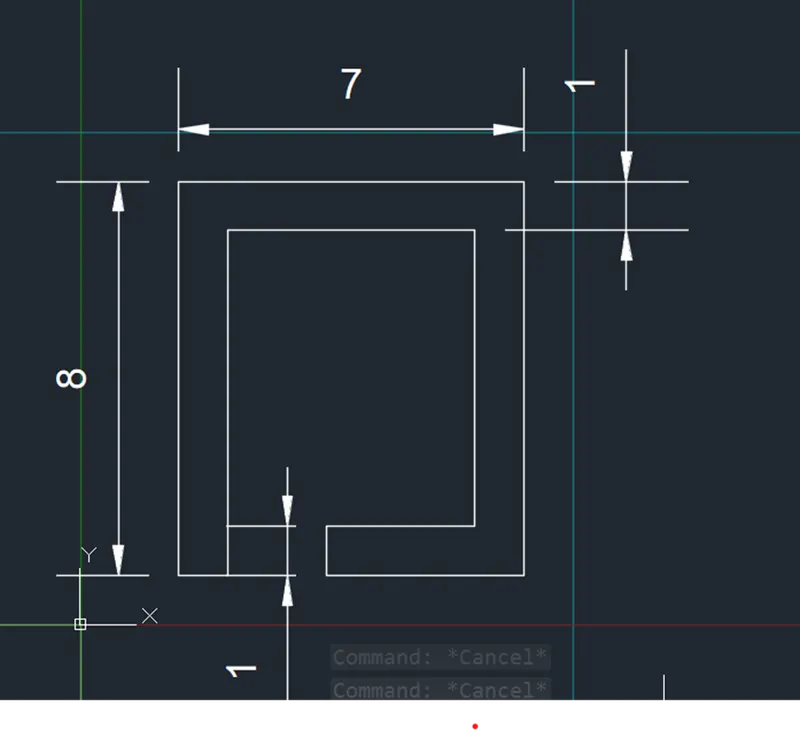
Procedure
Set the units and limits as per the requirement
Set the draft setting
Take line command and enter 2,1 because in question mentioned that the line tat from the 2,1
Coordinate
Than enter 2,9
Than 9,9
Than 9,1
Than 5,1
Than 5,2
Than 8,2
Than 8,8
Than 3,8
Than 3,1
And choose close option than obtained the desired geometric shape
Aim – to create geometries by absolute coordinate system
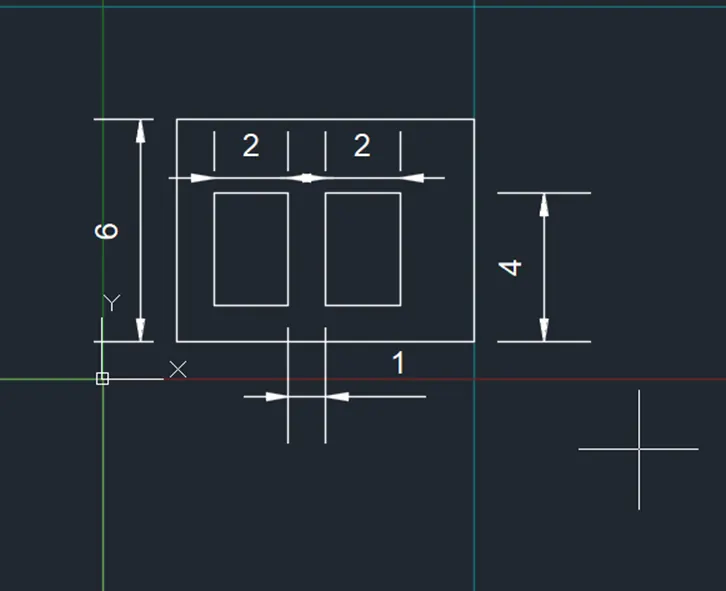
Procedure
Set the units and limits as per the requirement
Set the draft setting
Take line command and enter 2,1 because in question mentioned that the line tat from the 2,1
Coordinate
Than enter 2,6
Than 10,6
Than 10,1
Than 3,2
Than 3,5
Than 5,5
And choose close option than obtained the desired geometric shape
P8 Aim – to create geometries by absolute coordinate system
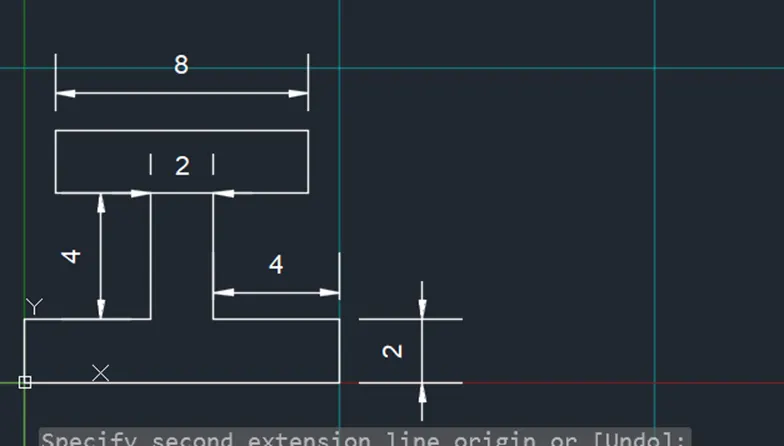
Procedure
Set the units and limits as per the requirement
Set the draft setting
Take line command and enter 0,0 because in question mentioned that the line tat from the 0,0
Coordinate
Than enter 10,0
Than 10,2
Than 6,2
Than 6,6
Than 9,6
Than 9,8
Than 1,8
Than 1,6
Than 4,6
Than 4,2
Than 0,2
Than choose option close
P9 Aim – to create geometries by absolute coordinate system
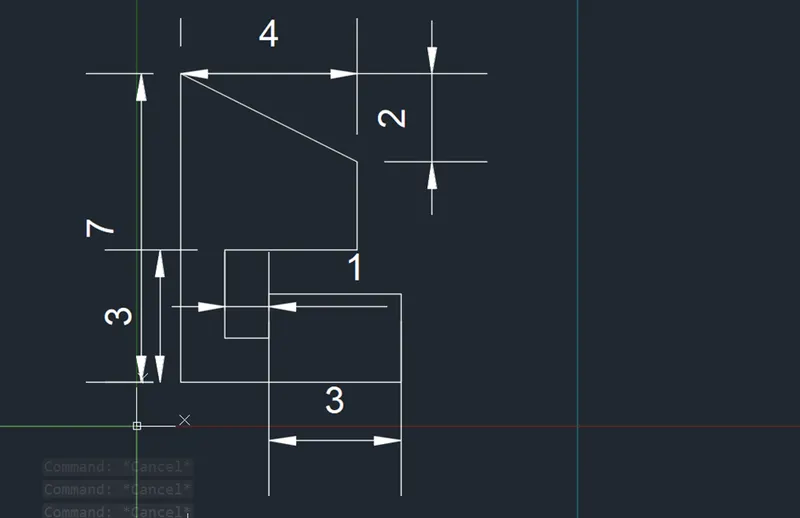
Aim – to create geometries by absolute coordinate system
Procedure
Set the units and limits as per the requirement
Set the draft setting
Take line command and enter 1,1 because in question mentioned that the line tat from the 1,1
Coordinate
Than enter 6,1
Than 6,3
Than 3,3
Than 3,2
Than 2,2
Than 2,4
Than 5,4
Than 5,6
Than 1,8
And choose close option than obtained the desired geometric shape
P10 Aim – to create geometries by absolute coordinate system
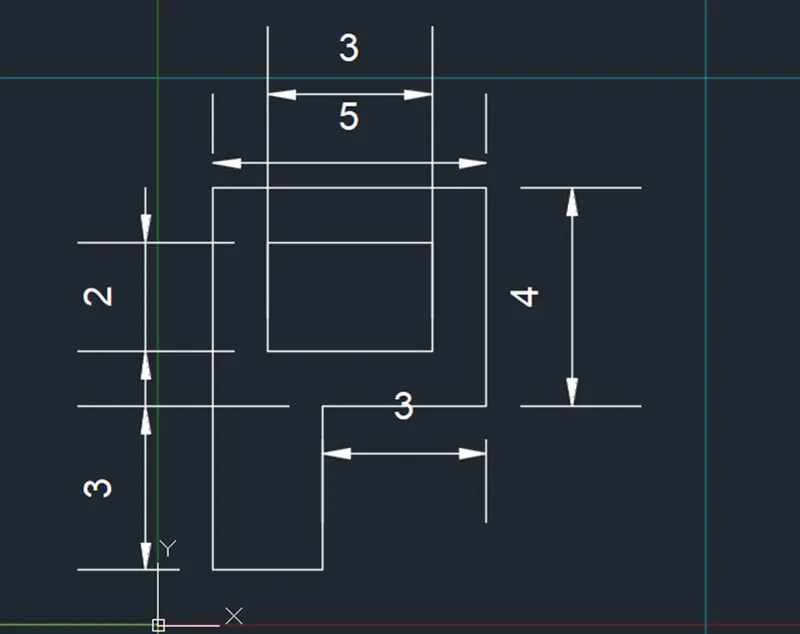
Procedure
Set the units and limits as per the requirement
Set the draft setting
Take line command and enter 1,1 because in question mentioned that the line tat from the 1,1
Coordinate
Than enter 1,8
Than 6,8
Than 6,4
Than 3,4
Than 3,1
Choose Close
Than 2,5
Than 5,5
Than 5,7
And choose close option than obtained the desired geometric shape
- PROFILE WOOD
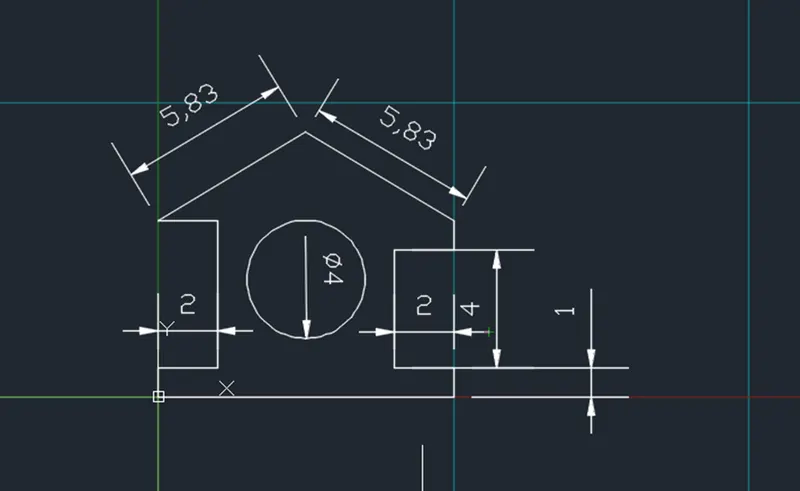
Aim – to create geometries by relative coordinate system Procedure
Set the units and limits as per the requirement
Set the draft setting
Take line command and enter 0,0 because in question mentioned that the line tat from the 0,0
Coordinate
Than enter@ 10,0
Than@ 0,1
Than @-2,0
Than @0,4
Than @2,0
Press ESC
Take line
Than @0,1
Than @2,0
Than @0,5
Than @-2,0
Take a mid point from the base at a height 9 and join the points it makes the truss and erase the line of midpoint
To draw circle of 5,4 with radius 2
2)QUEEN POST TRUSS
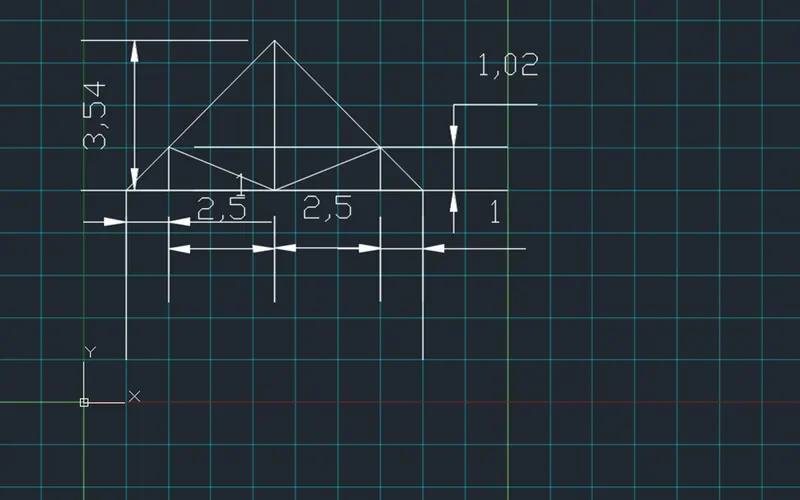
Aim – to create geometries by absolute coordinate system
Procedure
Set the units and limits as per the requirement
Set the grid setting
Take line command and enter 1,1 because in question mentioned that the line tat from the 1,1
Coordinate
Than enter 1,5
Than 8,5
Than 8,1
Press ESC
And take the midpoint of a line height 3.56 and close both sides it gives truss and offset of a distance 2.50 on both side
Than 3,6
Than 8,6
Than 8,7
Than 2,7
And choose close option than obtained the desired geometric shape
3)MONTH PITCH
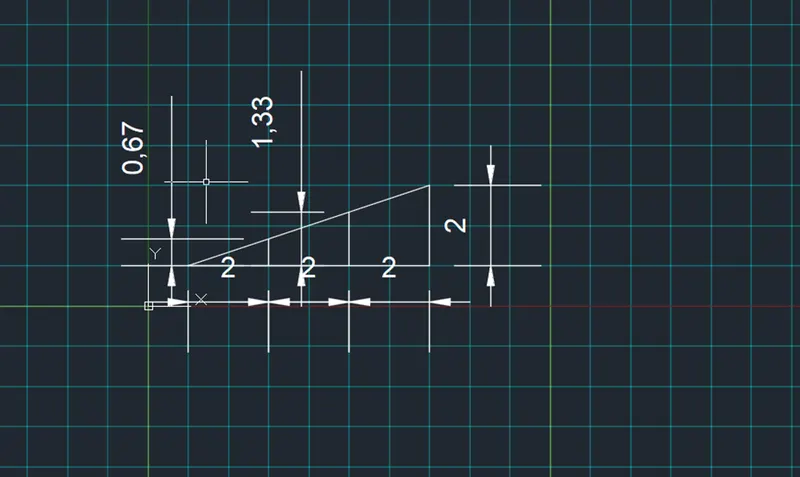
Aim – to create geometries by absolute coordinate system
Procedure
Set the units and limits as per the requirement
Set the draft setting
Take line command and enter 1,1 because in question mentioned that the line tat from the 1,1
Coordinate
Than enter 7,1
Than 7,3
Than 3,1.667
And choose the option close
Than 5,2.33
And choose the option close