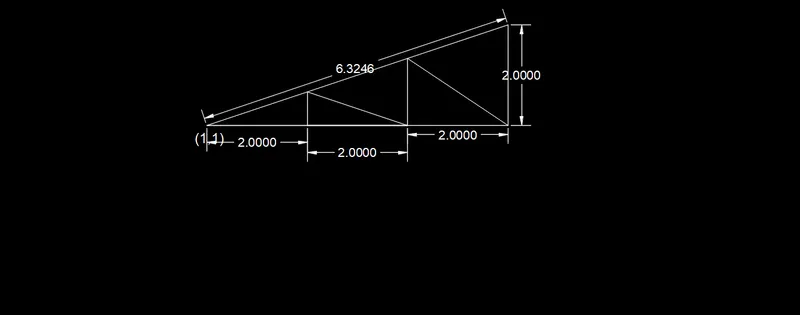
Creation of geometries by Coordinate system methods using AutoCad
aim : draw the drawing from point 1to2
- On the Start tab, click Start New Drawing. This opens a new drawing based on the default drawing template file. ...
- Right-click a file tab, and choose New to display the Select Template dialog box.
- Click Application menu New Drawing. Find.

aim : draw the drawing from point 1to2
- On the Start tab, click Start New Drawing. This opens a new drawing based on the default drawing template file. ...
- Right-click a file tab, and choose New to display the Select Template dialog box.
- Click Application menu New Drawing. Find.

aim : draw the drawing from point 1to2
- On the Start tab, click Start New Drawing. This opens a new drawing based on the default drawing template file. ...
- Right-click a file tab, and choose New to display the Select Template dialog box.
- Click Application menu New Drawing. Find.

aim : draw the drawing from point 1to2
- On the Start tab, click Start New Drawing. This opens a new drawing based on the default drawing template file. ...
- Right-click a file tab, and choose New to display the Select Template dialog box.
- Click Application menu New Drawing. Find.

aim : draw the drawing from point 1to2
- On the Start tab, click Start New Drawing. This opens a new drawing based on the default drawing template file. ...
- Right-click a file tab, and choose New to display the Select Template dialog box.
- Click Application menu New Drawing. Find.
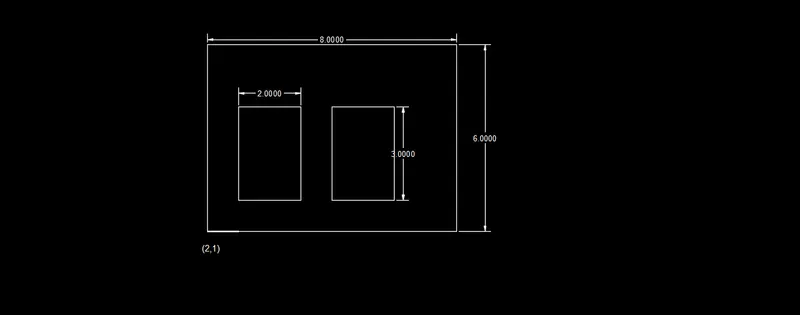
aim : draw the drawing from point 1to2
- On the Start tab, click Start New Drawing. This opens a new drawing based on the default drawing template file. ...
- Right-click a file tab, and choose New to display the Select Template dialog box.
- Click Application menu New Drawing. Find.

aim : draw the drawing from point 1to2
- On the Start tab, click Start New Drawing. This opens a new drawing based on the default drawing template file. ...
- Right-click a file tab, and choose New to display the Select Template dialog box.
- Click Application menu New Drawing. Find.
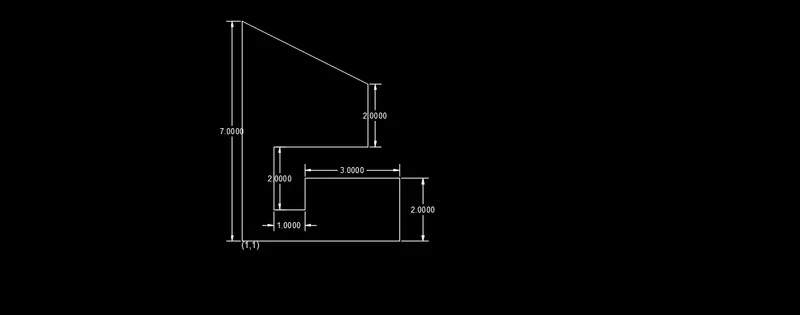
aim : draw the drawing from point 1to2
- On the Start tab, click Start New Drawing. This opens a new drawing based on the default drawing template file. ...
- Right-click a file tab, and choose New to display the Select Template dialog box.
- Click Application menu New Drawing. Find.
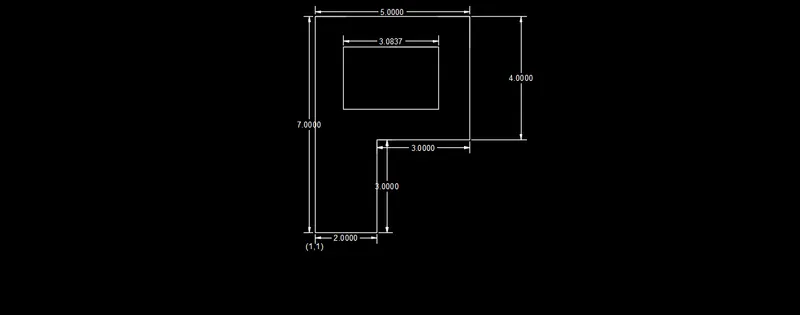
aim : draw the drawing from point 1to2
- On the Start tab, click Start New Drawing. This opens a new drawing based on the default drawing template file. ...
- Right-click a file tab, and choose New to display the Select Template dialog box.
- Click Application menu New Drawing. Find.

aim : draw the drawing from point 1to2
- On the Start tab, click Start New Drawing. This opens a new drawing based on the default drawing template file. ...
- Right-click a file tab, and choose New to display the Select Template dialog box.
- Click Application menu New Drawing. Find.
aim : draw the drawing from point 1to2
- On the Start tab, click Start New Drawing. This opens a new drawing based on the default drawing template file. ...
- Right-click a file tab, and choose New to display the Select Template dialog box.
- Click Application menu New Drawing. Find.
aim : draw the drawing from point 1to2
- On the Start tab, click Start New Drawing. This opens a new drawing based on the default drawing template file. ...
- Right-click a file tab, and choose New to display the Select Template dialog box.
- Click Application menu New Drawing. Find.