Creating Bar Bending schedule, Different Door types, and Creation of standard drawing templates using AutoCad
Aim:
To determine the Creating templates, inserting text and attributes
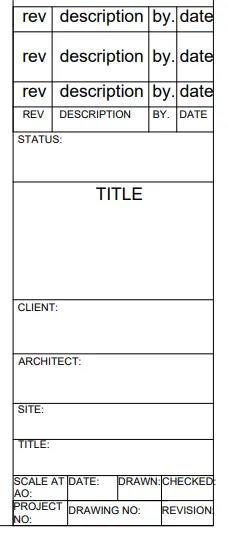
- Custom 1_ title block
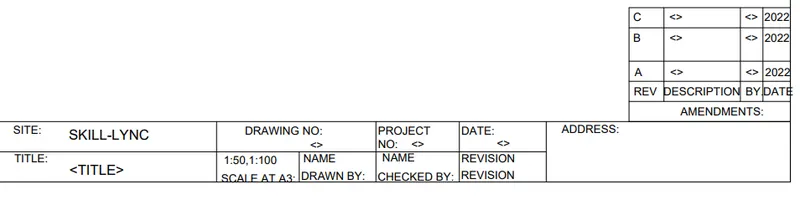
- Custom 2_ title block
Procedure:
Custom 1_ title block:
- Create a rectangle of size 66.63mm and 158 mm
- Divide it with line for the text box into columns
- For rows, take offset of 5,10,5,5,8,30,15,15,20,20,10,15 mm.
- By multiline text, type rev, description, by, date on the first row by text height 2.5 and style - Times New Roman.
- As it is repeated in the other two rows, take array give column as 1, rows as 3, spacing between rows as 7.
- Again, use multiline text and type the required text in caps with text height 1.5 and style as Times New Romans.
Creating block:
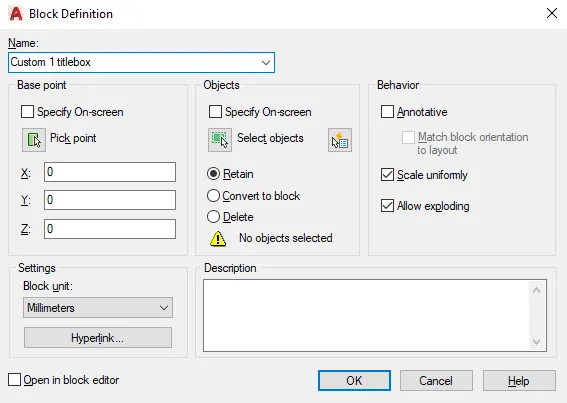
- Command "B" - block definition dialogue box appears- give name as "Custom 1_ title block"- select pick point and select a point in the table- select the object- select the whole table including the text. Give scale uniformly and tick allow exploding. Select convert to block option.
- As we have selected retain the object it will be retain and same as the actual drawing and a block is created for the objects that we have selected .If we want to use the block go to insert select the object and insert it.
Custom 2_ title block:
- Draw rectangle of 252 and 46 mm With lines divide the to the required rows and columns.
- With the use of multiline text insert the following: height 2.5.
Create a small rectangle at the right corner, explode it, create rows and columns.
By attributes, create the text inside it. Command "ATT" - attribute definition dialogue box appears.
For e.g.: In the first-row 1st column "C" is the text to be displayed. Command "ATT"
- Place the tag line on the place we need to hear 1st row 1st column of the box created. Create attributes similarly for the rest of the text. The attributes created are:
- Now create a block Command "B" with name Custom2_titleblock, select the whole title block and make it as a block. After creating it as a block we can see that all attributes will change to their default values.
Result:
To determined the Creating templates, inserting text and attributes
- Custom 1_ title block
- Custom 2_ title block
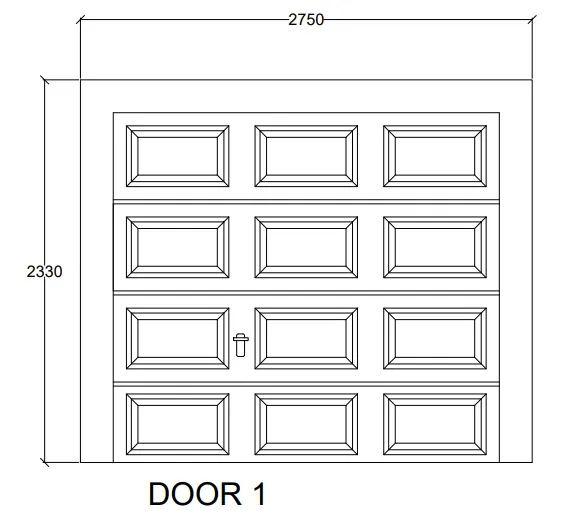
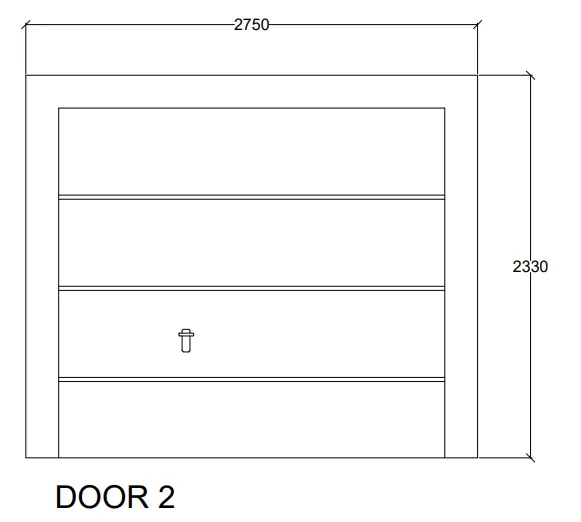
2.Create the doors type for warehouse as shown in the Figure. You need to create each door type as per standard size or given dimensions. Create the blocks of this door type after creating them
Aim:
To determine the Creating doors for warehouse and placing it in blocks:
- Door 1 - 2330 x 2750 mm
- Door 2 - 2330 x2750 mm
Procedure:
Door 1 -2330x2750mm:
- Create a rectangle of size 2330x2750mm.
- Offset 50mm as a frame. 90mm for the left side. Explode the rectangle.
- By divide "DIV" divide the top line into 4 segments. From the division point, draw lines vertically to divide it into shutters.
- Offset 25mm on both sides for the thickness, delete the center line.
- Create a rectangle to show the panels. Offset 20mm from the 1st rectangle and offset 100mm from the 2nd rectangle. Draw lines joining the corners of the outside and inside rectangle.
- Create the panel as a block, so that it is easy to copy. Create lock by rectangle command, and fillet the corners with radius 5mm.
- By using the copy all the frames are copied.
- Layer is created and all the objects are kept in different layers.
Creating block:
Command "B" - give name as door 1 - pick point- select corner point- select object - select the full object - ok. Select scale uniformly and allow exploding.
Door 2 -2330 x2750mm:
- Create a rectangle of size 2330x2750mm.Offset 50mm as a frame. 90mm for the left side. Explode the rectangle.
- By divide "DIV" divide the top line into 4 segments. From the division point, draw lines vertically to divide it into shutters. To make the points visible, Command "DDPTYPE" select the style of point
- Offset 25mm on both sides for the thickness, delete the center line. Create lock by rectangle drawn on opposite sides and fillet the corners with radius 5mm.
- Make layers and insert lock, frame in different layers
- Create it as a block "B" - pick a corner point - select the whole door -tick the box of scale uniformly- explode.
Result:
To determined the doors block was created.
- Door 1: 2330x2750mm
- Door 2: 2330 x2750mm
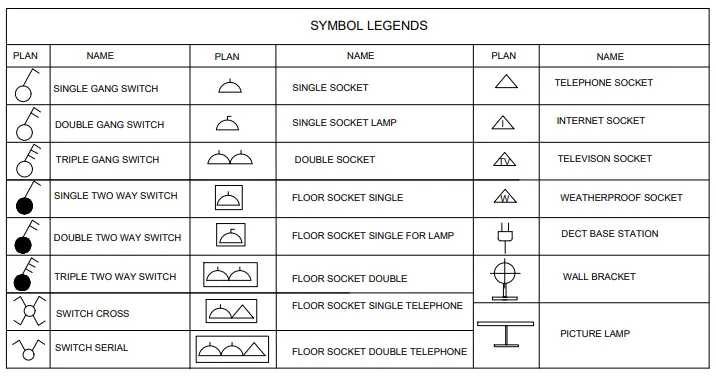
- Create each symbol as a block with the name given in the legend. After creating the blocks arrange them in the legend as shown in the Figure.
Aim:
To determine the create electrical legend
- Create each electrical symbol
- Creating them as block
- Arranging them in legends
Procedure:
Creating electrical symbols
- Single gang switch: Draw a circle of radius 64mm and with line draw an inclined line vertical and horizontal line perpendicular to the inclined as required.
- Double gang switch: Draw circle and draw two horizontal lines and a vertical incline line.
- Triple gang switch: Draw circle, 1 vertical incline line and three horizontal lines.
- Single two-way switch: Draw same as single gang switch and with donout command give internal dia as zero and for external diameter select it in the circle.
- Double two way switch: Draw same as double gang switch and create donout .
- Triple two-way switch: Draw same as triple gang switch and create donout.
- Switch cross: Create a circle and donout inside and with line command draw an inclined vertical and perpendicular horizontal. Mirror the line in both directions.
- Switch serial: Copy the switch cross and delete two bottom lines, remove the donout also.
- Single socket: Create a circle, divide it into half and draw a line at the top.
- Single socket for lamp: From the single socket, draw a horizontal line perpendicular to vertical.
- Double socket: Draw the single socket and copy it to create same and place it using snap on.
- Floor socket single: Draw a rectangle surrounding single socket.
- Floor single socket for lamp: Draw a rectangle surrounding single socket for lamp
- Floor socket double: Create two single socket and place a rectangle surrounding it.
- Floor socket single telephone: Draw a single socket, a triangle and surrounded by a rectangle.
- Floor socket double, telephone: draw 2 single socket and a triangle surrounded by a rectangle.
- Telephone socket: Draw a triangle
- Internet socket: Insert text "i" in the triangle.
- Tv socket: Insert text “TV' in the triangle.
- Weatherproof socket: Insert text "w" in the triangle.
- Duct base section: Draw a rectangle - select the bottom grip point - select add vertex - then pull the vertex to create a bend, with line draw the lines.
- Wall bracket: With rectangle draw the base, create a circle, draw a line connecting the rectangle and circle, draw a cross line inside the circle.
- Picture lamp: draw two rectangles connected by a line.
Creating them as block:
Command "B" give name as single gang switch - pick a point - select object (created single gang switch) - tick scale uniformly and allow exploding options.
- Similarly define each one of them as block giving the respective names. Do the same procedure for the remaining symbols.
Creating and arranging hem in layers:
- First create a rectangular table having 10 rows and 6 columns.
- Place each of the blocks in the respective rows and columns.
- To enter text with the block from the insert tab- select field- select object -select block.
E.g.: for single gang switch - select from the field. - select uppercase in format.
- Place the text in the respective rows give text height to 150.
- Similarly place all the title inside the legends.
Result:
To determine the create electrical legend
- Create each electrical symbol
- Creating them as block
- Arranging them in legends
- Create the door type for residential building as a block. Save the name of the blocks as type. Use given dimensions or assume dimensions as per industry standards.
Aim:
To determine to draw the doors of residential project and create it as block.
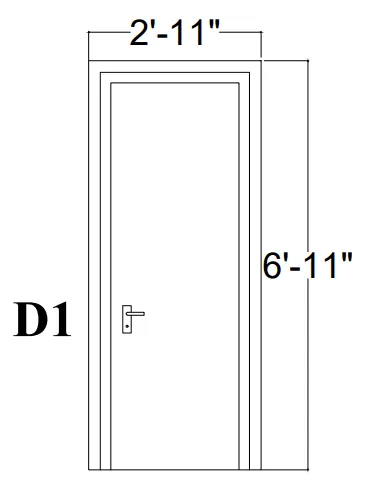
- D1
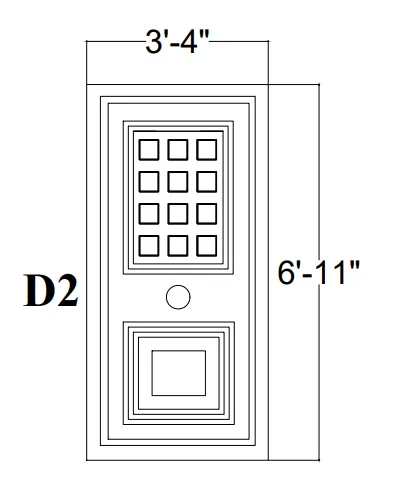
- D2
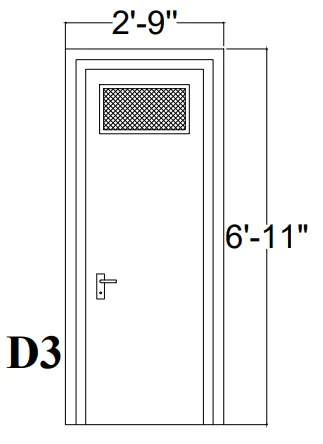
- D3
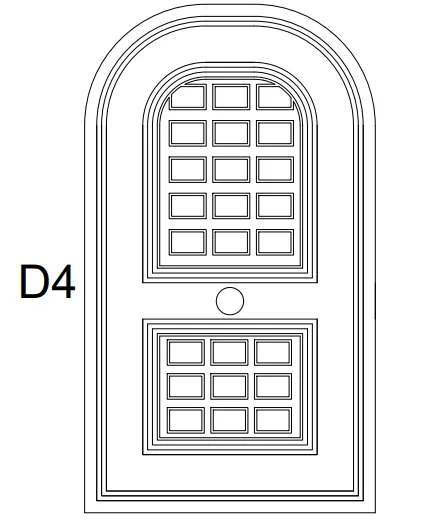
- D4
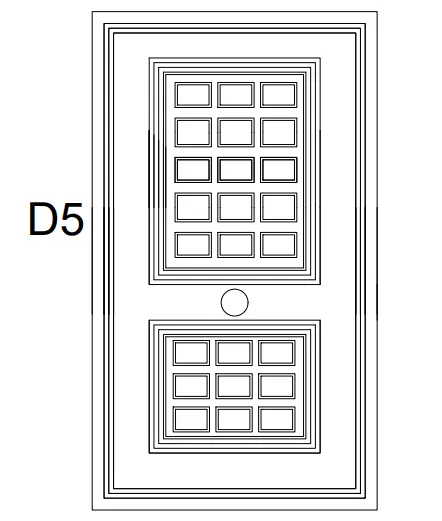
- D5
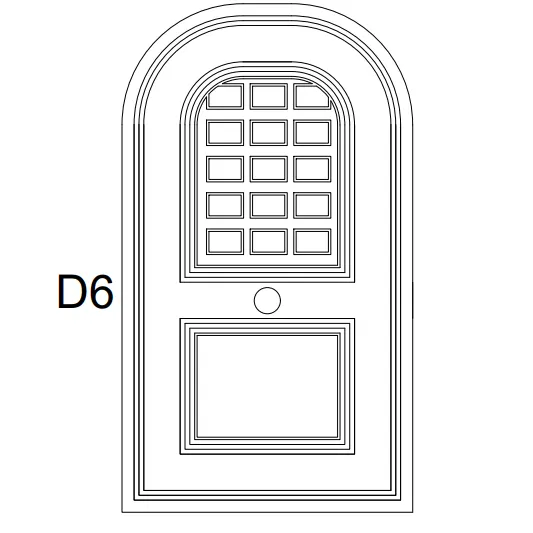
- D6
Procedure:
1). D1 - 2'10" x 6'11" :
- Draw rectangle with dimension 2'10" and 6'11".Draw offset 1.5" for frame. Draw offset 1" for shutter.
- Draw lock by two rectangles perpendicular to each other and fillet the corners with radius 0.1"and circle. Write text by multiline text "D1".
- Create it as block "B"- give name as "type-D1" -pick a corner point- select the object. then block is created.
2). D2 - 3'4" x 6'11" :
- Draw rectangle with dimension 3'4" and 6'11".Draw offset 1.5" for frame. Draw offset 1" for shutter.
- Draw rectangle for panel 1'11" and 2'9.1", then offset 1" two times. Draw a rectangle 5.4" x 5.7", offset 0.3".
- Copy it with copy command "co" - select mode - select the rectangle- select array-enter no: of array as 3 -place it as required. Copy the 3 rectangles to 4 rows.
- For the second panel draw a rectangle of 1'11" x 2'0.6". Offset 1" 3 times Draw another rectangle inside this of 1'0.8" x 1' 1.2" and offset 1".
- Draw lock by circle in between the two panels. Write text by multiline text "D2".
- Create it as block "B"- give name as "type-D2" -pick a corner point- select the object, then block is created.
3). D3 -2'9" x 6'11" :
- Draw a rectangle of 2'9" x 6'11".
- Offset 1" for thickness ,2"offset for frame, 1" thickness. Offset 1.5" as shutter thickness.
- Draw a rectangle at the top for ventilation 1'3" x 9.3", give offset 1" for thickness.Hatch inside the rectangle.
- Create lock by rectangle two of them, perpendicular to each other and a circle.
- Create it as a block Command "B" - give name as type d3 -pick point- select object -tick scale uniformly and explode all.
4). D4 - 3'9" x 8'7" :
- Draw rectangle "REC" of dimension 3'9" x 6'10".Explode it and create an arc with 2-point method with both point as the endpoints.Offset the arc and the line with 1.5" and then 1".
- Offset 8" from arc and rectangle for panel and divide it into two .Take 1" offset 2 times to show the thickness on top figure and bottom rectangle. Create rectangles inside the panel.
- For lock, create a circle.
- Make it a block, name as type D4 - pick a point and select the object tick the dialogue box of uniform scale and explode all.
5). D5 - 3'5" x 6'8" :
- Draw a rectangle of 3'5" x 6'8".Offset 1.5" for frame. Offset 1" as shutter thickness. Create another rectangle inside with offset 4.4".
- Create another rectangle on the bottom 2'2.9" x 2'2.6".Offset 1" two times for both rectangles.
- Create rectangle inside for panels with offset 0.5".Copy it for 3 columns and 4 rows. Similarly copy it in bottom rectangle for 3 rows and 3 columns.
- Create it as a block Command "B" - give name as type D5 -pick point- select object -tick scale uniformly and explode all.
6). D6 - 3'5" x 7' 11.6" :
- Draw rectangle "REC" of dimension 3'5" x 7'11.6".Explode it and create an arc with 2-point method with both point as the endpoints. Offset the arc and the line with 1.5" and then 1" for frame.
- Offset 8" from arc and rectangle for panel and divide it into two. Take 1" offset 2 times to show the thickness on top figure and bottom Create rectangles inside the top panel, 3 row and 4 columns.
- For bottom panel, offset the rectangles by 1" 3 time as and 3.3" and again 1".For lock, create a circle.
- Make it a block ,name as type D6 - pick a point and select the object tick the dialogue box of uniform scale and explode all.
Result:
The doors are created and are made into blocks.
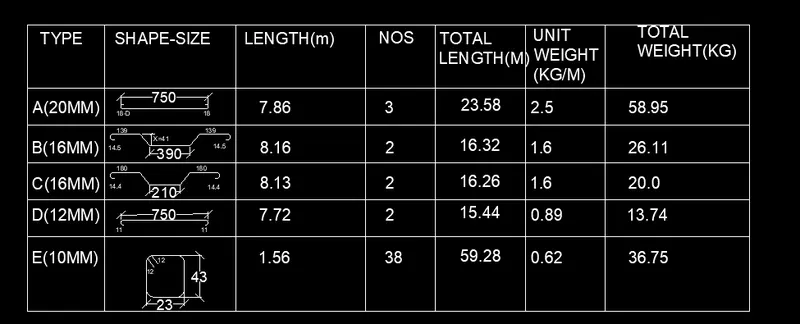
- Create each shape as a block as shown in the Figure. Save the block and insert them on the table as shown in the Figure.
Aim:
To create bar bending schedule and insert it as block.
- Drawing each shape.
- Creating it as block.
- Inserting it in table as Bar bending schedule.
Procedure:
1).Drawing each shape:
A -20mm :
- Draw a line of 750cm for straight bar. Create arc for the bend. Create on one side and mirror it on another side.
B-16mm :
- Draw line of 300mm for straight bar .Draw vertical line of 41cm and extend a horizontal line and draw a line inclined at 45 degree from the base of vertical line up to horizontal line.
- Trim off the unwanted lines. Copy the same on the other side. Draw a horizontal line of 139cm and copy it on other side .Draw bend with arc and mirror the same on other side.
C -16mm :
- Draw a line of 210cm .Draw vertical line of 41cm and extend a horizontal line and draw a line inclined at 45 degree from the base of vertical line up to horizontal line.
- Trim off the unwanted lines. Copy the same on the other side. Draw a horizontal line of 180cm and copy it on other side. Draw bend with arc and mirror the same on other side.
D -12mm :
- Draw a line of 750cm for straight bar. Draw an arc downwards. Mirror it on the other side.
E- 10mm :
- Draw a rectangle of 23cm and 43 cm. Fillet the corner with fillet radius 5cm.Draw two line of 120cm.
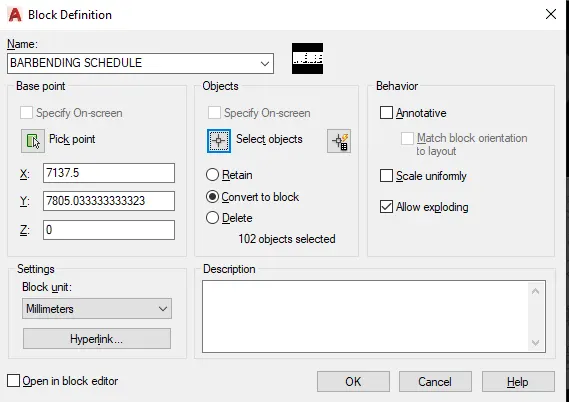
- Creating each of them as block by using Command -"B'- give name as A - pick a point- select the object - select delete - tick box of scale uniformly and explode all.
- Similarly create 5 blocks: A,B,C,D,E and insert each of the bars as blocks.
- Inserting blocks in the table:
- Create a table with rectangle and divide it into 6 rows and 7 columns. With multiline text enter type, shape size, length, no, total length, unit weight, total weight and all other text. By command "I" insert each of the block in respective columns.
Result:
To determined the barbending schedule and its block are created.