Conformal Meshing of an Electronic enclosure assembly
I. Aim
To create a conformal mesh for the given Icepak model of an electronic enclosure assembly.
II. Introduction
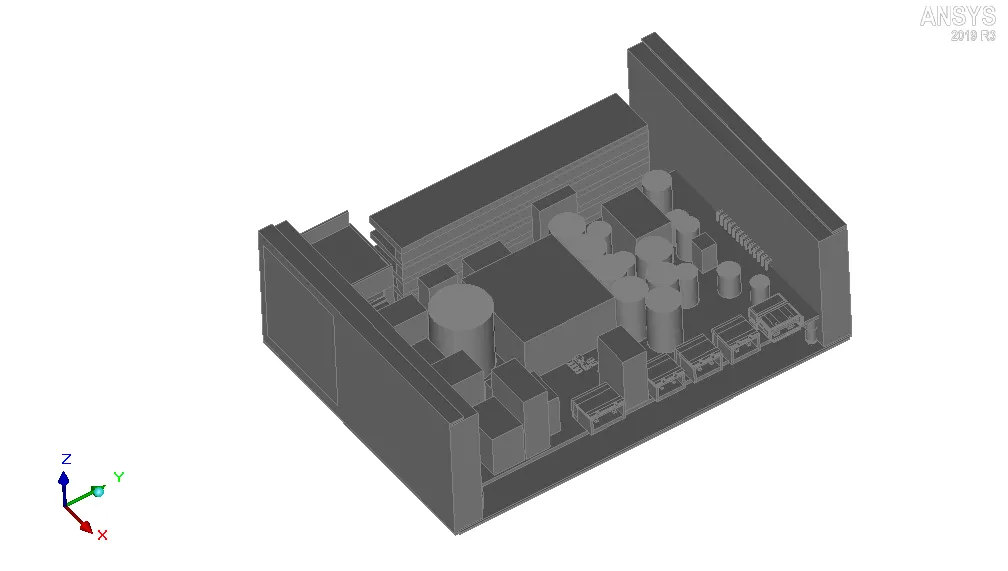
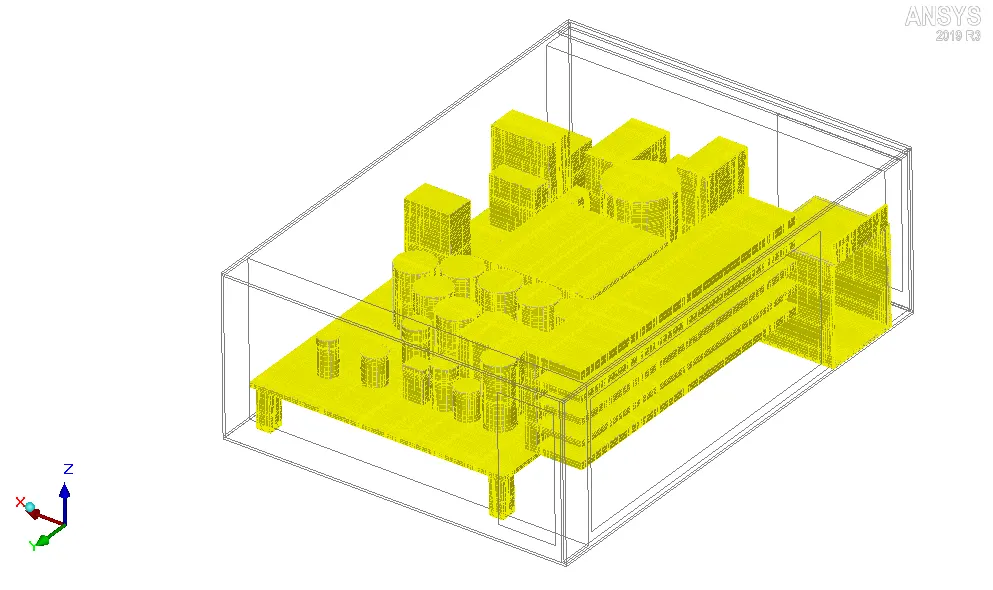
In the current project, conformal mesh is created for the Icepak model shown in the image attached below.
III. Theory
Meshing discretizes the physical domain into elements/cells. Within each of these elements/cells the governing equations, for flow and heat transfer, are solved to obtain the discretized solution field in the cabinet.
In any CFD analysis, ensuring a good quality mesh is very important to obtain an accurate solution. If the mesh is too coarse, the discretization error (incurred as a result of converting continuous PDE(s) into algebraic equations) becomes too large and the solution becomes inaccurate. On the other hand if the mesh is too fine, the computational time may become unacceptable.
ANSYS Icepak automates the mesh generation process such that near the object boundaries (where the velocity and temperature gradients are possibly higher) more elements are placed and in the open spaces between the objects less elements are placed. The user can affect this mesh generation process by setting the various parameters available in the Mesh control window of ANSYS Icepak. These parameters can be used to modify the mesh globally or locally.
IV. Meshing
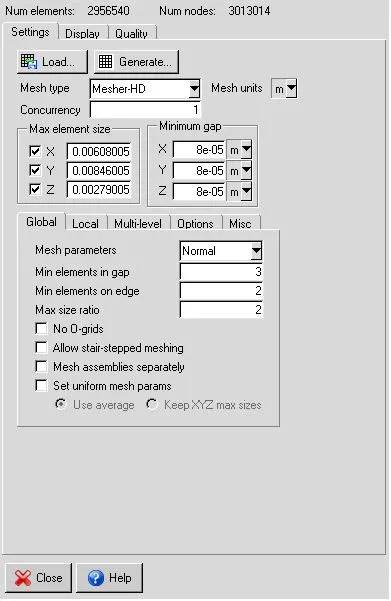
The following settings are applied in the Mesh control window to generate conformal mesh for the given Icepak model:
1. Mesh type: Mesher-HD
Generates a hex-dominant mesh.
2. Concurrency: 1
This option can be used to control the number of assemblies being meshed simultaneously when the option "Mesh assemblies separately" is turned on.
3. Mesh units: m
Sets the unit of element size to m.
4. Max element size:
X: 0.00608005m
Y: 0.00846005m
Z: 0.00279005m
The default values (about 1/20 of the cabinet dimensions in the corresponding directions) are adopted.
5. Minimum gap:
X: 8e-5m
Y: 8e-5m
Z: 8e-5m
This option specifies the minimum distances between objects in the model along X, Y and Z coordinate directions.
6. The following global settings are used for the mesh:
6.1. Mesh parameters: Normal
6.2. Min elements in gap: 3
This option specifies the minimum number of elements between two neighbouring objects.
6.3. Min elements on edge: 2
This option specifies the number of elements along the edge of each object.
6.4. Max size ratio: 2
This option specifies the maximum ratio between the sizes of two neighbouring elements, in the entire domain.
6.5. No O-grids: disabled
This option informs the Icepak mesher whether O-grids are to be placed around the objects in the model.
6.6. Allow stair-stepped meshing: disabled
This option informs the Icepak mesher whether stair-stepped meshing is permitted. If this option is enabled, the geometries of the objects in the model are approximated by the mesh since the projection and decomposition steps during 3D cut cell meshing are disabled. Stair-stepped meshing employs reduced number of elements in the mesh and can be used in cases where resolving the goemetry of objects is not important.
6.7. Mesh assemblies separately: disabled
This option informs the Icepak mesher to turn on/off non-conformal meshing for all the assemblies in the model that have the Mesh separately option turned on. In the current project, conformal mesh is desired and hence this option is disabled.
6.8. Set uniform params: disabled
If this option is enabled the following two options are activated:
(a) Use average: This option generates uniform mesh such that the element size along each coordinate is equal to the average of the maximum element sizes along the three coordinates.
(b) Keep XYZ max sizes: This option generates uniform mesh such that the element size along each coordinate is equal to the maximum element size along the same coordinate.
7. The local settings can be used to modify the mesh locally (on or near the objects in the model). In the current project, no modification is made to the mesh locally (on or near the objects in the model).
9. Multi-level meshing allows selective mesh refinement at places where higher resolution is desired. For the current mesh multi-level meshing is not enabled.
10. The following settings, available in the Options tab of the Mesh control window, can be used to modify the default settings:
10.1. Min elements on cyl face: 4
This option specifies the minimum number of elements on the cylindrical face of an object.
10.2. Min elements on tri face: 4
This option specifies the minimum number of elements on the triangular face of an object.
10.3. Max O-grid height: 0 mm
This option specifies the maximum height of the O-grid envelope around the objects in the model.
10.4. Init element height: disabled
This option is used to specify the height of the first element layer generated on the surface of any object in the model.
10.5. No group O-grids: disabled
This option is used to group cylindrical objects with the following characteristics together in order to generate O-grids:
i. The cylindrical objects should aligned axes.
ii. The cylindrical objects should be separated only by a small gap in the model.
10.6. Max elements: 25000000
This option specifies the maximum number of elements in the mesh.
11. The following settings are applied in the Misc tab of the Mesh control window:
11.1. Allow minimum gap changes: enabled
If the minimum separation between two objects in the model is smaller than the values specified by the user in the Minimum gap panel, this option allows the Icepak mesher to automatically set the appropriate values without any manual intervention.
11.2. Enforce 3D cut cell meshing for all objects: disabled
This option is used to employ cut cell meshing technique to all the objects in the model irrespective of their shapes, once 2D multi-level meshing is enabled.
11.3. Optimize mesh in thickness direction for package and PCB geometries: enabled
Enabling this option informs the Icepak mesher to put single elements along the thickness direction for each object enclosed by a package or PCB (except the trace heating layers).
11.4. Enable 2D multi-level meshing: disabled
This option is used to refine the mesh selectively near fine-level features. The following two options are available to define the type of 2D multi-level meshing:
i. Anisotropic: This option allows the mesher to refine the mesh while adapting to the geometry. The quality of the resulting elements are affected by the geometry.
ii. Isotropic: This option allows the mesher to refine the mesh independent of the geometry. The resulting quality of cells may be better since aspect ratio is maintained in 2D.
The image attached below shows the Mesh control window.
V. Visual Inspection
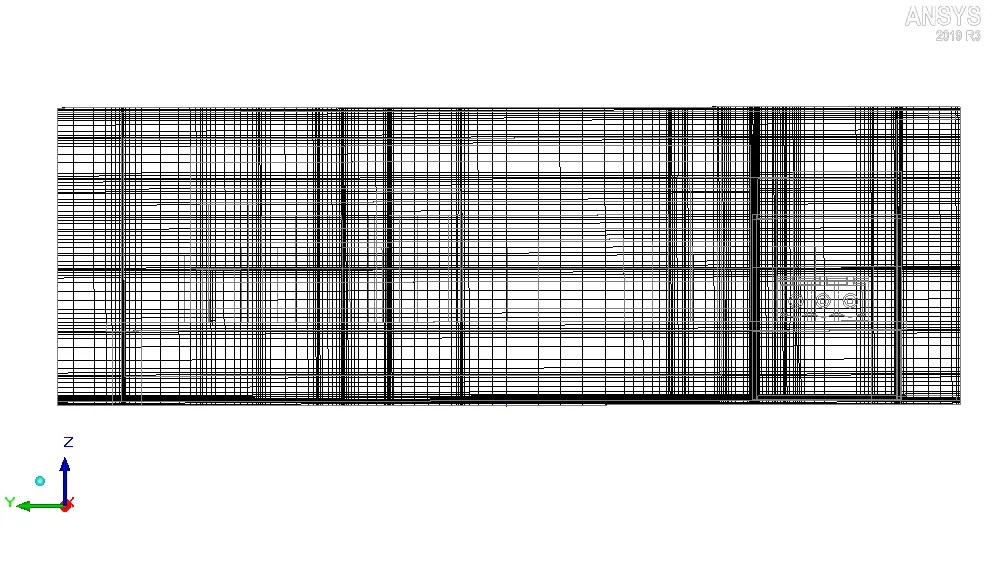
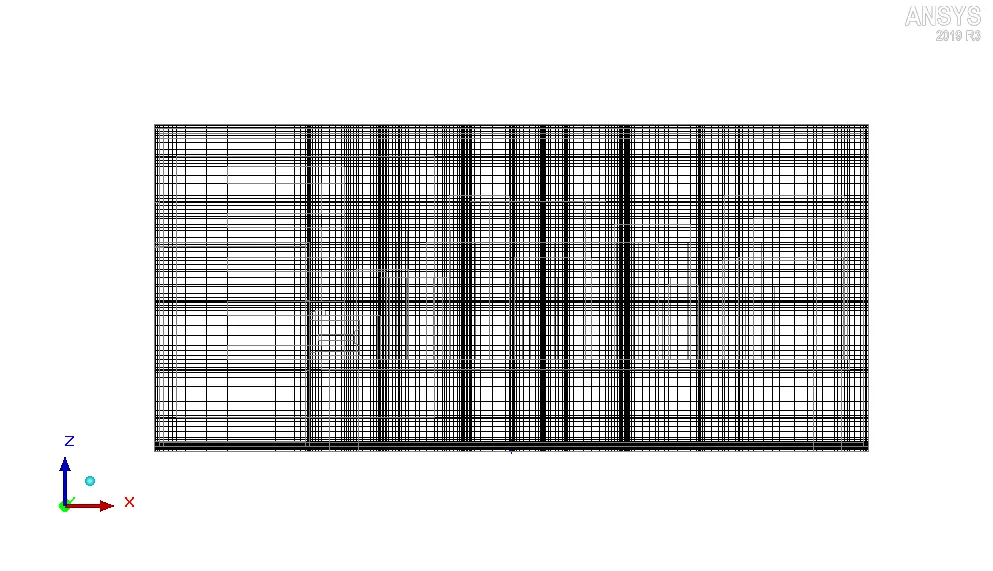
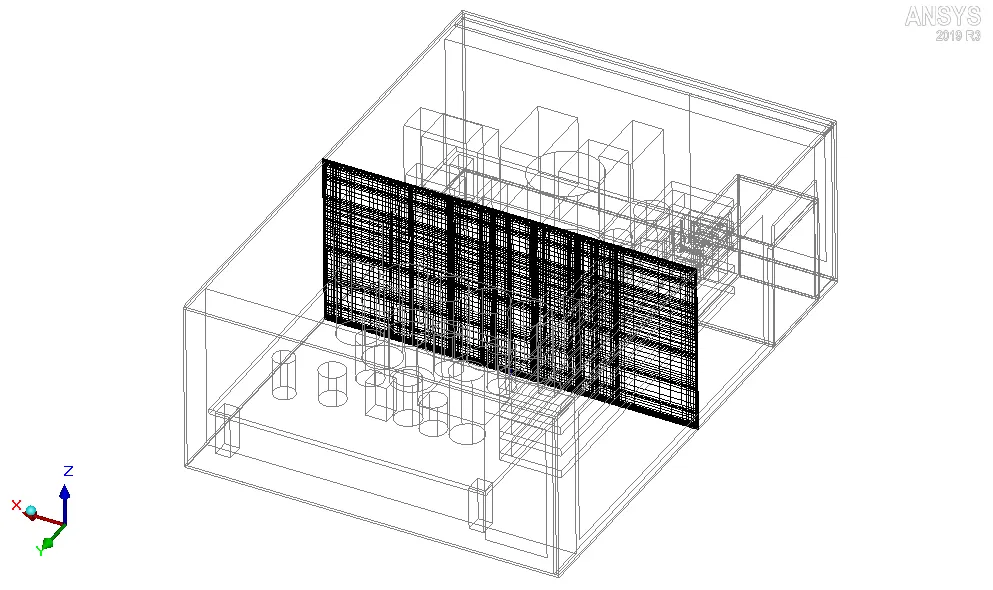
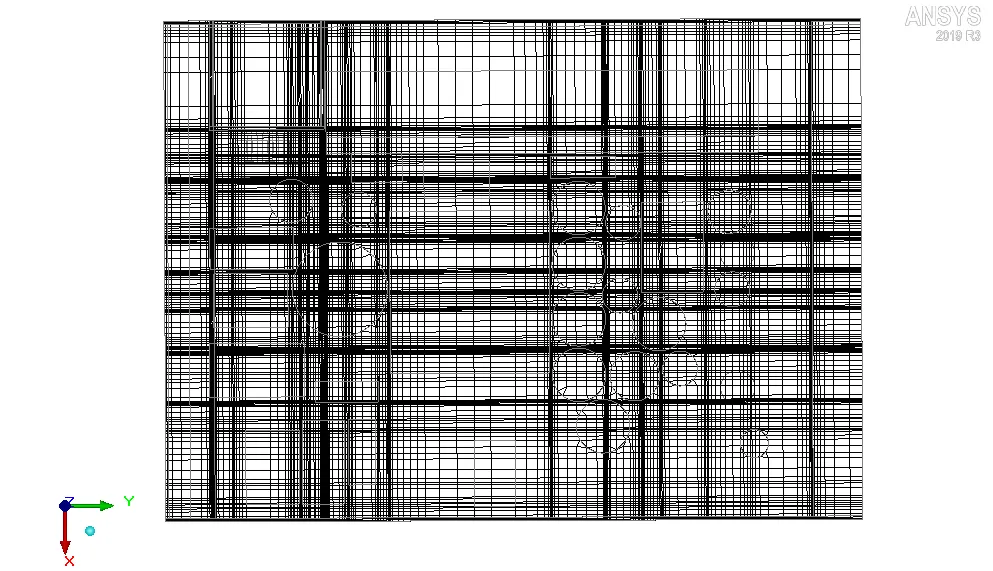
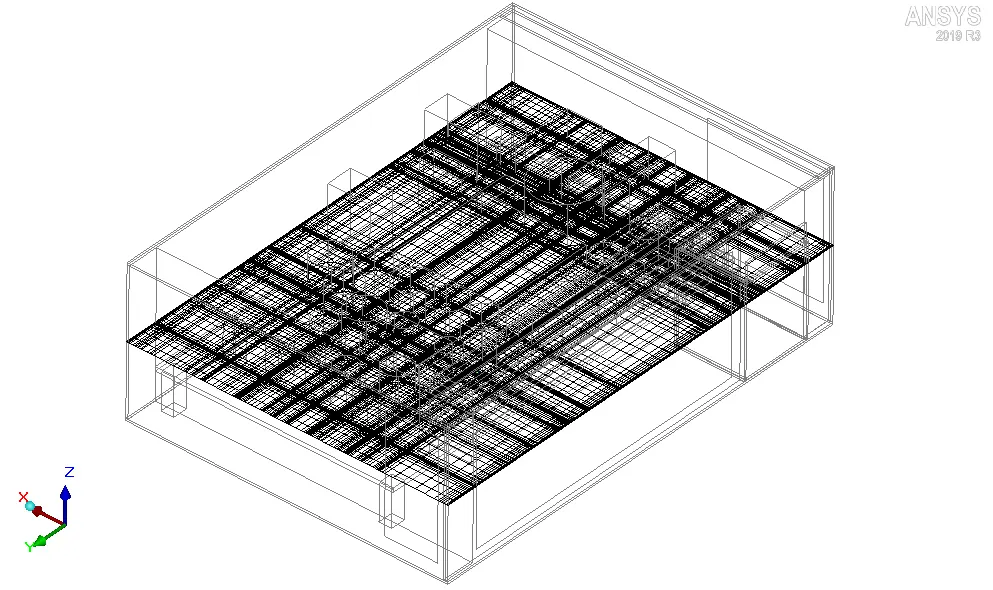
Visual inspection is a very important step that must be performed after mesh generation in order to ensure that the mesh model captures all the design inputs. The images attached below show the mesh along different cut-planes (i, ii and iii) and on the surface of all the objects within the enclosure (iv).
i. Mesh at X plane through the center
3D view
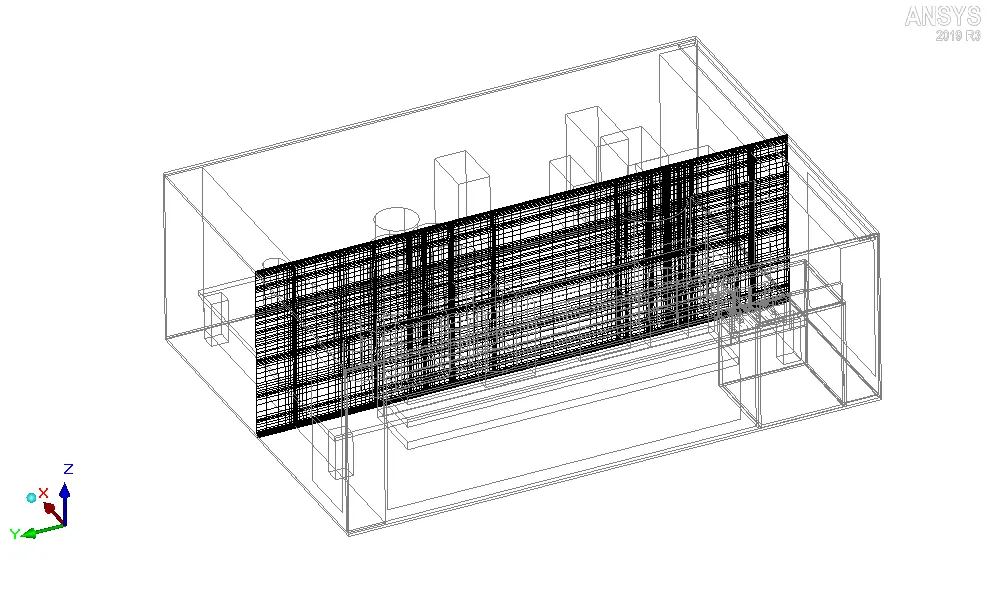
ii. Mesh at Y plane through the center
3D view
iii. Mesh at Z plane through the center
3D view
iv. Surface mesh
VI. Quality check
Quality check is performed after mesh generation to assess the mesh quality quantitatively. The following three parameters are used to check the quality of Hex-dominant mesh generated using Mesher_HD:
i. Face alignment: Face alignment index is used to quantify the face alignment between two neighbouring cells. The image attached below shows two neighbouring cells in a 2D mesh.
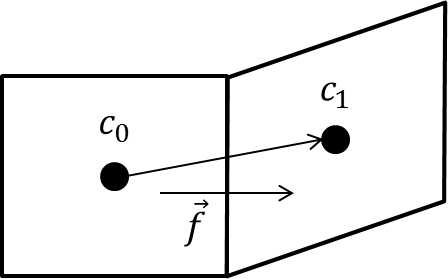
`c_0` and `c_1` are the centroids of the two cells and `vec{f}` is the normal vector to the common face between the two cells. The face alignment index is given by `vec{c_0c_1}cdotvec{f}`.
The histogram attached below shows the face alignment indices of different elements in the current mesh.
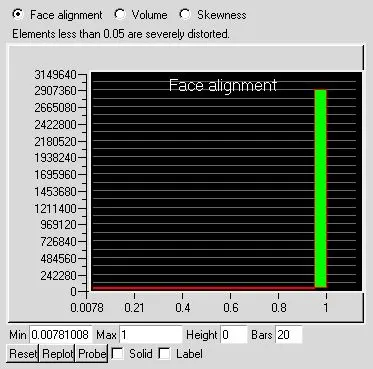
As evident from the histogram, the minimum face alignment index for the mesh elements is approximately 0.0078. However the mesh elements having face alignment index below 0.05 are severely distorted which may create a problem for the solver. Some modifications must be made to the mesh to ensure that the minimum face alignment index of the mesh elements doesn't fall below 0.05.
ii. Volume: The volume of mesh elements is evaluated. The histogram attached below shows the volume of different elements in the current mesh.
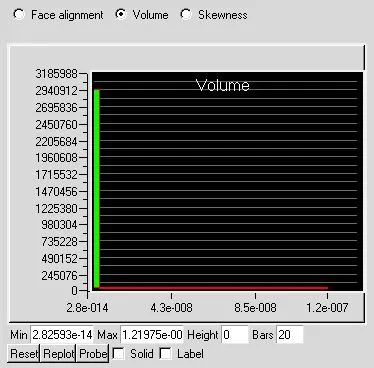
As evident from the histogram, the minimum volume of mesh elements is 2.82593e-14`m^3`. However for single precision solver the volume of mesh elements should be preferably greater than 1e-13`m^3`. Consequently the mesh needs to be modified.
iii. Skewness: The skewness of a face/cell indicates how close to ideal (equilateral or equiangular) it is. A face/cell with a skewness of 1 is equilateral/equiangular whereas a face/cell with a skewness of 0 is degenerate. The histogram attached below shows the skewness of different elements in the mesh.
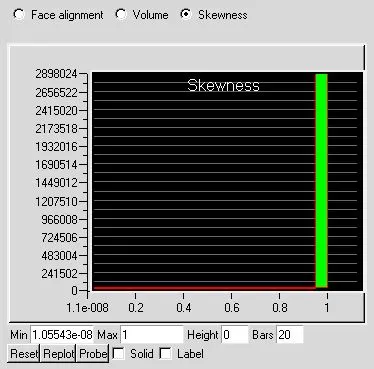
As evident from the histogram, the minimum skewness for mesh elements is 1.05543e-8. However all the elements with a skewness below 0.25 are of poor quality. Hence the mesh needs to be modified so that the minimum skewness of mesh elements lies above 0.25.
VII. Conclusion
In the current project, a conformal mesh was created for the given Icepak model. The mesh was plotted along different cut-planes and on the surface of all the objects within the enclosure. Quality check of the mesh revealed that several elements in the mesh have a poor quality. Hence the current mesh must be modified in order to avoid any problems during solution, which may arise due to poor quality mesh elements.