Canny Edge detection,NMS,Double Thresholding,Project link https://lms.skill-lync.com/programs/230630/305/1910/view-grade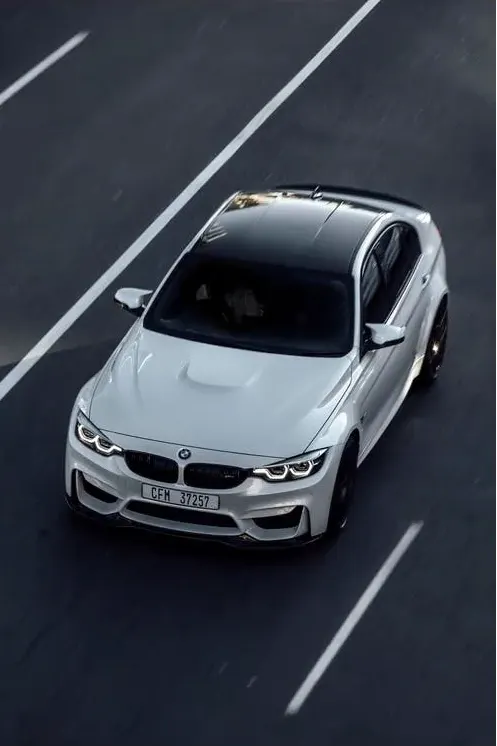
 import numpy as np
import os
import cv2
import matplotlib.pyplot as plt


# defining the canny detector function

# here weak and strong are thresholds
# double thresholding step
def Canny_detector(img, weak = None, strong = None):

    # conversion of image to grayscale

    cv2.imshow('Challenge3Car', img)
    cv2.waitKey(0)
    cv2.imwrite('Challenge3Car.jpg', img)
    # Use the cvtColor() function to grayscale the image
    gray_image = cv2.cvtColor(img, cv2.COLOR_BGR2GRAY)

    cv2.imshow('GrayscaleChallenge3Car', gray_image)
    cv2.waitKey(0)
    cv2.imwrite('GrayscaleChallenge3Car.jpg', gray_image)
    # Noise reduction step
    GB_image = cv2.GaussianBlur(gray_image, (5, 5), 1.4)
    cv2.imshow('GaussianBlurChallenge3Car', GB_image)
    cv2.waitKey(0)
    cv2.imwrite('GaussianBlurChallenge3Car.jpg', GB_image)

    # Calculating the gradients
    gx = cv2.Sobel(np.float32(GB_image), cv2.CV_64F, 1, 0, 3)
    gy = cv2.Sobel(np.float32(GB_image), cv2.CV_64F, 0, 1, 3)
    cv2.imshow('SobelxChallenge3Car', gx)
    cv2.waitKey(0)
    cv2.imwrite('SobelxChallenge3Car.jpg', gx)
    cv2.imshow('SobelyChallenge3Car', gy)
    cv2.waitKey(0)
    cv2.imwrite('SobelyChallenge3Car.jpg', gy)
    cv2.waitKey(0)
    # Conversion of Cartesian coordinates to polar
    mag, ang = cv2.cartToPolar(gx, gy, angleInDegrees = True)

    # setting the minimum and maximum thresholds
    # for double thresholding
    mag_max = np.max(mag)
    if not weak:weak = mag_max * 0.1
    if not strong:strong = mag_max * 0.5

    # getting the dimensions of the input image
    height, width = GB_image.shape

    # Looping through every pixel of the grayscale
    # image
    for i_x in range(width):
        for i_y in range(height):

            grad_ang = ang[i_y, i_x]
            grad_ang = abs(grad_ang-180) if abs(grad_ang)>180 else abs(grad_ang)

            # selecting the neighbours of the target pixel
            # according to the gradient direction
            # In the x axis direction
            if grad_ang<= 22.5:
                neighb_1_x, neighb_1_y = i_x-1, i_y
                neighb_2_x, neighb_2_y = i_x + 1, i_y

            # top right (diagonal-1) direction
            elif grad_ang>22.5 and grad_ang<=(22.5 + 45):
                neighb_1_x, neighb_1_y = i_x-1, i_y-1
                neighb_2_x, neighb_2_y = i_x + 1, i_y + 1

            # In y-axis direction
            elif grad_ang>(22.5 + 45) and grad_ang<=(22.5 + 90):
                neighb_1_x, neighb_1_y = i_x, i_y-1
                neighb_2_x, neighb_2_y = i_x, i_y + 1

            # top left (diagonal-2) direction
            elif grad_ang>(22.5 + 90) and grad_ang<=(22.5 + 135):
                neighb_1_x, neighb_1_y = i_x-1, i_y + 1
                neighb_2_x, neighb_2_y = i_x + 1, i_y-1

            # Now it restarts the cycle
            elif grad_ang>(22.5 + 135) and grad_ang<=(22.5 + 180):
                neighb_1_x, neighb_1_y = i_x-1, i_y
                neighb_2_x, neighb_2_y = i_x + 1, i_y

            # Non-maximum suppression step
            if width>neighb_1_x>= 0 and height>neighb_1_y>= 0:
                if mag[i_y, i_x], neighb_1_x]:
                    mag[i_y, i_x]= 0
                    continue

            if width>neighb_2_x>= 0 and height>neighb_2_y>= 0:
                if mag[i_y, i_x], neighb_2_x]:
                    mag[i_y, i_x]= 0

    weak_ids = np.zeros_like(GB_image)
    strong_ids = np.zeros_like(GB_image)
    ids = np.zeros_like(GB_image)

    # double thresholding step
    for i_x in range(width):
        for i_y in range(height):

            grad_mag = mag[i_y, i_x]

            if grad_mag
                mag[i_y, i_x]= 0
            elif strong>grad_mag>= weak:
                ids[i_y, i_x]= 1
            else:
                ids[i_y, i_x]= 2


    # finally returning the magnitude of
    # gradients of edges
    return mag

frame = cv2.imread('Car_Challenge3.png')
# calling the designed function for
# finding edges
canny_img = Canny_detector(frame)
cv2.imwrite('CannyChallenge3Car.jpg', canny_img)
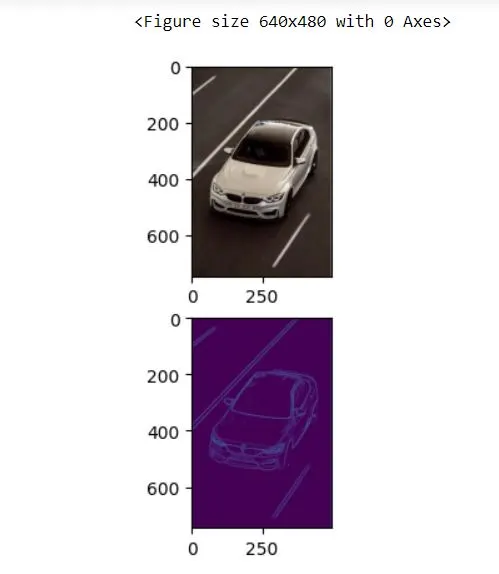
# Displaying the input and finaloutput image
plt.figure()
f, plots = plt.subplots(2, 1)
plots[0].imshow(frame)
plots[1].imshow(canny_img)