Backward Facing Step (BFS) flow simulation using Converge CFD
Aim
To simulate the case of backward facing step (BFS) flow using converge CFD
- Introduction
The backward step flow is a representative model for separation flows and is widely studied for its applications in aerodynamic flows, engine flows, and vehicles and also extended to flow over boats and buildings. The accuracy of a turbulent model can be determined by simulating this case as the availability of the vast experimental researches helps in the validation of the model.
BFS flow is a basic model that depicts the most important features observed in a separation flow namely, free shear flow separation, vortex evolution and re-attachment. It is to be noted that the step size determines the recirculation and reattachment process.
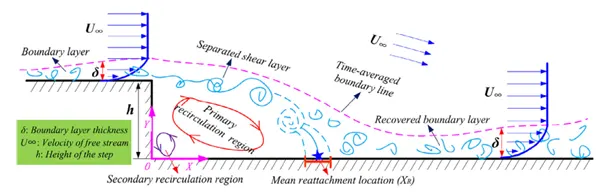
As shown in the figure, the flow field can be separated into four regions: separated shear layer, the re-circulation region under the shear layer, the reattachment region and the attached/recovery region. Between the mainstream flow and the separation stream, there exists a free shear layer at the step. This shear layer develops and finally re-attaches with the mainstream flow. The recirculation region can be separated into large vortices in the backward step region and a small vortex region in the corner of the step.
The Backward Facing Step flow becomes three dimensional in nature when the step height is significant and the Reynolds number for the flow is high. In order to simplify the case setup, the project considers very low step height with low Re. This helps us reduce the 3D case into a 2D case setup.
- Objective
The objectives of the case study include simulation of BFS flow to determine the below output characteristics:
- Mesh generated
- Pressure and velocity contours
- Plots of velocity, pressure, mass flow rate and total cell count
- Animation to explain the flow separation and re-attachment
The case is simulated for three different mesh grids of element size:
- dx = dy = dz =2e-3m
- dx = dy = dz =1.5e-3m
- dx = dy = dz =1.0e-3m
- Procedure
3.1 Geometry
The first step is to import the Standard Triangle Language (.stl) geometry file into converge CFD. The scale is checked and validated as converge CFD reads geometry in SI units by default.
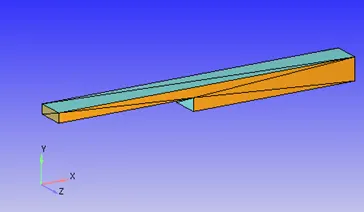
Fig 1: Backward Facing step geometry
The next step is to clean the geometry and run diagnosis to resolve problem triangles. The normal orientation is resolved by Transformà NormalàPropagate change from a single triangle.
3.2 Boundary Flag
We define the boundaries with a boundary flag and for the given case, the following flag are generated:
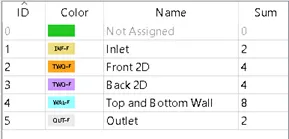
Fig 2: Boundary flag
As we are simulating a 2D case, the 3D geometry is converted by defining the Front and Back boundaries as Two-D. For this, it is to be ensured that the normal to these surfaces are along the z-direction.
3.3. Case Setup
The next step is to setup the case using converge studio.
Application typeà Time-based
Materialsà Predefined mixture- Air & Gas simulation
Speciesà N2 & O2
Run parametersà Solver: Steady state solver
Simulation time parametersà 0 to 15000 cycles ; Time step : 1e-9 to 1 second ; Max. CFL for convection =1.0
Boundary conditions:
|
Boundary |
Type |
Property |
Value |
|
Inlet |
Inflow |
Pressure |
110325Pa |
|
Outlet |
Outflow |
Pressure |
101325Pa |
|
Top & Bottom |
Wall |
Law of wall |
|
|
Front 2D |
Two_D |
- |
- |
|
Bottom 2D |
Two_D |
- |
- |
Region creationà Assign all boundaries
Region initializationà O2 mass fraction=0.23 , N2 mass fraction = 0.77
Physical modelà RNG k-Ɛ turbulence model
Grid controlà Fixed embedding (To refine mesh near the walls)
Base grid: Three cases are generated for the different mesh sizes
Fixed embeddingà Boundary ID: Top and Bottom Wall, Mode: Permanent, Scale: 1
- Final validation and export
After completing the setup, a final validation is performed to check for errors and if no issues are found, the input files are exported to the directory.
- Performing simulation
The simulation is performed using the cgywin command prompt terminal and the output files are generated.
The commands used are:
Command for running converge solver
mpiexec.exe -n 4 "C:\Program Files\Convergent_Science\CONVERGE\3.0.16\bin\intelmpi\converge.exe" restricted </dev/null> logfile &Command for tailing progress
Tail -10 logfileCommand for post converting output files to Paraview compatible binary extension
mpiexec.exe –n 4 post_convert_30_mpmpi_64.exe- Results and discussion
6.1 Convergence
A solution is usually said to be convergent when the error between successive iterations is within the tolerance limit. For this case, we monitor the mass flow rate and the simulation is termed convergent when there is no significant change in the successive iterations of the property. The below plot shows the convergence at iteration-2000.
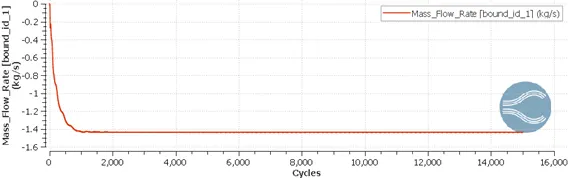
Fig 3: Inlet mass flow rate vs cycles
6.2 Conservation of mass
For a solution to be reliable, it is important that the conservation of mass principle holds true for the entire range of simulation. This can be validated by plotting the mass flow rate of inlet and outlet against the number of cycles. The below plot shows over the entire simulation range, the mass conservation holds true.
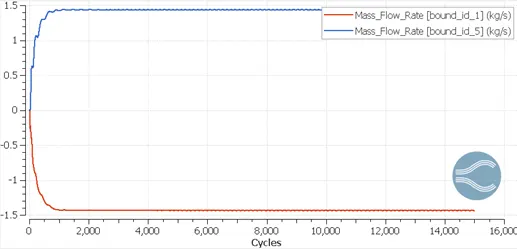
Fig 4: Mass flow rate of inlet and outlet vs cycles
6.3 Mesh
After importing the output files in Paraview, a brief comparison is made for the contours with surfaces with edges for all the three cases. For the same scale of reference, we can see that the mesh is changed from coarse to very fine.
Also, note the fixed embedding in the top and bottom walls which will help to capture the boundary phenomenon with more accuracy.
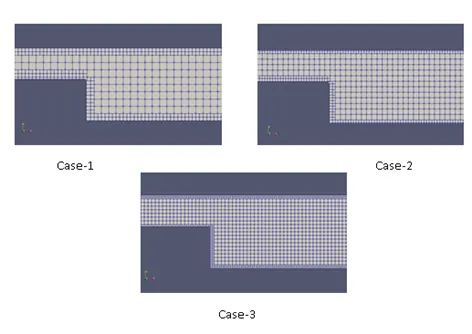
Fig 5: Surface with edges
6.4 Velocity contour plot
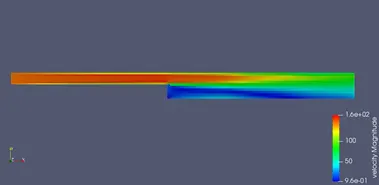
Fig 6 Velocity contour case-1
From the above contour plot, we can see that the velocity magnitude changes from 0.96 m/s to 160 m/s. The plot highlights the phenomena where the high velocity fluid undergoes flow separation resulting in the velocity drop. Also, due to the flow separation at the step and re-circulation vortices generated near the step wall, there is very low linear velocity magnitude as highlighted by the blue region in the contour plot.
The regions are more refined with smaller mesh grid size as can be seen in the below plot.
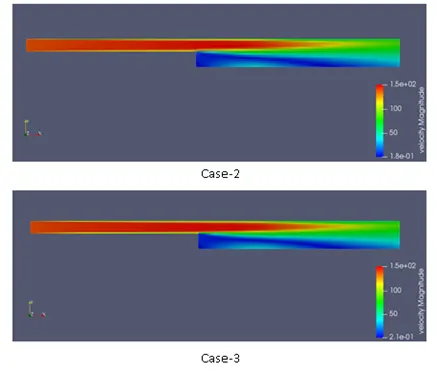
Fig 7 Velocity contour for case-2 and case-3
6.5 Pressure contour plot
The pressure plot shows an increase in pressure from the inlet towards the outlet. This can be explained by using the Bernoulli’s equation. The drop in velocity due to the area expansion is compensated by an increase in the pressure. Also, the pressure drop is significant at the vortex region near the step and this can be explained by the fluid re-circulation which results in significant static pressure drop.
The results are similar for the three cases simulated.
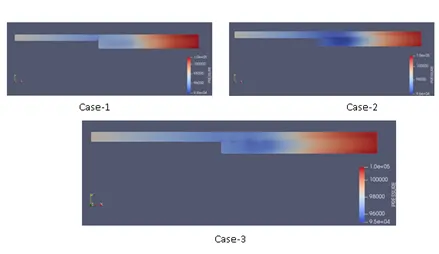
Fig 8 Pressure contour plot
6.6 Velocity line plot
Using Paraview, the velocity profile is determined at different location along the y axis. For the most accurate results, the velocity line is plotted for only the third case
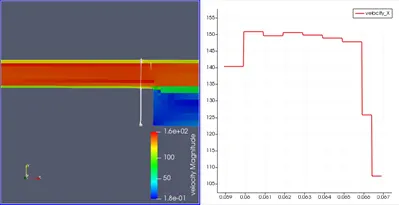
Fig 9 Velocity line plot before step
It can be seen that before reaching the step area, the velocity is completely developed in accordance with the boundary layer theory having maximum velocity at the center.
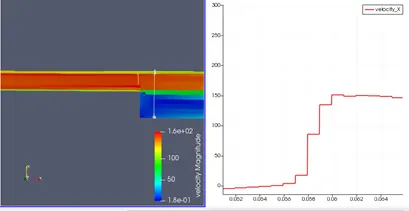
Fig 10 Velocity line plot at step
As there is re-circulation of fluid at the step region, we can observe negative velocity in the line plot. As we move in the y-direction, the flow separation divides the high velocity profile from the low velocity profile which is at about y= 0.058
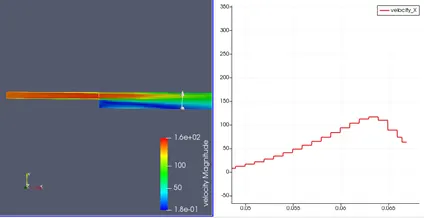
Fig 11 Velocity line plot at re-attachment region
At x= 0.23, we can see that the significant velocity gradient as observed near the step region diminishes and the velocity at the lower region starts to develop profile similar to the mainstream flow.
Towards the outlet, we see the separated flow mixes with the mainstream flow and re-attachment has occurred. A developed velocity profile can be seen in the line plot shown below.
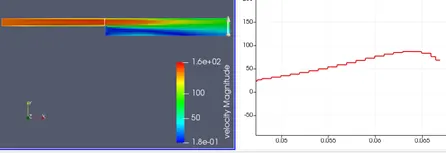
Fig 12 Velocity line plot at re-attachment region
6.7 Pressure line plot
As explained in the previous section using contour plots, the pressure increases as we move from inlet to outlet. However, at the re-circulation region, there is a significant drop in static pressure. This can be validated using a line plot.
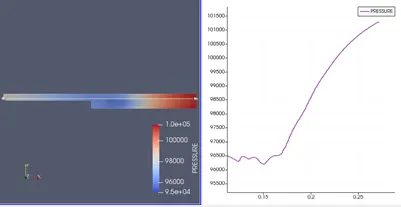
Fig 13 Pressure line plot
6.8 Total cell count
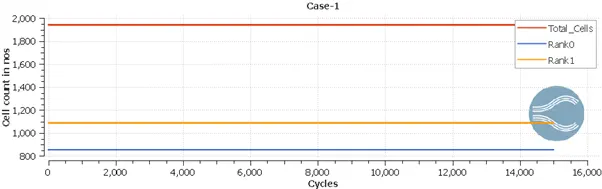
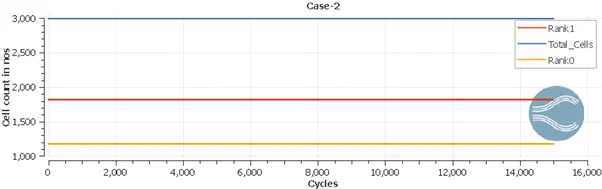
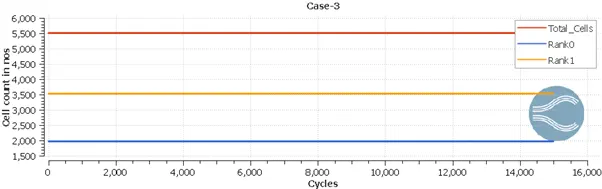
Fig 14 Total cell count plot for the three cases
6.9 Animation
The above animation shows the development of the solution. As the turbulence model is solved, we see the lower velocity modeled at the step region which undergoes re-circulation. The velocity further undergoes reattachment with the mainstream velocity as we move towards the outlet.
- Backward Facing Step flow using vector plot
In this section, we use the velocity vector plot to explain the various regions formed in the fluid flow. In order to accurately simulate the vector plot, the third case with the refined mesh is considered for study.
Using the Glyph command in paraview, the velocity vector plot is generated as below:
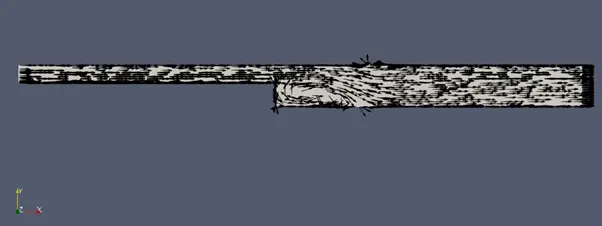
Fig 15 Velocity vector plot
7.1 Velocity profile from inlet upto the step region
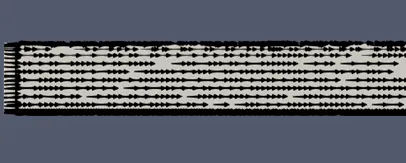
Fig 16 Velocity vector plot inlet region
It can be seen in the figure that the velocity vectors are straight and parallel to the x-axis. This represents a steady, streamline mainstream flow.
7.2 Velocity profile at the step
As the fluid encounters the step, separation occurs and we observe two flows- mainstream flow (top region) and re-circulating vortices near the bottom side. Also, at the corner of the step, a secondary vortex region is observed. These vortices phase out as we move along the outlet and at a distance x, the flow reattaches and the streamline gets aligned with that of the mainstream flow.
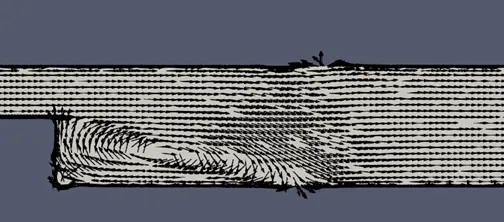
Fig 17 Velocity vector plot at step
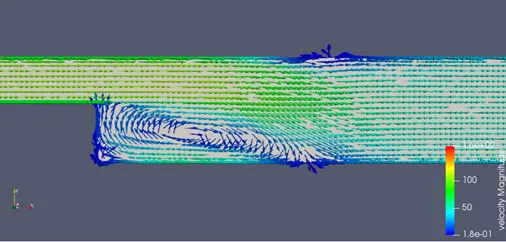
Fig 18 Velocity vector plot at step with velocity magnitude along x-direction
7.3 Velocity profile at the outlet
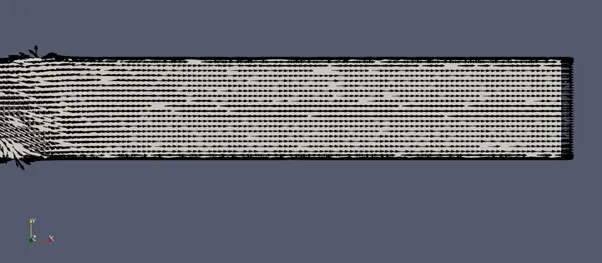
Fig 19 Velocity vector at outlet
After the reattachment, the velocity profile develops completely and at the outlet, we get a steady, linear velocity profile.
- Conclusion
Thus, the backward facing step flow is simulated successfully using Converge CFD.