Assignment 3-2D Element Formulation Challenge
Assignment 3
Crash Worthiness Analysis using HyperMesh and Radioss.
PROPERTY MEANING OF EACH TERMS:
Ishell
4 node shell element formulation flag.
= 0 Use value in /DEF_SHELL.
= 1 Default, if /DEF_SHELL is not defined Q4, visco-elastic hourglass modes orthogonal to deformation and rigid modes (Belytschko).
= 2 Q4, visco-elastic hourglass without orthogonality (Hallquist).
= 3 Q4, elasto-plastic hourglass with orthogonality.
= 4 Q4 with improved type 1 formulation (orthogonalization for warped elements).
= 12 QBAT shell formulation.
= 24 QEPH shell formulation.
3 node shell element formulation flag.
Objective: Objective of assignment is comparing the simulation results of the base setup and improved shell element properties for crash tube.
1.By Using the crash beam file from the previous assignment, change the run time to 55 ms.
2.By changing the number of animation steps during simulation to a minimum of 25 and maximum of 60.
3.To Run the base simulation without any modification to element properties.
4. By the end of the simulation, do the energy error and mass error checks and determine whether results would be
acceptable.
5. If acceptable, Plot rigid wall forces, internal energy, hourglass energy, contact energy, total energy of the simulations.
6. To Change all the shell elements properties to recommended properties, save this as separate, rad files and run the
simulation.
7. To Follow steps 5 and 6.
8. To Create a brief report comparing all the results from steps 5 and 6 for both simulations.
9. To Comment whether there is any change in the results and why there is any change in the result.
PROCEDURE:
STEP-1: Importing the crash beam file from the previous assignment by using import solver desk.
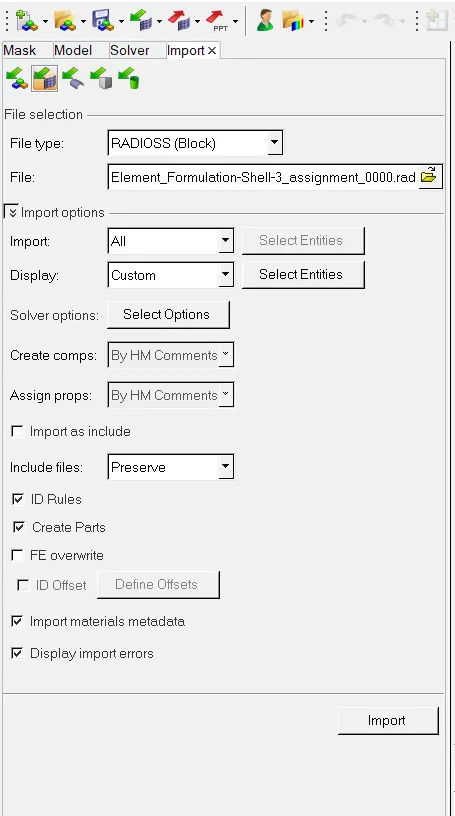
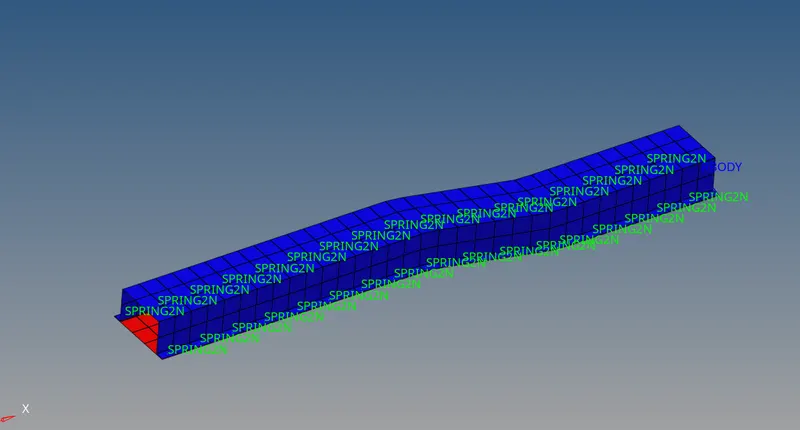
STEP-2: By Using the crash beam file from the previous assignment, change the run time to 55 ms.
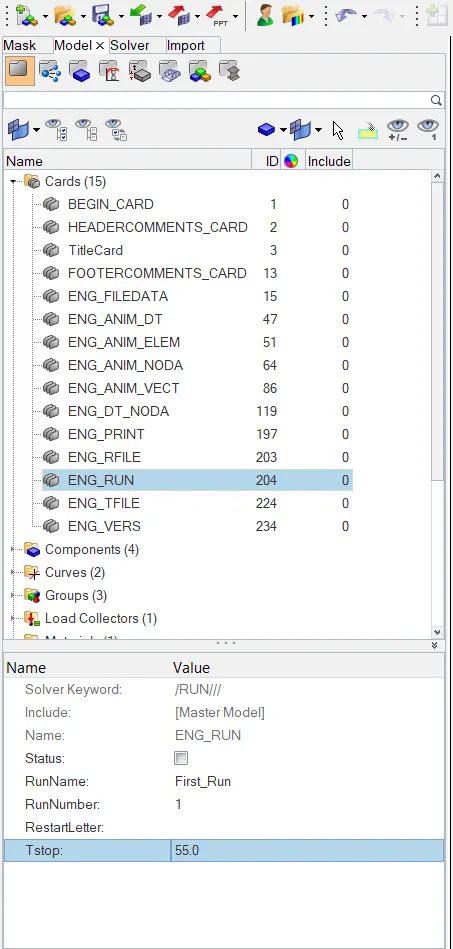
we have to change the run time to 55ms because run time is needed to run the simulation. It is the time required to run the simulation.so go to solver-engine keywords-ENG_RUN- change Tstop as 55ms.
STEP-3: By changing the number of animation steps during simulation to a minimum of 25 and maximum of 60.
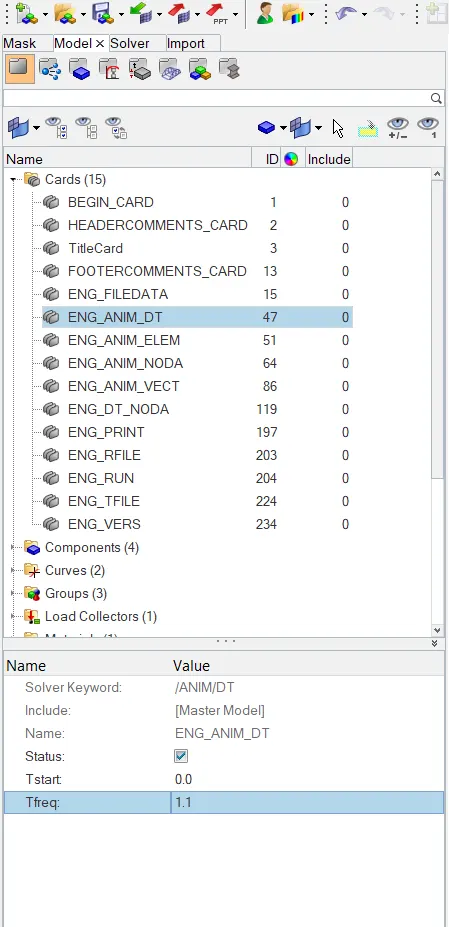
In the challenge they are asking to start the animation file anywhere between times 25ms and 60ms. so we taken time at 50ms. Go to solver-engine keywords- ANIM-ANIM/DT-ENG_ANIM_DT- CHANGE Tstart as 0ms and Tfreq as 1.1.
STEP-4: To Run the base simulation without any modification to element properties.
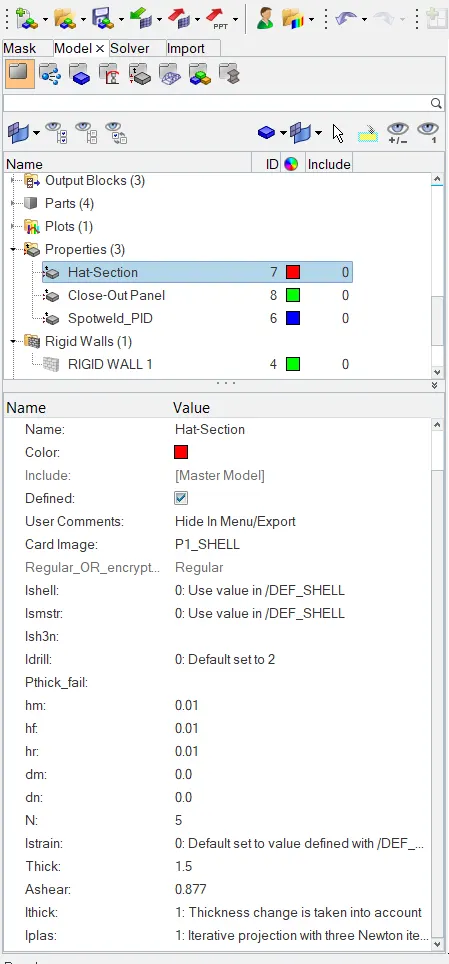
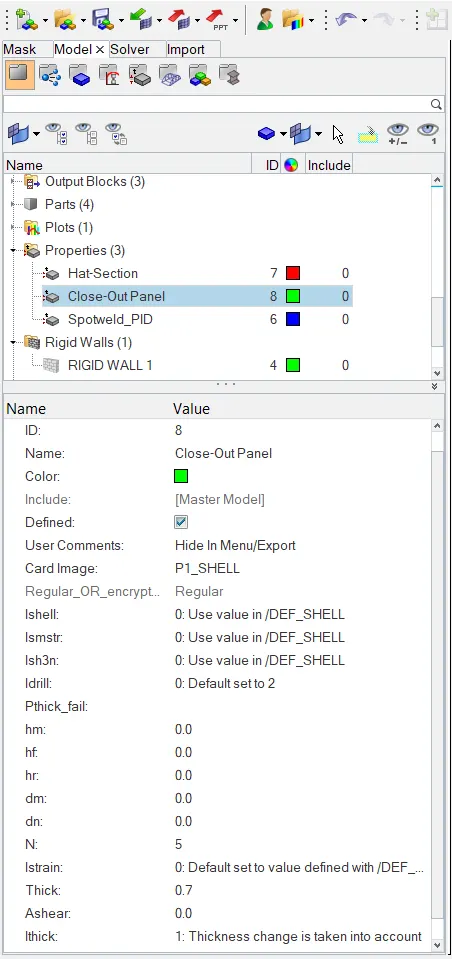
Actually we have to compare the results of base simulation and improved shell element properties for that reason we have to run the simulation without any modification to element properties.The below figures shows the element properties without any modification.(DEFAULT)
RUNNING SIMULATION:
We have to run the simulation, So go to analysis and click on radioss and a new diologue box we open and click on save as button to save the file in the respected place and make corrections such as export options as all, run option as analysis, run number as 1 and options as -nt 4. and click on radioss. so that required files can be saved in the respected folders.

STEP-5: By the end of the simulation, do the energy error and mass error checks and determine whether results would be acceptable.
After running the simulation go to files and open Element_Formulation-Shell-3_assignment_0001 file, and check for energy error and mass error.
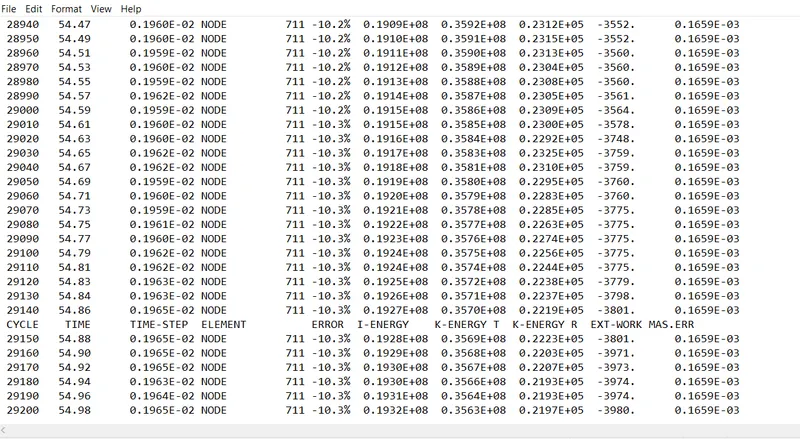
ENERGY ERROR: Basically energy error must be negative and decreasing.The Error must be less than -15% at the end of computation, as per the condition. If the error is below -15% than the results could be acceptable.
So from the above figure, at the end of computation the energy error is -10.3% and mass error is 0.1659E-03. As per the condition the energy error is -10.3% which is below the -15% and the results could be acceptable for further ploting of graphs.
NOTE: Here the negative sign indicates that the energy is rejected by the system.
STEP-6: Plot rigid wall forces, internal energy, hourglass energy, contact energy, total energy of the simulations.
After accepting the condition we have to plot the various graphs. so go to hyperview and import the Element_Formulation-Shell-3_assignment.h3d file and run the simulation and absorb the deformation of crash beam file.
1.Displacement
In geometry displacement is a vector whose length is the shortest distance from the initial to the final position of a point P undergoing motion. It quantifies both the distance and direction of the net or total motion along a straight line from the initial position to the final position of the point trajectory. A displacement may be identified with the translation that maps the initial position to the final position.
2. Hourglass Energy
Hourglass (HG) modes are nonphysical, zero-energy modes of deformation that produce zero strain and no stress. Hourglass modes occur only in under-integrated (single integration point) solid, shell, and thick shell elements. Hyperworks has various algorithms for inhibiting hourglass modes. The default algorithm (type 1), while the cheapest, is generally not the most effective algorithm.
A way to entirely eliminate hourglass concerns is to switch to element formulations with fully-integrated or selectively reduced (S/R) integration. There can be a downside to this approach. For example, type 2 solids are much more expensive than the single point default solid. Secondly, they are much more unstable in large deformation applications (negative volumes much more likely). Third, type 2 solids have some tendency to 'shear-lock' and thus behave too stiffly in applications where the element shape is poor.
3. Von Mises yield Criterion
The von Mises yield criterion (also known as the maximum distortion energy criterion) suggests that yielding of a ductile material begins when the second deviatroic stress invariant{\displaystyle J_{2}} reaches a critical value. It is part of plasticity theory that applies best to ductile materials, such as some metals. Prior to yield, the material response can be assumed to be of a nonlinear elastic, viscoelastic, or linear elastic behavior.
Simulation Result:
1) Internal energy, Kinetic Energy, Hourglass energy and total; energy vs Time
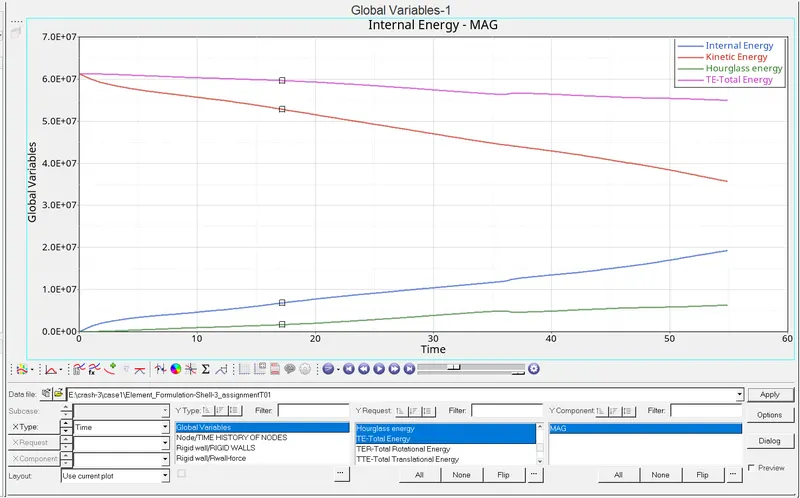
a) Max. Total Energy = 6.1x10^7 and Min. Total Energy= 5.5x 10^7. Total energy decrease as time increases.
b) Max.kinetic Energy = 6.1x10^7 and Min. Kinetic Energy= 3.6 x 10^7. Kinetic energy decrease as time increases.
c) Max. Hourglass Energy = 0.6x10^7 and Min. hourglass Energy= 0.3x 10^7 Hourglass energy increases as time increases.
d) Max. Internal Energy = 1.95x10^7 and Min. Internal Energy= 0.7x 10^7 Intrenal energy increases as time increases.
2) Resultant normal force, tangent force and total resultant force vs Time
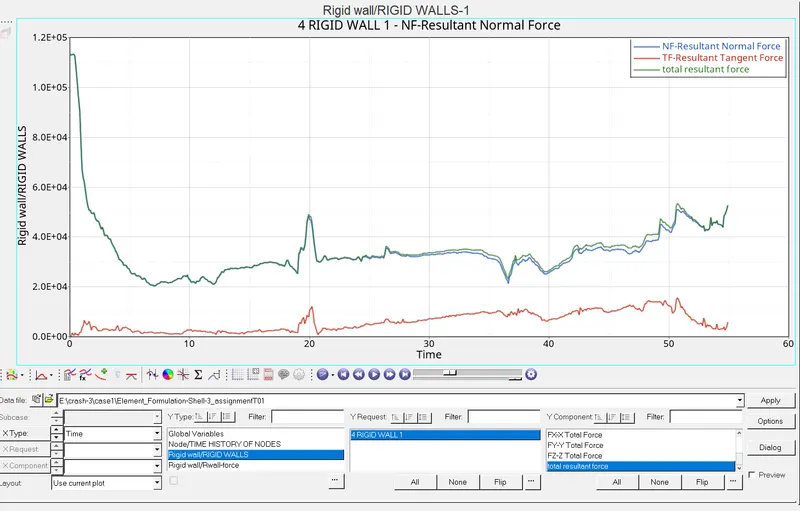
a) Resultant normal force and total resultant force almost similar and decrease vs time. Having max. Value at start of collision = 1.1 x 10^5.
b) Resultant tangent force value increase slightly with time.
Condition 2 (Improved Shell Element Simulation):
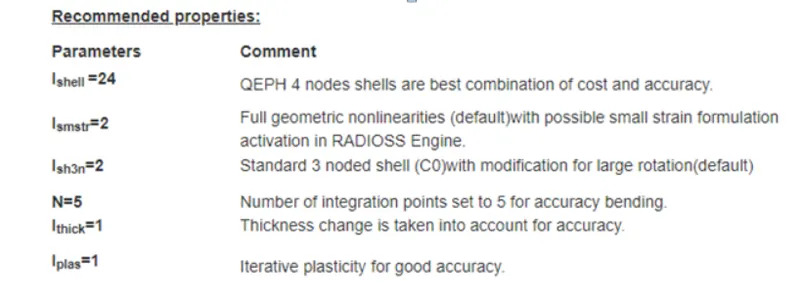
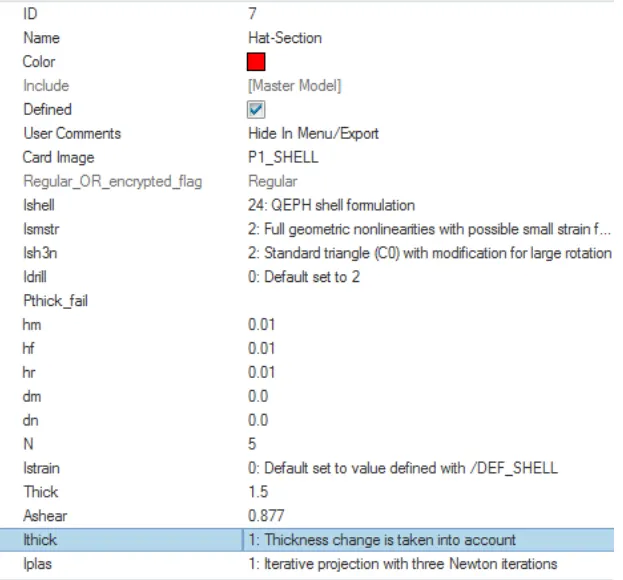
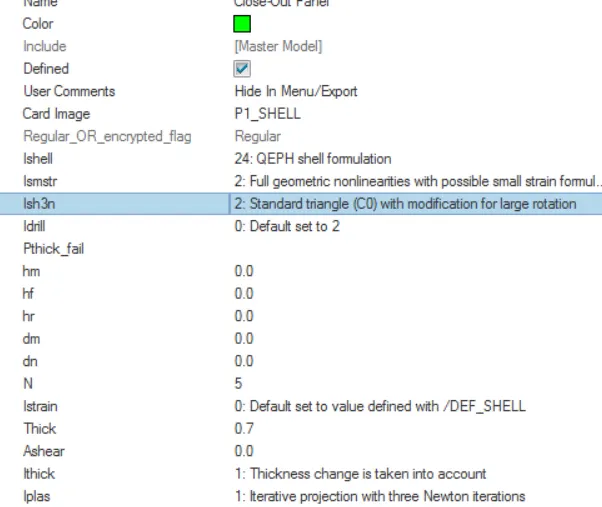
-After running the simmulation hyperwork solver view shows the results obtaion from simulation.
FIRST_RUN_0001.out file with text editor:
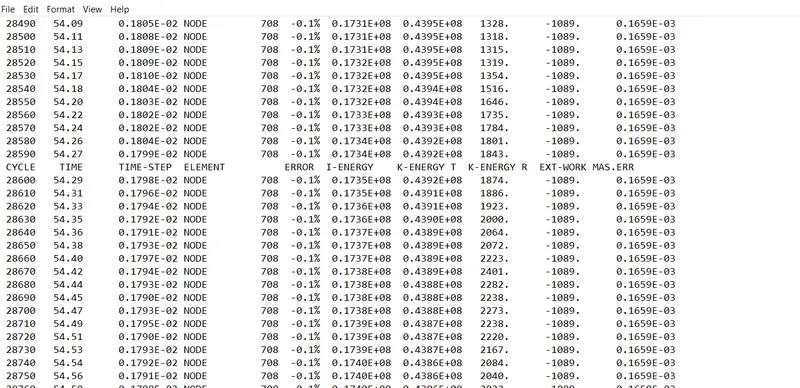
Maximum energy error in above case is -0.1%. It is better to have error closer to zero. Energy error is acceptable up to -15 %, therefore positive signal for further simulation.
Maximum mass error = 0.1659E-03
Simulation Result:
1) Internal energy, Kinetic Energy, Hourglass energy and total energy vs Time
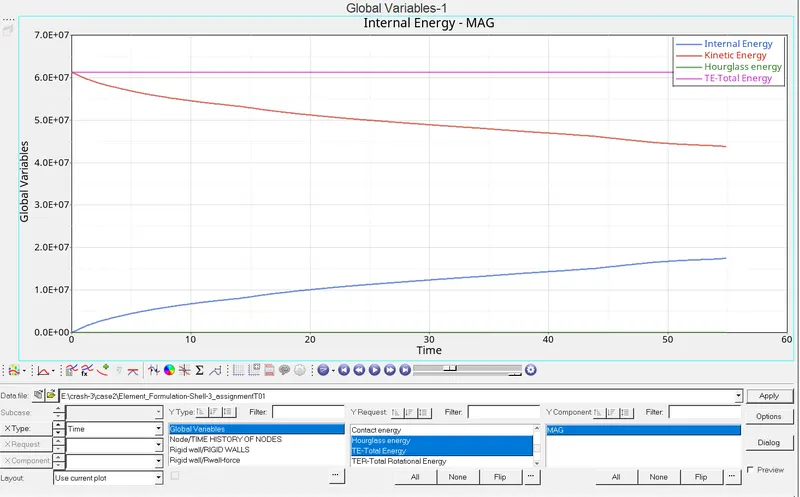
a) Total Energy remain constan = 6.1 x 10^7.
b) Max.kinetic Energy = 6.1x10^7 and Min. Kinetic Energy= 4.3 x 10^7. Kinetic energy decrease as time increases.
c) Hourglass Energy remain constant and equal to zero.
d) Max. Internal Energy = 1.8x10^7 and Min. Internal Energy= 0. Intrenal energy increases as time increas
2) Resultant normal force, tangent force and total resultant force vs Time
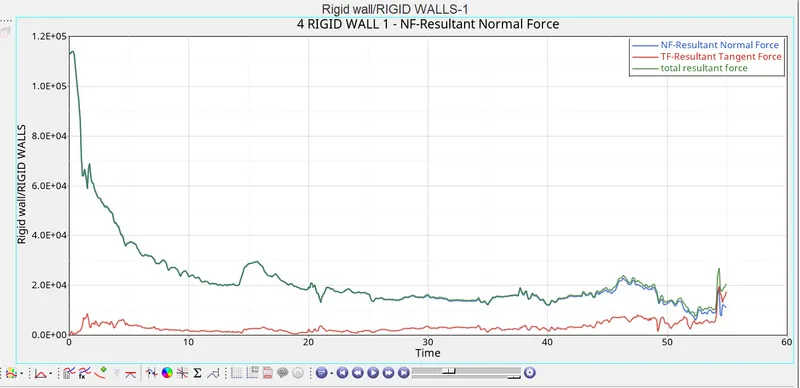
a) Resultant normal force and total resultant force almost similar and decrease vs time. Having max. Value at start of collision = 1.1 x 10^5.
b) Resultant tangent force value increase slightly with time.
Comparison:
| SL NO | BASE SIMULATION | IMPROVED SHELL ELEMENT SIMULATION | |
| 1 | Energy error | -10.3 % | -0.1% |
| 2 | Total energy | decreases as time increases | remains constant |
| 3 | kinetic energy | min K.E is 3.6*10^7 | min K.E is 4.3*10^7 |
| 4 | Hourglass energy | increases as time increases | remains at zero |
Conclusion:
Energy error decreases from -10.3% to -0.1 % and most importantly hourglass energy remain zero by applying improved shell element property.