FORWARD KINEMATICS OF A 2R ROBOTIC ARM MANIPULATOR
AIM:
To Simulate the forward Kinematics of a 2R Robotic Arm Manipulator.
OBJECTIVE:
- To execute a program to simulate the forward Kinematics of a 2R Robotic Arm Manipulator & functions of workspace.
THEORY:
ROBOTIC ARM:
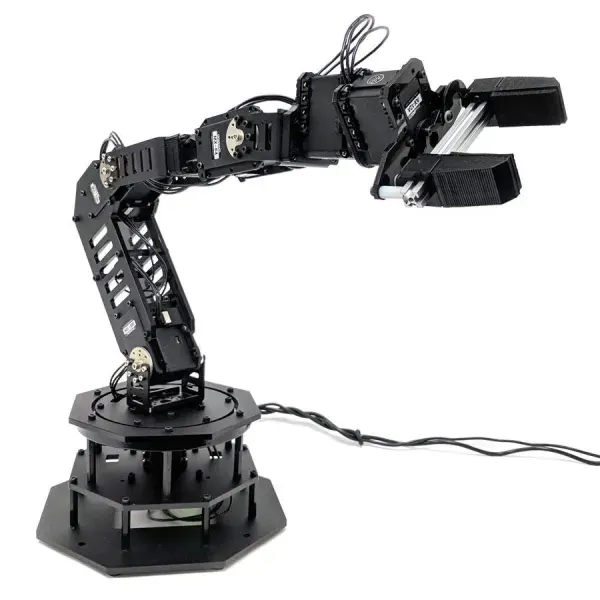
Robotic arm is refers to the kinematic of linkages that inititae how the robot is going to move in the workspace. The links are connected with the manipulator for pick and move an object from place to another place.
A robotic arm is a type of mechanical arm, usually programmable, with similar functions to a human arm; the arm may be the sum total of the mechanism or may be part of a more complex robot. The links of such a manipulator are connected by joints allowing either rotational motion (such as in an articulated robot) or translational (linear) displacement. The links of the manipulator can be considered to form a kinematic chain. The terminus of the kinematic chain of the manipulator is called the end effector and it is analogous to the human hand.
WORKSPACE:
The worksapce refers to the possible location that robot can reach. There will be an different type of workspace that will based on manipulator and the rotation of an moving arm. i,e(mechanical works,painting works,welding works ect,)
EQUATIONS REQUIRED FOR ROBOTIC ARM STIMULATION:
An 2R Robotic arm consist of two links and manipulator. The base portion is connected with that 2 links. The links are connected via rotational joints. They are as follows below
Link 1- Can be rotated by theta 1 with respect to X axis along length l1
Link 2- Can be rotated by theta 2 with respect to X axis along length l2
Here the figure shows that the 2 links. We need to determine the coordinates of 3 points with respect to x and y axis
Origin point - Its the starting point of the link1 (x0,y0)
Intermediate point - An end point of the link 1 and starting point of link 2(x1,y1)
End point - End point of link 2 (x2,y2)
whereas coordinates are
x= 0
y= 0
x1= l1 cos(theta1)
y1= l1 sin(theta1)
x2= x1+l2 cos(theta2)
y2= y1+l2 sin (theta2)
The programs are generated for the kinematic simulation of 2R robotic arm is listed below
PROGRAM INPUT:
clear all
close all
clc

%inputs
l1 = 1;
l2 = 0.5;

theta1 = linspace (0,90,10);
theta2 = linspace (0,90,10);
ct=1;
for i = 1:length(theta1)
    THETA1 = theta1(i);
    for j = 1:length(theta2)
        THETA2 = theta2(j);

x0 = 0;
y0 = 0;

x1 = l1*cosd(THETA1);
y1 = l1*sind(THETA1);

x2 = x1+l2*cosd(THETA2);
y2 = y1+l2*sind(THETA2);

%plotting


plot([x0 x1],[y0 y1],[x1 x2],[y1 y2],'linewidth',3)
axis([-0.1 1.5 0 1.5])
pause(0.03)
M(ct) = getframe (gcf);
ct=ct+1


    end
end
movie(M)
videofile = VideoWriter('forward_kinematic.avi','uncompressed AVI');
open(videofile)
writeVideo(videofile,M)
close(videofile)
Stimulation video link mentioned below
"ERROR 1" While executing this program are given below
clear all
close all
clc

%inputs
l1 = 1;
l2 = 0.5;

theta1 = linspace (0,90,10);
theta2 = linspace (0,90,10);
ct=1;
for i = 1:length(THETA1)
    THETA1 = theta1(i);
    for j = 1:length(THETA2)
        THETA2 = theta2(j);

x0 = 0;
y0 = 0;

x1 = l1*cosd(THETA1);
y1 = l1*sind(THETA1);

x2 = x1+l2*cosd(THETA2);
y2 = y1+l2*sind(THETA2);

%plotting


plot([x0 x1],[y0 y1],[x1 x2],[y1 y2],'linewidth',3)
axis([-0.1 1.5 0 1.5])
pause(0.03)
M(ct) = getframe (gcf);
ct=ct+1


    end
end
movie(M)
videofile = VideoWriter('forward_kinematic.avi','uncompressed AVI');
open(videofile)
writeVideo(videofile,M)
close(videofile)
OUTPUT:
While inserting the function in 'for loop" the variables are in the captial form and it unrecongnized function or variable 'THETA1' so the changes are appiled and the variables are replaced by 'theta1'.
"ERROR 2" While executing this program are given below
Videowriter is the 'error 2' in this program where the writer 'W' will be on capital hence its replaced
CONCLUSION:
A program for the simulation and workspace of forward kinematics of a 2R Robotic Arm using MATLAB are executed and errors occured while running the program were rectified.