2R Robotic arm-Forward Kinematics simulation using Python
Objective:
Write a program in python to simulate the forward kinematics of a 2R Robotic Arm.
Forward Kinematics: Forward Kinematics refers to the use of the kinematic equations of a robot to compute the position of the end-effector from specified values for the joint parameters. The kinematics equations of the robot are used in robotics, computer games, and animation. The reverse process that computes the joint parameters that achieve a specified position of the end-effector is known as inverse kinematics.
Robotic Arm: A robotic arm is a type of mechanical arm, usually programmable, with similar functions to a human arm, the arm may be the sum total of the mechanism or may be part of a more complex robot. The links of such a manipulator are connected by joints allowing either rotational motion (such as in an articulated robot) or translational (linear) displacement. The links of the manipulator can be considered to form a kinematic chain. The terminus of the kinematic chain of the manipulator is called the end effector and it is analogous to the human hand.
2R Robotic Arm Example:
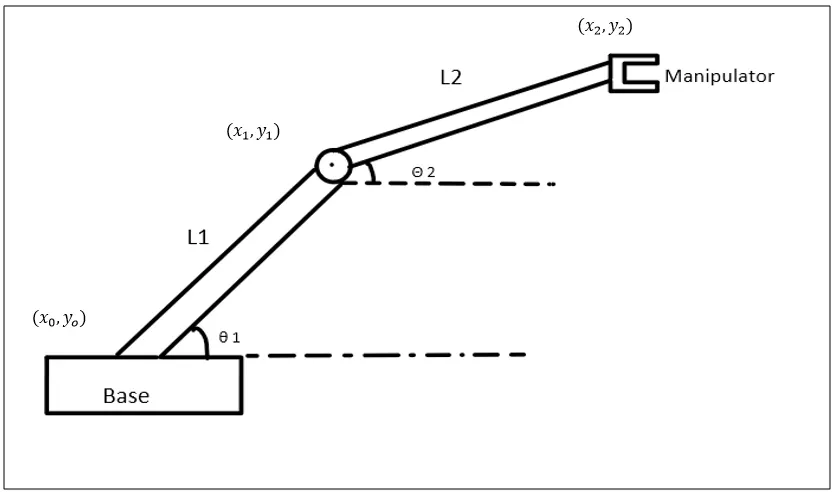
- The parts of the robotic arm are base, Link-1(L1), Link-2(L2) and Manipulator.
- The base is fixed. One end of Link-1 is attached to the base at an angle of `theta_1`.
- Other end of link-1 is connected to the link-2 at an angle of `theta_2`.
- Link-2 end is connected to the manipulator.
Python Code:
# 2R Robotic arm simulation by Giridhar
import math
import matplotlib.pyplot as plt

#inputs
l1 = 1
l2 = 0.5

n_theta = 10

theta_start = 0
theta_end = math.pi/2

theta1 = []
theta2 = []

for i in range (0,n_theta):
	tmp = theta_start + i * (theta_end-theta_start)/n_theta-1
	theta1.append(tmp)
	theta2.append(tmp)


# Base of the robot
x0 = 0
y0 = 0

ct = 1

for t1 in theta1:
	for t2 in theta2:
		# connection coordinates
		x1 = l1*math.cos(t1)
		y1 = l1*math.sin(t1)

		# manipulator coordinates
		x2 = x1 + l2*math.cos(t2)
		y2 = y1 + l2*math.sin(t2)

		filename = str(ct) + '.png'
		ct = ct + 1

		plt.figure()
		plt.plot([x0,x1],[y0,y1])
		plt.plot([x1,x2],[y1,y2])
		plt.xlim([0,1.6])
		plt.ylim([0,1.6])
		plt.savefig(filename)
Output:

2R Robotic Arm Animation:
Above animation shows relative position of link 2(yellow colour) with varying position of link 1(blue colour).
Code Explanation:
- Math module is imported as the code contains mathematical calculations.
- matplotlib.pyplot as plt is imported as we need plots from the calculations performed.
- Inputs are given:
Length of link 1 (l1) = 1 metre.
Length of link 2 (l2) = 0.5 metre.
Number of values for each angle `theta_1 and theta_2` (n_theta) = 10 (Total of 100 combinations)
Each angle value start from(theta_start) = 0 degree and end at (theta_end) = 90 degree (math.pi/2: math module is used for identifying pi's mathematical value).
- theta1 and theta2 is defined using a empty array for output.
- A for loop is created for incremental changes for respective values. theta 1 varies from 0 to 90 degrees. For each value theta 1, theta 2 also varies from 0 to 90 degrees.
- Coordinates of arms(Links):
Base coordinates(x0,y0): x0 = 0, y0 = 0
Another for loop is created to find the second and third coordinates with the help of angles stored in the prior for loop.
Second Coordinates(x1,y1): x1= l1*math.cos(t1) and y1= l1*math.sin(t1)
Third Coordinates(x2,y2): x2 = x1 + l2*math.cos(t2), y2 = y1 + l2*math.sin(t2)
- ct=1 is assigned before for loop and ct= ct+1 inside the loop, so that each figure is saved with the name starting with 1 and incremented by 1.
- plt.figure is used to plot the graphs.
- plt.plot is used to define coordinates of links.
- plt._lim command is used to define limits in coordinates for the whole graph.
- The plot is saved using plt.savefig command.
- These .png files are converted into a gif file using the imgflip.com. We can also do it using the cygwin and imagemagick softwares together.
Conclusion:
- Python program is succesfully executed to simulate Forward Kinematics of 2R Robotic Arm.
Reference:
1. Wikipedia: https://en.wikipedia.org/