DussehraFestive scholarship on Skill-Lync courses, this week onlyFestive scholarship is openOffer ends Wed, 21 Oct, 11:59 pm IST.
Dussehra 2026

Start your next chapter this Dussehra

Tell us where you want to work. A counsellor will match you to the right course and confirm the festive scholarship you qualify for.

  • Festive scholarship on course fees, confirmed on your call
  • Free 20-minute call to map the right course to your goal
  • Real industry projects and placement support with every course

Offer ends Wed, 21 Oct, 11:59 pm IST

3,905 engineers placed since 2019 · 1,277 hiring companies

By submitting you agree to our Terms and Privacy Policy.

You're on the list

Browse courses
Mechanical · Course

Crashworthiness Analysis using HyperMesh and Radioss

A comprehensive course on crashworthiness assessment of passenger car vehicles using Altair products. This course is highly suited for beginners

Duration
12 weeks
Content
25 hours
Projects
3
Mode
Online
Overview

What you'll
be able to do.

  • This course is designed keeping in mind an industry beginner or graduating student in focus.
  • This course is designed to provide a deep dive into the Crashworthiness industry.
  • It provides the knowledge right from the basics of FEA applied to crashworthiness, hands-on experience with industrial tools such as HyperWorks and RADIOSS, and a look into how this is applied towards passing crashworthiness standards.
Tools you'll use
HyperMeshRadioss
Curriculum

14 modules,
built with industry.

Get the full syllabus ↓
  1. 01Crashworthiness Analysis using HyperMesh and Radioss14 modules
    1. Basics of Crashworthiness Physics, FEA Concepts and CAE ProcessW01
      • In the first module you will learn about different types of analysis, the difference between implicit and explicit analysis, different non-linearities and, along with this, you will also bust the myth that ‘strong structure equates safe structure" by teaching you about:
        • Meaning of crash safety for a vehicle.
        • The Law of conservation of energy is applied to a car crash.
        • Basic concepts of FEA, such as linear-nonlinear, static-dynamic, implicit-explicit analysis, their differences, and the guidelines on how to choose a method for a given FEA problem are explained.
    2. Introduction to HyperMeshW02
      • HyperMesh is one of the most popular Finite Element Preprocessor used to generate meshes
      • of complex models. In this module, you will learn the GUI of HyperMesh, various elements available in FEA like 1D, 2D, and 3D elements, how to choose the element depending on the geometry by covering topics such as:
        • Overview of Pre-Processors and their importance in FEA Processes
        • Primary introduction to GUI of HyperMesh, toolbars, and basic operations
    3. Geometry Editing in HyperMeshW03
      • Learning to mesh geometries is an important step in performing FEA. Therefore, we will extensively cover the topic by which the students can understand, geometry clean up, tools available for geometry cleanups,
        • Using an edited geometry to generate a mid-surface and an appropriate 2D mesh with regards to mesh flow, trias, and mesh size, by various methods.
        • Using the geometry tools to clean up the distorted geometry.
    4. Meshing – 1D, 2D & 3D and Mesh Quality CheckW04
      • In this section, you will learn about 1D, 2D, and 3D meshing, what mesh quality is and how to improve it, before exporting the meshed model to the specific solver.
        • Using an edited geometry to generate a mid-surface and an appropriate 2D mesh with regards to mesh flow, trias, and mesh size, by various methods
        • Using the geometry to create a 3D mesh using various methods.
        • Meaning of mesh quality and ways to control and improve it
        • Types of 1D elements, their specifications, and creation
        • Exporting a meshed model from HyperMesh in the specified solver format
    5. Introduction to RadiossW05
      • In this section, you will learn what an explicit solver is, what an engine file and a starter file are, and their significance, as well as what an out file is and how to read this out file.
        • Overview of Radioss: An Explicit FEA Solver for Crashworthiness
        • Essential Radioss input files, their significance, and format
        • An overview of output files and their significance
    6. Element Properties and MaterialsW06
      • In this section, you will learn about the various element formulations available for different types of elements in the Radioss and their applications, how to assign thickness to the component, and also various parameters available in the property card and their significance.
        Similarly, you will also learn about the various material cards available in Radioss and their use cases along with their failure criteria.
        • Application of thickness and dimensional properties, integration points for 1D, 2D, and 3D elements
        • Study and application of concepts such as material intrinsic properties, failure criteria, non-linearity, plasticity, and hyper-elasticity into a material model.
    7. HyperCrash, HyperView and HyperGraphW07
      • In this section, you will learn about a new application that was developed by Altair exclusively to set up crash simulations, and along with this, you will be learning the GUI of Hypercrash. You will also be introduced to Hyperview and HyperGraph, where you will learn how to post-process the simulation results.
        • An Introduction to HyperCrash, a specialized preprocessor for Radioss
        • Introduction to HyperView and HyperGraph as post-processing tools in the FEA process
    8. Interface (Contact) ModellingW08
      • Interface modeling will be a complex topic that you can find in any solver. Here you will learn what contact is and how it works, what the different parameters you need to look into while defining a contact in a model are, and what the different types of contacts are and their use cases.
        • Concepts of an interface between given components, penalty formulation method, contact stiffness, gap, penetration, interference, and tied interfaces
        • Creation of various types of interfaces and removing any errors or interferences
    9. Boundary Conditions SetupW09
      • In this section, you will learn how to set up a proper boundary condition for any given simulation, what the different types of loading conditions are, and the different types of joints available in Radioss
        • Setup of static and dynamic loading conditions such as velocity, acceleration, a constraint on degree of freedom, rigid walls, spot welds, and seam welds.
    10. Simulation ControlW10
      • In this section, you will learn about the concept of the time step and how it can be optimized to increase the speed of the simulation, and also the concept of mass scaling. You will also understand the various control cards available in Radioss and their use cases.
        • Control of simulation in terms of the time step, accuracy, run time, types of outputs
    11. Checks and DebugsW11
      • In this section, you will learn the various checks you should do before running the simulation and also how to debug a simulation along with its approach.
        • Using diagnostic methods, check for and debug any errors in the model.
    12. Airbag and its Modelling in FEAW12
      • In this section, you will exclusively learn about the physics of an airbag in crash scenarios and how to model them in Radioss. You will be learning about two types of airbags (with vent and without vent).
        • The concept of an airbag in FEA, its modeling methods and challenges with an example
    13. Occupant Injury CriteriaW13
      • In this section, you will learn how the injury criteria are calculated in the actual crash test environment and how they affect the rating of the vehicle. You will also learn about the dummy standards that are used in crash testing.
        • Various occupant injury criteria are currently being considered while determining the crashworthiness and safety performance of a car.
    14. Crashworthiness StandardsW14
      • In this section, you will learn about the standards followed in different ENCAPs
        • The basic elements of the most popular crashworthiness standards, the criteria used to determine crashworthiness performance, and methods to measure this in the FEA model are all studied.
Industry projects

3 projects
you'll ship.

Our projects are designed by experts in the industry to reflect industry standards. By working through our projects, Learners will gain a practical understanding of what they will take on at a larger-scale in the industry. In total, there are 3 Projects that are available in this program.

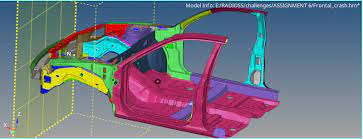
Frontal Crash of a NEON Dodge Model in FMVSS Regulation

Frontal Crash of a NEON Dodge Model in FMVSS Regulation

In this project, the students will set up the case for the frontal crash of a NEON Dodge Model. They will also simulate the results and prepare a report for the same.
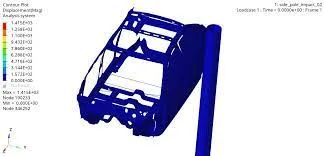
Side Pole Impact Analysis of NEON Dodge Model in FMVSS Regulation

Side Pole Impact Analysis of NEON Dodge Model in FMVSS Regulation

In this project, the student will set up the case for the side crash of the NEON Dodge Model and analyse the side pole impact from the results.
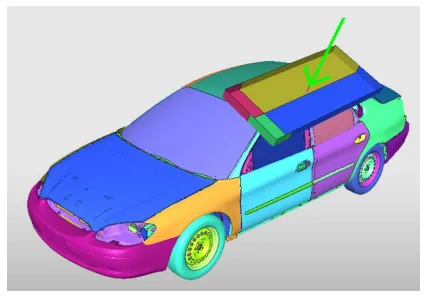
Roof Crush Analysis of a NEON Doge Model in FMVSS Regulation

Roof Crush Analysis of a NEON Doge Model in FMVSS Regulation

In this project, you will set up the case for the roof crash. You'll also analyse the results and report it.

Fee

One fee.
Everything included.

Become job ready with our comprehensive industry focused curriculum for freshers & early career professionals

Premium
₹40,000
Inclusive of all charges
  • 1 Year Access
  • Personalized Page
  • Live Individual & Group Sessions
  • Personalized & Hands-On
  • Job-Oriented Industry Relevant Curriculum
Check eligibility →
FAQ

Questions,
answered.

What is HyperMesh?

Hyperworks provides a magnificent software called HyperMesh. It is essential for meshing complicated structures and is indispensable in crashworthiness analysis.

How do group calls help in learning the course better?

All the course participants and three support engineers will be present on the call. The learners can freely ask queries and receive solutions. Participants who do not have doubts can also join in and learn from the questions put forth by others.

How will I benefit from the HyperMesh course?

Your participation in the HyperMesh course will give you hands-on knowledge of the domain. The HyperMesh certification courseadds value to your CV and gives you an edge over your competitors in the job market.

What makes the Skill-Lync HyperMesh certification course the best?

The real-time projects add to your engineering experience and add value to your portfolio. The support engineers are attentive to the needs of the learners, clear their doubts quickly, and monitor their progress so that they don’t lose interest and give up the course before completion. 

How much time will I need to dedicate to the HyperMesh course daily?

You will need to spend two hours daily in self-study to complete the course.

Next step

Not sure it's
the right fit?

A counsellor will walk you through the syllabus, projects and fee options — and tell you honestly if another course suits you better.

Get the syllabus + a call back

We'll email the full syllabus and call within one working day.

By submitting you agree to our Terms and Privacy Policy.

Call usEnquire

Talk to a career counsellor

Free 20-minute call. We'll map the right course to where you want to work.

By submitting you agree to our Terms and Privacy Policy.