Inverted Tetra And Large-Volume Tetrahedron Elements
Incorrect editing of a mesh can result in overlapping adjacent tetrahedrons (tetra). This is called an inverted tetrahedron. An inverted tetra is detected with the Mesh Repair Wizard
 Navin Baskar·14 Oct 2022·2 min read
Inverted Tetra And Large-Volume Tetrahedron Elements
Incorrect editing of a mesh can result in overlapping adjacent tetrahedrons (tetra). This is called an inverted tetrahedron. An inverted tetra is detected with the Mesh Repair Wizard - (Mesh tab > Mesh Repair panel > Mesh Repair Wizard)
How are Inverted Tetras formed?
A tetra is a four-sided, three-dimensional shape that happens to be the building block for 3D mesh analysis.
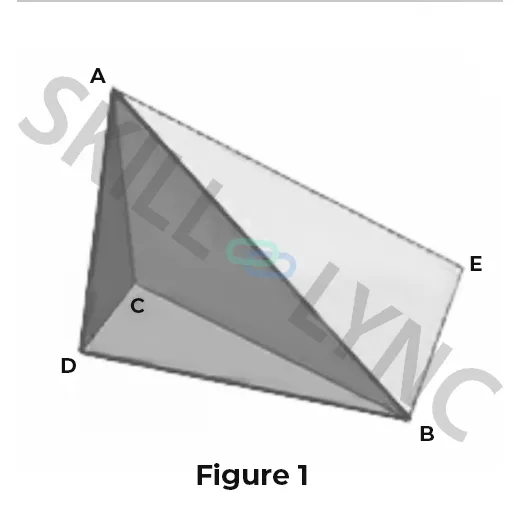
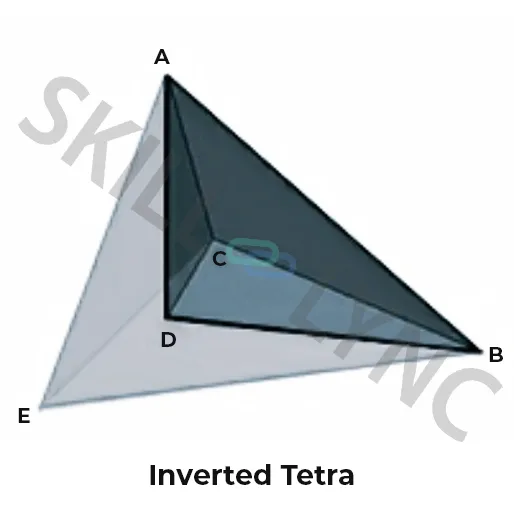
A tetra can have up to four neighbouring tetras, each of them sharing a common face. In Figure 1 below, we can see two tetras, ABCD and ACBE, that share a common face, ABC. The fourth node of each tetra, D or E, is not part of the shared face. They are called the opposite nodes to the shared face.
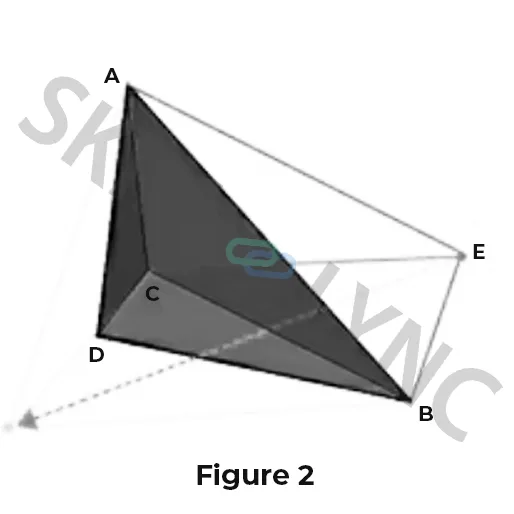
The two opposite nodes, D and E, should not be on the same side of the shared face. If the mesh was edited manually or generated by another product, it might result in the example where node E has been moved into a new position (Figure 2). The two tetras ABCD and ACBE still share the common face ABC, but their opposite nodes, D and E, are now on the same side of the shared face. In this case, we would say that tetra ACBE is inverted, and the mesh has a connectivity error.
How does an Inverted Tetra affect the analysis?
When a mesh contains inverted tetras, the total volume of the solid model and the analysis results will be incorrect as the volume will be measured and included in some analysis calculations more than once. The 3D Solver may also stop on its own if inverted tetras are found.
Remedy: It is essential to check for, and repair inverted tetras. Inverted tetra cannot be repaired automatically. Inverted tetras are detected with the Mesh Repair Wizard (Mesh tab > Mesh Repair panel > Mesh Repair Wizard).
Large Volume Tetrahedron
Individual tetrahedra with a large relative volume can impact the analysis. Internal nodes won't be distributed uniformly in unmatched thicker regions. This can result in some tetra elements being larger than others. As calculation results of average tetra are taken into account, large-volume tetra can affect the solution resolution in chunky areas.
To find out large elements, we can define volume ratio as the volume of a particular tetra vs the average volume of the tetra within the part. The default value of this ratio can be 20. Any tetra with a volume ratio over this threshold is said to have a large volume.
How does the Large Volume Tetrahedron affect the analysis?
The accuracy of results in regions of sudden thickness change may be affected by tetra with large volumes.
Remedy: Tetra with extremely large volumes are detected with the 3D Mesh Repair Wizard. Mesh Repair Wizard: (Mesh tab > Mesh Edit panel > Mesh Repair Wizard). Unless there are unexpected results in thick, chunky areas, it is not compulsory to repair this problem.