Embedded Systems in Robotics: How Robots Sense, Think and Act
What the embedded system in a robot actually does: it reads encoders, IMUs and range sensors, runs PID and odometry at a fixed rate, and drives motors with PWM. A worked example takes a 65 mm wheel from encoder counts (1,440 per turn, 0.1418 mm each) to speed and position, and shows why loop rate matters. Plus the hardware, safety rules and skills for robot firmware.
In short
- Every robot runs on embedded systems: small computers, usually microcontrollers, that read the sensors, run the control loops and drive the motors many times a second.
- A bigger computer may plan the route or recognise objects, but the timing-critical work (encoder counting, PID, PWM, safety stops) sits on the microcontroller.
- In Skill-Lync's worked example, a 65 mm wheel with a 12-pulse encoder and a 30:1 gearbox gives 1,440 counts per turn, or 0.1418 mm of travel per count. Run at 100 Hz, the loop sees speed in steps of 14.2 mm/s.
- Robots are a growing market in India: industrial robot installations hit a record 9,120 units in 2024, up 7%, making India the sixth-largest installer in the world (IFR, World Robotics 2025).
Embedded systems are the part of a robot that turns sensing into motion. A microcontroller inside the robot counts encoder pulses, reads the IMU and distance sensors, runs control algorithms such as PID at a fixed rate, and sets the PWM that drives each motor. Without that real-time layer, a robot's planning software has no reliable way to move anything.
This guide explains what the embedded controller in a robot actually does, block by block. It works one complete example with real numbers, from encoder counts to wheel speed and position, and shows why the loop rate matters. It then covers the hardware and software robots use, the safety rules, and the skills you need to work on robot electronics in India.
What is the role of embedded systems in robotics?
An embedded system is the robot's real-time controller. It reads sensors such as encoders, IMUs and range finders, runs control loops at a fixed rate, and outputs signals that drive motors and actuators. It also watches for faults and stops the robot safely. Higher-level computers plan and perceive; the embedded system makes motion happen on time.
A robot is a machine that senses, decides and acts in the physical world, with some degree of autonomy. Every one of those three steps needs electronics running code. In a small mobile robot the whole job can fit on one microcontroller. In an industrial arm or a warehouse robot it is spread over many: a motor drive per joint, a safety controller, a main controller, and a PC or embedded Linux board for vision and planning.
What makes this embedded work, rather than ordinary programming, is timing. A balancing robot that runs its control loop late falls over. A motor driver that misses a current limit burns its transistors. So robot firmware is written for predictable timing first and features second, usually in C or C++ on a microcontroller, with or without a real-time operating system (RTOS).
How is an embedded system different from a robot's main computer?
An embedded system is built for one job with strict timing, low power and direct access to hardware pins, usually a microcontroller running firmware from on-chip flash. A robot's main computer is a general-purpose processor running Linux for heavy, less time-critical tasks like mapping, vision and path planning. Most robots use both, linked by UART, CAN, USB or Ethernet.
The split exists because each side is good at different things. A microcontroller has hardware timers, PWM outputs, ADCs and interrupt inputs, and it boots in milliseconds into code that always takes the same time to run. A Linux board has far more memory and processing power for cameras and maps, but its scheduler does not guarantee that a loop runs every 10 ms to the microsecond. Skill-Lync's Microcontrollers book sets out the microprocessor versus microcontroller difference in detail, and the Mechatronics book shows where each sits in a machine.
How does a robot's embedded controller sense, think and act?
It runs a loop at a fixed rate. Each cycle it reads sensors through the microcontroller's peripherals, computes what each motor should do, and writes new outputs. Encoders are read by hardware timers, IMUs over I²C or SPI, currents by the ADC. Control laws such as PID turn errors into PWM duty cycles that drive the motors.
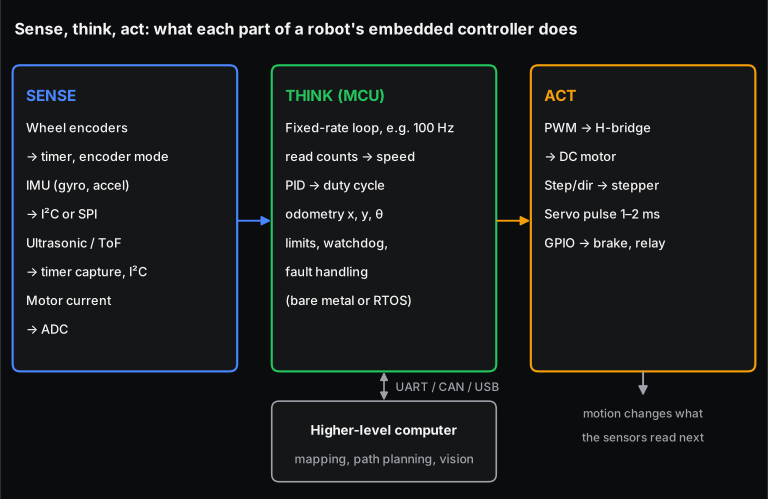
Here is what each block involves in a real robot:
- Sense. Quadrature encoders on the motors give position and speed. An IMU (gyroscope and accelerometer) gives rotation rate and tilt. Ultrasonic, infrared or time-of-flight sensors give distance, and current sensors protect the motors. The encoder chapter of Skill-Lync's Mechatronics book has an interactive that shows how the A and B channels give direction.
- Think. The microcontroller converts raw counts into speeds, runs a controller per motor, keeps track of where the robot is (odometry), and checks limits. A watchdog timer resets the chip if the code ever hangs.
- Act. PWM signals switch an H-bridge that sets each DC motor's voltage. Steppers take step and direction pulses, and hobby servos take a 1 to 2 ms position pulse. GPIO pins drive brakes, relays and lights.
- Talk. The microcontroller reports odometry and takes speed commands from the higher-level computer over a serial link or CAN bus. CAN is the same bus cars use, explained in our post on CAN protocol applications.
Worked example: how does a robot turn encoder counts into speed and position?
Take a small two-wheeled robot of the kind built in college labs. Each wheel is driven by a DC gearmotor with a 30:1 gearbox and a magnetic encoder on the motor shaft that gives 12 pulses per motor revolution on each of its two channels, A and B. The wheels are 65 mm in diameter and 150 mm apart. Top speed is 0.5 m/s. All numbers below were computed by Skill-Lync with a short Python script.
Step 1: counts per wheel revolution
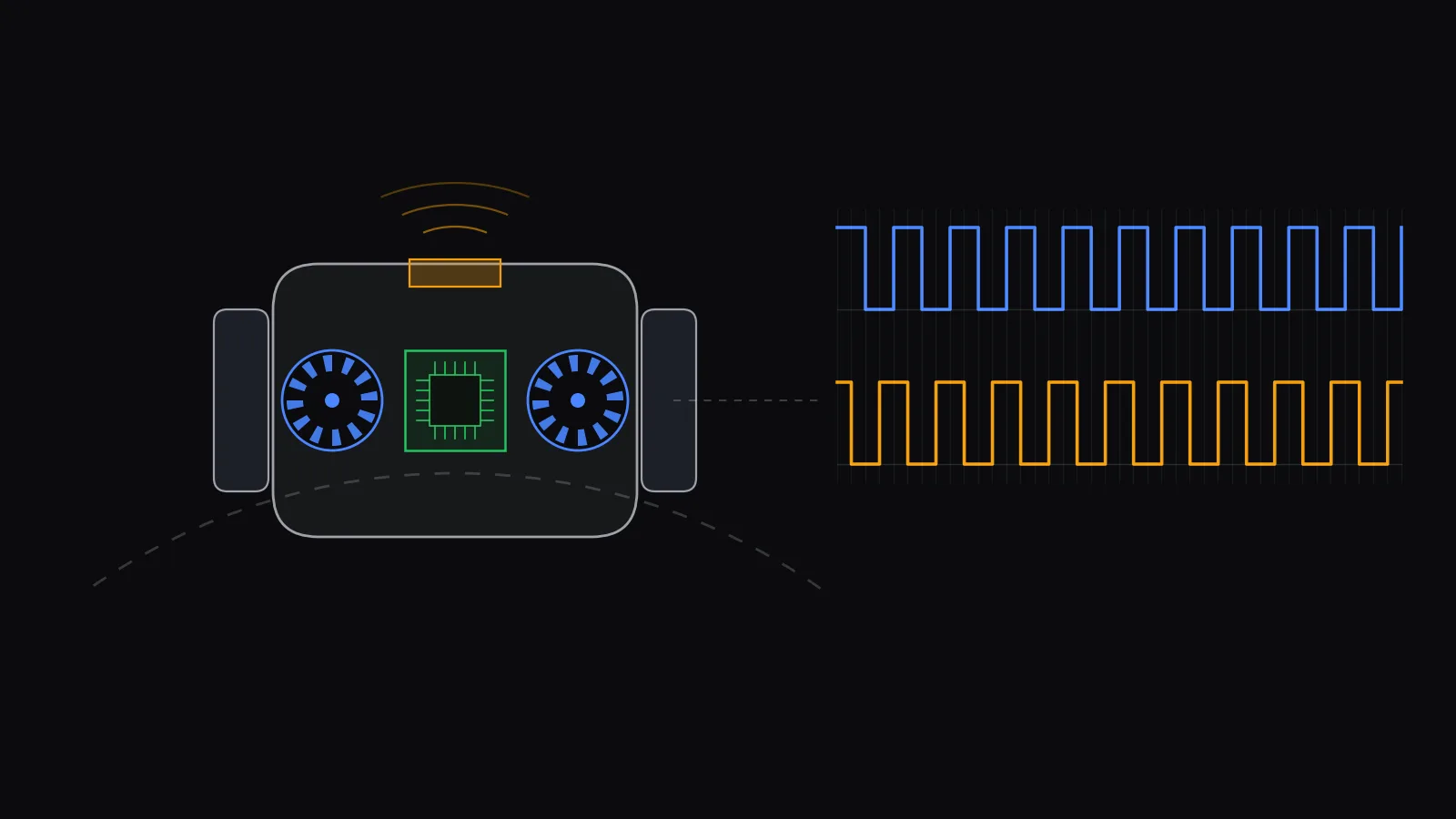
The microcontroller's timer counts every rising and falling edge on both channels, which is called x4 decoding. On an STM32, for example, a general-purpose timer does this in hardware in encoder mode, and sets the count direction from which channel leads. So one wheel revolution gives:
Step 2: distance per count
The wheel circumference is mm, so each count is:
Step 3: counts per second at top speed
At 0.5 m/s the wheel turns at 146.9 rpm, and the encoder produces counts per second per wheel. For two wheels that is 7,052 edges a second. If each edge raised an interrupt, the CPU would spend a noticeable share of its time just counting. A timer in encoder mode counts them in hardware, and the code only reads the counter once per loop.
A 16-bit counter would wrap after s at top speed. That is not a problem: the code takes the difference between two readings as a signed 16-bit number. At most 35 counts pass between readings, far below the 32,768 at which the difference becomes ambiguous.
Step 4: speed from counts, and why loop rate matters
The simplest speed estimate counts how many edges arrived during one loop period :
The smallest speed step it can show is one count per period. At a 10 ms loop (100 Hz) that is mm/s, about 2.8% of top speed. That is fine for cruising, but at a slow 0.05 m/s crawl the step is 28% of the speed, so a PID loop sees a jumpy signal.
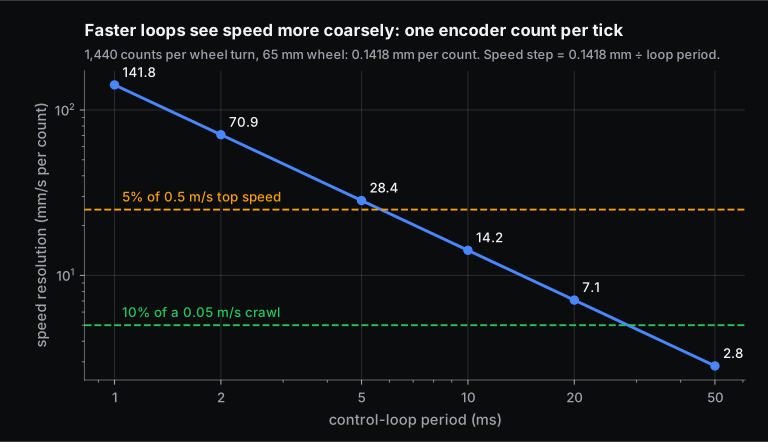
That is the trade-off firmware engineers manage. A faster loop reacts sooner but measures speed more coarsely; a slower loop measures finely but reacts late. The usual fixes are a higher-resolution encoder, filtering the speed estimate, or, at low speed, timing the interval between edges with a timer's input capture instead of counting edges. The 84 MHz Cortex-M4 in this example has 840,000 clock cycles in every 10 ms tick, so computing power is rarely the limit; measurement is.
Step 5: odometry, where the robot is
Suppose in one 10 ms tick the left encoder gives 30 counts and the right 36. The wheels moved mm and mm. For a robot with track width mm:
So the robot moved forward at 0.468 m/s while turning left at 0.567 rad/s, on an arc of radius 825 mm. Adding these small steps every tick gives the robot's position and heading. Because each step carries a little error from wheel slip and rounding, odometry drifts over time. That is why robots fuse it with an IMU, and with cameras or lidar on the higher-level computer.
The speed from step 4 feeds a PID controller per wheel. The PID chapter of the Mechatronics book has a live simulation where you can change the gains and watch the response.
Which microcontrollers and software do robots use?
Most robot controllers use 32-bit ARM Cortex-M microcontrollers, programmed in C or C++, either bare metal or on a small RTOS such as FreeRTOS or Zephyr. Learning platforms like Arduino and ESP32 boards are common in student robots. A Linux single-board computer or PC on top runs vision, mapping and planning, often on ROS 2.
| Layer | Typical hardware | Typical software | Timing |
|---|---|---|---|
| Motor and joint control | Cortex-M microcontroller, motor driver IC | C, interrupts, hardware timers | Fastest: the inner current loop runs many times faster than the speed and position loops around it |
| Robot controller | Larger microcontroller or real-time processor | C/C++ on an RTOS, CAN or EtherCAT links to joints | Hard deadlines |
| Perception and planning | Linux board or PC, sometimes with a GPU | C++/Python, ROS 2, vision libraries | Softer deadlines; a late frame is tolerated |
Each design picks its loop rates from its motor and sensor dynamics, as the worked example shows; there is no single correct number.
Where are embedded systems used in robotics?
Everywhere a robot moves: industrial arms in car plants, autonomous mobile robots and AGVs in warehouses, drones, surgical robots, agricultural and inspection robots, and consumer devices like robot vacuums. Each has microcontrollers for motor control, sensing and safety, plus a bigger processor when it needs vision or mapping.
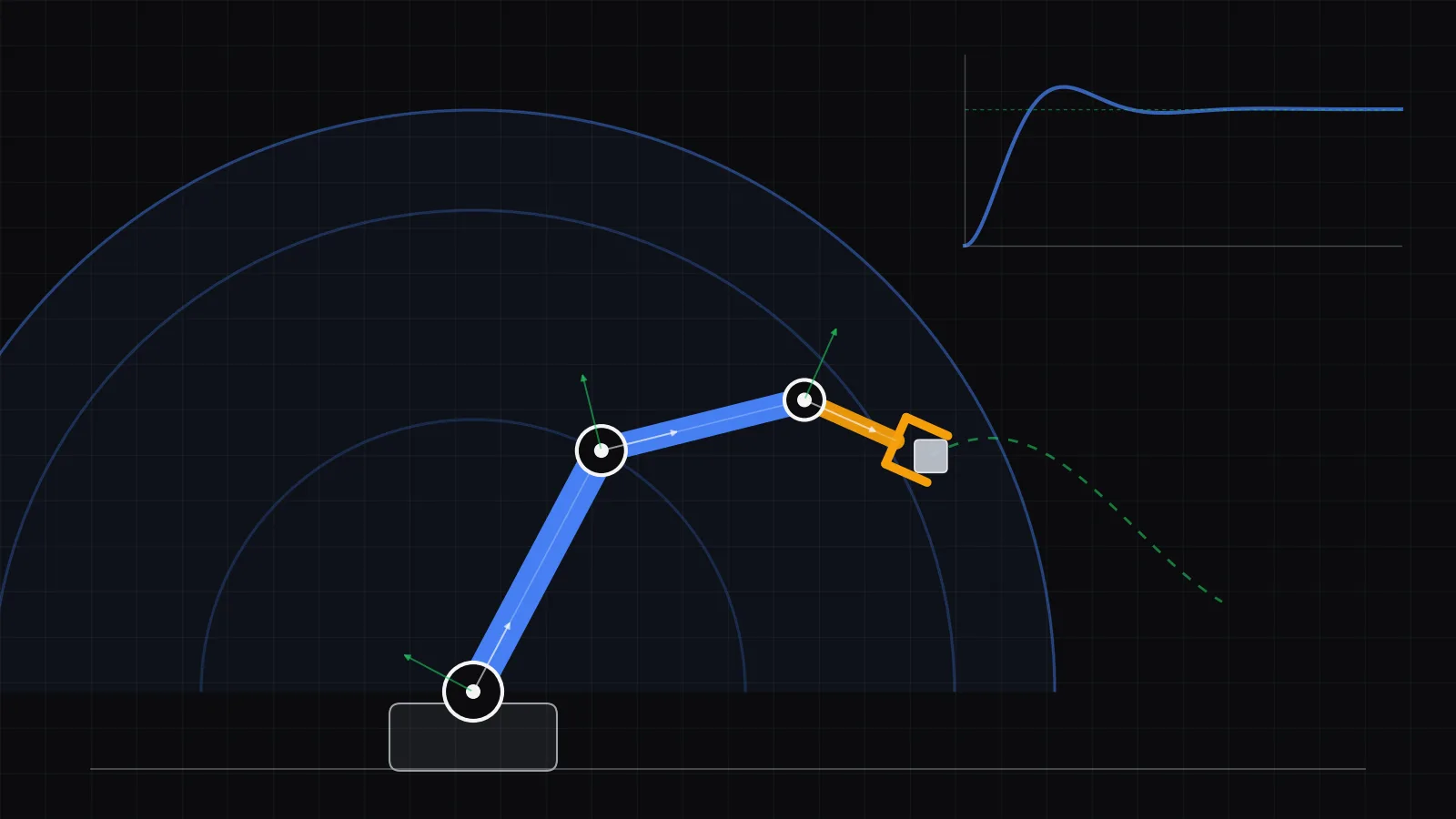
- Industrial arms. Each joint has its own servo drive closing current, speed and position loops. A safety controller monitors speed and position limits.
- Mobile robots. Wheel speed control and odometry run on a microcontroller; navigation runs on the main computer. Our worked example is a small version of this.
- Drones. A flight controller reads the IMU and adjusts four or more motor speeds many times a second to stay level.
- Medical and service robots. Precise, redundant motor control with extra safety monitoring. See our post on robotic surgery.
For a tour of robot types and what each is used for, read the various types of robots and their benefits.
In India, the main buyer of factory robots is the car industry. The International Federation of Robotics (IFR) reported a record 9,120 industrial robots installed in India in 2024, 7% more than in 2023. Automotive took 45% of them, 4,070 units, and India's operating stock reached 52,570 robots, 10th in the world. Worldwide, 542,000 industrial robots were installed in 2024.
What safety rules apply to a robot's embedded system?
Industrial robots follow ISO 10218, whose 2025 revision makes functional-safety requirements more explicit and folds in the collaborative-robot rules of ISO/TS 15066. In practice the embedded system must detect faults, limit speed and force where people work nearby, and bring the robot to a safe stop when anything goes wrong.
For firmware this means a few concrete habits: a watchdog that resets a hung controller, plausibility checks on every sensor (an encoder that stops counting while the motor draws current is a fault), current and temperature limits, and a stop path that does not depend on the main software working. Safety functions on real products are usually handled by separate certified safety controllers; the application firmware must cooperate with them, not replace them.
What skills do you need to work on embedded systems for robots?
You need C programming on microcontrollers, the main peripherals (timers, PWM, ADC, UART, I²C, SPI, CAN), control basics such as PID and sensor filtering, and enough electronics to read a schematic and use an oscilloscope. Knowing an RTOS, and ROS 2 for the higher-level side, makes you useful on a full robot team.
- Embedded C and one microcontroller family deeply: registers, interrupts, timers, and debugging with a debugger and an oscilloscope.
- Sensors and actuators: encoders, IMUs, motor drivers, and the maths that turns their raw readings into useful numbers.
- Control: PID tuning, loop rates and filtering, as in the worked example above.
- Communication: UART and CAN between controllers, and how messages are timed.
- A real build: a line follower, a balancing robot or a wheeled robot with odometry teaches more than any list.
If you are preparing for GATE, robotics now has its own paper; see GATE 2027 Robotics and Automation.
How can you learn embedded systems for robotics?
Start with the free lessons in Skill-Lync's Fundamentals of Embedded Systems course, which begin with embedded systems in mechatronic systems, ARM microcontroller architecture and sensor and actuator basics. The full Fundamentals of Embedded Systems course and the PG Certification in Embedded Systems take you further, and the embedded systems courses hub compares every Skill-Lync option with fees and jobs. If you are unsure where to start, talk to a Skill-Lync counsellor.
Frequently asked questions
Is embedded systems a good choice for a career in robotics?
Yes, if you like working close to hardware. Every robot needs firmware for motor control, sensing and safety, so embedded engineers are part of every robot team. The same skills also open automotive, drone and industrial automation jobs, which gives you options if robotics hiring in your city is thin.
Which microcontroller is best for a robotics project?
For a first robot, any well-documented board works: an Arduino for simplicity, an ESP32 if you need Wi-Fi, or an STM32 board if you want to learn industrial-style ARM Cortex-M development with hardware encoder timers. Pick the one with good documentation and a debugger, then learn it deeply rather than switching boards.
Do robots use an RTOS?
Many do. A real-time operating system lets one microcontroller run several tasks, such as motor control, communication and logging, with guaranteed priorities. Simple robots often run bare metal with one timer interrupt driving the control loop. The choice depends on how many things must happen on time at once.
What is the difference between robotics and mechatronics?
Mechatronics is the wider discipline of combining mechanics, electronics, control and software in any machine, from a washing machine to an ABS brake. Robotics is one application of it, focused on machines that sense, decide and move with some autonomy. Embedded systems are central to both.
How fast should a robot's control loop run?
It depends on the dynamics. Inner loops such as motor current run fastest, speed and position loops slower, and navigation slowest. A loop should be several times faster than the motion it controls. Faster is not always better: as the worked example shows, a faster loop sees encoder speed more coarsely, so the rate must suit the sensor resolution.
Sources and further reading
- International Federation of Robotics, India Rises to Sixth in Global Factory Robot Installations (press release, 25 Sep 2025: 9,120 installations in 2024, +7%, automotive 45%, stock 52,570; accessed 17 Nov 2026)
- International Federation of Robotics, Global robot demand in factories doubles over 10 years (542,000 robots installed worldwide in 2024; accessed 17 Nov 2026)
- STMicroelectronics, RM0430 reference manual, General-purpose timers (TIM2 to TIM5): encoder interface mode (counting on TI1, TI2 or both edges, hardware direction; accessed 17 Nov 2026)
- Association for Advancing Automation (A3), Updated ISO 10218: major advancements in industrial robot safety standards now available (2025 revision; accessed 17 Nov 2026)
- Skill-Lync, Mechatronics: interactive book (encoders, PID, embedded systems and robot drives)
- Skill-Lync, Microcontrollers (8051, PIC18, ARM): interactive book