Project 1 - Interfacing a 16*2 LCD with Arduino using I2C protocol
Tinker Cad Plateform:
Arduino Code:1
// C++ code
//
#include<Wire.h> //Include I2C Library
#include <LiquidCrystal.h> //Include LCD16x2 Library
LiquidCrystal lcd(2,3,4,5,6,7,8); //Define an object for lcd interfacing and define RS,RW,E,D4,D5,D6,D7 pins
byte x=0;
void setup()
{
Wire.begin(); //Begin I2C Bus. Address optional for Master Device
lcd.setCursor(0,0); //Set LCD Cursor to beginning
lcd.print("Master LCD"); //Print "Master Device" for 2 Seconds
delay(2000); //Delay of 2 seconds before communication starts
lcd.clear(); //clear lcd after 2 seconds
delay(3000);
}
void loop()
{
Wire.beginTransmission(10); // Transmit to device number 10
Wire.write(x); // Sends int value 'x'
Wire.endTransmission(); //End Transmission
x+=2; //Increment the transfer data by 2
lcd.setCursor(0,0); //Set lcd to starting position
Wire.requestFrom(10, 1); // request bytes from peripheral device #8
int c = Wire.read();
lcd.print(c);
if (c == 255)
{
lcd.clear();
}
delay(1000);
}
Arduino Code 2:
// C++ code
//
#include <Wire.h> //Include I2C Library
#include <LiquidCrystal.h> //Include LCD16x2 Library
LiquidCrystal lcd(2,3,4,9,10,11,12); //Define an object for lcd interfacing and define RS,RW,E,D4,D5,D6,D7 pins
int x = 0; //Initialize transfer variable as 0
void setup()
{
Wire.begin(10); //Begin I2C Bus with slave address 10
Wire.onReceive(MasterWrite); //Defining handler function for I2C Data receive
Wire.onRequest(MasterRequest); //Defining handler function for I2C Master Data Request
lcd.setCursor(0,0); //Set LCD Cursor to beginning
lcd.print("Slave Device LCD"); //Print "Slave Device LCD" for 2 Seconds
delay(2000); //Delay of 2 seconds before communication starts
lcd.clear(); //clear lcd after 2 seconds
}
void loop()
{
//Empty Loop Variable
}
void MasterRequest()
{
Wire.write(x); //When Master Request Data, Send x value and increment it
x++; //Increment the transfer variable
}
void MasterWrite(int d)
{
lcd.setCursor(0,0); //Set LCD Cursor to Beginning
while(Wire.available()) {
int c = Wire.read(); // Receive the integer data from Master
lcd.print(c); // Print the integer value
if (c>253)
{
lcd.clear();
}
}
}
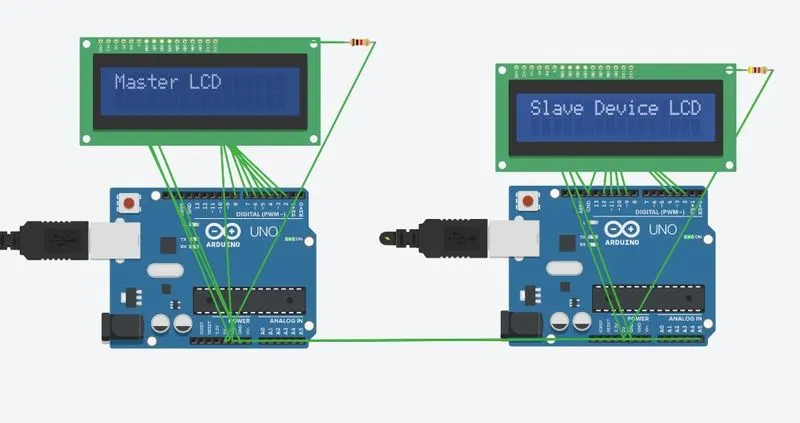
Tinker Cad Link: https://www.tinkercad.com/things/4xbz5d1AP8h?sharecode=Qanv3KcibFKD63fA2MrocwtRuaGFHGRcxoOx4XjlYvE