DussehraFestive scholarship on Skill-Lync courses, this week onlyFestive scholarship is openOffer ends Wed, 21 Oct, 11:59 pm IST.
Dussehra 2026

Start your next chapter this Dussehra

Tell us where you want to work. A counsellor will match you to the right course and confirm the festive scholarship you qualify for.

  • Festive scholarship on course fees, confirmed on your call
  • Free 20-minute call to map the right course to your goal
  • Real industry projects and placement support with every course

Offer ends Wed, 21 Oct, 11:59 pm IST

3,905 engineers placed since 2019 · 1,277 hiring companies

By submitting you agree to our Terms and Privacy Policy.

You're on the list

Browse courses
Electrical · Course

PCB Design for Beginners using Altium Designer

Enrol in the mentor-led Altium designer course and learn to design complex circuits for modern industrial applications. The PCB design course online will teach you everything you need to know for selecting components and guidelines to follow.

Duration
12 weeks
Content
9 hours
Projects
3
Mode
Online
Overview

What you'll
be able to do.

  • The students will gain a thorough knowledge of the PCB design process.
  • During this coursework, the students are exposed to
    • A brief review of electrical components and their applications
    • The construction of electrical symbols
    • Design of circuit diagrams with all the electrical characteristics
  • Also, they will learn the concepts of PCB design, Component Selection, Schematic Design, Layout, and Routing.
  • The students are exposed to the modern trends and standard practices being followed in the industry right now.
  • Through this course, the students will learn to design PCBs using Altium.
  • This course forms the foundation for anyone wanting to design their own electronic devices and PCBs.
Tools you'll use
Altium Designer
Curriculum

27 modules,
built with industry.

  1. 01PCB Design for Beginners using Altium Designer27 modules
    1. Basic Electronics and ComponentsW01

      In this week,

      • Basic electronic components such as capacitors, resistors, inductors, diodes, and transistors are covered.
      • We will see how PCBs use the above-mentioned devices.
    2. Circuit AnalysisW02

      In this week,

      • Circuit analysis to determine the currents and voltages in an electronic circuit with connected electronic components is studied.
      • We will learn how a simple circuit works, by analyzing it.
    3. Basics of AltiumW03
      • Altium software is used in the electronic schematic design of PCBs.
      • It provides a platform for engineers to develop and visualize PCBs in 3D.
      • Engineers can design and edit the most complex PCBs using the Altium platform.
    4. Symbols Creation and ParametersW04
      • In Altium Designer, users can create electronic component symbols with their parameters when designing a circuit.
      • Each electronic component has its own symbol in a circuit, as well as an associated electrical parameter.
      • It is important to know how to create a symbol when designing a PCB to ensure proper schematic representation.
    5. Footprint Creation and StandardsW05
      • In the design of any PCB is a footprint that provides a standard layout design for components in the circuit.
      • While Altium has standardized footprints, it can also be used to design your own footprint with the help of CAD tools.
    6. Schematic Drafting using AltiumW06
      • Schematic drawings are at the base of circuit diagrams and PCB designs.
      • They provide information about the components and flow of current in the circuit.
      • Altium Designer gives users schematic drafting tools needed to design schematic diagrams.
    7. PCB Design OverviewW07
      • Before designing a PCB, it is important to understand the basic concepts behind it.
      • This overview also strengthens the understanding needed to carry out PCB design using Altium Designer.
    8. Steps in PCB DesigningW08
      • PCB designing involves a series of sequential steps with feedback loops.
      • It is important to design the PCB in this order of steps to prevent errors in the overall design.
    9. PCB Design using AltiumW09
      • Altium offers many tools and widgets to design and develop PCBs.
      • It is important to understand how to use Altium Designer in the creation of a PCB.
    10. Placement of ComponentsW10
      • Electrical components have specific placements in PCBs to ensure that electrical interconnections are created between them.
      • By properly placing components, the functional efficiency of the overall design can be improved.
      • A good understanding of component placement is vital because of this.
    11. Rules for PCB DesignW11
      • In order to design an efficient PCB, there are a certain set of guidelines to follow.
      • These provide information on the layout, placement, and schematic rules to be followed in order to optimize efficiency.
    12. Stackup and ViasW12
      • PCB designs have a series of layers, and vias are essential in forming the electrical connections between these layers.
      • For instance, stackup design has many layers of copper and insulation which need to be connected with vias.
      • It is important to know how to design stackups and vias into a PCB for proper conduction of electricity through the components.
    13. Stackup Design using AltiumW13
      • Before a board layout design can be formed, a PCB’s stackup design has to be developed.
      • This refers to the way the layers of copper and insulation are arranged.
      • Altium Designer can be used for designing the stackup of a PCB.
    14. Post-Processing of PCB DesignW14
      • Post-processing a PCB design involves design rule checking, design for manufacturability, and other procedures ensuring that all the details are in place.
    15. Design Rule CheckingW15
      • Design rule checking studies the physical and logical soundness of a PCB design.
      • This makes sure that there are no errors in the design of the PCB.
      • Altium Designer can perform this in real-time with reference to a set of design rules.
      • By identifying errors in the initial design phase, scrapping products, later on, will be limited.
    16. Gerber ReviewW16
      • Information regarding each layer of the PCB is in an open ASCII vector file called Gerber files.
      • It provides a universal format that can be understood by engineers everywhere.
      • These files are created, reviewed, and viewed using Altium Designer.
    17. EMI/EMCW17
      • As PCBs have electronic components, they emit electromagnetic waves.
      • It is important to manage EMI when designing a PCB to ensure it is within the acceptable range of EMI/EMC standards.
      • Circuit and PCB layout design, as well as component selection, contribute to the EMI/EMC factors of PCBs.
    18. Communication in Automotive IndustryW18
      • There are different communication protocols that transimt information.
      • It is important to know the types of communication used in automotive products like CAN, LIN, and LAN.
    19. PCB Manufacturing TechniquesW19
      • The PCB manufacturing process has certain techniques which ensure the proper performance of the product.
      • Different PCBs require a different set of manufacturing techniques depending on their operation.
      • The more complex the PCB, the more steps and techniques are involved.
    20. PCB Assembly ProcessW20
      • PCBs are designed with a series of components that are assembled to achieve an intended outcome.
      • The process of assembly has a series of interrelated steps. Each step of the process has to be in tune with the next through feedback loops from output to input.
    21. Circuit ProtectionW21
      • In any electrical and electronic system is the possibility of voltage fluctuations that may damage or cause failure in a circuit.
      • In such a case, it is important that circuit protection is in place to protect the circuit and those in direct contact with it.
      • It is important to know how to integrate circuit protection into a PCB design.
    22. Circuit Protection Selection MethodsW22
      • There are many sources of potential damage to circuits, due to which there are different methods of circuit methods for each one.
      • It is important for PCB design engineers to be aware of the different methods and integrate them into their designs as needed.
    23. Saturn PCB Design Software DiscussionW23
      • Saturn PCB Design provides engineers with PCB design, manufacturing, and assembly services for use in electronic engineering projects.
    24. Multilayer PCB Design Overview in AltiumW24
      • Multilayer PCBs are more complex in design because they generally have more components.
      • As a result of this, they have more routing required.
      • Although there are multiple layers, they are compressed down into one.
      • By using Altium Designer, multilayer stackups can be integrated into PCB designs.
    25. CAN Example with AltiumW25
      • The CAN communication protocol is useful for short messages that do not target a specific node.
      • Altium Designer is used in the development of a CAN condition.
    26. GroundW26
      • Ground planes are important in PCB designs as they minimize the electrical noise and interaction between two layers with active signals.
      • This can be done for the different layers using Altium Designer.
    27. Component SelectionW27
      • When creating a PCB, component selection is one of the first steps as it sets the base for the following steps.
      • Selecting the right components is important to reduce the chance of inconsistencies through the PCB design process.
      • It is therefore important to understand the process of component selection.
Industry projects

3 projects
you'll ship.

Our projects are designed by experts in the industry to reflect industry standards. By working through our projects, Learners will gain a practical understanding of what they will take on at a larger-scale in the industry. In total, there are 3 Projects that are available in this program.

PCB Design projects

PCB Design projects

Design and Implementation of PCB Design Projects based on the inputs provided and the concepts learned during the course duration.

40-V to 80-V adjustable output voltage boost reference design for LIDAR applications

40-V to 80-V adjustable output voltage boost reference design for LIDAR applications

This projects will help us in understanding how to design a 40-V to 80-V adjustable output voltage boost for LIDAR applications.
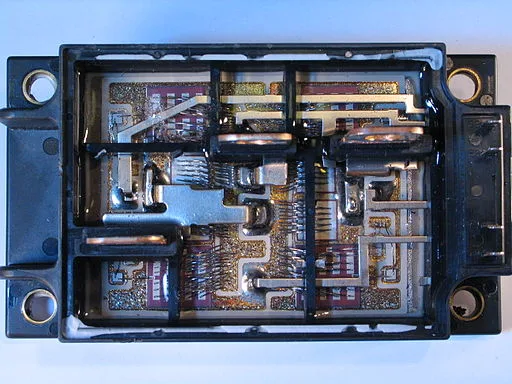
SiC/IGBT isolated gate driver reference design with thermal diode and sensing FET

SiC/IGBT isolated gate driver reference design with thermal diode and sensing FET

The process of designing an SiC/IGBT isolated gate driver using thermal diode and sensing FET is discussed in this project.

Fee

One fee.
Everything included.

Become job ready with our comprehensive industry focused curriculum for freshers & early career professionals

Premium
₹40,000
Inclusive of all charges
  • 1 Year Access
  • Personalized Page
  • Live Individual & Group Sessions
  • Personalized & Hands-On
  • Job-Oriented Industry Relevant Curriculum
Check eligibility →
FAQ

Questions,
answered.

Who can take up PCB design courses?

Students and graduates of electrical engineering and related engineering disciplines can take up the PCB Design for Beginners using the Altium Designer course. If your area of interest lies in designing circuit boards, you can pursue this PCB design course online.

Is this PCB design certification course an online course?

Yes, the PCB Design for Beginners using Altium Designer is a 100% online course.

What is the duration of the PCB Design for Beginners using Altium Designer course?

This PCB design certification course is a 12-week course.

What are the plans for learning this PCB design course online with a certificate?

The basic plan would give you two months of access, the pro plan would give you four months of access, and the premium plan would provide you with lifetime access. You can choose a plan based on your requirements.

How much can a PCB Design Engineer earn?

According to Glassdoor, the average salary of a PCB Design Engineer is ₹ 3.9 lakhs per annum. However, it primarily depends on your experience and expertise.

Is there any certificate for completing this PCB design course online?

Yes, After completing the PCB course, you shall be given a course completion certificate. The top 5% of the scorers will be given a merit certificate alongside the course completion certificate.

How can I clear my queries if I got doubts while pursuing this ANSYS online course?

You can clear your queries with email and forum support.

Who has framed this PCB design course online with a certificate?

Industry experts in this domain have designed PCB Design for Beginners using the Altium Designer course to make this course industry-relevant.

Do I need to work on projects for completing this PCB design certification course?

Yes, You have to work on projects for completing the PCB designing course online.

Next step

Not sure it's
the right fit?

A counsellor will walk you through the syllabus, projects and fee options — and tell you honestly if another course suits you better.

Get the syllabus + a call back

We'll email the full syllabus and call within one working day.

By submitting you agree to our Terms and Privacy Policy.

Call usEnquire

Talk to a career counsellor

Free 20-minute call. We'll map the right course to where you want to work.

By submitting you agree to our Terms and Privacy Policy.