What Is Cloud Storage? How It Works, Its Types and What It Costs
Cloud storage explained from the upload path to the bill: block vs file vs object, public, private, hybrid and multi-cloud, what 11 nines of durability means, why providers use erasure coding, and a worked monthly cost for 2,000 GB in AWS Mumbai at 21 Nov 2026 prices.

Cloud storage is renting disk space in someone else's data centre and reaching it over the internet. You upload a file, the provider splits it into pieces with extra parity pieces and spreads them across separate buildings, and you read it back from any device. It comes in three technical types (block, file and object) and four ways of deploying it (public, private, hybrid and multi-cloud), and you pay per gigabyte per month.
This guide explains each part in plain words, then works through the numbers an engineer actually needs: what "eleven nines" of durability means for 10 million files, why providers use erasure coding instead of three copies, how long a 200 GB upload takes, and what 2,000 GB of simulation results costs per month in AWS's Mumbai region at list prices of 21 Nov 2026. Every calculation was checked with a script by Skill-Lync's Engineering Desk.
Key takeaways
- Three types: block (a raw disk for one server), file (shared folders over NFS or SMB) and object (key, data and metadata over HTTPS). Object storage holds most of the world's backups, media and data lakes.
- Durability: Amazon S3 and Google Cloud Storage are designed for 99.999999999 % (11 nines) annual durability; Azure's geo-redundant options are designed for 16 nines (provider documentation, accessed 22 Nov 2026).
- Erasure coding saves disk: three full copies need 3,000 TB of raw disk for 1,000 TB of data; a 6 + 3 Reed-Solomon code needs 1,500 TB and survives three lost pieces instead of two (Apache Hadoop documentation).
- Price in Mumbai: S3 Standard costs $0.025 per GB-month for the first 50 TB; Glacier Flexible Retrieval costs $0.0045 (AWS Price List API, 21 Nov 2026).
- India rules: the DPDP Rules, 2025 were notified on 14 Nov 2025 with an 18-month phased rollout; RBI has required payment data to be stored only in India since its circular of 6 Apr 2018.
What is cloud storage?
Cloud storage is a service where your files live on a provider's servers instead of your own disk, and you reach them over a network through an app, a web page or an API. You do not buy drives; you pay for the gigabytes you use each month, and the provider handles hardware failures, copies and capacity growth.
The US National Institute of Standards and Technology (NIST) defines cloud computing in SP 800-145 (2011) as on-demand network access to a shared pool of configurable resources (networks, servers, storage, applications) that can be provisioned and released with minimal management effort. Cloud storage is the storage part of that model.
There are two faces to it. As a consumer, you see Google Drive, iCloud or Dropbox: a folder that syncs. As an engineer, you see the infrastructure underneath: Amazon S3, Azure Blob Storage and Google Cloud Storage buckets, disks attached to virtual machines and network file shares. This post covers both, with the weight on how the infrastructure works, because that is what interviews and jobs ask about.
How does cloud storage work, step by step?
When you upload a file, your device sends it over HTTPS to the provider's regional endpoint, which checks your identity and permissions. The provider splits the file into data pieces, computes parity pieces, stores them on different machines in at least three separate data centres, and records the piece locations and a checksum in a metadata index.
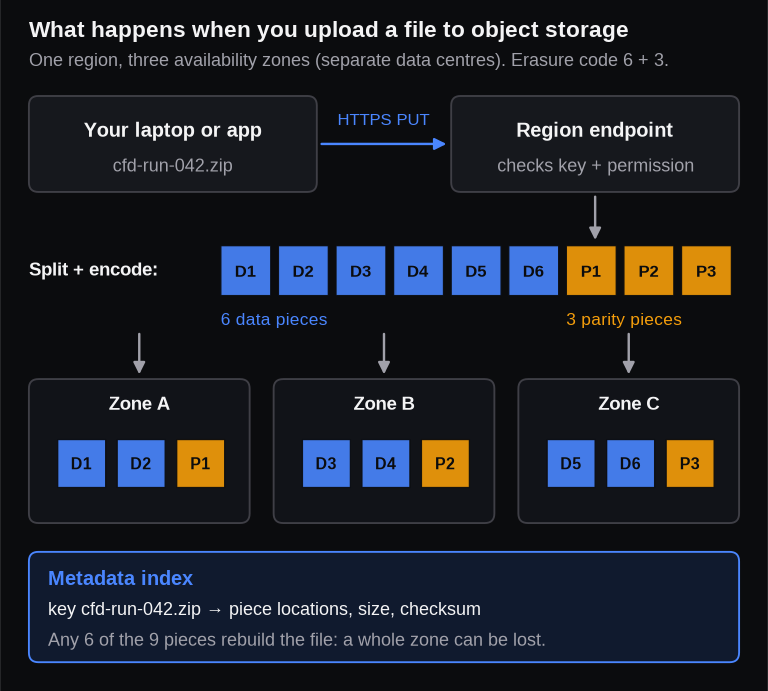
- Authenticate. Every request carries a signed key or token. The endpoint checks that this user may write to this bucket or folder.
- Upload in parts. Large files go up as parts in parallel. In Amazon S3 a multipart upload can have up to 10,000 parts of 5 MiB to 5 GiB each, so the largest object is 48.8 TiB.
- Split and encode. The service cuts the data into pieces and computes extra parity pieces (erasure coding), or keeps whole copies (replication).
- Spread across failure zones. Pieces go to different disks, racks and buildings. AWS says S3 Standard, Standard-IA and the Glacier classes store data across a minimum of three Availability Zones in a region.
- Record metadata. An index maps the object's key (its name) to where the pieces live, its size and a checksum.
- Verify and repair. Background processes re-read pieces, compare checksums and rebuild anything lost on a failed disk.
- Read back. A GET request fetches enough pieces to rebuild the file. Since 1 Dec 2020, S3 gives strong read-after-write consistency: a read straight after a successful write returns the new data.
Worked example: rebuilding a lost piece with parity
Real services use Reed-Solomon codes, but the idea fits in one line of XOR (exclusive OR). Take the 11-byte name CFD-RUN-042, pad it to 12 bytes and cut it into three 4-byte pieces: CFD-, RUN- and 042 plus one zero byte. The parity piece is the byte-by-byte XOR of the three:
For the first byte: . Now lose the disk holding RUN-. XOR the survivors with the parity and the missing byte comes back:
, which is the letter R. Doing this for all four bytes rebuilds RUN- exactly. One parity piece survives one loss; Reed-Solomon generalises this so that parity pieces survive any losses.
What are the types of cloud storage?
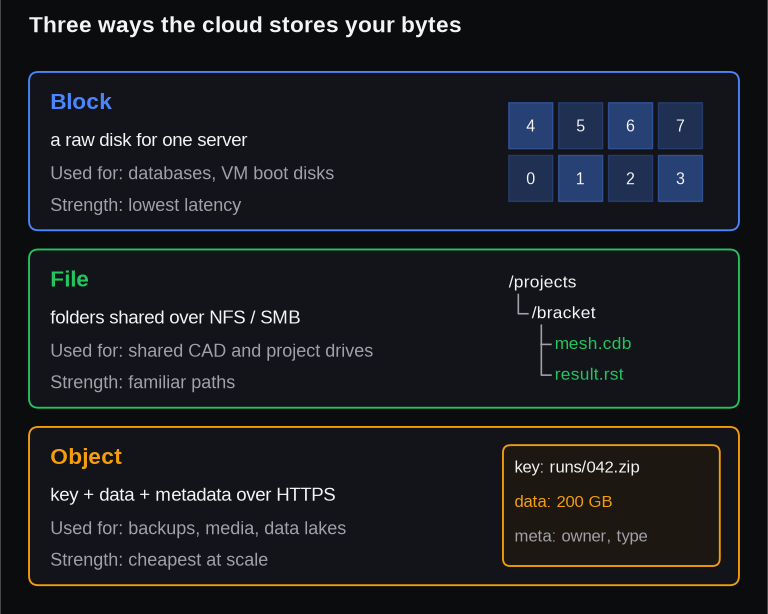
Cloud storage comes in three technical types. Block storage gives a server a raw disk made of numbered blocks, best for databases. File storage gives many machines a shared folder tree over NFS or SMB. Object storage keeps each file as an object with a key and metadata, reached over HTTPS, and is the cheapest way to hold large volumes.
| Type | How you reach it | Best for | Examples |
|---|---|---|---|
| Block | Attached to one virtual machine as a disk | Databases, boot disks, low-latency apps | Amazon EBS |
| File | Mounted as a network folder (NFS, SMB) | Shared project drives, home directories | Amazon EFS, Amazon FSx, Azure Files |
| Object | HTTPS API: PUT, GET, DELETE by key | Backups, archives, media, data lakes, ML datasets | Amazon S3, Azure Blob Storage, Google Cloud Storage |
A simple way to choose: if a single program needs to change a few kilobytes in the middle of a file thousands of times a second, use block. If people and programs need ordinary paths like /projects/bracket/mesh.cdb, use file. If you write whole files once and read them many times, or keep them for years, use object.
Public, private, hybrid or multi-cloud: what is the difference?
These are deployment models, not storage types. Public cloud runs on a provider's shared infrastructure; private cloud is dedicated to one organisation; hybrid joins a private environment and a public cloud so data can move between them; multi-cloud means using two or more public providers. NIST lists public, private, community and hybrid; "multi-cloud" is industry usage.
| Model | Who owns the hardware | Typical reason |
|---|---|---|
| Public | The provider; many customers share it, isolated by software | No upfront cost, scale on demand |
| Private | One organisation (on its premises or hosted for it alone) | Control, regulation, predictable heavy load |
| Hybrid | Both: private systems linked to a public cloud | Keep sensitive data in-house, burst or archive to public cloud |
| Multi-cloud | Two or more public providers | Avoid lock-in, use each provider's best service, meet a location rule |
| Community (NIST) | Shared by organisations with common concerns | Joint compliance needs, e.g. a group of agencies |
A correction to the earlier version of this post: AWS and Google Cloud are public cloud providers (they can be one half of a hybrid setup), and Dropbox and Google Drive are consumer storage services built on top of cloud infrastructure, not examples of multi-cloud.
How safe is data in the cloud? What do "11 nines" mean?
Durability is the chance your data is not lost in a year. Amazon S3 and Google Cloud Storage are designed for 99.999999999 % (11 nines), meaning a yearly loss chance of one in 100 billion per object. Store 10 million objects and you expect to lose one object about once every 10,000 years, on average.
The arithmetic, checked in the run script:
One loss per years. Azure publishes the same kind of numbers per redundancy option: locally redundant storage (LRS) at least 11 nines, zone-redundant (ZRS) at least 12 nines, and geo-redundant (GRS, GZRS) at least 16 nines, because GRS also copies the data asynchronously to a second region that Microsoft describes as hundreds of miles from the first.
Two things durability does not cover. Availability is whether you can reach the data right now: S3 Standard is designed for 99.99 %, Standard-IA for 99.9 % and One Zone-IA for 99.5 %. And your own mistakes: if you or a script deletes a file, the provider durably deletes it. Versioning, retention locks and a backup held in a separate account protect against that, not the nines.
Why do providers use erasure coding instead of copies?
Erasure coding gives similar protection to full copies for far less disk. Three copies of 1,000 TB need 3,000 TB of raw disk and survive two lost copies. A 6 + 3 Reed-Solomon code needs 1,500 TB and survives any three lost pieces. Backblaze's open-source coder uses 17 + 3, about 1,176 TB.
The raw-to-usable ratio of a code with data and parity pieces is
so 3 copies cost 3.0×, RS 6 + 3 costs 1.5× and RS 17 + 3 costs 20/17 = 1.176×. The Apache Hadoop documentation makes the same point for HDFS: 3× replication has 200 % storage overhead, while erasure coding is typically no more than 50 %, and a 6-block file takes 18 blocks replicated but 9 blocks with RS 6 + 3.
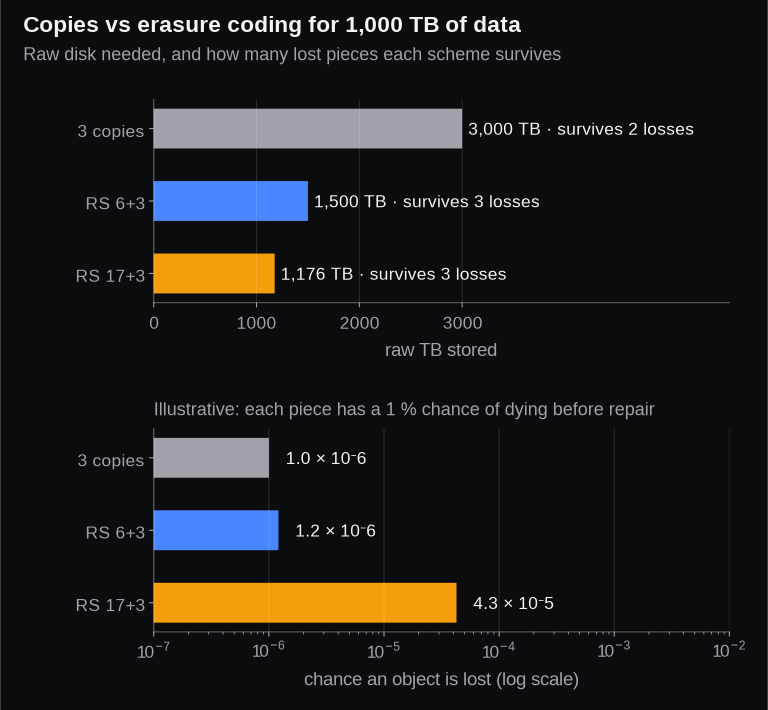
The lower chart has an honest catch. With the same 1 % chance per piece, RS 17 + 3 loses an object about 40 times more often than three copies, because 20 pieces give more chances for four failures. RS 6 + 3 nearly matches three copies (1.2 × 10⁻⁶ against 1.0 × 10⁻⁶) at half the disk. Wide codes are cheap but rely on fast repair; that is the real engineering trade-off.
How much does cloud storage cost in India?
In AWS's Mumbai region (ap-south-1), S3 Standard costs $0.025 per GB-month for the first 50 TB, Standard-IA $0.0138, Glacier Instant Retrieval $0.005 and Glacier Flexible Retrieval $0.0045 (AWS Price List API, published 21 Nov 2026). The cheaper classes add a fee per gigabyte you read back, so the right class depends on how often you read.
Worked example: 2,000 GB of simulation results
A CAE team keeps 2,000 GB of finished CFD and FEA result files. The table shows the monthly bill at Mumbai list prices, storage plus retrieval fees only (request charges depend on how many files you have and are left out). Glacier Flexible's read fee is for a standard retrieval, which takes hours; bulk retrieval is free and slower.
| Class (min. stay) | $/GB-month + $/GB read | No reads | 10 % read |
|---|---|---|---|
| S3 Standard (none) | 0.025 + 0 | $50.00 | $50.00 |
| Standard-IA (30 days) | 0.0138 + 0.01 | $27.60 | $29.60 |
| Glacier Instant (90 days) | 0.005 + 0.03 | $10.00 | $16.00 |
| Glacier Flexible (90 days) | 0.0045 + 0.012 | $9.00 | $11.40 |
Over 12 months with no reads, that is $600 in Standard against $108 in Glacier Flexible Retrieval. The break-even points come from setting two bills equal. Glacier Instant beats Standard until you read back this fraction of the data each month:
So read less than about two-thirds of the data a month and Glacier Instant is cheaper; read more and Standard wins. Standard-IA stays cheaper than Standard until , more than the whole data set every month.
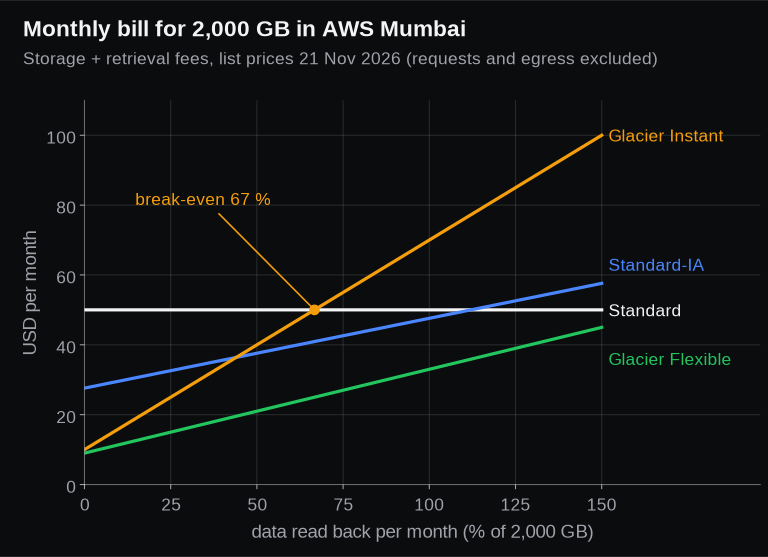
Two costs catch beginners. Egress: downloading to the internet from Mumbai costs $0.1093 per GB for the first 10 TB a month beyond the free allowance, so pulling 200 GB down costs about $21.86 whichever class it sat in. Minimum stays: delete a Standard-IA object after 10 days and you still pay for 30. These are list prices in US dollars before tax; your invoice shows the final figure.
How long does it take to upload large files?
Upload time is size divided by your real upload speed. A 200 GB result archive over a 100 Mbps line at about 80 % efficiency takes 20,000 seconds, roughly 5.6 hours. At 50 Mbps it takes about 11.1 hours; at 1 Gbps about 33 minutes. Multipart upload lets you send parts in parallel and resume after a drop.
Part size matters for big files. With S3's limit of 10,000 parts, a 200 GB file in 64 MiB parts needs 2,981 parts, which fits. A 1 TiB file needs parts of at least 104.9 MiB, so pick 128 MiB. The 80 % efficiency is an assumption for protocol overhead and Wi-Fi; measure your own line.
How much free cloud storage do students get?
A Google Account includes up to 15 GB shared across Gmail, Drive and Photos. Apple's iCloud gives 5 GB free, and Dropbox Basic gives 2 GB. In India, Apple lists iCloud+ at ₹75 a month for 50 GB, ₹219 for 200 GB and ₹749 for 2 TB (Apple support page, accessed 22 Nov 2026).
For learning the engineering side, every big provider offers a free tier or student credits; read the current terms before you start, and set a billing alert so a forgotten bucket does not run up a bill.
What Indian rules apply to data stored in the cloud?
Two matter most. The Digital Personal Data Protection Act, 2023 and the DPDP Rules, 2025 (notified 14 Nov 2025, phased over 18 months) require reasonable security safeguards and breach notification for personal data. RBI's circular of 6 Apr 2018 requires payment-system data to be stored only in India.
- DPDP: the government's explainer says the highest penalty, up to ₹250 crore, applies to a data fiduciary failing to keep reasonable security safeguards. Significant data fiduciaries may have to follow government directions on restricted data, "including local storage where needed".
- RBI: payment system operators must keep end-to-end payment data in India. If processing happens abroad, RBI's FAQ says the data must be deleted there and brought back within one business day or 24 hours.
- Where Indian data can sit: AWS has run its Mumbai region since June 2016 and opened Hyderabad (three Availability Zones) in November 2022, so a fully in-country primary and backup is possible.
This is a summary for students, not legal advice; companies take their compliance teams' reading of the final rules.
What is cloud storage used for in engineering?
Engineering teams use cloud storage for six jobs: backups kept apart from production systems, long-term archives of design and test data, disaster recovery in a second region, delivering media and software downloads, data lakes for analytics and machine learning, and shared project drives for cloud workstations. Each job suits a different type and storage class.
- Backup: copies of production data in a separate account or region, with versioning, so ransomware or a bad script cannot delete both.
- Archive: design records, test data and simulation results that must be kept for years but are rarely read; Glacier-type classes cut cost by roughly five times against Standard in the example above.
- Disaster recovery: geo-redundant storage in a second region keeps data if a whole region fails, with the caveat Azure states plainly that asynchronous copies can miss the last writes.
- Content delivery: images, video and software downloads served through a CDN from an object-storage origin.
- Data lakes and machine learning: raw sensor logs, telemetry from test vehicles and training datasets kept in object storage and read by analytics and ML jobs.
- Shared engineering drives: file storage lets a team mount the same CAD and CAE project folders from cloud workstations.
Google's daily data volumes show the scale this has reached; see our explainer on how much data Google processes every day, and for the network path your upload takes, how data travels across the internet.
How do you learn cloud storage for a job?
Start with the concepts above, then build: create a bucket, upload with multipart, turn on versioning, write a lifecycle rule that moves old files to an archive class, and check the bill after a week. Each step is a concept from this post that you will have touched with your own hands.
Skill-Lync's Fundamentals of Cloud Computing (9 hours) covers the core cloud services, including storage and databases, and Azure Fundamentals (21 hours) has a week on Azure Storage: Blob Storage, Azure Files, queues and tables. For the bigger picture of service and deployment models, read what cloud computing is. Not sure which path fits you? Talk to a Skill-Lync counsellor.
Frequently asked questions
Is cloud storage safe?
Against hardware failure, yes: Amazon S3 and Google Cloud Storage are designed for 11 nines of yearly durability, spreading pieces across separate data centres. The bigger risks are human: leaked passwords, public buckets and accidental deletes. Use multi-factor login, keep buckets private, turn on versioning and keep one backup in a separate account.
What are the 3 types of cloud storage?
Block, file and object. Block storage is a raw disk attached to one virtual machine, used for databases. File storage is a shared folder tree reached over NFS or SMB. Object storage keeps whole files with a key and metadata behind an HTTPS API, and is the cheapest choice for backups, archives, media and data lakes.
Is Google Drive cloud storage?
Yes. Google Drive is a consumer cloud storage service: your files sit on Google's servers and sync to your devices. Every Google Account includes up to 15 GB, shared with Gmail and Google Photos. Engineers building applications use Google Cloud Storage instead, which is object storage reached through an API and billed per gigabyte-month.
What is the difference between cloud storage and cloud computing?
Cloud computing is the whole model of renting computing resources over a network: servers, storage, databases, networking and software. Cloud storage is one part of it, the part that keeps data. A cloud application usually combines both: virtual machines or functions do the work, and block, file or object storage holds the data they read and write.
Can I lose data stored in the cloud?
Losing it to failed disks is extremely unlikely at 11 nines, but you can still lose it. Deleting a file, overwriting it, a compromised account, an unpaid bill or a provider shutting a service can all remove data. Keep versioning on, use retention locks for critical records, and keep an independent backup with a second account or provider.
Sources and further reading
- NIST, SP 800-145: The NIST Definition of Cloud Computing (Sept 2011), accessed 22 Nov 2026.
- AWS, Understanding and managing Amazon S3 storage classes and Data protection in Amazon S3, accessed 22 Nov 2026.
- AWS, Amazon S3 multipart upload limits, accessed 22 Nov 2026.
- AWS, Amazon S3 pricing; figures taken from the AWS Price List API offer files for Asia Pacific (Mumbai), AmazonS3 published 21 Nov 2026 and AWSDataTransfer, accessed 22 Nov 2026.
- AWS, Amazon S3 now delivers strong read-after-write consistency (1 Dec 2020).
- AWS, What is cloud storage?, accessed 22 Nov 2026.
- Amazon, AWS launches second infrastructure region in India (Nov 2022).
- Microsoft, Azure Storage redundancy (updated 11 Aug 2026), accessed 22 Nov 2026.
- Google Cloud, Cloud Storage availability and durability, accessed 22 Nov 2026.
- Apache Hadoop, HDFS Erasure Coding, accessed 22 Nov 2026.
- Backblaze, JavaReedSolomon (benchmark uses 17 data + 3 parity shards, "match the usage at Backblaze"), accessed 22 Nov 2026.
- Google, How your Google storage works; Apple, iCloud+ plans and pricing (published 29 Sept 2026); Dropbox, Dropbox Basic; all accessed 22 Nov 2026.
- PIB / MeitY, DPDP Rules, 2025 notified (Nov 2025).
- Reserve Bank of India, Storage of Payment System Data (6 Apr 2018) and FAQ.