DussehraFestive scholarship on Skill-Lync courses, this week onlyFestive scholarship is openOffer ends Wed, 21 Oct, 11:59 pm IST.

Dussehra 2026

Start your next chapter this Dussehra

Tell us where you want to work. A counsellor will match you to the right course and confirm the festive scholarship you qualify for.

  • Festive scholarship on course fees, confirmed on your call
  • Free 20-minute call to map the right course to your goal
  • Real industry projects and placement support with every course

Offer ends Wed, 21 Oct, 11:59 pm IST

3,905 engineers placed since 2019 · 1,277 hiring companies

By submitting you agree to our Terms and Privacy Policy.

You're on the list

Browse courses
Civil · Course

AutoCAD Essentials for Civil Engineers

Infrastructure development requires construction engineers trained in autocad and civil engineering fundamentals. Our essential program provides training for autocad drawing for civil engineers through industry-oriented projects.

Duration
12 weeks
Content
30 hours
Projects
2
Mode
Online
Overview

What you'll
be able to do.

AutoCAD is a drafting tool used in the architecture, engineering, and construction (AEC) field across all stages of the construction process. Engineers use this software tool to plan, draw, execute, and study the strength and properties of a building and its individual components. It offers a time and cost efficient alternative to manual drafting, and improves accuracy by reducing space for errors in designs. AutoCAD even maximizes collaboration among other professionals working on the same project.

By taking this course, learners will...

  • Be well-versed with the AutoCAD user interface (UI).
  • Understand basic and advanced techniques used in the development of 2D and 3D models.
  • Understand major CAD standards and practices used worldwide to create construction documents.
  • Get hands-on experience with the AutoCAD UI needed to excel in the civil engineering industry.
  • Complete challenges and projects designed by experts according to industry specifications that require extensive application of AutoCAD techniques learned throughout the course.

Who can enroll in this course?

Students and professionals in the AEC field who want to learn how AutoCAD is used in the industry can enroll in this course.

Tools you'll use
AutoCAD
Curriculum

13 modules,
built with industry.

Get the full syllabus ↓
  1. 01AutoCAD Essentials for Civil Engineers13 modules
    1. Introduction to AutoCADW01

      AutoCAD software is used for 2D and 3D design, drafting and modeling. Civil engineers use AutoCAD for planning, drawing, and analyzing sites and structures. This software tool is preferred over manual drafting because it is simpler to modify and reproduce the drawing. It is important to understand the basics of AutoCAD and why it is extensively used in the industry.

      This week will cover

      • Introduction to AutoCAD and its Role in Various Industries
      • Why CAD is preferred over manual drafting
      • Difference between AutoCAD and AutoCAD LT
      • Start and Exit Functions in AutoCAD
      • AutoCAD Screen Layout
      • Application Menu
      • Introduction to Various File Formats
    2. Getting Started with AutoCADW02

      The AutoCAD UI has different coordinate systems, tools commands, and options for users to work with. It is important to understand the basics of the AutoCAD UI to design and develop structures.

      This week will cover

      • Absolute coordinate system
      • Relative coordinate system
      • Direct entry method
      • Line and circle command
      • Options and properties
      • Fence, WPolygon, and CPolygon
      • Erase command
      • Setting units and limits
    3. Advanced Sketching, Editing, and Drawing Aids (1)W03

      There is an extensive collection of sketching, editing, and drawing tools available in AutoCAD. It is important for users to understand how to work with each of these tools.

      This week will cover

      • Rectangle and polygon commands
      • Move, copy, offset, rotate, scale, filet, and chamfer
      • Ortho, snap, object snap, and its setting
    4. Advanced Sketching, Editing and Drawing Aids (2)W04

      There is an extensive collection of sketching, editing, and drawing tools available in AutoCAD. It is important for users to understand how to work with each of these tools.

      This week will cover

      • Ellipse, arc, construction line, and ray
      • Multiple points, divide, and measure
      • Donut
      • Mirror, trim, extend, blend curves, and explode
      • Lengthen, align, break, and break at
      • Point and join
      • Creating a new layer and assigning color, line, weight, and line type
    5. Advanced Sketching, Editing and Drawing Aids (3)W05

      There is an extensive collection of sketching, editing, and drawing tools available in AutoCAD. It is important for users to understand how to work with each of these tools.

      This week will cover

      • Polyline, spline, region, revision cloud, wipeout, 3D polyline, and helic
      • Array, edit, polyline, and spline
      • On/off, freeze, isolate/unisolate, and locking
      • Matching and merge layers
    6. Create and Modify AnnotationsW06

      Annotations in AutoCAD drawings provide meaning to the overall project. For example, annotations can show the dimensions, length, diameter, and thicknesses in a drawing. They can be created and modified according to user needs. It is important to understand how the AutoCAD annotation tool is used in AutoCAD for accurately adding meaning to drawings.

      This week will cover

      • Single line and multiline text
      • Linear, aligned, angular arc, length, radius, diameter, jogged, and ordinate
      • Add, remove, align, and collect leader
      • Insert and modify the table
    7. HatchingW07

      Hatching is used in AutoCAD to fill an area with a pattern that indicates a certain attribute of that section. For instance, material, surface finish, and contrast can be shown using the hatching tool. It is important to understand the basics of hatching and how to use it in the AutoCAD UI.

      This week will cover

      • Hatch in geometry, around text, dimension and attributes
      • Editing hatch
    8. Working with Blocks and Block AttributeW08

      Blocks in AutoCAD are collections of objects that are consolidated into one defined 2D/3D object. By doing this, modifications made to the whole block will apply the same changes to the collection of individual objects in it. It is important to understand how to use blocks in the UI.

      This week will cover

      • Types of block
      • Create, insert, and edit block
      • Create and insert WBLOCK
      • Nested block
      • Dynamic block
      • Define, insert, manage, and edit block attributes
    9. Understanding External References and Layout ConceptW09

      External references such as PDFs, drawings, images, and more can be attached to AutoCAD projects. Objects that illustrate various views of model space are called layout viewports. It is important to know how to attach external references, and how to create layout viewports in AutoCAD.

      This week will cover

      • Attach, detach, bind option
      • Viewport concept
      • Plot and its settings
    10. Design Center and Tool Palettes ConceptsW10

      The AutoCAD design center gives access to other blocks, drawings, and more in the drawing area. Tool palettes can be customized to have your most used patterns, commands, and blocks for ease of access. It is important to know how to work with the design center and tool palette in the AutoCAD UI.

      This week will cover

      • Design centers for insert blocks
      • Create your own tool palettes
    11. Introduction to 3D Coordinate SystemW11

      Since users can work with 3D models in the AutoCAD UI, there is a 3D coordinate system. There are also navigation and viewing tools specific to 3D models. By using 3D viewing tools, objects can be viewed from different angles on the coordinate system. It is important to know how to use these tools when working with 3D models in AutoCAD.

      This week will cover

      • Types of 3D models
      • 3D navigation tools
      • 3D viewing tools
      • Setting viewport display
      • World coordinate system
      • User coordinate system and its settings
    12. Getting Started with 3D ModelingW12

      AutoCAD is used to create 3D models, and even has specific commands like sweep, revolve, and extrude that can be used. It is important to understand how to work with the AutoCAD UI when it comes to 3D modeling.

      This week will cover

      • Working with solid primitives
      • Types of solid primitives
      • Extrude, sweep, loft, revolve of solids
      • Boolean operations, filet, chamfer of solid objects
      • Generate section, live section, and a flat shot of solids
    13. VisualizationW13

      Visual styles in AutoCAD define the lighting, backgrounds, shadows, shading, and edges in viewports. When images are rendered in AutoCAD, they have realistic lighting, shadows, and reflections that resemble a real image. It is important to understand visual styles and rendering in AutoCAD when it comes to rendering images.

      This week will cover

      • Visual styles
      • Use of light, material, and sun
      • Render
      • Render environment and render presets
      • Render window
      • Controlling render output size
      • Use of camera and views
Industry projects

2 projects
you'll ship.

Our projects are designed by experts in the industry to reflect industry standards. By working through our projects, Learners will gain a practical understanding of what they will take on at a larger-scale in the industry. In total, there are 2 Projects that are available in this program.

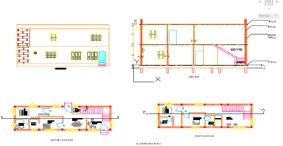
Design and Draft the Layout of a Residential Building and Prepare Architectural Floor Plans and Structural Drawings

Design and Draft the Layout of a Residential Building and Prepare Architectural Floor Plans and Structural Drawings

Learners are required to design and develop the layout for a residential building with a given set of data using AutoCAD. They also have to develop the architectural and structural…
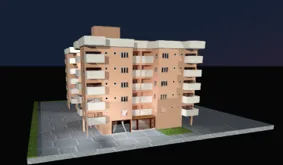
Designing the 3D Model of a Building using AutoCAD 3D

Designing the 3D Model of a Building using AutoCAD 3D

Learners are required to create a 3D model of a residential building with a rendered view using AutoCAD 3D.

Fee

One fee.
Everything included.

Become job ready with our comprehensive industry focused curriculum for freshers & early career professionals

Premium
₹40,000
Inclusive of all charges
  • 1 Year Access
  • Personalized Page
  • Live Individual & Group Sessions
  • Personalized & Hands-On
  • Job-Oriented Industry Relevant Curriculum
Check eligibility →
FAQ

Questions,
answered.

Is it helpful to undergo this course if I want to get a job?

There are many real-world applications in the AutoCAD course syllabus. The course teaches you several industry-relevant skills which will help you perform efficiently at a job.

Will I be able to get an e-verification after completing the course?

Yes, you will get an e-verified profile after completing the AutoCAD courses for civil engineers, which you can share on relevant websites such as LinkedIn.

Will I get any support if I have doubts?

Yes, you can approach a skilled expert through email support and forum support to get your doubts cleared.

What will be the mode of delivery of the course?

The civil AutoCAD course will be delivered to you online mode.

Does the course involve any project work?

Yes, you will be working on several projects during the course, including designing and drafting the layout of a residential building and creating a three-dimensional model of a residential building.

Do students get to work on any software during this course?

Yes, you will work on several software and tools during the interim of the course, including Excel and AutoCAD.

Who will be teaching the course?

You can expect to gain academic learning from industry experts who have extensive knowledge in their field.

Who can take this course?

Anyone who has completed a recent diploma, under graduation, or post-graduation in the field of civil engineering can start this course.

What is the duration of the AutoCAD online course with a certificate in India ?

The AutoCAD full course can be completed in 3 months.

Next step

Not sure it's
the right fit?

A counsellor will walk you through the syllabus, projects and fee options — and tell you honestly if another course suits you better.

Get the syllabus + a call back

We'll email the full syllabus and call within one working day.

By submitting you agree to our Terms and Privacy Policy.

Call usEnquire

Talk to a career counsellor

Free 20-minute call. We'll map the right course to where you want to work.

By submitting you agree to our Terms and Privacy Policy.