Guided industry project
Modelling Boeing 747 Using SolidWorks
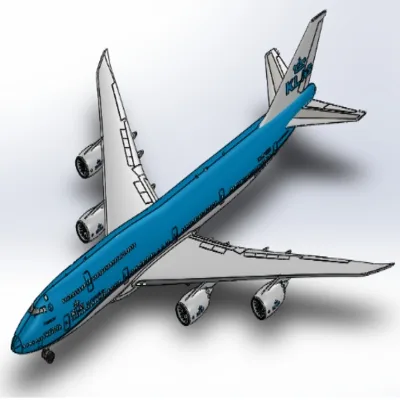
In this project, you will learn how to model a Boeing 747-8 in SOLIDWORKS. Here you will learn part, surface and assembly workbenches of Solidworks from scratch. At the end of this project you will gain hands-on experience in modeling a complex design like that of the Boeing 747-8 and will get an overall idea on how the design software works.
- Duration
- 1 month
- Fee
- ₹30,000
- For
- Basic knowledge in Solidworks, Catia or other Design Software.
What will you do in this project?
In this project, you will design Boeing 747-8 Aircraft model using Solidworks. You will do the following in this project,
- You will be dealing with the arrangement of the front, top, and side views of aircraft blueprints with respect to the front, top, and right planes.
- Modeling the fuselage main body using surface loft command. Later you will use Part modeling tools to design belly fairing and pitot tubes
- You will be also working on more details likes passenger window, Nose Cone, Windshield Wiper, etc.over the main body.
- You will be creating a vertical and Horizontal stabilizer using a lofted Bose/base tool. Landing gear hatches open/close are also done on later stages.
- Later you will work on Part Modelling and Assembly of Nose Gear and Main Gear along with Engine modeling.
- At the final stages, you will be adding livery and complete the model by assembling all the parts and sub-assemblies.
Benefits of this Project
In this project, you will learn how to model a Boeing 747-8 in SOLIDWORKS. Here you will learn part, surface and assembly workbenches of Solidworks from scratch. At the end of this project you will gain hands-on experience in modeling a complex design like that of the Boeing 747-8 and will get an overall idea on how the design software works.The project is a beginner and intermediate level project
- This project is great for undergraduate students, M.Tech or MS students.
- If you are a working professional, this project will be helpful to learn surface workbench and other workbenches of Solidworks.
- You will learn to design complex shapes using surface and part tools.
- You will learn sketcher, part, surface and assembly workbench.
Pre-requisites
- Must be familiar with Engineering drawing subjects.
- Having a basic knowledge of Solidworks or other design software will help in completing the project in a fast phase.
Work with Multiple Tools
- You will learn Solidworks from scratch
- Will work on complex shapes.
- Major workbenches like sketcher, part, surface, and assembly are covered.
Mechanical EngineeringAutomotive EngineeringAeronautical EngineeringAerospace Engineering

Next stepBuild it with